车控
数字车钥匙开通完成后,车主APP可以通过车控指令远程控制车辆的开门等操作。
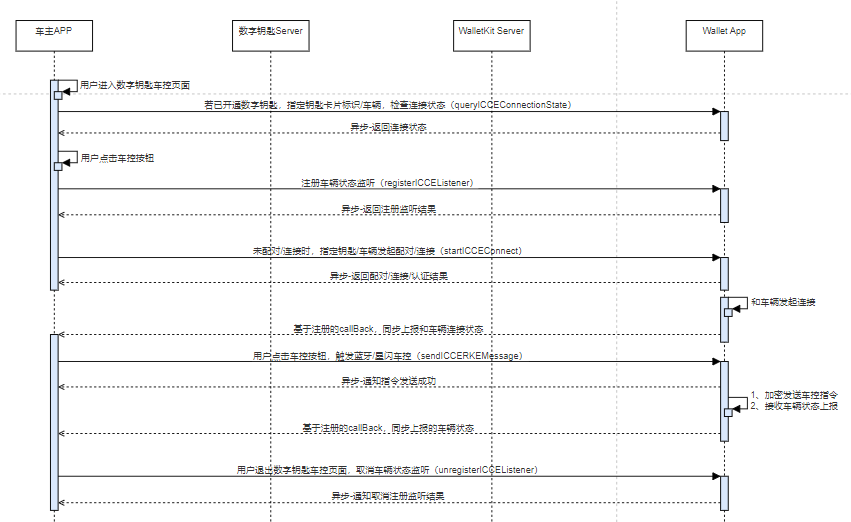
典型的交互流程如下:
- 通过queryICCEConnectionState接口检查车控蓝牙的连接状态,如果未连接则使用startICCEConnection主动连接。
- 通过registerICCEListener注册监听,接收华为钱包发送的消息。
- 车主APP可以通过sendICCERKEMessage接口发送车控指令。
- 用户退出数字钥匙车控页面,通过unregisterICCEListener接口取消监听。
开发步骤
-
车主APP使用创建Wallet Kit服务时注册的服务号和申请钥匙卡片时定义的卡券唯一标识,通过queryICCEConnectionState判断车钥匙的蓝牙链路状态。
import { common } from '@kit.AbilityKit';import { walletPass } from '@kit.WalletKit';import { BusinessError } from '@kit.BasicServicesKit';@Entry@Componentstruct Index {private walletPassClient: walletPass.WalletPassClient = new walletPass.WalletPassClient(this.getUIContext().getHostContext() as common.UIAbilityContext);// 创建Wallet Kit服务时注册的服务号private passType: string = '';// 申请钥匙卡片时定义的卡券唯一标识private serialNumber: string = '';async queryICCEConnectionState() {let passStr = JSON.stringify({passType: this.passType,serialNumber: this.serialNumber});this.walletPassClient.queryICCEConnectionState(passStr).then((result: string) => {console.info(`Succeeded in querying ICCEConnectionState, result: ${result}`);}).catch((err: BusinessError) => {console.error(`Failed to query ICCEConnectionState, code:${err.code}, message:${err.message}`);})}build() {// your application UI}} -
如果queryICCEConnectionState接口返回连接状态connectionState为未配对0时,需要调用startICCEConnection主动创建蓝牙链接。
import { common } from '@kit.AbilityKit';import { walletPass } from '@kit.WalletKit';import { BusinessError } from '@kit.BasicServicesKit';@Entry@Componentstruct Index {private walletPassClient: walletPass.WalletPassClient = new walletPass.WalletPassClient(this.getUIContext().getHostContext() as common.UIAbilityContext);// 创建Wallet Kit服务时注册的服务号private passType: string = '';// 申请钥匙卡片时定义的卡券唯一标识private serialNumber: string = '';async startICCEConnection() {let passStr = JSON.stringify({passType: this.passType,serialNumber: this.serialNumber});this.walletPassClient.startICCEConnection(passStr).then((result: string) => {console.info(`Succeeded in starting ICCEConnection, result: ${result}`);}).catch((err: BusinessError) => {console.error(`Failed to start ICCEConnection, code:${err.code}, message:${err.message}`);})}build() {// your application UI}} -
车主APP通过registerICCEListener注册监听华为钱包发送的消息。
import { common } from '@kit.AbilityKit';import { walletPass } from '@kit.WalletKit';import { BusinessError } from '@kit.BasicServicesKit';import { rpc } from '@kit.IPCKit';class ICCECallBack extends rpc.RemoteObject {constructor() {super('ICCECallBack');}async onRemoteMessageRequest(code: number, data: rpc.MessageSequence, reply: rpc.MessageSequence, option: rpc.MessageOption): Promise<boolean> {// processing after receiving communication datalet codeInt = data.readInt();return true;}}@Entry@Componentstruct Index {private walletPassClient: walletPass.WalletPassClient = new walletPass.WalletPassClient(this.getUIContext().getHostContext() as common.UIAbilityContext);private callback: rpc.RemoteObject | null = null;// 创建Wallet Kit服务时注册的服务号private passType: string = '';// 注册监听的应用名称,一般为包名private registerName: string = '';async registerICCEListener() {let passStr = JSON.stringify({passType: this.passType,registerName: this.registerName});this.callback = new ICCECallBack();this.walletPassClient.registerICCEListener(passStr, this.callback).then((result: string) => {console.info(`Succeeded in registering ICCEListener, result: ${result}`);}).catch((err: BusinessError) => {console.error(`Failed to register ICCEListener, code:${err.code}, message:${err.message}`);})}build() {// your application UI}} -
车主APP通过sendICCERKEMessage接口发送车控指令。
import { common } from '@kit.AbilityKit';import { walletPass } from '@kit.WalletKit';import { BusinessError } from '@kit.BasicServicesKit';@Entry@Componentstruct Index {private walletPassClient: walletPass.WalletPassClient = new walletPass.WalletPassClient(this.getUIContext().getHostContext() as common.UIAbilityContext);// 创建Wallet Kit服务时注册的服务号private passType: string = '';// 申请钥匙卡片时定义的卡券唯一标识private serialNumber: string = '';// 车控指令private rkeCommand: string = '';async sendICCERKEMessage() {let passStr = JSON.stringify({passType: this.passType,serialNumber: this.serialNumber,rkeCommand: this.rkeCommand,encryptFlag: '0',directionFlag: '1'});this.walletPassClient.sendICCERKEMessage(passStr).then((result: string) => {console.info(`Succeeded in sending ICCERKEMessage, result: ${result}`);}).catch((err: BusinessError) => {console.error(`Failed to send ICCERKEMessage, code:${err.code}, message:${err.message}`);})}build() {// your application UI}} -
用户退出数字钥匙车控页面,车主APP通过unregisterICCEListener接口取消监听。
import { common } from '@kit.AbilityKit';import { walletPass } from '@kit.WalletKit';import { BusinessError } from '@kit.BasicServicesKit';import { rpc } from '@kit.IPCKit';@Entry@Componentstruct Index {private walletPassClient: walletPass.WalletPassClient = new walletPass.WalletPassClient(this.getUIContext().getHostContext() as common.UIAbilityContext);private callback: rpc.RemoteObject | null = null;// 创建Wallet Kit服务时注册的服务号private passType: string = '';// 注册监听的应用名称,一般为包名private registerName: string = '';async unregisterICCEListener() {let passStr = JSON.stringify({passType: this.passType,registerName: this.registerName});this.walletPassClient.unregisterICCEListener(passStr).then((result: string) => {console.info(`Succeeded in unregistering ICCEListener, result: ${result}`);this.callback = null;}).catch((err: BusinessError) => {console.error(`Failed to unregister ICCEListener, code:${err.code}, message:${err.message}`);})}build() {// your application UI}}