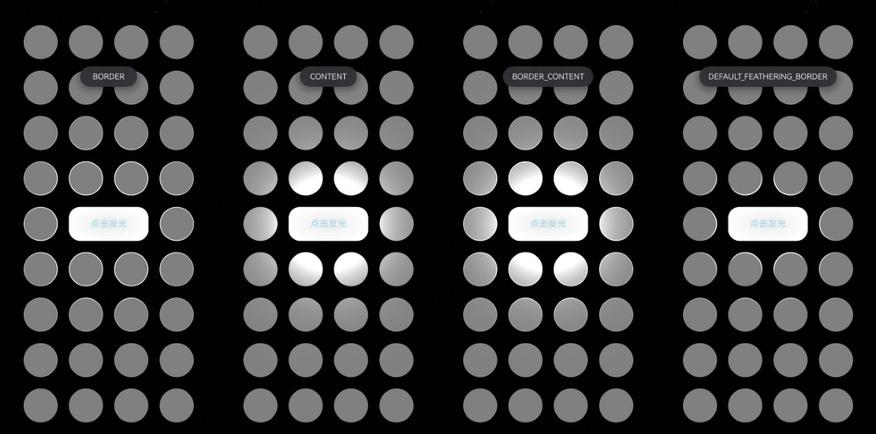
点光源效果
场景介绍
从6.0.0(20) Beta1版本开始,新增支持点光源效果。
通过点光源接口可以设置组件的发光效果以及被照亮的受光效果,使得组件交互体验更显沉浸。
约束与限制
单个组件最多同时受12个光源照亮。
开发步骤
-
导入模块。
import { hdsEffect } from '@kit.UIDesignKit'; -
创建点光源发光效果。如果需要发光,配置sourceType属性;如果需要被照亮,配置illuminatedType属性。
以下代码表示:当中间的Button点击时,产生点光源效果,重复点击触发不同点光源效果。
@Entry@Componentstruct Index {@State bloomValue: number = 0;@State index: number = 0;@State illuminatedType: hdsEffect.PointLightIlluminatedType = hdsEffect.PointLightIlluminatedType.NONE;@State button_gradient_state: hdsEffect.PressShadowType = hdsEffect.PressShadowType.NONE;@State lightIntensity: number = 10;@State types: hdsEffect.PointLightIlluminatedType[] =[hdsEffect.PointLightIlluminatedType.NONE, hdsEffect.PointLightIlluminatedType.BORDER,hdsEffect.PointLightIlluminatedType.CONTENT, hdsEffect.PointLightIlluminatedType.BORDER_CONTENT,hdsEffect.PointLightIlluminatedType.DEFAULT_FEATHERING_BORDER];build() {Flex({direction: FlexDirection.Column,justifyContent: FlexAlign.Center,alignItems: ItemAlign.Center,}) {// 纵向循环ForEach(Array<number>(4).fill(0), (row: number) => {Flex({direction: FlexDirection.Row,justifyContent: FlexAlign.Center,alignItems: ItemAlign.Center,}) {// 横向循环ForEach(Array<number>(4).fill(0), (col: number) => {Flex().visualEffect(new hdsEffect.HdsEffectBuilder().pointLight({illuminatedType: this.illuminatedType,}).buildEffect()).backgroundColor(0x808080).size({ width: 60, height: 60 }).borderRadius(50).margin({ top: 20, right: 10, left: 10 }) // 添加间距})}.width('100%') // 设置 Row 组件的宽度为 100%})Flex({direction: FlexDirection.Row,justifyContent: FlexAlign.Center, // 使用 SpaceBetween 来均匀分布间距alignItems: ItemAlign.Center,}) {Flex().visualEffect(new hdsEffect.HdsEffectBuilder().pointLight({illuminatedType: this.illuminatedType,}).buildEffect()).backgroundColor(0x808080).size({ width: 60, height: 60 }).borderRadius(50).margin({ top: 20, right: 10, left: 10 })Button('点击发光').size({ width: 140, height: 60 }).backgroundColor(0x808080).fontColor(0xADD8E6).visualEffect(new hdsEffect.HdsEffectBuilder().pressShadow(this.button_gradient_state).pointLight({options: {color: Color.White,intensity: this.lightIntensity,height: 150}}).pressShadow(this.button_gradient_state).buildEffect()).onClick(() => {if (this.index <= 3) {this.index++;this.illuminatedType = this.types[this.index];this.button_gradient_state = hdsEffect.PressShadowType.BLEND_GRADIENT;}let message = 'NONE';if (this.illuminatedType == 1) {message = 'BORDER';} else if (this.illuminatedType == 2) {message = 'CONTENT';} else if (this.illuminatedType == 3) {message = 'BORDER_CONTENT';} else {message = 'DEFAULT_FEATHERING_BORDER';}this.getUIContext().getPromptAction().showToast({message: message,duration: 2000,bottom: '80%'});}).margin({ top: 20, right: 10, left: 10 })Flex().visualEffect(new hdsEffect.HdsEffectBuilder().pointLight({illuminatedType: this.illuminatedType,}).buildEffect()).backgroundColor(0x808080).size({ width: 60, height: 60 }).borderRadius(50).margin({ top: 20, right: 10, left: 10 })}.width('100%') // 设置 Row 组件的宽度为 100%ForEach(Array<number>(4).fill(0), (row: number) => {Flex({direction: FlexDirection.Row,justifyContent: FlexAlign.Center,alignItems: ItemAlign.Center,}) {// 横向循环ForEach(Array<number>(4).fill(0), (col: number) => {Flex().visualEffect(new hdsEffect.HdsEffectBuilder().pointLight({illuminatedType: this.illuminatedType,}).buildEffect()).backgroundColor(0x808080).size({ width: 60, height: 60 }).borderRadius(50).margin({ top: 20, right: 10, left: 10 })})}.width('100%') // 设置 Row 组件的宽度为 100%})}.backgroundColor(Color.Black)}}