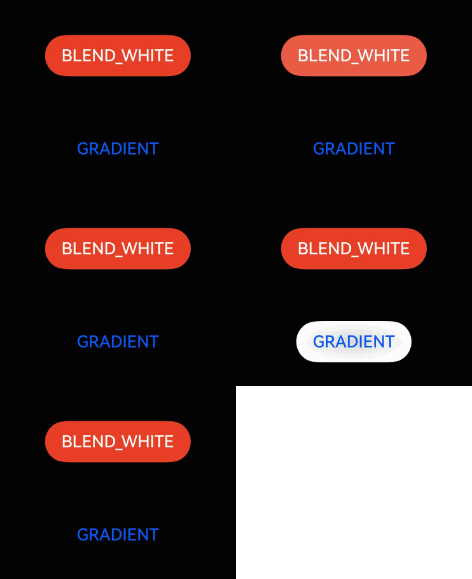
按压阴影
场景介绍
从6.0.0(20) Beta1版本开始,新增支持按压阴影。
通过按压阴影接口可以设置组件的背景色变化效果,一般常用于组件按压交互时的背景色变化场景。
开发步骤
-
导入模块。
import { hdsEffect } from '@kit.UIDesignKit'; -
创建按压阴影效果。
@Entry@Componentstruct PressShadowExample {@State button_blend_state: hdsEffect.PressShadowType = hdsEffect.PressShadowType.NONE;@State button_gradient_state: hdsEffect.PressShadowType = hdsEffect.PressShadowType.NONE;build() {NavDestination() {Column({ space: 50 }) {Button("BLEND_WHITE", { buttonStyle: ButtonStyleMode.EMPHASIZED, role: ButtonRole.ERROR, stateEffect: false }).visualEffect(new hdsEffect.HdsEffectBuilder().pressShadow(this.button_blend_state).buildEffect()).onTouch((event: TouchEvent) => {if (event.type === TouchType.Down) {this.button_blend_state = hdsEffect.PressShadowType.BLEND_WHITE;} else if (event.type === TouchType.Up || event.type === TouchType.Cancel) {this.button_blend_state = hdsEffect.PressShadowType.NONE;}})Button("GRADIENT", { buttonStyle: ButtonStyleMode.NORMAL, stateEffect: false }).visualEffect(new hdsEffect.HdsEffectBuilder().pressShadow(this.button_gradient_state).buildEffect()).onTouch((event: TouchEvent) => {if (event.type === TouchType.Down) {this.button_gradient_state = hdsEffect.PressShadowType.BLEND_GRADIENT;} else if (event.type === TouchType.Up || event.type === TouchType.Cancel) {this.button_gradient_state = hdsEffect.PressShadowType.NONE;}})}.height('70%').justifyContent(FlexAlign.Center)}.width('100%').height('100%').title('Button example').backgroundColor('#040404')}}