开发实例
-
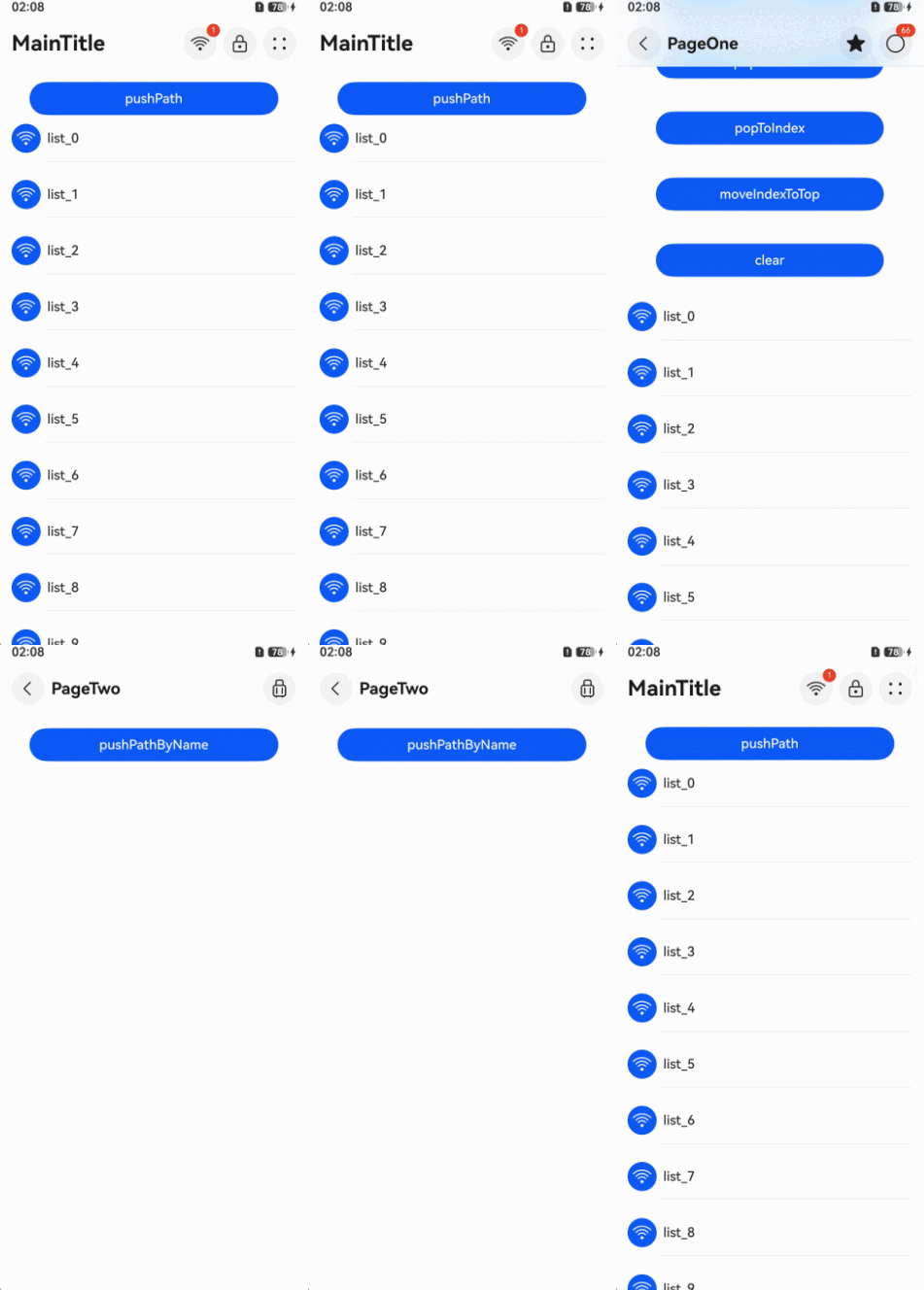
在首页创建一级导航,适用于需要构建具有导航结构的主界面,支持动态标题栏样式切换与页面跳转功能。通过titleBar接口设置导航栏的内容和样式,包括标题、菜单项、返回按钮等元素。通过pushPath路由方法跳转至二级导航页面。
// 模块导入// 从6.0.2(22)版本开始,无需手动导入HdsNavigationAttribute。具体请参考HdsNavigation的导入模块说明。import { HdsNavigation, ScrollEffectType, HdsNavigationTitleMode, HdsNavigationAttribute } from '@kit.UIDesignKit';@Entry@Componentstruct Index {private arr: number[] = [0, 1, 2, 3, 4, 5, 6, 7, 8, 9, 10, 11, 12, 13, 14, 15, 16, 17, 18, 19, 20];@Provide('pageInfos') pageInfos: NavPathStack = new NavPathStack();scroller: Scroller = new Scroller();build() {HdsNavigation(this.pageInfos) { // 创建HdsNavigation组件Stack() {Button('pushPath', { stateEffect: true, type: ButtonType.Capsule }).width('80%').height(40).margin({ top: '5%', right: '50vp', left: '50vp' }).onClick(() => {this.pageInfos.pushPath({ name: 'pageOne' });})}.zIndex(5)List({ space: 12, initialIndex: 0, scroller: this.scroller }) {ForEach(this.arr, (item: number) => {ListItem() {Column() {Row({ space: 8 }) {Button() {SymbolGlyph($r('sys.symbol.wifi')).fontColor([$r('sys.color.icon_on_primary')]).fontSize(24)}.width(35).height(35)Text('list_' + item).width('100%').height(72).fontSize(16).fontWeight(500)}Divider().margin({ left: 40 })}}.height(56)}, (item: number) => item.toString())}.margin({ left: 16, right: 16 }).clip(false) // 设置不对子组件超出当前组件范围外的区域进行裁剪,使内容区可以穿透到标题栏下方.cachedCount(3, true) // 设置列表中ListItem/ListItemGroup的预加载数量,列表穿透到标题栏下方不会消失.scrollBar(BarState.Off).edgeEffect(EdgeEffect.Spring, { alwaysEnabled: true })}.titleBar({// HdsNavigation标题栏设置enableComponentSafeArea: true, // 将标题栏设置为组件级安全区,内容区可避让标题栏style: {// HdsNavigation标题栏样式设置// 标题栏动态模糊样式:通用模糊scrollEffectOpts: {enableScrollEffect: true,scrollEffectType: ScrollEffectType.COMMON_BLUR,},},content: {// HdsNavigation标题栏内容区设置title: {// HdsNavigation标题栏标题设置mainTitle: 'MainTitle',},menu: {// HdsNavigation标题栏菜单项设置value: [{// 第一个菜单项内容设置content: {label: 'menu1',icon: $r('sys.symbol.ohos_wifi'),isEnabled: true,},badge: {count: 1,}}, {// 第二个菜单项内容设置content: {label: 'menu2',icon: $r('sys.symbol.ohos_lock'),isEnabled: true,action: () => {console.info(`HDS_NAV HELLO 2`);}}}, {// 第三个菜单项内容设置content: {label: 'menu3',icon: $r('sys.symbol.speaker_plus'),}}, {content: {// 第三个菜单项内容设置label: 'menu4',icon: $r('sys.symbol.ohos_star'),}}]},}}).titleMode(HdsNavigationTitleMode.MINI).hideBackButton(true).bindToScrollable([this.scroller]) // 绑定导航组件和可滚动容器组件}} -
在PageOne页面创建二级导航组件。通过titleBar接口设置HdsNavDestination标题栏HarmonyOS风格化样式及内容设置。展示NavPathStack路由使用示例。
// PageOne.ets// 模块导入// 从6.0.2(22)版本开始,无需手动导入HdsNavDestinationAttribute。具体请参考HdsNavDestination的导入模块说明。import { HdsNavDestination, HdsNavDestinationAttribute } from '@kit.UIDesignKit';@Builderexport function PageOneBuilder() {PageOne()}@Componentexport struct PageOne {@Consume('pageInfos') pageInfos: NavPathStack;private arr: number[] = [0, 1, 2, 3, 4, 5, 6, 7, 8, 9, 10, 11, 12, 13, 14, 15, 16, 17, 18, 19, 20];scroller: Scroller = new Scroller();listScroller: Scroller = new Scroller();build() {HdsNavDestination() { // 创建HdsNavDestination组件Scroll(this.scroller) { // HdsNavDestination内容区设置可滚动容器组件,用于实现内容区滚动联动标题栏动态模糊样式Column() {Button('pushPath', { stateEffect: true, type: ButtonType.Capsule }).width('80%').height(40).margin({top: '5%',right: '50vp',left: '50vp',bottom: '5%'}).onClick(() => {this.pageInfos.pushPath({ name: 'pageTwo' }); // 将name指定的HdsNavDestination页面信息入栈})Button('popToName', { stateEffect: true, type: ButtonType.Capsule }).width('80%').height(40).margin(20).onClick(() => {this.pageInfos.popToName('pageTwo'); // 回退路由栈到首个名为name的HdsNavDestination页面})Button('popToIndex', { stateEffect: true, type: ButtonType.Capsule }).width('80%').height(40).margin(20).onClick(() => {this.pageInfos.popToIndex(1); // 回退路由栈到index指定的HdsNavDestination页面})Button('moveIndexToTop', { stateEffect: true, type: ButtonType.Capsule }).width('80%').height(40).margin(20).onClick(() => {this.pageInfos.moveIndexToTop(1); // 将index指定的HdsNavDestination页面移到栈顶})Button('clear', { stateEffect: true, type: ButtonType.Capsule }).width('80%').height(40).margin(20).onClick(() => {this.pageInfos.clear(); // 清除栈中所有页面})List({ space: 12, initialIndex: 0 }) {ForEach(this.arr, (item: number) => {ListItem() {Column() {Row({ space: 8 }) {Button() {SymbolGlyph($r('sys.symbol.wifi')).fontColor([$r('sys.color.icon_on_primary')]).fontSize(24)}.width(35).height(35)Text('list_' + item).width('100%').height(72).fontSize(16).fontWeight(500)}Divider().margin({ left: 40 })}}.height(56).borderRadius(24)}, (item: number) => item.toString())}.edgeEffect(EdgeEffect.None).scrollBar(BarState.Off).width('100%').height('100%').cachedCount(3, true) // 设置列表中ListItem/ListItemGroup的预加载数量,列表穿透到标题栏下方不会消失.clip(false) // 设置不对子组件超出当前组件范围外的区域进行裁剪,使内容区可以穿透到标题栏下方.nestedScroll({ scrollForward: NestedScrollMode.PARENT_FIRST, scrollBackward: NestedScrollMode.PARENT_FIRST })}}.edgeEffect(EdgeEffect.Spring).scrollBar(BarState.Off).margin({ left: 16, right: 16 }).clip(false) // 设置不对子组件超出当前组件范围外的区域进行裁剪,使内容区可以穿透到标题栏下方}.titleBar({enableComponentSafeArea: true, // 将标题栏设置为组件级安全区,内容区可避让标题栏content: {// HdsNavigation标题栏内容区设置title: {// HdsNavigation标题栏标题设置mainTitle: 'PageOne',},// HdsNavigation标题栏返回按钮设置backIcon: {label: 'backIcon', // 无障碍播报内容componentId: 'backIconId', // 返回按钮id},menu: {// HdsNavigation标题栏菜单设置value: [{// 第一个菜单项内容设置content: {label: 'menu1',icon: $r('sys.symbol.ohos_star'),}}, {// 第二个菜单项内容设置content: {label: 'menu2',icon: $r('sys.symbol.ohos_circle'),},badge: {value: '66'}}]},}}).bindToNestedScrollable([{ parent: this.scroller, child: this.listScroller }]) // 绑定导航组件和可滚动容器组件}} -
在PageTwo页面创建二级导航组件。
// PageTwo.ets// 模块导入// 从6.0.2(22)版本开始,无需手动导入HdsNavDestinationAttribute。具体请参考HdsNavDestination的导入模块说明。import { HdsNavDestination, HdsNavDestinationAttribute } from '@kit.UIDesignKit';@Builderexport function PageTwoBuilder() {PageTwo()}@Componentexport struct PageTwo {@Consume('pageInfos') pageInfos: NavPathStack;private stack: NavPathStack | null = null;private name: string = '';scroller: Scroller = new Scroller();build() {HdsNavDestination() { // 创建HdsNavDestination组件Scroll(this.scroller) { // HdsNavDestination组件内容区设置Button('pushPathByName', { stateEffect: true, type: ButtonType.Capsule }).width('80%').height(40).margin(20).onClick(() => {this.pageInfos.pushPathByName('pageOne', null); // 将name指定的HdsNavDestination页面信息入栈})}.align(Alignment.Top).clip(false) // 设置不对子组件超出当前组件范围外的区域进行裁剪,使内容区可以穿透到标题栏下方.width('100%').height('100%').edgeEffect(EdgeEffect.Spring, { alwaysEnabled: true })}.titleBar({enableComponentSafeArea: true, // 将标题栏设置为组件级安全区,内容区可避让标题栏// HdsNavDestination组件标题栏设置content: {title: {mainTitle: 'PageTwo'},menu: {value: [{content: {label: 'menu1',icon: $r('sys.symbol.trunk'),}}]},},}).bindToScrollable([this.scroller]) // 绑定导航组件和可滚动容器组件.onReady((ctx: NavDestinationContext) => {// 在NavDestination中能够拿到传来的NavPathInfo和当前所处的NavPathStacktry {this.name = ctx?.pathInfo?.name;this.stack = ctx.pathStack;} catch (e) {console.error(`testTag onReady catch exception code:${JSON.stringify(e.code)}, message: ${JSON.stringify(e.message)}`);}})}} -
工程entry/src/main/module.json5文件中的“module”下新增如下配置,用于页面跳转。
"routerMap": "$profile:route_map" -
工程entry/src/main/resources/base/profile目录下增加route_map.json文件。
{"routerMap": [{"name": "pageOne","pageSourceFile": "src/main/ets/pages/PageOne.ets","buildFunction": "PageOneBuilder","data": {"description": "this is pageOne"}},{"name": "pageTwo","pageSourceFile": "src/main/ets/pages/PageTwo.ets","buildFunction": "PageTwoBuilder"}]}