设置列表卡片样式
场景介绍
从6.0.0(20) Beta1版本开始,新增支持设置列表卡片样式。
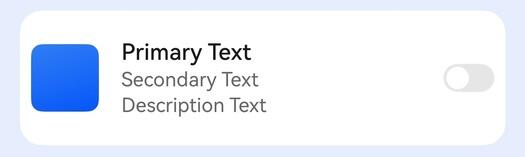
应用使用HdsListItemCard组件实现多设备上的系统列表样式。
开发步骤
-
导入相关模块。
import { HdsListItemCard, PrefixImage, SuffixSwitch} from '@kit.UIDesignKit';import { promptAction } from '@kit.ArkUI'; -
创建HdsListItemCard组件,设置左边为Image,中间为Text,右边为Switch的场景。
@Entry@Componentstruct Test {private scroller: ListScroller = new ListScroller();build() {Column() {List({ space: 10, scroller: this.scroller }) {ListItem() {HdsListItemCard({// A区图片prefixItem: new PrefixImage({image: $r('app.media.background'),onClick: () => {promptAction.openToast({ message: 'left image' });}}),// B区文本textItem: {primaryText: {text: 'Primary Text'},secondaryText: {text: 'Secondary Text'},description: {text: 'Description Text'}},// C区SwitchsuffixItem: new SuffixSwitch({isCheck: false,onChange: (num: boolean) => {if (num) {promptAction.openToast({ message: 'switch is true' });} else {promptAction.openToast({ message: 'switch is false' });}}}),onClick: () => {promptAction.openToast({ message: 'hdslistitem' });}})}}.width('100%').height('100%').margin(10)}.backgroundColor(0x1a0a59f7).height('100%')}}