设置侧边栏半屏居中对齐样式
场景介绍
从6.0.0(20) Beta1版本开始,新增支持设置侧边栏半屏居中对齐样式。
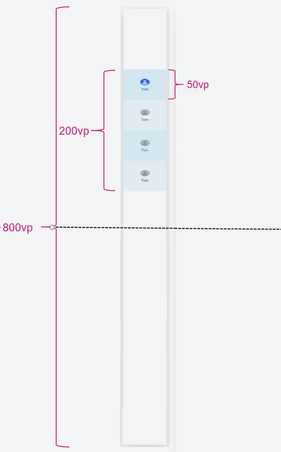
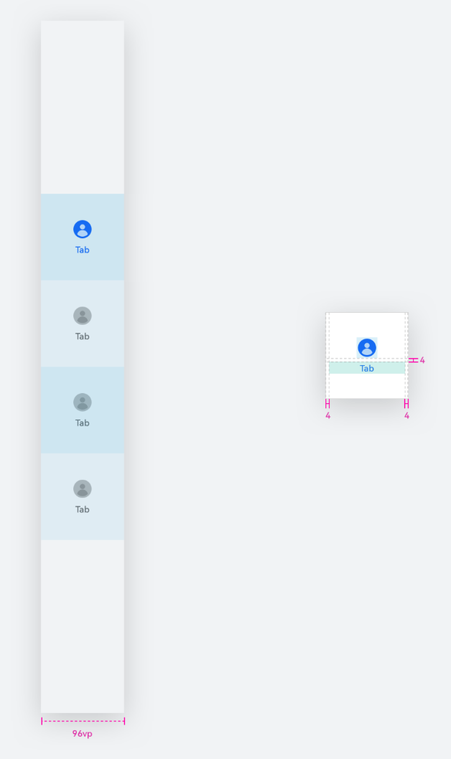
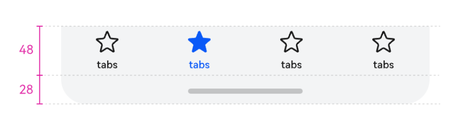
HdsTabs容器组件侧边栏支持半屏居中对齐布局。横向Tabs时,若没有主动设置TabBar高度,则TabBar默认高度为48vp,纵向TabBar默认宽度为96vp,barHeight设成固定值后,TabBar无法扩展底部安全区。当safeAreaPadding不设置bottom或者bottom设置为0时,可以实现扩展安全区。
-
半屏居中对齐布局
-
默认横向和纵向宽度
约束条件
- 依赖页签位于侧边栏,vertical设置为true。
- 页签使用BottomTabBarStyle样式。
开发步骤
-
导入相关模块。
// 从6.0.2(22)版本开始,无需手动导入HdsTabsAttribute。具体请参考HdsTabs的导入模块说明。import { HdsTabs, ExtendBarMode, HdsTabsAttribute } from '@kit.UIDesignKit'; -
创建Hds一级容器组件,设置HdsTabs组件的barMode样式为ExtendBarMode.HALF_SCREEN_FIXED,所有页签总高度之和为HdsTabs组件高度的四分之一,且处在二分之一屏的居中位置。
@Entry@Componentstruct Index {@State isVertical: boolean = false;build() {Column() {Column() {Row() {Button('verticalChange').onClick(() => {this.isVertical = !this.isVertical;})}}.margin({ top: 20 }).width('100%').height('10%')HdsTabs({ barPosition: BarPosition.End }) {TabContent() {Column().width('100%').height('100%').backgroundColor(Color.Yellow)}.tabBar(new BottomTabBarStyle($r('sys.media.ohos_app_icon'), 'Yellow'))TabContent() {Column().width('100%').height('100%').backgroundColor(Color.Blue)}.tabBar(new BottomTabBarStyle($r('sys.media.ohos_app_icon'), 'Blue'))TabContent() {Column().width('100%').height('100%').backgroundColor(Color.Pink)}.tabBar(new BottomTabBarStyle($r('sys.media.ohos_app_icon'), 'Pink'))}.vertical(this.isVertical).barMode(ExtendBarMode.HALF_SCREEN_FIXED).width('100%').height('90%')}}}