账号密码保存
密码保险箱在应用的登录、注册、修改密码等场景中具备自动保存用户名和密码的能力。
保存后的用户名和密码可以在下次登录、修改密码时自动填充到界面上的对应输入框,用户可以在密码保险箱内对已保存的用户名和密码进行查看,修改,添加备注,删除。
当应用界面触发账号密码自动保存时,若密码保险箱中不存在同应用下的相同账号,系统将弹出账号密码保存提示框,用户点击“保存密码”按钮后,本次使用的账号和密码将被保存至密码保险箱。
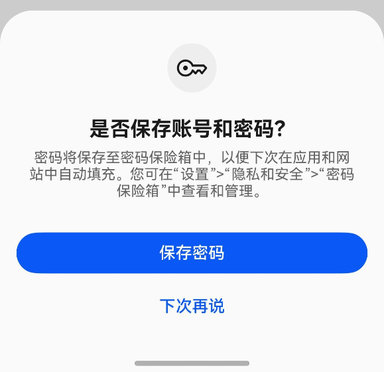
当应用触发账号登录或注册时,均可触发保存功能,以下分别介绍两种布局的标准适配场景。
触发条件及注意事项:
-
已设置锁屏密码,并且开启密码保险箱中“自动填充和保存”开关。
-
界面中TextInput输入框组件的enableAutoFill属性的值应为true(默认为true)。
-
密码保险箱的自动保存功能只适用于用户名和密码保存场景,在界面中必须同时存在用户名和密码的TextInput输入框组件。具体类型请参考输入框类型说明。
用户名输入框应设置type属性为InputType.USER_NAME。
密码输入框应设置type属性为InputType.Password或InputType.NEW_PASSWORD。
其中,InputType.Password表示普通密码输入框,适用于登录界面的密码和修改密码界面的旧密码。
InputType.NEW_PASSWORD表示新密码输入框,适用于注册界面和修改密码界面的新密码。
-
用户名和密码输入框中需要输入内容,不能为空也不能超长。用户名长度不能超过128字符,密码长度不能超过256字符。
-
页面跳转时触发保存功能。
-
在只有type为InputType.USER_NAME和InputType.Password的两个TextInput组件时,如果使用账号密码填充-修改密码自动填充了用户名和密码并没有修改,则不会触发保存和更新功能。
账号密码登录
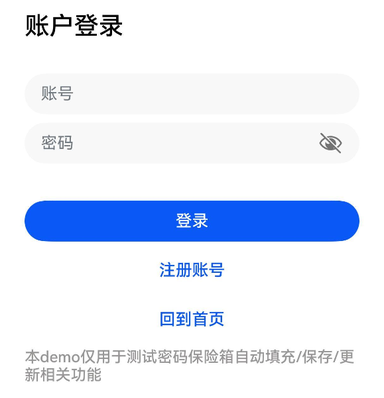
示例代码如下:
@Entry
@Component
struct LoginExample {
  pathInfos: NavPathStack = new NavPathStack();
  @State ReserveAccount: string = '';
  @State ReservePassword: string = '';

  @Builder
  PageMap(name: string) {
    if (name === 'home_page') {
      HomePage()
    }
  }

  build() {
    Navigation(this.pathInfos) {
      Column({ space: 16 }) {
        Text("账户登录").commonTitleStyles()

        TextInput({ placeholder: '用户名' })
          .commonInputStyles()
          .type(InputType.USER_NAME) // 账号框使用USER_NAME属性
          .onChange((value: string) => {
            this.ReserveAccount = value;
          })

        TextInput({ placeholder: '密码' })
          .showPasswordIcon(true)
          .commonInputStyles()
          .type(InputType.Password) // 密码框使用Password属性
          .onChange((value: string) => {
            this.ReservePassword = value;
          })

        Button('登录')
          .width('100%')
          .enabled((this.ReserveAccount !== '') && (this.ReservePassword !== ''))
          .onClick(() => {
            this.pathInfos.pushPathByName('home_page', null)
          })
      }
      .padding(16)
    }
    .navDestination(this.PageMap)
    .height('100%')
    .width('100%')
  }
}

@Component
struct HomePage {
  pathInfos: NavPathStack = new NavPathStack();

  build() {
    NavDestination() {
      Column() {
        Text("Home Page").commonTitleStyles()
      }.width('100%').height('100%')
    }.title("Home Page")
    .onReady((context: NavDestinationContext) => {
      this.pathInfos = context.pathStack;
    })
  }
}

@Extend(Text)
function commonTitleStyles() {
  .fontSize(24)
  .fontColor('#000000')
  .fontWeight(FontWeight.Medium)
  .margin({ top: 24, bottom: 16 })
}

@Extend(TextInput)
function commonInputStyles() {
  .placeholderColor(0x182431)
  .width('100%')
  .opacity(0.6)
  .placeholderFont({ size: 16, weight: FontWeight.Regular })
  .margin({ top: 16 })
}

@Extend(Button)
function commonButtonStyles() {
  .width('100%')
  .height(40)
  .borderRadius(20)
  .margin({ top: 24 })
}
账号密码注册
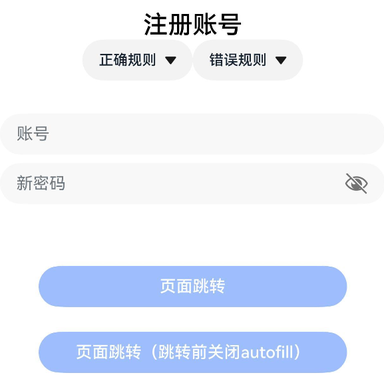
示例代码如下:
@Entry
@Component
struct RegisterExample {
  pathInfos: NavPathStack = new NavPathStack();
  @State ReserveAccount: string = '';
  @State ReservePassword: string = '';
  @State enableAutoFill: boolean = true;

  onBackPress() {
    // 当非成功登录、返回等页面跳转时,将enableAutoFill设置为false,密码保险箱将不启用自动填充功能
    this.enableAutoFill = false;
    return false;
  }

  @Builder
  PageMap(name: string) {
    if (name === 'register_result_page') {
      RegisterResultPage()
    }
  }

  build() {
    Navigation(this.pathInfos) {
      Column() {
        Text("注册账号")
          .commonTitleStyles()

        TextInput({ placeholder: '用户名' })
          .commonInputStyles()
          .type(InputType.USER_NAME) // 账号框使用USER_NAME属性
          .onChange((value: string) => {
            this.ReserveAccount = value;
          })

        TextInput({ placeholder: '新密码' })
          .showPasswordIcon(true)
          .commonInputStyles()
          .type(InputType.NEW_PASSWORD) // 密码框使用NEW_PASSWORD属性,可以触发生成强密码。
          .enableAutoFill(this.enableAutoFill)
          .passwordRules('begin:[upper],special:[yes],len:[maxlen:32,minlen:12]')
          .onChange((value: string) => {
            this.ReservePassword = value;
          })

        Button('页面跳转')
          .commonButtonStyles()
          .enabled((this.ReserveAccount !== '') && (this.ReservePassword !== ''))
          .onClick(() => {
            this.pathInfos.pushPathByName('register_result_page', null)
          })

        Button('页面跳转(跳转前关闭autofill)')
          .commonButtonStyles()
          .enabled((this.ReserveAccount !== '') && (this.ReservePassword !== ''))
          .onClick(() => {
            this.enableAutoFill = false;
            this.pathInfos.pushPathByName('register_result_page', null)
          })
      }
    }
    .navDestination(this.PageMap)
    .height('100%')
    .width('100%')
  }
}

@Component
struct RegisterResultPage {
  pathInfos: NavPathStack = new NavPathStack();

  build() {
    NavDestination() {
      Column() {
        Text("Result Page").commonTitleStyles()
      }.width('100%').height('100%')
    }.title("Result Page")
    .onReady((context: NavDestinationContext) => {
      this.pathInfos = context.pathStack;
    })
  }
}

@Extend(Text)
function commonTitleStyles() {
  .fontSize(24)
  .fontColor('#000000')
  .fontWeight(FontWeight.Medium)
  .margin({ top: 24, bottom: 16 })
}

@Extend(TextInput)
function commonInputStyles() {
  .placeholderColor(0x182431)
  .width('100%')
  .opacity(0.6)
  .placeholderFont({ size: 16, weight: FontWeight.Regular })
  .margin({ top: 16 })
}

@Extend(Button)
function commonButtonStyles() {
  .width('100%')
  .height(40)
  .borderRadius(20)
  .margin({ top: 24 })
}