强密码填充
密码保险箱可以在用户需要输入一个新密码时,自动生成一个高强度的密码。用户选择使用生成的强密码时可以将这个密码填充到新密码输入框。
触发条件及注意事项:
-
已设置锁屏密码并且开启密码保险箱中“自动填充和保存”开关。
-
界面中必须同时存在type为InputType.USER_NAME(表示用户名输入框)和InputType.NEW_PASSWORD(表示新密码输入框)的TextInput输入框组件。
具体类型请参考输入框类型说明。
-
TextInput组件的enableAutoFill属性的值为true(默认true)。
-
用户在界面中首次点击新密码输入框时触发强密码弹窗,用户点击使用密码按钮可以将弹窗中显示的强密码自动填充到新密码输入框。
-
开发者可以根据一定的规则和建议指定强密码生成规则。
注册
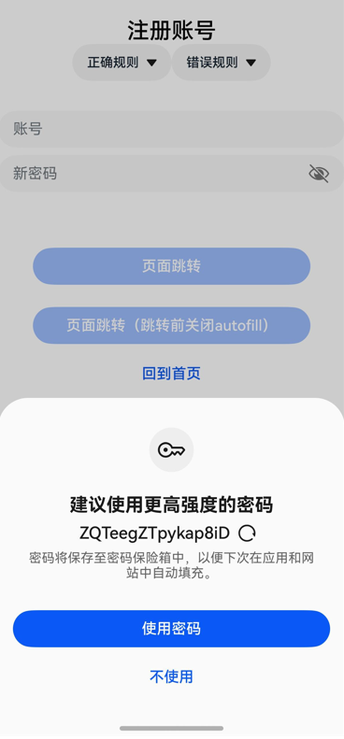
示例代码如下:
@Entry
@Component
struct RegisterExample {
  pathInfos: NavPathStack = new NavPathStack();
  @State ReserveAccount: string = '';
  @State ReservePassword: string = '';
  @State enableAutoFill: boolean = true;

  onBackPress() {
    // 当非成功登录、返回等页面跳转时,将enableAutoFill设置为false,密码保险箱将不启用自动填充功能
    this.enableAutoFill = false;
    return false;
  }

  @Builder
  PageMap(name: string) {
    if (name === 'register_result_page') {
      RegisterResultPage()
    }
  }

  build() {
    Navigation(this.pathInfos) {
      Column() {
        Text("注册账号")
          .commonTitleStyles()

        TextInput({ placeholder: '用户名' })
          .commonInputStyles()
          .type(InputType.USER_NAME) // 账号框使用USER_NAME属性
          .onChange((value: string) => {
            this.ReserveAccount = value;
          })

        TextInput({ placeholder: '新密码' })
          .showPasswordIcon(true)
          .commonInputStyles()
          .type(InputType.NEW_PASSWORD) // 密码框使用NEW_PASSWORD属性,可以触发生成强密码。
          .enableAutoFill(this.enableAutoFill)
          .passwordRules('begin:[upper],special:[yes],len:[maxlen:32,minlen:12]')
          .onChange((value: string) => {
            this.ReservePassword = value;
          })

        Button('页面跳转')
          .commonButtonStyles()
          .enabled((this.ReserveAccount !== '') && (this.ReservePassword !== ''))
          .onClick(() => {
            this.pathInfos.pushPathByName('register_result_page', null)
          })

        Button('页面跳转(跳转前关闭autofill)')
          .commonButtonStyles()
          .enabled((this.ReserveAccount !== '') && (this.ReservePassword !== ''))
          .onClick(() => {
            this.enableAutoFill = false;
            this.pathInfos.pushPathByName('register_result_page', null)
          })
      }
    }
    .navDestination(this.PageMap)
    .height('100%')
    .width('100%')
  }
}

@Component
struct RegisterResultPage {
  pathInfos: NavPathStack = new NavPathStack();

  build() {
    NavDestination() {
      Column() {
        Text("Result Page").commonTitleStyles()
      }.width('100%').height('100%')
    }.title("Result Page")
    .onReady((context: NavDestinationContext) => {
      this.pathInfos = context.pathStack;
    })
  }
}

@Extend(Text)
function commonTitleStyles() {
  .fontSize(24)
  .fontColor('#000000')
  .fontWeight(FontWeight.Medium)
  .margin({ top: 24, bottom: 16 })
}

@Extend(TextInput)
function commonInputStyles() {
  .placeholderColor(0x182431)
  .width('100%')
  .opacity(0.6)
  .placeholderFont({ size: 16, weight: FontWeight.Regular })
  .margin({ top: 16 })
}

@Extend(Button)
function commonButtonStyles() {
  .width('100%')
  .height(40)
  .borderRadius(20)
  .margin({ top: 24 })
}
修改密码
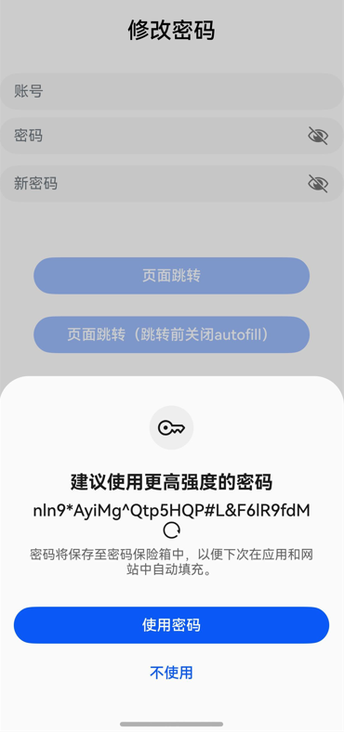
示例代码如下:
@Component
struct RegisterExample {
  pathInfos: NavPathStack = new NavPathStack();
  @State ReserveAccount: string = '';
  @State ReservePassword: string = '';
  @State enableAutoFill: boolean = true;

  onBackPress() {
    // 当非成功登录、返回等页面跳转时,将enableAutoFill设置为false,密码保险箱将不启用自动填充功能
    this.enableAutoFill = false;
    return false;
  }

  @Builder
  PageMap(name: string) {
    if (name === 'register_result_page') {
      RegisterResultPage()
    }
  }

  build() {
    Navigation(this.pathInfos) {
      Column() {
        Text("修改密码")
          .commonTitleStyles()

        TextInput({ placeholder: '用户名' })
          .commonInputStyles()
          .type(InputType.USER_NAME) // 账号框使用USER_NAME属性
          .onChange((value: string) => {
            this.ReserveAccount = value;
          })

        TextInput({ placeholder: '密码' })
          .showPasswordIcon(true)
          .commonInputStyles()
          .type(InputType.Password)
          .onChange((value: string) => {
            this.ReservePassword = value;
          })

        TextInput({ placeholder: '新密码' })
          .showPasswordIcon(true)
          .commonInputStyles()
          .type(InputType.NEW_PASSWORD) // 密码框使用NEW_PASSWORD属性,可以触发生成强密码。
          .enableAutoFill(this.enableAutoFill)
          .passwordRules('begin:[upper],special:[yes],len:[maxlen:32,minlen:12]')
          .onChange((value: string) => {
            this.ReservePassword = value;
          })

        Button('页面跳转')
          .commonButtonStyles()
          .enabled((this.ReserveAccount !== '') && (this.ReservePassword !== ''))
          .onClick(() => {
            this.pathInfos.pushPathByName('register_result_page', null)
          })

        Button('页面跳转(跳转前关闭autofill)')
          .commonButtonStyles()
          .enabled((this.ReserveAccount !== '') && (this.ReservePassword !== ''))
          .onClick(() => {
            this.enableAutoFill = false;
            this.pathInfos.pushPathByName('register_result_page', null)
          })
      }
    }
    .navDestination(this.PageMap)
    .height('100%')
    .width('100%')
  }
}

@Component
struct RegisterResultPage {
  pathInfos: NavPathStack = new NavPathStack();

  build() {
    NavDestination() {
      Column() {
        Text("Result Page").commonTitleStyles()
      }.width('100%').height('100%')
    }.title("Result Page")
    .onReady((context: NavDestinationContext) => {
      this.pathInfos = context.pathStack;
    })
  }
}

@Extend(Text)
function commonTitleStyles() {
  .fontSize(24)
  .fontColor('#000000')
  .fontWeight(FontWeight.Medium)
  .margin({ top: 24, bottom: 16 })
}

@Extend(TextInput)
function commonInputStyles() {
  .placeholderColor(0x182431)
  .width('100%')
  .opacity(0.6)
  .placeholderFont({ size: 16, weight: FontWeight.Regular })
  .margin({ top: 16 })
}

@Extend(Button)
function commonButtonStyles() {
  .width('100%')
  .height(40)
  .borderRadius(20)
  .margin({ top: 24 })
}