设置数字盾密码
场景介绍
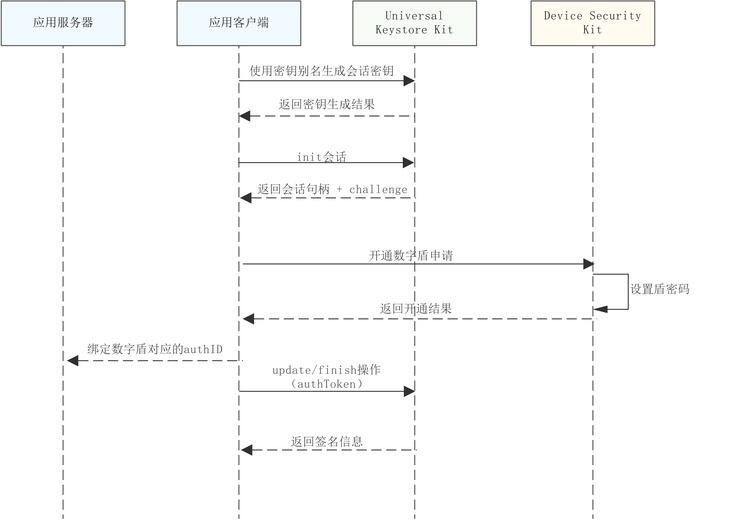
用户首次激活数字盾时,需通过可信用户交互(全称Trusted User Interface,下文简称TUI)安全界面设置专用密码,后续进行交易认证时,将通过该密码完成安全验证。
约束与限制
本功能目前仅在手机设备支持。
业务流程
接口说明
接口及使用方法请参见API参考。
| 接口名 | 描述 |
|---|---|
| enableTrustedAuthentication(challenge: Uint8Array, pwdInfo: PasswordInfo, label: TUILable): Promise<AuthInfo> | 创建数字盾密码 |
开通数字盾界面介绍
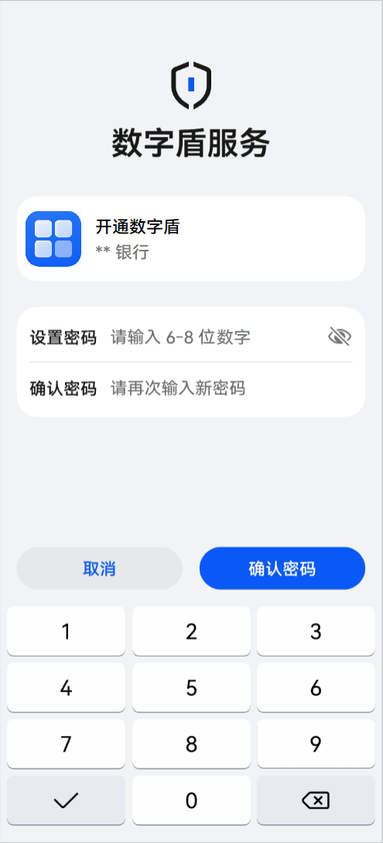
如图为开通数字盾服务时对应的TUI(Trusted User Interface)界面示例,其中密码长度、对应TUI应用图标以及当前应用场景说明均由开发者调用接口时传入,当设置盾密码长度不符合要求、密码强度低、两次密码设置不一致时,均会有对应失败报错提醒。
开发步骤
-
导入huks 、trustedAuthentication 和相关依赖模块。
import { resourceManager } from '@kit.LocalizationKit'import { huks } from '@kit.UniversalKeystoreKit';import { BusinessError } from '@kit.BasicServicesKit';import { trustedAuthentication } from '@kit.DeviceSecurityKit';import { cryptoFramework } from '@kit.CryptoArchitectureKit';import { hilog } from '@kit.PerformanceAnalysisKit';import { common } from '@kit.AbilityKit'; -
参考密钥管理服务提供的密钥生成开发指导,使用指定的会话密钥别名及指定密钥属性集合完成密钥生成。

创建密钥时指定密钥属性集合中身份认证类型tag: huks.HuksTag.HUKS_TAG_USER_AUTH_TYPE时,必须要包括huks.HuksUserAuthType.HUKS_USER_AUTH_TYPE_TUI_PIN认证方式,其余认证类型可以根据业务需要进行定制配置。
// 密钥属性集示例let properties: Array<huks.HuksParam> = [{tag: huks.HuksTag.HUKS_TAG_ALGORITHM,value: huks.HuksKeyAlg.HUKS_ALG_ECC}, {tag: huks.HuksTag.HUKS_TAG_PURPOSE,value: huks.HuksKeyPurpose.HUKS_KEY_PURPOSE_SIGN | huks.HuksKeyPurpose.HUKS_KEY_PURPOSE_VERIFY}, {tag: huks.HuksTag.HUKS_TAG_KEY_SIZE,value: huks.HuksKeySize.HUKS_ECC_KEY_SIZE_256,}, {tag: huks.HuksTag.HUKS_TAG_DIGEST,value: huks.HuksKeyDigest.HUKS_DIGEST_SHA256},{tag: huks.HuksTag.HUKS_TAG_KEY_AUTH_PURPOSE,value: huks.HuksKeyPurpose.HUKS_KEY_PURPOSE_SIGN},// 指定密钥身份认证的类型:TUI_PIN/指纹/人脸{tag: huks.HuksTag.HUKS_TAG_USER_AUTH_TYPE,value: huks.HuksUserAuthType.HUKS_USER_AUTH_TYPE_TUI_PIN | huks.HuksUserAuthType.HUKS_USER_AUTH_TYPE_FINGERPRINT | huks.HuksUserAuthType.HUKS_USER_AUTH_TYPE_FACE},// 指定密钥安全授权的类型(失效类型):新录入生物特征(如指纹)后无效{tag: huks.HuksTag.HUKS_TAG_KEY_AUTH_ACCESS_TYPE,value: huks.HuksAuthAccessType.HUKS_AUTH_ACCESS_ALWAYS_VALID},// 指定挑战值的类型:默认类型{tag: huks.HuksTag.HUKS_TAG_CHALLENGE_TYPE,value: huks.HuksChallengeType.HUKS_CHALLENGE_TYPE_NORMAL}]; -
参考密钥管理服务提供的签名/验签指导,初始化签名会话。
-
调用设置密码接口,发起数字盾密码创建申请。
// 设置数字盾密码async function SetPwd(challenge: Uint8Array, context: common.UIAbilityContext):Promise<trustedAuthentication.AuthInfo> {try {// 数字盾密码定制属性参数const passwordInfo: trustedAuthentication.PasswordInfo = {pwdType: trustedAuthentication.PasswordType.PASSWORD_TYPE_DIGITAL,pwdMaxLength: 10,pwdMinLength: 6,maxAuthFailCount: 6};const resourceMgr: resourceManager.ResourceManager = context.resourceManager;const fileData : Uint8Array = await resourceMgr.getRawFileContent('test_logo_rgba.png');//实际使用时请替换为应用要在TUI界面展示的logo图片名称const buffer = fileData.buffer;const label:trustedAuthentication.TUILable = {image: buffer as ArrayBuffer,title: "开通数字盾",}const authInfo = await trustedAuthentication.enableTrustedAuthentication(challenge, passwordInfo, label);return authInfo;} catch (err) {hilog.error(0x0000, 'testTag', `Failed to enableTrustedAuthentication, code:${err.code}, message:${err.message}`);throw new Error('Enable trusted authentication failed:' + (err as BusinessError).message);}}const rand = cryptoFramework.createRandom();const len: number = 32;const challenge: Uint8Array = rand?.generateRandomSync(len)?.data;//实际使用时请替换为通过UniversalKeystoreKit初始化会话获取的challengelet context = this.getUIContext().getHostContext() as common.UIAbilityContext;let authInfo: trustedAuthentication.AuthInfo = await SetPwd(challenge, context); -
参考密钥管理服务提供的签名/验签指导, 对通过密码设置获取到的authToken数据进行签名,并结束会话。