模拟点击增强检测
场景介绍
从6.0.2(22) 版本开始,新增支持模拟点击增强检测。
应用通过调用Device Security Kit的detectSimulatedClickRiskEnhanced接口,获取模拟点击增强检测结果,用于自动化点击、设备墙等作弊行为检测。
应用可以根据检测结果评估如何进行业务操作。
约束与限制
每30秒最多可以调用10次,每个应用在每个设备上每天最多可以调用20次。
业务流程
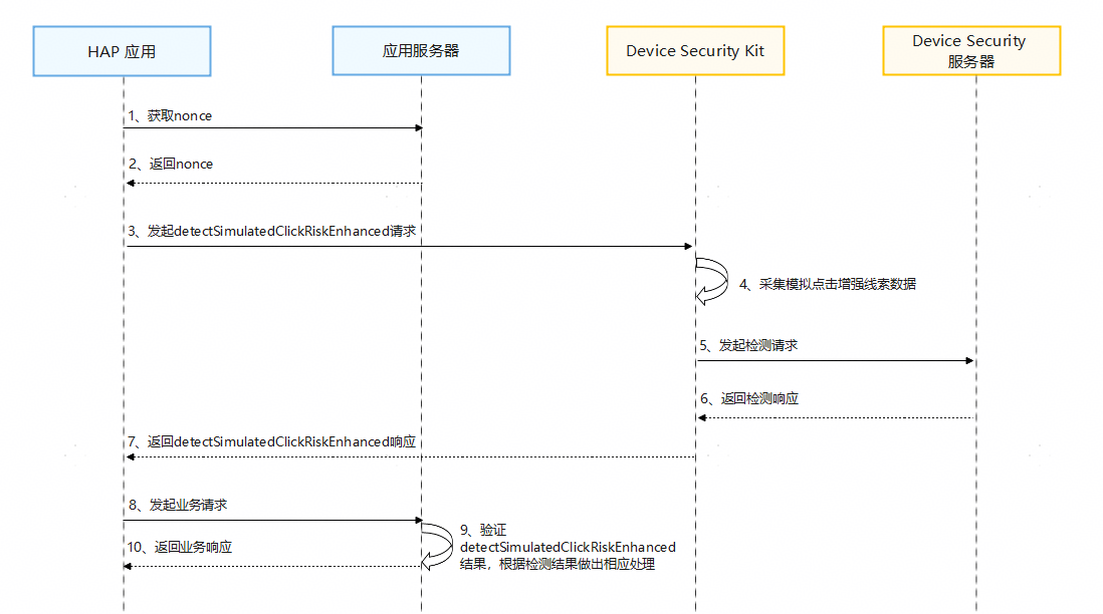
流程说明:
-
开发者应用获取nonce。
在调用detectSimulatedClickRiskEnhanced接口时,开发者必须传入一个随机生成的nonce值。在检测结果中会包含这个nonce值,您可以通过校验这个nonce值来确定返回结果能够对应您的请求,并且没有被重放攻击。

- nonce值必须为24至80字节之间。
- 建议每次请求都从服务器随机生成新的nonce值。
-
开发者应用调用detectSimulatedClickRiskEnhanced接口,发起模拟点击增强检测请求。
Device Security Kit收到请求后,首先采集当前设备模拟点击线索数据,然后将线索数据和nonce一起发送到Device Security服务器做检测,最后通过detectSimulatedClickRiskEnhanced接口的返回值将检测结果传递给开发者应用。
-
当开发者应用发起业务请求时,在应用服务器中验证模拟点击增强检测结果完整性。
接口说明
以下是模拟点击增强检测相关接口,更多接口及使用方法请参见API参考。
| 接口名 | 描述 |
|---|---|
| detectSimulatedClickRiskEnhanced(params:SimulatedClickDetectionEnhancedRequest):Promise<string> | 模拟点击增强检测 |
开发步骤
-
导入Device Security Kit模块及相关公共模块。
import { businessRiskIntelligentDetection } from '@kit.DeviceSecurityKit';import { BusinessError } from '@kit.BasicServicesKit';import { hilog } from '@kit.PerformanceAnalysisKit';import { cryptoFramework } from '@kit.CryptoArchitectureKit' -
调用detectSimulatedClickRiskEnhanced接口获取模拟点击增强检测结果。
const TAG = "BusinessRiskIntelligentDetectionJsTest";let nonceLength = 48;let nonceBlob = cryptoFramework.createRandom().generateRandomSync(nonceLength);let params = {version: 1,nonce: nonceBlob.data,algorithm: businessRiskIntelligentDetection.SigningAlgorithm.ES256} as businessRiskIntelligentDetection.SimulatedClickDetectionEnhancedRequest;try {hilog.info(0x0000, TAG, 'Detect simulated click risk enhanced begin.');businessRiskIntelligentDetection.detectSimulatedClickRiskEnhanced(params).then((result: string) => {hilog.info(0x0000, TAG, 'Detect simulated click risk enhanced success: %{public}s', result);}).catch((error: Error) => {let e: BusinessError = error as BusinessError;hilog.error(0x0000, TAG, 'Detect simulated click risk enhanced failed: %{public}d %{public}s', e.code, e.message);});} catch (error) {let e: BusinessError = error as BusinessError;hilog.error(0x0000, TAG, 'Detect simulated click risk enhanced failed: %{public}d %{public}s', e.code, e.message);} -
在开发者应用服务器中验证模拟点击增强检测结果。
模拟点击增强检测接口响应结果,格式为JSON WEB签名(JWS)。验证检测结果完整示例可参考java示例代码,具体步骤如下:
-
解析JWS,获取header、payload、signature。
-
从header中获取证书链,使用Huawei CBG Device Attestation Root CA证书对其进行验证。
-
校验证书链中x5c[0]证书的Common Name是否为Harmony OS Device Attestation Service。
-
从signature中获取签名,校验其签名。
-
从payload中获取模拟点击增强检测结果,格式和样例摘录如下:
Header字段
{"alg": "ES256","x5c": ["",""],"nonce": "R2Rra24fVm5xa2Mg","appId": "xxxxxxxxx","typ": "JWT"}- "alg":数字签名算法,ES256表示为SHA256withECDSA。
- "x5c":华为签名服务器对JWS签名的证书链,x5c[0]为给JWS签名的证书,x5c[1]为签名证书链二级CA。
- "nonce":请求参数SimulatedClickDetectionEnhancedRequest中传入的nonce值的Base64编码。
- "appId":您在华为开发者联盟网站上申请的APP ID。
- "typ":结果为JWT格式。
Payload字段:
{"timestampMs": 9860437986543,"version": 1,"riskDecision": "fake","tags": ["AbnormalTap"]}- timestampMs:华为签名服务器生成的时间戳。
- riskDecision:风险检测结果。
- version:检测结果消息格式的版本。默认值为1,当前只支持1。
- tags:模拟点击关键特征。如果tags列表为空,表示未发现关键特征。如果tags列表不为空,表示发现关键特征。
tags值 含义 AbnormalDeviceIntegrity 设备完整性遭到破坏。 AbnormalDeviceBehavior 设备行为异常,例如,设备连接状态、传感器状态等行为异常。 AbnormalTap 存在异常点击行为,例如,点击事件注入,自动化点击等。 riskDecision值 含义 fake 当前设备存在作弊风险行为。存在自动化操控行为或设备墙作弊行为,详情见tags。 likelyReal 当前操作设备的是真人用户的可能性较高。 unknown 未知。未检测到明显特征,无法识别。
-