跨设备互通(RichEditor控件)
富文本控件RichEditor已集成跨设备互通能力。在平板或2in1设备上,用户可通过其右键菜单调用手机的相机、扫描及图库(访问图片)功能。
场景介绍
您通过此能力实现跨设备交互,可以使用其他设备的相机、扫描和图库功能。
约束与限制
需同时满足以下条件,才能使用该功能:
-
设备限制
- 本端设备:HarmonyOS版本为HarmonyOS NEXT及以上的平板或2in1设备。
- 远端设备:HarmonyOS版本为HarmonyOS NEXT及以上、具有相机能力的手机或平板设备。
-
使用限制
-
双端设备需要登录同一华为账号。
-
跨设备互通API支持根据特定调用策略调用设备。调用策略:2in1设备可以调用平板和手机,平板可以调用手机,同类型设备不可调用。
-
双端设备需要打开WLAN和蓝牙开关。
条件允许时,建议双端设备接入同一个局域网,可提升唤醒相机的速度。
-
开发步骤
添加RichEditor富文本组件,即可在富文本组件中右键中选择其他设备进行导入,通过onWillChange属性对回传的照片进行处理。
@Entry
@Component
struct Index {
  controller: RichEditorController = new RichEditorController()
  options: RichEditorOptions = { controller: this.controller }

  build() {
    Column() {
      Column() {
        RichEditor(this.options)
          .onWillChange((value: RichEditorChangeValue) => {
            if (value?.replacedImageSpans[0]?.imageStyle?.objectFit != 0) {
              return true;
            }
            for(let item of value.replacedImageSpans) {
              this.controller.addImageSpan(item.valuePixelMap, {
                imageStyle: {
                  size: ["500px", "500px"],
                  layoutStyle: {
                    borderRadius: '10px',
                  }
                }
              })
            }
            return false;
          })
          .borderWidth(1)
          .borderColor(Color.Green)
          .width("100%")
          .height("100%")
      }
      .borderWidth(1)
      .borderColor(Color.Red)
      .width("100%")
      .height("70%")
    }
  }
}
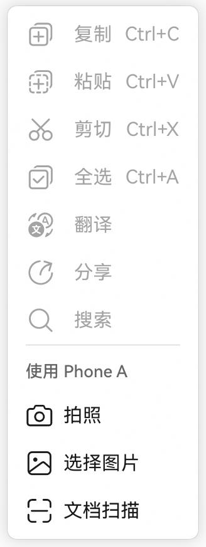
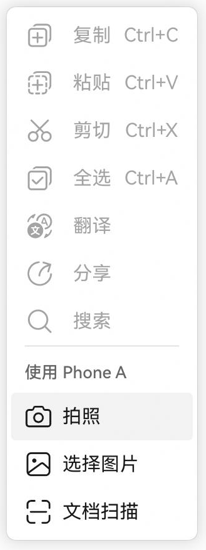
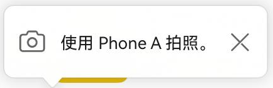
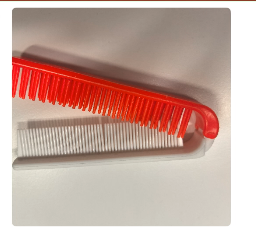
富文本组件使用流程如下:
1.在富文本区域右键。
2.选择想要使用的能力。
3.等待对端设备拍照回传。
4.图片回传后,在光标后面已嵌入一张图片。
关闭富文本跨设备互通能力
如果需要关闭富文本右键菜单跨设备互通能力,可通过editMenuOptions属性自定义菜单内容去除跨设备互通菜单项,示例如下:
@Entry
@Component
struct Index {
  controller: RichEditorController = new RichEditorController()
  options: RichEditorOptions = { controller: this.controller }

  build() {
    Column() {
      Column() {
        RichEditor(this.options)
          .editMenuOptions({
            onCreateMenu: (menuItems: Array<TextMenuItem>) => {
              if (menuItems.length === 0) {
                return menuItems;
              }
              let newMenuItems: TextMenuItem[] = [];
              menuItems.forEach((item, index) => {
                if(!item.id.equals(TextMenuItemId.COLLABORATION_SERVICE)) {
                  newMenuItems.push(item);
                }
              })
              return newMenuItems;
            },
            onMenuItemClick: (menuItem: TextMenuItem, textRange: TextRange) => {
              return false;
            }
          })
          .borderWidth(1)
          .borderColor(Color.Green)
          .width("100%")
          .height("100%")
      }
      .borderWidth(1)
      .borderColor(Color.Red)
      .width("100%")
      .height("70%")
    }
  }
}