配对与连接设备
简介
本指南主要提供了主动配对设备和连接设备可用profile能力的开发指导。
开发步骤
申请蓝牙权限
需要申请权限ohos.permission.ACCESS_BLUETOOTH。如何配置和申请权限,具体操作请参考声明权限和向用户申请授权。
导入所需API模块
导入connection、a2dp、 hfp、 hid、baseProfile、constant和错误码模块。
import { connection, a2dp, hfp, hid, baseProfile, constant, common } from '@kit.ConnectivityKit';
import { BusinessError } from '@kit.BasicServicesKit';
订阅配对状态变化事件
通过订阅配对状态变化事件,可以获取实时的配对状态。在整个配对过程中,涉及多种状态的跃迁,其中BOND_STATE_BONDED表示已配对。
应用主动发起配对其他设备,或者其他设备主动配对本机设备,都可以通过此事件获取配对情况。
// 定义配对状态变化函数回调
function onReceiveEvent(data: connection.BondStateParam) {
    console.info('pair result: '+ JSON.stringify(data));
}

try {
  // 发起订阅
  connection.on('bondStateChange', onReceiveEvent);
} catch (err) {
  console.error('errCode: ' + (err as BusinessError).code + ', errMessage: ' + (err as BusinessError).message);
}
发起配对
若目标设备的配对状态是BOND_STATE_INVALID,则可以主动配对目标设备。
配对过程中,系统会弹出对话框。不同配对类型,对话框样式可能不一样,其中“确认配对密钥(Confirm Passkey)”模式如下图1。若用户同意授权,才能配对成功。
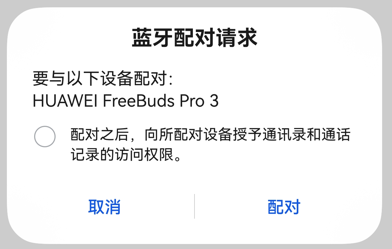
图1 蓝牙配对请求对话框
蓝牙设备的实际MAC地址属于用户的隐私信息,在发现设备过程中,蓝牙子系统会给每个蓝牙外设分配一个虚拟MAC地址,并保存该虚拟MAC地址与外设实际MAC地址的映射关系。
若开发者不知道目标设备的地址类型,推荐使用API version 20及以前的配对方式发起配对,详情请见connection.pairDevice。
- 此配对方式不需要关注目标设备的MAC地址类型。
// 通过发现设备流程获取目标设备地址
let device = '11:22:33:44:55:66';

try {
  // 发起配对
  connection.pairDevice(device).then(() => {
    console.info('pairDevice');
  }, (error: BusinessError) => {
    console.error('pairDevice: errCode:' + error.code + ', errMessage:' + error.message);
  });
} catch (err) {
  console.error('startPair: errCode:' + err.code + ', errMessage:' + err.message);
}
若开发者已知目标设备的地址类型,推荐使用API version 21开始支持的配对方式发起配对,详情请见connection.pairDevice。
- 此配对方式需要同时指定目标设备的MAC地址和地址类型。
let btAddr: common.BluetoothAddress = {
    "address": '11:22:33:44:55:66', // 目标设备的实际MAC地址或虚拟MAC地址
    "addressType": common.BluetoothAddressType.REAL, // 相应的地址类型
}

try {
    // 发起配对
    connection.pairDevice(btAddr).then(() => {
        console.info('pairDevice');
    }, (error: BusinessError) => {
        console.error('pairDevice: errCode:' + error.code + ', errMessage:' + error.message);
    });
} catch (err) {
  console.error('startPair: errCode:' + err.code + ', errMessage:' + err.message);
}
连接已配对设备的profile
若应用配对完目标设备后,可以调用connectAllowedProfiles,发起连接该设备支持的profile能力(只包括A2DP、HFP和HID)。若应用需要使用SPP连接,请参考连接和传输数据。
- 蓝牙子系统会在配对过程中查询和保存目标设备支持的所有profile能力。
- 配对完成后,应用可以主动查询目标设备的profile能力,需调用getRemoteProfileUuids。若存在应用需要的能力,则可以在配对完成后30s内,发起连接目标设备的profile。
// 设备地址是已配对的设备
let device = 'XX:XX:XX:XX:XX:XX';

// 创建A2DP/HFP/HID实例
let a2dpSrc = a2dp.createA2dpSrcProfile();
let hfpAg = hfp.createHfpAgProfile();
let hidHost = hid.createHidHostProfile();

// 定义A2DP连接状态变化回调函数
function onA2dpConnectStateChange(data: baseProfile.StateChangeParam) {
  console.info(`A2DP State: ${JSON.stringify(data)}`);
}

// 定义HFP连接状态变化回调函数
function onHfpConnectStateChange(data: baseProfile.StateChangeParam) {
  console.info(`HFP State: ${JSON.stringify(data)}`);
}

// 定义HID连接状态变化回调函数
function onHidConnectStateChange(data: baseProfile.StateChangeParam) {
  console.info(`HID State: ${JSON.stringify(data)}`);
}

try {
    // 建议判断目标设备的profile能力是否存在A2DP/HFP/HID
    // 订阅A2DP/HFP/HID连接状态变化事件
    a2dpSrc.on('connectionStateChange', onA2dpConnectStateChange);
    hfpAg.on('connectionStateChange', onHfpConnectStateChange);
    hidHost.on('connectionStateChange', onHidConnectStateChange);

    // 发起连接profile
    connection.connectAllowedProfiles(device).then(() => {
      console.info('connectAllowedProfiles');
    }, (error: BusinessError) => {
      console.error('errCode:' + error.code + ',errMessage' + error.message);
    });
} catch (err) {
  console.error('errCode:' + err.code + ',errMessage' + err.message);
}
完整示例
import { connection, a2dp, hfp, hid, baseProfile, constant } from '@kit.ConnectivityKit';
import { BusinessError } from '@kit.BasicServicesKit';

export class PairDeviceManager {
  device: string = '';
  pairState: connection.BondState = connection.BondState.BOND_STATE_INVALID;
  a2dpSrc = a2dp.createA2dpSrcProfile();
  hfpAg = hfp.createHfpAgProfile();
  hidHost = hid.createHidHostProfile();

  // 定义配对状态变化回调函数
  onBondStateEvent = (data: connection.BondStateParam) => {
    console.info('pair result: '+ JSON.stringify(data));
    if (data && data.deviceId == this.device) {
      this.pairState = data.state; // 保存目标设备的配对状态
    }
  };

  // 发起配对,设备地址可以通过查找设备流程获取
  public startPair(device: string) {
    this.device = device;
    try {
      // 发起订阅配对状态变化事件
      connection.on('bondStateChange', this.onBondStateEvent);
    } catch (err) {
      console.error('bondStateChange errCode: ' + (err as BusinessError).code + ', errMessage: ' + (err as BusinessError).message);
    }

    try {
      // 发起配对
      connection.pairDevice(device).then(() => {
        console.info('pairDevice');
      }, (error: BusinessError) => {
        console.error('pairDevice: errCode:' + error.code + ',errMessage' + error.message);
      });
    } catch (err) {
      console.error('startPair: errCode:' + err.code + ',errMessage' + err.message);
    }
  }

  // 定义A2DP连接状态变化回调函数
  onA2dpConnectStateChange = (data: baseProfile.StateChangeParam) => {
    console.info(`A2DP State: ${JSON.stringify(data)}`);
  };

  // 定义HFP连接状态变化回调函数
  onHfpConnectStateChange = (data: baseProfile.StateChangeParam) => {
    console.info(`HFP State: ${JSON.stringify(data)}`);
  };

  // 定义HID连接状态变化回调函数
  onHidConnectStateChange = (data: baseProfile.StateChangeParam) => {
    console.info(`HID State: ${JSON.stringify(data)}`);
  };

  // 发起连接
  public async connect(device: string) {
    try {
      let uuids = await connection.getRemoteProfileUuids(device);
      console.info('device: ' + device + ' remoteUuids: '+ JSON.stringify(uuids));
      let allowedProfiles = 0;
      // 若存在应用需要的profile,则监听对应的profile连接状态
      if (uuids.some(uuid => uuid == constant.ProfileUuids.PROFILE_UUID_A2DP_SINK.toLowerCase())) {
        console.info('device supports a2dp');
        allowedProfiles++;
        this.a2dpSrc.on('connectionStateChange', this.onA2dpConnectStateChange);
      }
      if (uuids.some(uuid => uuid == constant.ProfileUuids.PROFILE_UUID_HFP_HF.toLowerCase())) {
        console.info('device supports hfp');
        allowedProfiles++;
        this.hfpAg.on('connectionStateChange', this.onHfpConnectStateChange);
      }
      if (uuids.some(uuid => uuid == constant.ProfileUuids.PROFILE_UUID_HID.toLowerCase()) ||
        uuids.some(uuid => uuid == constant.ProfileUuids.PROFILE_UUID_HOGP.toLowerCase())) {
        console.info('device supports hid');
        allowedProfiles++;
        this.hidHost.on('connectionStateChange', this.onHidConnectStateChange);
      }
      if (allowedProfiles > 0) { // 若存在可用的profile,则发起连接
        connection.connectAllowedProfiles(device).then(() => {
          console.info('connectAllowedProfiles');
        }, (error: BusinessError) => {
          console.error('errCode:' + error.code + ',errMessage' + error.message);
        });
      }
    } catch (err) {
      console.error('errCode:' + err.code + ',errMessage' + err.message);
    }
  }
}

let pairDeviceManager = new PairDeviceManager();
export default pairDeviceManager as PairDeviceManager;