穿戴设备模板化通知
手机侧应用向穿戴设备发送通知,并在穿戴设备上按模板显示,支持穿戴设备收到通知后同步振动或响铃(跟随穿戴设备系统设置)。执行成功后,穿戴设备上会显示下图所示通知界面。
该接口无需用户授权,仅需要确保应用已申请消息通知权限(参见申请接入Wear Engine服务),否则接口将调用失败。
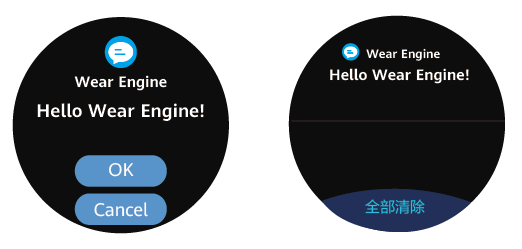

-
穿戴设备侧无对应的应用也可以显示模板化通知。
-
请确保穿戴设备和华为运动健康App处于连接状态。用户可进入App“设备”界面查看设备是否在线。开发者可调用getConnectedDevices方法了解设备是否在线,如果返回列表中不包含目标设备,则提醒用户重新连接该设备。
-
穿戴设备振动或响铃的条件:
- 穿戴设备侧已开启振动或响铃;
- 穿戴设备处于佩戴状态;
- 穿戴设备未开启勿扰模式。
-
通知在穿戴设备上自动弹出通知的条件:
- 穿戴设备处于佩戴状态;
- 穿戴设备未开启勿扰模式。
向穿戴设备侧发送通知
该接口的调用需要在开发者联盟申请消息通知权限(请参考申请接入Wear Engine服务)。
-
参见已连接穿戴设备查询章节,获取已连接设备列表。
-
参见目标设备选择章节,从已连接设备列表中选定需要通信的设备。
-
调用wearEngine中的getNotifyClient方法,获取NotifyClient对象。
-
定义NotificationOptions配置参数类。
-
调用notify方法,从手机上的应用发送通知到穿戴设备侧。
// 步骤3 获取NotifyClient对象let notifyClient: wearEngine.NotifyClient = wearEngine.getNotifyClient(this.getUIContext().getHostContext());// 步骤4 构造NotificationOptions对象let button1: wearEngine.NotificationButton = {buttonId: wearEngine.ButtonId.FIRST_BUTTON,// 按钮内容最大长度为12字节content: 'button_1'}let type1Notification: wearEngine.Notification = {type: wearEngine.NotificationType.NOTIFICATION_WITH_ONE_BUTTON,// 包名与标题的最大长度为28字节bundleName: 'bundleName',title: 'title',// 消息内容最大长度为400字节text: 'text',buttons: [button1]}let options: wearEngine.NotificationOptions = {notification: type1Notification,onAction: (feedback: wearEngine.NotificationFeedback) => {console.info(`one button notify get feedback is ${feedback.action ? feedback.action : feedback.errorCode}`);}}// 步骤5 发送模板化通知至设备侧notifyClient.notify(targetDevice.randomId, options).then(result => {console.info(`Succeeded in sending notification.`);}).catch((error: BusinessError) => {console.error(`Failed to send notification. Code is ${error.code}, message is ${error.message}`);})