接入一笔成形
接入一笔成形功能,可以传入手写笔迹的点位信息、通过手写笔/手指在屏幕上停顿一定的时间后触发此功能,触发功能后将自动识别当前绘制的图形,并生成对应的图像信息。
场景介绍
在应用中实现一笔成形,效果如下:
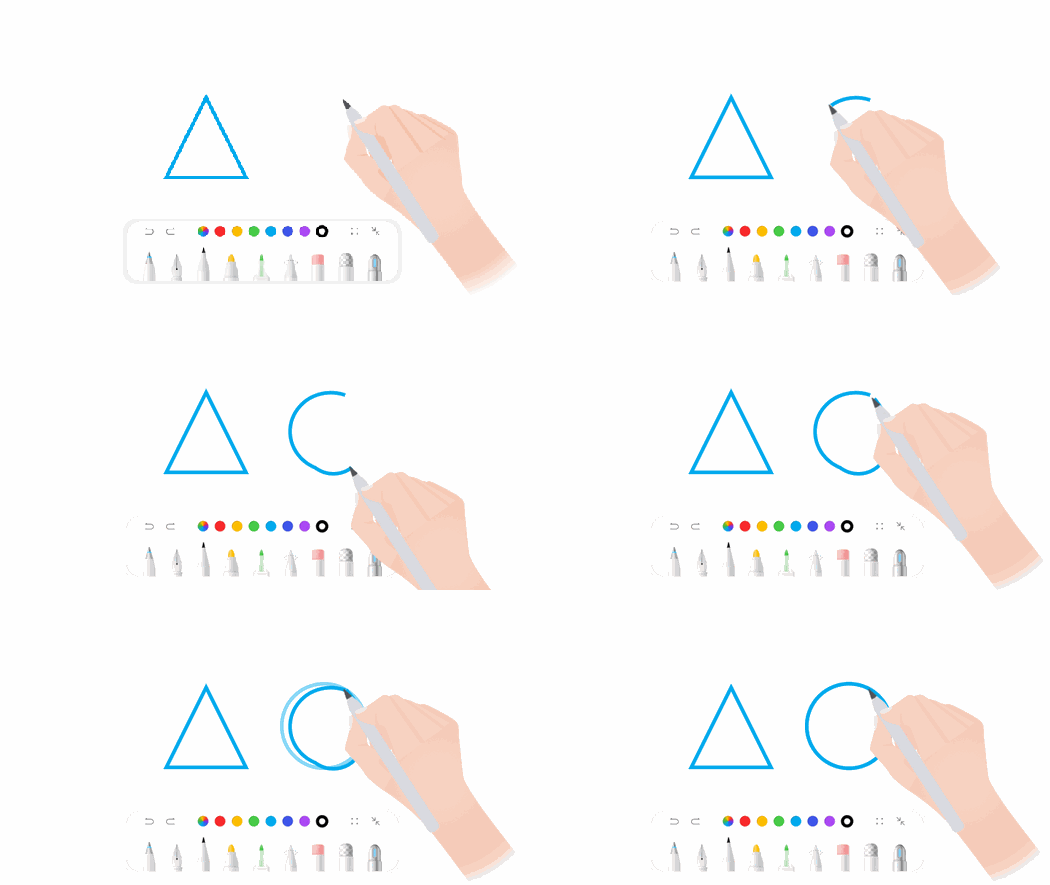
- 支持获取识别的图像信息,图像信息支持存储。
- 支持从存储的图像信息中读取信息。
接口说明
| 类名 | 接口名 | 说明 |
|---|---|---|
| InstantShapeGenerator | processTouchEvent | 传递触摸事件。 |
| InstantShapeGenerator | getPathFromString | 从给定的形状字符串中提取形状信息。 |
| InstantShapeGenerator | notifyAreaChange | 通知组件大小变化。 |
| InstantShapeGenerator | setPauseTime | 设置触发识别的暂停时间,单位:ms。 |
| InstantShapeGenerator | release | 销毁识别工具。 |
| InstantShapeGenerator | onShapeRecognized | 注册识别完成时的回调方法。 |
开发步骤
-
导入相关模块。
import { InstantShapeGenerator, ShapeInfo } from '@kit.Penkit'; -
构造包含一笔成形能力,下面以控件为例:
@Entry@Componentstruct InstantShapeDemo {private instantShapeGenerator: InstantShapeGenerator = new InstantShapeGenerator();private points: DrawPathPointModel[] = [];// 绘制路径private drawPath = new Path2D();private shapePath = new Path2D();private mShapeSuccess = false;private settings: RenderingContextSettings = new RenderingContextSettings(true);private context: CanvasRenderingContext2D = new CanvasRenderingContext2D(this.settings);// 通过回调方法获取识别结果private shapeInfoCallback = (shapeInfo: ShapeInfo) => {this.shapePath = shapeInfo.shapePath;this.mShapeSuccess = true;this.context.beginPath();this.context.reset();this.drawCurrentPathModel(this.shapePath);}aboutToAppear() {console.info('InstantShapeGenerator aboutToAppear');// 设置触发识别的暂停时间this.instantShapeGenerator?.setPauseTime(280);// 注册完成时的回调方法this.instantShapeGenerator?.onShapeRecognized(this.shapeInfoCallback);}aboutToDisappear() {console.info('InstantShapeGenerator aboutToDisappear')this.instantShapeGenerator?.release();}build() {Stack({ alignContent: Alignment.TopEnd }) {Canvas(this.context).width('100%').height('100%').onAreaChange((oldValue: Area, newValue: Area) => {// 通知组件大小变化。形状的大小(例如圆的半径)根据组件尺寸而变化this.instantShapeGenerator?.notifyAreaChange(Number(newValue.width), Number(newValue.height));}).onTouch((event: TouchEvent) => {// 传递触摸事件this.instantShapeGenerator?.processTouchEvent(event);switch (event.type) {case TouchType.Down:this.moveStart(event.touches[0]?.x, event.touches[0]?.y);break;case TouchType.Move:this.moveUpdate(event.touches[0]?.x, event.touches[0]?.y);break;case TouchType.Up:this.moveEnd();break;}})}.height('100%').width('100%')}moveStart(x: number, y: number) {this.points.push({ x: x, y: y })this.drawPath.moveTo(x, y);this.drawCurrentPathModel(this.drawPath);this.mShapeSuccess = false;}moveUpdate(x: number, y: number) {let lastPoint = this.points[this.points.length - 1];this.points.push({ x: x, y: y });this.drawPath.quadraticCurveTo((x + lastPoint?.x) / 2, (y + lastPoint?.y) / 2, x, y);if (!this.mShapeSuccess) {this.drawCurrentPathModel(this.drawPath);}}moveEnd() {this.points = [];this.drawPath = new Path2D();this.shapePath = new Path2D();}private drawCurrentPathModel(path: Path2D) {this.context.globalCompositeOperation = 'source-over';this.context.lineWidth = 8;this.context.strokeStyle = "#ED1B1B";this.context.lineJoin = 'round';this.context.stroke(path);}}export class DrawPathPointModel {x: number = 0;y: number = 0;}