监听HiCar的连接状态
场景介绍
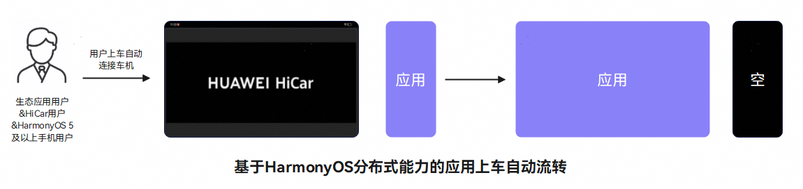
生态应用可以通过监听智慧出行连接状态接口获取连接信息,适配HiCar业务(如:应用流转)。
接口说明
监听HiCar的连接状态使用接口如下:
| 接口名 | 描述 |
|---|---|
| on('smartMobilityStatus') | 注册智慧出行连接状态的监听。 |
| off('smartMobilityStatus') | 取消注册智慧出行连接状态的监听。 |
开发流程
开发步骤
-
导入相关模块。
import { smartMobilityCommon } from '@kit.CarKit';import { hilog } from '@kit.PerformanceAnalysisKit'; -
监听HiCar连接状态。
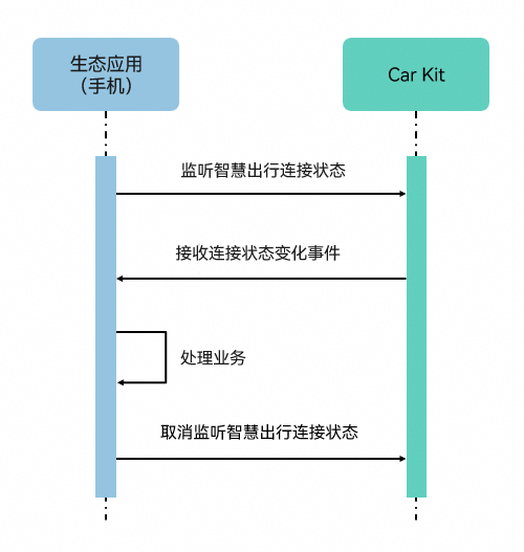
应用在适配HiCar时,需要注册智慧出行连接状态的监听,用于对应的业务逻辑处理。
try {// 获取SmartMobilityAwareness实例let awareness: smartMobilityCommon.SmartMobilityAwareness = smartMobilityCommon.getSmartMobilityAwareness();// 业务类型let types: smartMobilityCommon.SmartMobilityType[] = [smartMobilityCommon.SmartMobilityType.HICAR];// 智慧出行连接状态回调函数const callBack = (info: smartMobilityCommon.SmartMobilityInfo) => {hilog.info(0x0000, 'testTag', 'Received smart mobility info: ', JSON.stringify(info));if (info.status === smartMobilityCommon.SmartMobilityStatus.RUNNING) {// 连接成功通知} else if (info.status === smartMobilityCommon.SmartMobilityStatus.IDLE) {// 断开连接通知}};// 注册智慧出行连接状态的监听awareness.on('smartMobilityStatus', types, callBack);} catch (e) {// 捕获接口调用异常时的错误码并做相应处理hilog.error(0x0000, 'testTag', `on smart mobility status listener error, error code: ${e?.code}`);} -
取消监听。
在应用退出时,需要取消之前注册的监听,减少系统不必要的资源消耗。
try {// 获取SmartMobilityAwareness实例let awareness: smartMobilityCommon.SmartMobilityAwareness = smartMobilityCommon.getSmartMobilityAwareness();// 业务类型let types: smartMobilityCommon.SmartMobilityType[] = [smartMobilityCommon.SmartMobilityType.HICAR];// 取消注册智慧出行连接状态的监听awareness.off('smartMobilityStatus', types);} catch (e) {// 捕获接口调用异常时的错误码并做相应处理hilog.error(0x0000, 'testTag', `off smart mobility status listener error, error code: ${e?.code}`);}