主动获取HiCar的连接状态
场景介绍
生态应用可以通过主动获取智慧出行连接状态接口来获取HiCar的连接状态(如:判断应用是否在HiCar上拉起)。
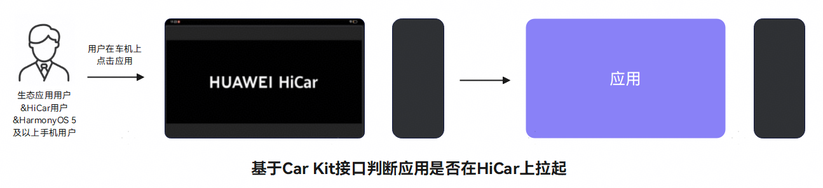
接口说明
获取HiCar连接状态的接口如下:
| 接口名 | 描述 |
|---|---|
| getSmartMobilityStatus | 获取智慧出行连接状态。 |
SmartMobilityInfo事件名说明
SmartMobilityInfo状态(status)取值如下:
| 编号 | 状态 | 描述 |
|---|---|---|
| 0 | IDLE | 空闲态。 |
| 1 | RUNNING | 运行态。 |
SmartMobilityInfo业务类型(type)取值如下:
| 编号 | 业务类型 | 描述 |
|---|---|---|
| 0 | HICAR | HiCar。 |
| 1 | SUPER_LAUNCHER | 超级桌面。 |
| 2 | CAR_HOP | 流转。 |
SmartMobilityInfo业务数据(data)参数如下:
| 编号 | 参数 | 描述 |
|---|---|---|
| 0 | DEVICE_TYPE | 设备类型。 |
| 1 | DISPLAY_ID | 业务所在的虚拟屏ID。 |
| 2 | IS_PHONE_DESKTOP | 当前是否在HiCar上显示手机桌面(仅在HiCar业务中展示)。 |
开发步骤
-
导入相关模块。
import { smartMobilityCommon } from '@kit.CarKit';import { UIAbility } from '@kit.AbilityKit';import { hilog } from '@kit.PerformanceAnalysisKit'; -
查询智慧出行连接状态。
应用在适配HiCar时,可以实时查询接口来获取智慧出行连接状态(如:判断应用是否在HiCar上)。
export default class EntryAbility extends UIAbility {isAppOnHiCar(): boolean {try {// 应用所在的屏幕idconst currentDisplayId = this.context.config.displayId;// 获取SmartMobilityAwareness实例let awareness: smartMobilityCommon.SmartMobilityAwareness = smartMobilityCommon.getSmartMobilityAwareness();// 获取当前智慧出行连接状态let info: smartMobilityCommon.SmartMobilityInfo =awareness.getSmartMobilityStatus(smartMobilityCommon.SmartMobilityType.HICAR);const deviceDisplayId = Number(info.data["DISPLAY_ID"]);if (currentDisplayId === deviceDisplayId) {// 表示应用在对应的设备屏幕上hilog.info(0x0000, 'testTag', 'app in on device screen');return true;}} catch (e) {// 捕获接口调用异常时的错误码并做相应处理hilog.error(0x0000, 'testTag', `get smart mobility status error, error code: ${e?.code}`);}return false;}}