隐私管理服务
隐私管理服务为使用标准化隐私声明托管服务的应用/元服务提供查询隐私链接、查询隐私签署状态、撤销同意记录和拉起标准化隐私弹框请求用户同意功能。

如果在应用/元服务中使用了标准化隐私声明托管服务,则首次打开应用/元服务,会默认显示标准化隐私弹窗,请勿在应用/元服务中自行实现弹窗展示隐私声明,否则发布审核将被驳回。
场景介绍
-
查询隐私链接
在接入标准化隐私声明托管服务的场景下,应用/元服务内查询或展示隐私协议所需。
-
查询隐私签署状态
支持查询协议签署状态,以便于应用/元服务内规划相关权限及合理合规获取数据。用户未签署隐私协议时,将无法申请系统权限。
-
撤销同意记录
用于撤销用户已签署同意的隐私协议记录,撤销同意记录后再次打开应用/元服务会重新弹出标准化隐私弹框。
-
请求用户同意
在接入标准化隐私声明托管服务的前提下,用于开发者需要主动拉起标准化隐私弹框请求用户同意的场景。
业务流程
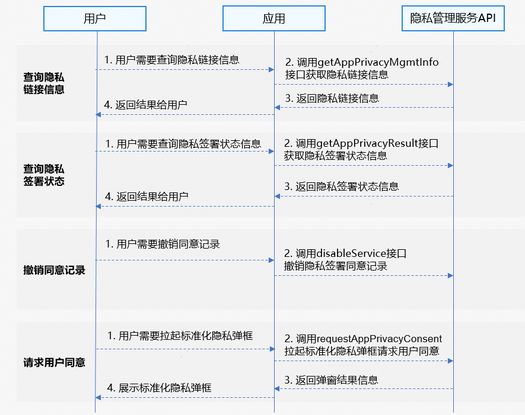
查询隐私链接信息
- 用户需要查询隐私链接信息。
- 应用/元服务调用getAppPrivacyMgmtInfo接口查询隐私链接信息。
- 返回隐私链接信息。
- 应用/元服务将查询结果返回给用户。
查询隐私签署状态
- 用户需要查询隐私签署状态信息。
- 应用/元服务调用getAppPrivacyResult接口查询隐私签署状态信息。
- 返回隐私签署状态信息。
- 应用/元服务将结果返回给用户。
撤销同意记录
- 用户需要撤销隐私签署同意记录。
- 应用/元服务调用disableService接口撤销隐私签署同意记录。
请求用户同意
- 用户需要展示标准化隐私弹框。
- 应用/元服务调用requestAppPrivacyConsent接口拉起标准化隐私弹框。
- 返回弹窗结果信息。
- 向用户展示标准化隐私弹框请求用户同意。
约束与限制
- 同一个Ability内不允许重复调用loadContent()方法加载页面。
- 应用/元服务需要接入隐私声明托管服务。
- 隐私管理服务支持Phone、Tablet、PC/2in1设备。并且从5.1.1(19)版本开始,新增支持TV设备。
- 隐私管理服务暂不支持模拟器,请使用真机调试。
接口说明
隐私管理服务提供以下接口,具体API说明详见接口文档。
| 接口名 | 描述 |
|---|---|
| getAppPrivacyMgmtInfo(): AppPrivacyMgmtInfo | 查询隐私链接信息接口,用于查询隐私链接信息。 |
| getAppPrivacyResult(): AppPrivacyResult[] | 查询隐私签署状态接口,用于查询隐私签署状态信息。 |
| disableService():void | 撤销同意记录接口,用于撤销隐私签署同意记录。 |
| requestAppPrivacyConsent(context:common.UIAbilityContext):Promise<ConsentResult> | 请求用户同意接口,用于开发者需要主动拉起标准化隐私弹框。 |
开发步骤
查询隐私链接信息
-
导入privacyManager模块及相关公共模块。
import { privacyManager } from '@kit.AppGalleryKit';import { hilog } from '@kit.PerformanceAnalysisKit'; -
调用getAppPrivacyMgmtInfo方法查询隐私链接信息。
try {let appPrivacyManageInfo: privacyManager.AppPrivacyMgmtInfo = privacyManager.getAppPrivacyMgmtInfo();hilog.info(0, 'TAG', "Succeeded in getting AppPrivacyManageInfo type: " + appPrivacyManageInfo["type"]);let privacyLinkInfoArray : privacyManager.AppPrivacyLink[] = appPrivacyManageInfo.privacyInfo;hilog.info(0, 'TAG', "Succeeded in getting AppPrivacyManageInfo size = " + privacyLinkInfoArray.length);for (let i = 0; i < privacyLinkInfoArray.length; i++) {hilog.info(0, 'TAG', "Succeeded in getting AppPrivacyManageInfo type = " + privacyLinkInfoArray[i]["type"] + ", version = " + privacyLinkInfoArray[i]["versionCode"] + ", url = " + privacyLinkInfoArray[i]["url"]);}} catch (error) {hilog.error(0, 'TAG', "GetAppPrivacyManageInfoPublic exception code: " + error.code + ", exception message: " + error.message);}
查询隐私签署状态
-
导入privacyManager模块及相关公共模块。
import { privacyManager } from '@kit.AppGalleryKit';import { hilog } from '@kit.PerformanceAnalysisKit'; -
调用getAppPrivacyResult方法查询隐私签署状态。
try {let appPrivacyResults: privacyManager.AppPrivacyResult[] = privacyManager.getAppPrivacyResult();hilog.info(0, 'TAG', "Succeeded in getting AppPrivacyResult size = " + appPrivacyResults.length);for (let i = 0; i < appPrivacyResults.length; i++) {hilog.info(0, 'TAG', "Succeeded in getting AppPrivacyResult type = " + appPrivacyResults[i]["type"] + ", version = " + appPrivacyResults[i]["versionCode"] + ", result = "+appPrivacyResults[i]["result"]);}} catch (error) {hilog.error(0, 'TAG', "GetAppPrivacyResultPublic exception code: " + error.code + ", exception message: " + error.message);}
撤销同意记录
-
导入privacyManager模块及相关公共模块。
import { privacyManager } from '@kit.AppGalleryKit';import { hilog } from '@kit.PerformanceAnalysisKit'; -
调用disableService方法撤销同意记录。
try {privacyManager.disableService();hilog.info(0, 'TAG', "Succeeded in disabling Service success.");} catch (error) {hilog.error(0, 'TAG', "DisableService exception code: " + error.code + ", exception message: " + error.message);}
请求用户同意
-
导入privacyManager模块及相关公共模块。
import { privacyManager } from '@kit.AppGalleryKit';import { hilog } from '@kit.PerformanceAnalysisKit';import type { common } from '@kit.AbilityKit';import { BusinessError } from '@kit.BasicServicesKit'; -
调用requestAppPrivacyConsent方法拉起标准化隐私弹框请求用户同意。
try {const uiContext = this.getUIContext().getHostContext() as common.UIAbilityContext;privacyManager.requestAppPrivacyConsent(uiContext).then((consentResult : privacyManager.ConsentResult) => {let appPrivacyResults: privacyManager.AppPrivacyResult[] = consentResult["results"];for (let i = 0; i < appPrivacyResults.length; i++) {hilog.info(0, 'TAG', "GetAppPrivacyResult type = " + appPrivacyResults[i]["type"] + ", version = " + appPrivacyResults[i]["versionCode"] + ", result = " + appPrivacyResults[i]["result"] + ", signingTimestamp = " + appPrivacyResults[i]["signingTimestamp"]);}}).catch((error: BusinessError<Object>) => {hilog.error(0, 'TAG', `requestAppPrivacyConsent failed, Code: ${error.code}, message: ${error.message}`);});} catch (error) {hilog.error(0, 'TAG', "requestAppPrivacyConsent exception code: " + error.code + ", exception message: " + error.message);}
隐私弹框签署结果公共事件
在接入标准化隐私声明托管服务之后,用户未签署隐私声明前,打开应用/元服务会弹出标准化隐私弹框,弹框样式如下:
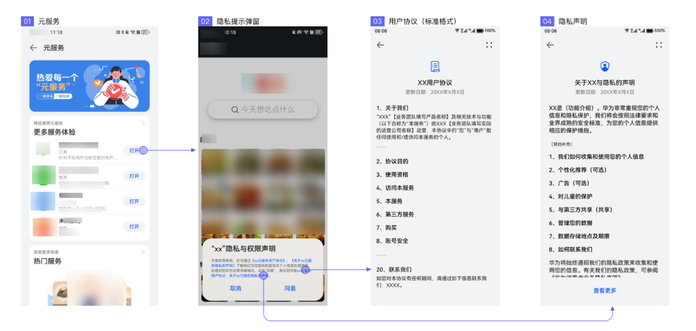
用户点击同意隐私弹框,应用市场会发送隐私弹框签署结果公共事件。应用可通过监听该事件,感知用户隐私签署结果。
事件说明
| 事件名称 | 值 | 描述 |
|---|---|---|
| COMMON_EVENT_PRIVACY_STATE_CHANGED | usual.event.PRIVACY_STATE_CHANGED | 隐私弹框签署结果公共事件,事件携带数据如下: { 'resultType': privacyResultType, 'appIndex': appIndex } 其中: - privacyResultType: 1:同意完整模式 0:未同意 - appIndex:分身索引 |
公共事件接收示例(无应用分身场景):
import { hilog } from '@kit.PerformanceAnalysisKit';
import { commonEventManager } from '@kit.BasicServicesKit';
const TAG = 'PrivacySubscribe';

class PrivacySubscribeSample {
  private readonly eventId = 'usual.event.PRIVACY_STATE_CHANGED';
  // 订阅者信息, 用于保存创建成功的订阅者对象,后续使用其完成订阅及退订的动作
  private subscriber: commonEventManager.CommonEventSubscriber | undefined = undefined;
  // 事件列表
  private subscribeInfo: commonEventManager.CommonEventSubscribeInfo = {
    events: [this.eventId]
  };

  public subscribe(): void {
    hilog.info(0, TAG, "subscribe");
    // 创建订阅者
    commonEventManager.createSubscriber(this.subscribeInfo).then((commonEventSubscriber) => {
      hilog.info(0, TAG, "createSubscriber");
      this.subscriber = commonEventSubscriber;

      // 订阅公共事件
      try {
        commonEventManager.subscribe(this.subscriber, (err, data) => {
          if (err) {
            hilog.error(0, TAG, `subscribe failed, code is ${err?.code}, message is ${err?.message}`);
            return;
          }

          let result = JSON.parse(data?.data ?? '{}')?.resultType as number;
          if (result === 1) {
            // 隐私同意处理
          }
        });
      } catch (error) {
        hilog.error(0, TAG, "init createSubscriber failed, exception code: " + error.code + ", exception message: " + error.message);
      }
    });
  }
}
公共事件接收示例(应用分身场景):
import { hilog } from '@kit.PerformanceAnalysisKit';
import { commonEventManager } from '@kit.BasicServicesKit';
import { UIAbility } from '@kit.AbilityKit';

const TAG = 'PrivacyEventSubscriber';

export default class MyAbility extends UIAbility {
  onBackground() {
    let appCloneIndex = 0;
    let applicationContext = this.context.getApplicationContext();
    try {
      appCloneIndex = applicationContext.getCurrentAppCloneIndex();
    } catch (error) {
      hilog.error(0, TAG, `getCurrentAppCloneIndex fail, exception code:` + error.code + `, exception message: ` + error.message);
    }
    new PrivacyEventSubscriber(appCloneIndex).subscribe();
  }
}

class PrivacyEventSubscriber {
  private appCloneIndex: number = 0;
  private readonly eventId = 'usual.event.PRIVACY_STATE_CHANGED';
  // 订阅者信息, 用于保存创建成功的订阅者对象,后续使用其完成订阅及退订的动作
  private subscriber: commonEventManager.CommonEventSubscriber | undefined = undefined;
  // 事件列表
  private subscribeInfo: commonEventManager.CommonEventSubscribeInfo = {
    events: [this.eventId]
  };

  constructor(appCloneIndex: number) {
    this.appCloneIndex = appCloneIndex;
  }

  public subscribe(): void {
    hilog.info(0, TAG, "subscribe");
    // 创建订阅者
    commonEventManager.createSubscriber(this.subscribeInfo).then((commonEventSubscriber) => {
      hilog.info(0, TAG, "createSubscriber");
      this.subscriber = commonEventSubscriber;

      // 订阅公共事件
      try {
        commonEventManager.subscribe(this.subscriber, (err, data) => {
          if (err) {
            hilog.error(0, TAG, `subscribe failed, code is ${err?.code}, message is ${err?.message}`);
            return;
          }

          let result = JSON.parse(data?.data ?? '{}')?.resultType as number;
          let appIndex = JSON.parse(data?.data ?? '{}')?.appIndex as number ?? 0;
          // 公共事件传递的分身索引等于当前应用的分身索引
          if (appIndex === this.appCloneIndex) {
            if (result === 1) {
              // 隐私同意处理
            }
          }
        });
      } catch (error) {
        hilog.error(0, TAG, "init createSubscriber failed, exception code: " + error.code + ", exception message: " + error.message);
      }
    });
  }
}
未上架应用接入隐私管理服务
针对未上架应用市场的应用/元服务,可以通过手动预置隐私链接信息模拟接入隐私托管和隐私管理服务。
预置隐私链接信息完成后,打开应用会弹出统一隐私弹框,应用可以使用隐私管理服务提供的查询隐私链接、查询隐私签署状态和撤销同意记录等相关功能。
-
将应用工程构建模式修改为debug模式。
-
打开代码工程中type为entry类型的模块,修改其中的src/main/module.json5文件,添加module.metadata信息,其中包含四个字段,值均为字符串类型:
字段名称 字段解释 是否必填 appgallery_privacy_hosted 是否启用隐私弹框,1表示启用,其他值均表示不启用。 是 appgallery_privacy_link_privacy_statement 隐私协议url(https),在隐私弹框中作为隐私协议的内容。 是 appgallery_privacy_link_user_agreement 用户协议url(https),在隐私弹框中作为用户协议的内容。 否 appgallery_privacy_link_user_agreements 多个用户协议url(https),在隐私弹框中作为多个用户协议的内容。 该值直接引用一个json文件,json文件存放在module的type为entry模块的resources/rawfile文件夹下。 有多个用户协议链接时,优先取appgallery_privacy_link_user_agreements字段,appgallery_privacy_link_user_agreement配置的单个用户协议链接无效。 起始版本:5.0.2(14) 否
在华为应用市场可以正常使用、并且网络连通的情况下,使用hdc命令从本地文件安装应用,即可使用预置的隐私链接信息测试隐私弹框、调试隐私管理服务接口。
示例配置:
// module.json5
{
  "module": {
    "name": "entry",
    "type": "entry",
    "description": "$string:module_desc",
    "metadata": [
      {
        "name": "appgallery_privacy_hosted",
        "value": "1"
      },
      {
        "name": "appgallery_privacy_link_privacy_statement",
        "value": "https://www.example.com/" // 必须是https网址
      },
      {
        "name": "appgallery_privacy_link_user_agreement",
        "value": "https://www.example.com/" // 必须是https网址
      },
      {
        "name": "appgallery_privacy_link_user_agreements",
        "value": "link_user_agreements.json" // 配置json文件名称,示例配置见下文
      }
    ],
    // 其他内容
  }
}
link_user_agreements.json示例配置:
{
    "user_agreement_Infos": [
        {
            "name": "用户协议1",       // 需要展示的用户协议名字1
            "url": "https://xxxx"     // 用户协议链接地址
        },
        {
            "name": "用户协议2",       // 需要展示的用户协议名字2
            "url": "https://xxxx"     // 用户协议链接地址
        }
    ]
}