生态查询服务
场景介绍
生态查询服务可以为您提供应用/元服务运行信息的查询,当前提供场景值查询和广告验签信息查询。场景值是用来描述用户进入应用和元服务的路径。您可以通过本服务,来查询您的元服务/应用是通过何种场景被打开的(场景值列表)。当前我们支持元服务的场景值查询,后续我们会继续公布应用场景值的查询。广告验签版本查询只在您的应用涉及广告场景下才会被使用到。您可以通过本查询服务,查询广告验签参数处理逻辑。
业务流程
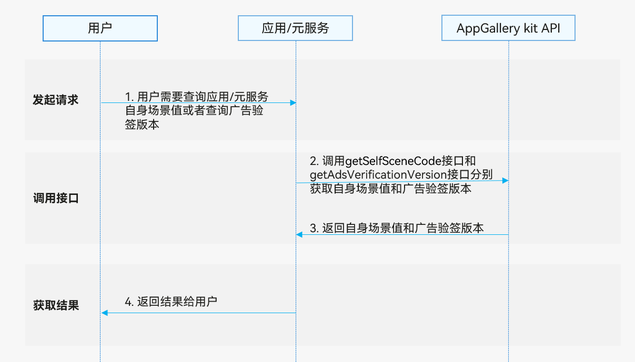
- 用户需要查询应用/元服务自身场景值或者查询广告验签版本。
- 应用调用getSelfSceneCode接口和getAdsVerificationVersion接口分别获取自身场景值和广告验签版本。
- 返回自身场景值和广告验签版本给应用/元服务。
- 返回结果给用户。
约束与限制
- 生态查询服务支持Phone、Tablet、PC/2in1设备。并且从5.1.1(19)版本开始,新增支持TV设备。
- 如果应用或者元服务没有产生场景值,调用getSelfSceneCode接口返回的场景值为空。
- 生态查询服务不支持模拟器,请使用真机调试。
接口说明
生态查询服务场景提供以下接口,具体API说明详见接口文档。
| 接口名 | 描述 |
|---|---|
| getSelfSceneCode():string | 获取自身场景值。 |
| getAdsVerificationVersion(): number | 查询广告验签版本。 |
开发步骤
查询自身场景值
-
导入模块。
import { hilog } from '@kit.PerformanceAnalysisKit';import { sceneManager } from '@kit.AppGalleryKit'; -
调用getSelfSceneCode方法。
try {const sceneCode: string = sceneManager.getSelfSceneCode();hilog.info(0, 'TAG', "Succeeded in getting SelfSceneCode res = " + sceneCode);} catch (error) {hilog.error(0, 'TAG', `getSelfSceneCode failed. code is ${error.code}, message is ${error.message}`);}
查询广告验签版本
-
导入模块。
import { hilog } from '@kit.PerformanceAnalysisKit';import { sceneManager } from '@kit.AppGalleryKit'; -
调用getAdsVerificationVersion方法。
try {const version: number = sceneManager.getAdsVerificationVersion();hilog.info(0, 'TAG', "Succeeded in getting AdsVerificationVersion res = " + version);} catch (error) {hilog.error(0, 'TAG', `getAdsVerificationVersion failed. code is ${error.code}, message is ${error.message}`);}