分享链接
分享App Linking直达应用
使用App Linking分享应用,目标设备接收后可直达应用,参见:使用App Linking实现应用间跳转。
开发步骤
-
开通App Linking服务,并完成相关配置,App Linking需经过调试。参见:调试App Linking。
-
在应用配置文件(src/main/module.json5)的skills配置中增加关联配置。参见:声明应用关联的网站域名。
-
使用App Linking发起系统分享。
import { systemShare } from '@kit.ShareKit';import { uniformTypeDescriptor as utd } from '@kit.ArkData';import { common } from '@kit.AbilityKit';import { image } from '@kit.ImageKit';import { BusinessError } from '@kit.BasicServicesKit';@Componentexport default struct Index {private async share() {// 生成应用图标缩略图let uiContext: UIContext = this.getUIContext();let contextFaker: Context = uiContext.getHostContext() as Context;let thumbnailPath = contextFaker.filesDir + '/exampleImage.jpg'; // 仅为示例 请替换正确的文件路径let imageSource: image.ImageSource = image.createImageSource(thumbnailPath);let imagePacker: image.ImagePacker = image.createImagePacker();let buffer: ArrayBuffer = await imagePacker.packToData(imageSource, {// 当前只支持'image/jpeg','image/webp'和'image/png'类型图片.format: 'image/jpeg',// JPEG编码中设定输出图片质量的参数,取值范围为0-100.// 建议适当压缩,图片过大无法拉起分享.quality: 30});// 构造ShareData,需配置一条有效数据信息let shareData: systemShare.SharedData = new systemShare.SharedData({utd: utd.UniformDataType.HYPERLINK,// App Linking链接 仅为示例content: 'https://sharekitdemo.drcn.agconnect.link/ZB3p',title: '应用名称', // 不传title时 显示链接description: '应用描述', // 不传则不显示描述内容thumbnail: new Uint8Array(buffer) // 推荐传入应用图标 不传则显示默认html图标});// 进行分享面板显示let controller: systemShare.ShareController = new systemShare.ShareController(shareData);let context: common.UIAbilityContext = uiContext.getHostContext() as common.UIAbilityContext;controller.show(context, {previewMode: systemShare.SharePreviewMode.DEFAULT,selectionMode: systemShare.SelectionMode.SINGLE}).then(() => {console.info('ShareController show success.');}).catch((error: BusinessError) => {console.error(`ShareController show error. code: ${error.code}, message: ${error.message}`);});}build() {Button('分享').onClick(() => this.share())}} -
目标应用处理App Linking。参见:拉起方实现跳转指导。
import { common, OpenLinkOptions } from '@kit.AbilityKit';import { BusinessError } from '@kit.BasicServicesKit';@Entry@Componentstruct Index {build() {Button('start link', { type: ButtonType.Capsule, stateEffect: true }).width('87%').height('5%').margin({ bottom: '12vp' }).onClick(() => {let uiContext: UIContext = this.getUIContext();let context: common.UIAbilityContext = uiContext.getHostContext() as common.UIAbilityContext;let link: string = "https://www.example.com/programs?action=showall";let openLinkOptions: OpenLinkOptions = {appLinkingOnly: false};context.openLink(link, openLinkOptions).then(() => {console.info('openlink success.');}).catch((error: BusinessError) => {console.error(`openlink failed. code: ${error.code}, message: ${error.message}`);});})}}完整示例代码请参见:samplecode-分享App Linking直达应用。
分享普通链接直达浏览器
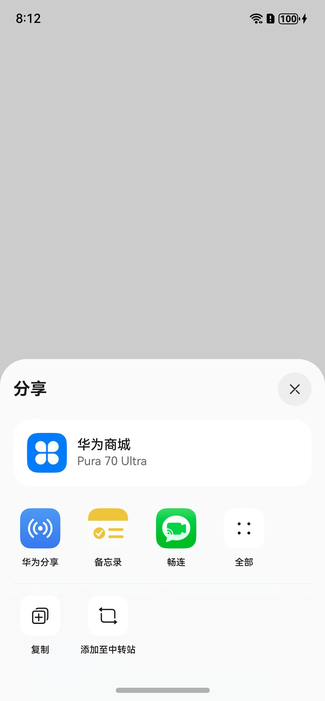
普通链接分享支持将网页链接到目标设备/目标应用。
- 目标设备接收时,通过浏览器直接打开链接。
- 目标应用接收时,可便捷地处理链接内容。例如:将一个链接分享给畅连,发送给畅连好友。
开发步骤
-
导入相关模块。
import { systemShare } from '@kit.ShareKit';import { uniformTypeDescriptor as utd } from '@kit.ArkData';import { common } from '@kit.AbilityKit';import { BusinessError } from '@kit.BasicServicesKit'; -
构造分享数据。
// 构造ShareData,需配置一条有效数据信息let shareData: systemShare.SharedData = new systemShare.SharedData({utd: utd.UniformDataType.HYPERLINK,content: 'https://www.vmall.com/index.html?cid=128688', // 仅为示例 使用时请替换为自己的链接title: '华为商城',description: '华为手机',// thumbnail: new Uint8Array() // 推荐传入适合的缩略图 不传则显示默认html图标}); -
额外增加一条数据。
shareData.addRecord({utd: utd.UniformDataType.HYPERLINK,content: 'https://www.vmall.com/index.html?cid=128688', // 仅为示例 使用时请替换为自己的链接title: '测试链接',description: '测试描述',}); -
启动分享面板。
// 进行分享面板显示let controller: systemShare.ShareController = new systemShare.ShareController(shareData);let uiContext: UIContext = this.getUIContext();let context: common.UIAbilityContext = uiContext.getHostContext() as common.UIAbilityContext;controller.show(context, {selectionMode: systemShare.SelectionMode.SINGLE,previewMode: systemShare.SharePreviewMode.DEFAULT,}).then(() => {console.info('ShareController show success.');}).catch((error: BusinessError) => {console.error(`ShareController show error. code: ${error.code}, message: ${error.message}`);});完整示例代码请参见:samplecode-分享普通链接直达浏览器。