停止策略
场景介绍
当用户希望停止某个管控规则时,可以调用停止管控策略的接口。根据参数中传入的策略名,应用可以停止对应管控策略。一旦策略被停止,系统将不再根据该规则对用户的屏幕使用行为进行监管。
用户体验设计
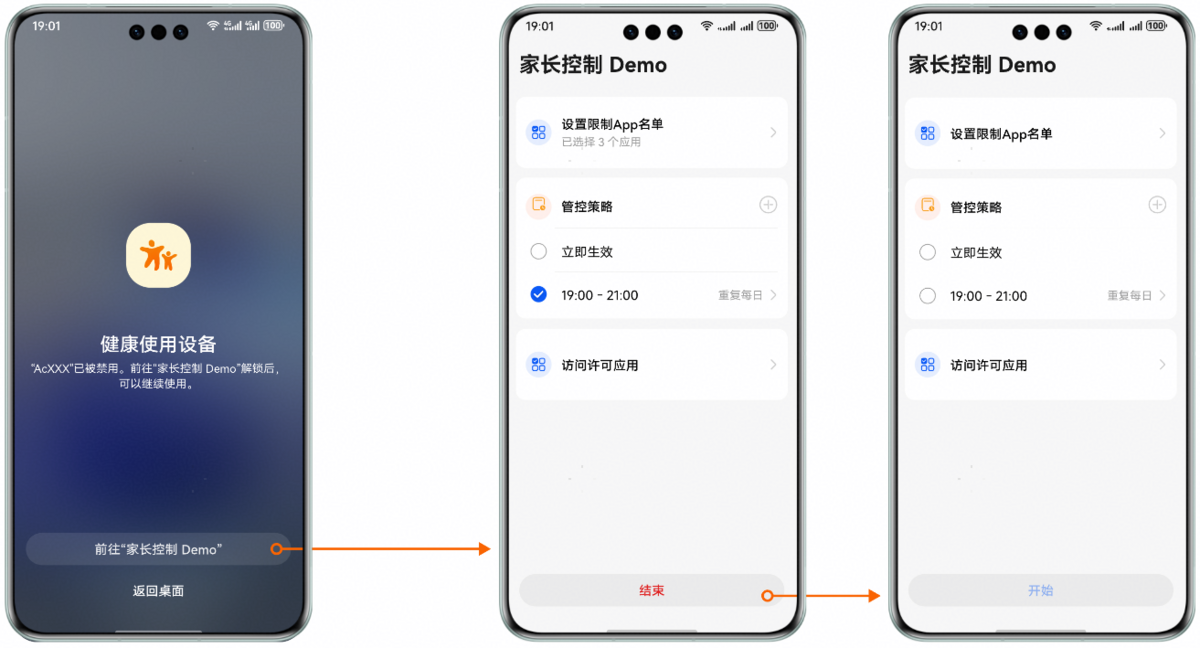
业务流程
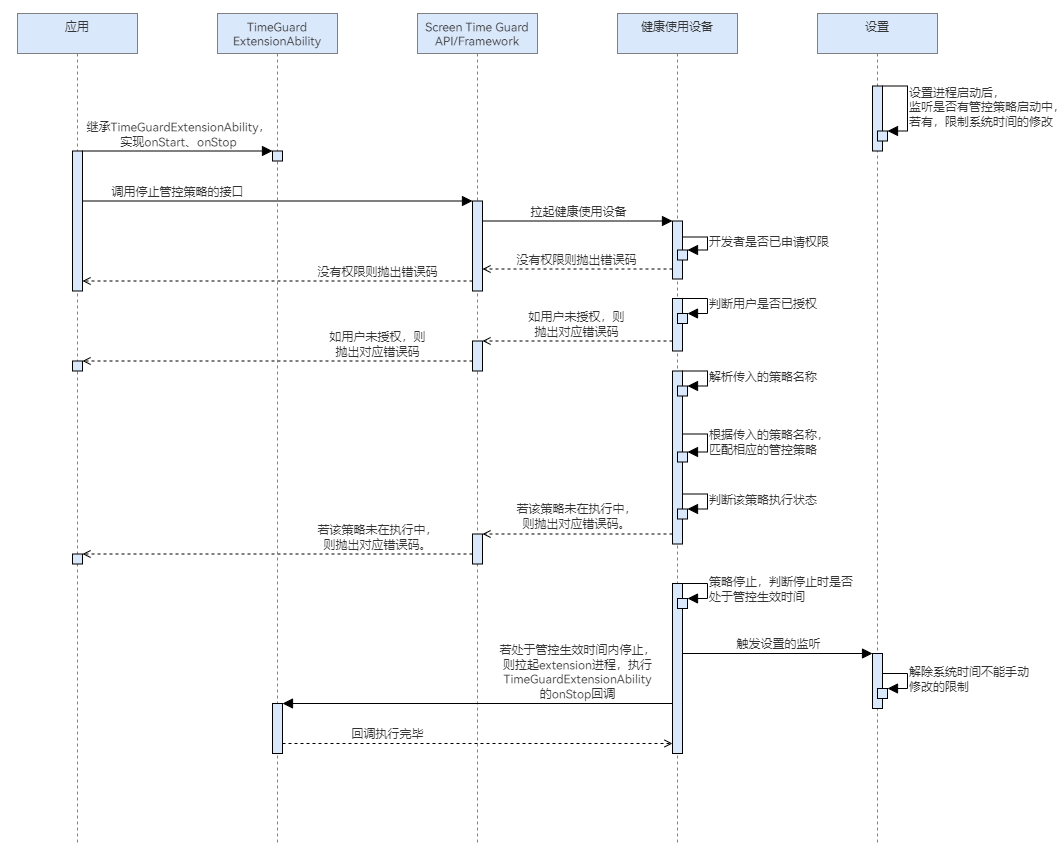
流程说明:
- 应用继承TimeGuardExtensionAbility,实现onStop方法,此步非必需。
- 应用调用停止管控策略的接口,会拉起健康使用设备查询本应用是否已申请权限、用户是否已给本应用授权。
- 若没有权限,则抛出相应错误码。若有权限,则解析参数中传入的策略名称,判断策略是否存在。
- 若策略不存在,则抛出相应错误码;若存在,则查询该策略是否正在执行。
- 若停止策略时正在执行策略,则策略会正常停止,健康使用设备会记录策略停止状态;若停止策略时策略并未执行,该接口将抛出策略未在执行中的错误码。
- 策略生效期间停止策略,会拉起extension进程,执行TimeGuardExtensionAbility的onStop回调。在非策略生效期间停止策略,不会触发onStop回调。
- 停止该策略后,若该应用不存在任何启动状态的策略,则该应用被设置为可卸载。
- 停止该策略后,若设备中不存在任何启动状态的策略,则系统时间设置为可修改。
接口说明
停止策略的关键接口如下表所示:
| 接口名 | 描述 |
|---|---|
| stopGuardStrategy(strategyName: string): Promise<void> | 根据策略名称,停止其管控策略。 |
| onStop(strategyName: string): Promise<void> | 在策略结束时执行特定逻辑。 |
开发前提
停止管控策略需要申请用户授权,请先参考请求用户授权章节完成用户授权。
开发步骤
-
导入相关模块。
import { guardService, TimeGuardExtensionAbility } from '@kit.ScreenTimeGuardKit';import { hilog } from '@kit.PerformanceAnalysisKit';import { BusinessError } from '@kit.BasicServicesKit'; -
继承TimeGuardExtensionAbility,重写onStop回调。
export default class EntryAbility extends TimeGuardExtensionAbility {async onStop(strategyName: string): Promise<void> {hilog.info(0x0000, 'test --- onStop', strategyName);}} -
调用stopGuardStrategy,停止管控策略。
async function testStopGuardStrategy() {try {const strategyName = "TestStrategy";await guardService.stopGuardStrategy(strategyName);} catch (err) {const message = (err as BusinessError).message;const code = (err as BusinessError).code;hilog.error(0x0000, `ScreenTimeGuard:stopGuardStrategy`, `stopGuardStrategy failed with error code: ${code}, message: ${message}`);}}