设置应用访问限制
场景介绍
当用户希望限制用户访问某些特定应用时,可以调用限制应用访问的接口。根据参数中传入的token以及限制类型(允许/禁用),可以限制用户对禁用名单中应用的访问,或只允许用户访问允许清单中的应用。
业务流程
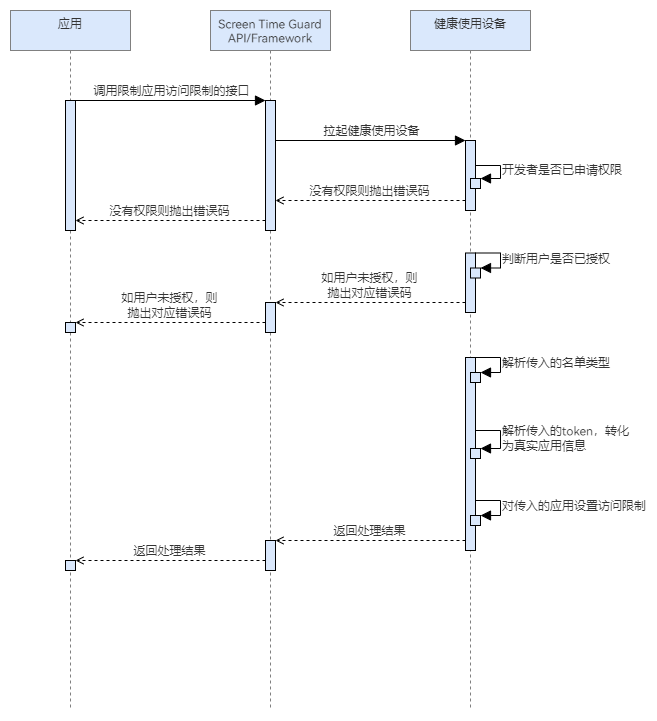
流程说明:
- 应用调用设置应用访问限制的接口,拉起健康使用设备查询开发者是否已申请权限,以及用户是否授权。
- 若开发者没有权限或用户没有授权,则抛出相应错误码。若开发者有权限且用户已授权,则解析参数中传入的限制类型以及token,对应用做限制处理,返回处理结果。
接口说明
限制应用访问的关键接口如下表所示:
| 接口名 | 描述 |
|---|---|
| setAppsRestriction(appInfo: AppInfo, restrictionType: RestrictionType): Promise<void> | 根据传入的应用token数组和限制类型(禁用/允许清单),确定是否限制对应应用的访问。 |

定义释义:
限制类型为禁用清单时,对应用数组中的应用做限制。
限制类型为允许清单时,对应用数组以外的应用做限制。
边界场景:
1、如果传入的应用数组为空,限制类型为禁用清单,则不对任何应用做限制。该场景相当于没有开启有效管控。
2、如果传入的应用数组为空,限制类型为允许清单,则对系统内置允许清单应用(电话、联系人、设置、未成年人模式)、管控发起应用本身、已授权的管控应用之外的所有应用做限制。
3、对同一个管控应用,如果反复调用该接口做限制(不管是允许清单还是禁用清单),均以最新的一次的限制来生效。
4、传入的应用数组中如果包含无效token,则为参数错误。
开发前提
设置应用访问限制需要申请用户授权,请先参考请求用户授权章节完成用户授权。
开发步骤
-
导入相关模块。
import { guardService, appPicker } from '@kit.ScreenTimeGuardKit';import { hilog } from '@kit.PerformanceAnalysisKit';import { BusinessError } from '@kit.BasicServicesKit'; -
调用setAppsRestriction,设置应用访问限制。
@Entry@Componentstruct TestPage {build() {Column() {Button("TestSetAppsRestriction").onClick(async () => {try {// 先调用startAppPicker获取相应应用的tokenconst tokens = await appPicker.startAppPicker(this.getUIContext().getHostContext(), { appTokens: [] });const appInfo: guardService.AppInfo = { appTokens: tokens };const restrictionType: guardService.RestrictionType = guardService.RestrictionType.BLOCKLIST_TYPE;await guardService.setAppsRestriction(appInfo, restrictionType);} catch (err) {const message = (err as BusinessError).message;const code = (err as BusinessError).code;hilog.error(0x0000, `ScreenTimeGuard:setAppsRestriction`, `setAppsRestriction failed with error code: ${code}, message: ${message}`)}})}}}