React Native框架+H5接入智能填充

目前仅支持已适配HarmonyOS的三方框架应用使用。
HarmonyOS版React Native环境搭建请参考官方文档React Native环境搭建指导。
前提条件
- 设备智能填充开关必须处于打开状态,请前往“设置 > 隐私和安全 > 智能填充”页面开启开关。
- 设备已连接互联网并且登录华为账号。
- 该应用需已接入智能填充服务。
开发准备
配置React Native已适配HarmonyOS的工程。
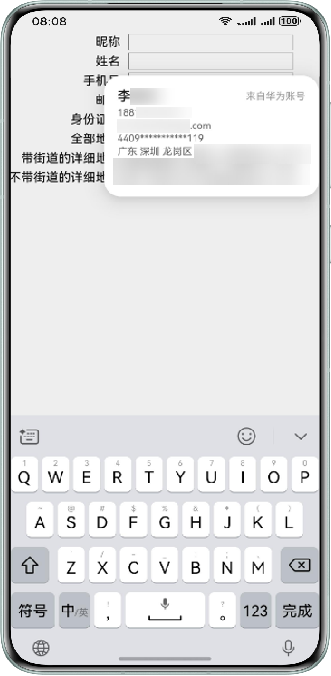
React Native输入框效果图
示例代码
在React Native输入框TextInput需要配置textContentType属性来支持智能填充,代码如下:
import React from 'react';
import { Text, TextInput, View, StyleSheet } from 'react-native';

const styles = StyleSheet.create({
  default: {
    borderWidth: StyleSheet.hairlineWidth,
    borderColor: '#0f0f0f',
    flex: 1,
    fontSize: 13,
    padding: 4,
    height: 80,
    width: 200,
  },
  labelContainer: {
    flexDirection: 'row',
    marginVertical: 2,
  },
  label: {
    width: 140,
    textAlign: 'right',
    marginRight: 10,
    paddingTop: 2,
    fontSize: 15,
  },
  inputContainer: {
    flex: 1,
  }
});
class WithLabel extends React.Component<$FlowFixMeProps> {
  render(): React.Node {
    return (
      <View style={styles.labelContainer}>
        <Text style={styles.label}>{this.props.label}</Text>
        <View style={styles.inputContainer}>{this.props.children}</View>
      </View>
    );
  }
}
const RNTesterApp = () => {
  return (
    <View style={{width: '100%', height: '100%'}}>
      <WithLabel label="昵称">
        <TextInput textContentType="nickname" style={styles.default} />
      </WithLabel>
      <WithLabel label="姓名">
        <TextInput textContentType="name" style={styles.default} />
      </WithLabel>
      <WithLabel label="手机号">
        <TextInput textContentType="telephoneNumber" style={styles.default} />
      </WithLabel>
      <WithLabel label="邮件">
        <TextInput textContentType="emailAddress" style={styles.default} />
      </WithLabel>
      <WithLabel label="身份证号">
        <TextInput textContentType="idCardNumber" style={styles.default} />
      </WithLabel>
      <WithLabel label="全部地址">
        <TextInput textContentType="formatAddress" style={styles.default} />
      </WithLabel>
      <WithLabel label="带街道的详细地址">
        <TextInput textContentType="fullStreetAddress" style={styles.default}  />
      </WithLabel>
      <WithLabel label="不带街道的详细地址">
        <TextInput textContentType="detailInfoWithoutStreet" style={styles.default} />
      </WithLabel>
    </View>
  );
};
export default RNTesterApp;
React Native框架中加载的H5页面效果图
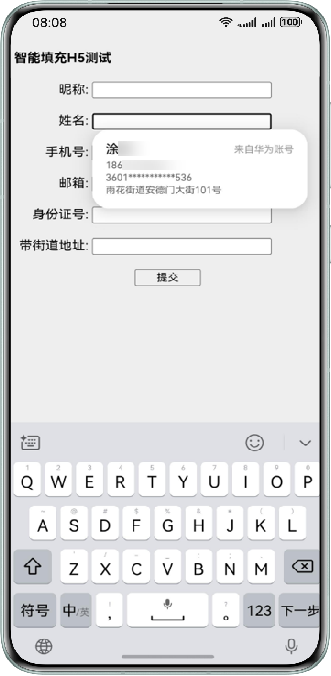
React Native框架加载H5页面场景,通过给form表单的input输入框(form表单的子节点)配置autocomplete属性来支持智能填充,代码如下:
import React from 'react';
import { View } from 'react-native';
import { WebView } from 'react-native-webview';

const RNTesterApp = () => {
  return (
    <View style={{width: '100%', height: '100%'}}>
      <WebView
        source={require('./autofill_h5.html')}
        style={{flex: 1, paddingTop: 50}}
      />
    </View>
  );
};

export default RNTesterApp;
autofill_h5.html实现参考示例代码二。