推荐车牌号场景
从5.1.0(18)开始,支持智能填充的推荐车牌号场景。
在填写车牌号表单场景时,智能填充可从用户的历史表单输入中提供输入建议,开发者可以参考如下代码进行开发。

只推荐机主本人历史表单信息的车牌号信息(与登录设备的账号信息,实名姓名+手机号或邮箱信息相同)。
效果图
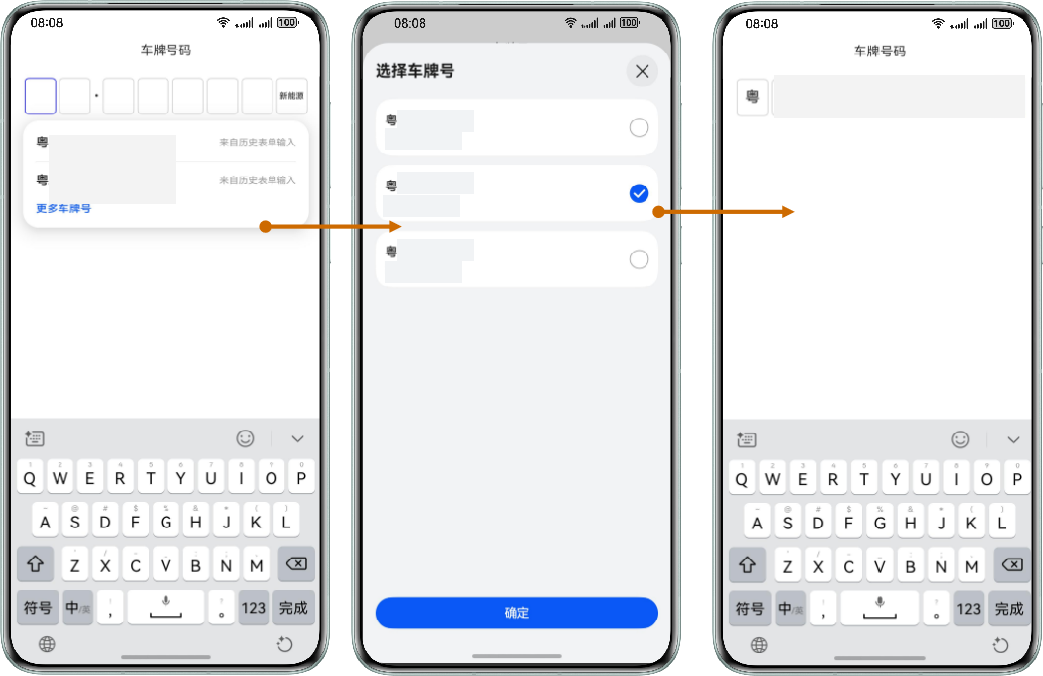
示例代码
import { display } from '@kit.ArkUI';

const NEW_ENERGY_TEXT = '新能源';

@Extend(Text)
function extendStyles(value: string, width: number, height: number, active: boolean) {
  .fontSize(value === NEW_ENERGY_TEXT ? 10 : 18)
  .fontWeight(FontWeight.Medium)
  .textAlign(TextAlign.Center)
  .width(width)
  .height(height)
  .borderWidth('3px')
  .borderColor(active ? Color.Blue : '#ccc')
  .borderRadius(5)
}

@Entry
@Component
struct LicensePlate {
  // 车牌号输入框的数量。
  private length = 8;
  private licenseItemId = '_license_item';
  @State licensePlateVal: string[] = [];
  @State activeIndex: number = -1;
  @State itemWidth: number = 30;
  @State itemHeight: number = 30;
  @State inputText: string = '';
  // 用户是否已经触发输入。
  @State isUserInput: boolean = false;
  // 匹配历史输入的上一个输入框的值
  private beforeValue: string = '';

  aboutToAppear(): void {
    this.licensePlateVal = new Array(this.length).fill('');
    let displayClass = display.getDefaultDisplaySync();
    let width = displayClass.width;
    // 每个框的宽度根据屏幕宽度计算。
    this.itemWidth = this.getUIContext().px2vp(width) / (this.length + 1) - 4;
    this.itemHeight = this.itemWidth * 1.2;
  }

  setValue(val: string): void {
    if (!this.isUserInput) {
      // 根据智能填充填写车牌号输入框。
      this.handleAutoFill(val);
      this.beforeValue = val;
      return;
    }
    if (!val || val.length === 0 || this.beforeValue.length > val.length) {
      let licensePlate = this.getLicensePlate();
      if (licensePlate.length > 0) {
        this.inputText = licensePlate;
      }
      this.beforeValue = this.inputText;
      return;
    }
    let inputData = val.substring(this.beforeValue.length);
    if (inputData.length > this.length) {
      inputData = inputData.substring(0, this.length);
    }
    // 用户输入仅替换选定的输入框,而智能填充则替换所有输入框中的所有值。
    this.handleUserInput(inputData);
    this.beforeValue = val;
  }

  getLicensePlate(): string {
    return this.licensePlateVal.join('');
  }

  handleUserInput(val: string): void {
    if (val.length > this.length - this.activeIndex) {
      val = val.substring(0, this.length - this.activeIndex);
    }
    for (let i = 0; i < val.length; i++) {
      this.licensePlateVal[this.activeIndex] = val[i];
      this.activeIndex = Math.min(this.activeIndex + 1, this.length - 1);
    }
  }

  handleAutoFill(val: string): void {
    let value = val.split('');
    this.licensePlateVal.fill('');
    for (let i = 0; i < this.length; i++) {
      this.licensePlateVal[i] = i < value.length ? value[i] : this.licensePlateVal[i];
    }
    this.activeIndex = Math.min(value.length + 1, this.length - 1);
  }

  handleDelete() {
    if (!this.licensePlateVal[this.activeIndex]) {
      this.licensePlateVal[this.activeIndex - 1] = '';
    } else {
      this.licensePlateVal[this.activeIndex] = '';
    }
    this.activeIndex = Math.max(0, this.activeIndex - 1);
  }

  getValue(index: number): string {
    return (index === this.length - 1 && !this.licensePlateVal[index]) ? NEW_ENERGY_TEXT : this.licensePlateVal[index];
  }

  handleLicenseClick(screenX: number) {
    for(let index = 0; index <= 7; index++) {
      let id = index + this.licenseItemId;
      let position = this.getUIContext().getComponentUtils().getRectangleById(id);
      // 相对于屏幕的位置信息,单位px
      let left = position?.screenOffset?.x ?? 0;
      let right = left + (position?.size?.width ?? 0);
      if (screenX >= left && screenX <= right) {
        this.activeIndex = index;
      }
    }
  }

  @Builder
  displayItem(index: number) {
    Column() {
      Text(this.getValue(index))
        .extendStyles(this.getValue(index), this.itemWidth, this.itemHeight, this.activeIndex === index)
    }
    .id(index + this.licenseItemId)
    .padding({
      left: 2,
      right: 2
    })
  }

  @Builder
  buildLicensePlateNumber() {
    Flex({
      direction: FlexDirection.Row,
      alignItems: ItemAlign.Center,
      justifyContent: FlexAlign.SpaceBetween
    }) {
      Column() {
        Row() {
          Text("车牌号码")
        }.height(30)

        Stack({ alignContent: Alignment.BottomStart }) {
          Row() {
            this.displayItem(0)
            this.displayItem(1)
            Text('·')
              .fontSize(22)
              .fontWeight(600)
              .height(this.itemHeight)
            this.displayItem(2)
            this.displayItem(3)
            this.displayItem(4)
            this.displayItem(5)
            this.displayItem(6)
            this.displayItem(7)
          }

          TextInput({ text: $$this.inputText })
            .width('100%')
            .height('100%')
            .opacity(0)
            .contentType(ContentType.LICENSE_PLATE)
            .onClick((event) => {
              // 相对于屏幕的X轴坐标,单位px
              let displayX = this.getUIContext().vp2px(event.displayX);
              this.handleLicenseClick(displayX);
              if (this.activeIndex < 0) {
                this.activeIndex = 0;
              }
            })
            .onChange((val: string) => {
              if (val === this.beforeValue) {
                return;
              }
              this.setValue(val);
              this.isUserInput = false;
            })
            .onDidInsert(() => {
              // 当使用输入法输入数据时触发。如果输入法是自定义的,则在用户输入数据时将isUserInput设置为true。
              this.isUserInput = true;
            })
            .onDidDelete((val: DeleteValue) => {
              // 当使用输入方法删除数据时触发。如果输入方法是自定义的,当用户删除数据时,将`isUserInput`设置为`true`,并调用相应的处理函数。
              if (val?.deleteValue?.length > 0) {
                this.isUserInput = true;
              }
              this.handleDelete();
            })
        }
        .height(this.itemHeight)
        .margin({ top: 20 })
      }
    }
    .backgroundColor(Color.White)
    .height(50)
    .margin({ left: 15, right: 15 })
    .id("customInput")
    .defaultFocus(false)
  }

  build() {
    Column() {
      this.buildLicensePlateNumber()
    }
  }
}