通过API展示关注组件
场景介绍
从6.0.1(21)版本开始,支持关注组件API功能。
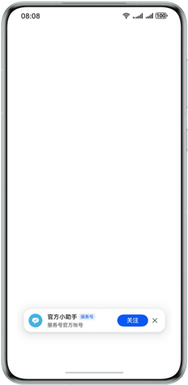
Scenario Fusion Kit提供服务号关注组件功能,调用该接口可以在业务应用/元服务页面展示服务号关注组件,用户点击关注按钮可关注上对应服务号。
-
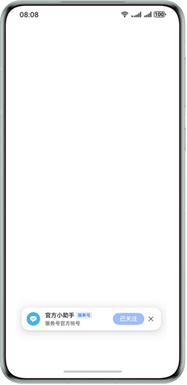
用户关注服务号成功,按钮会变为已关注并置灰,在1.5秒后关注组件会自动消失。
-
用户关注服务号失败,则会出现错误提示。
前提条件
在华为开发者联盟服务号管理首页,申请华为服务号,并获取服务号id。
- 使用企业开发者账号登录,并完成企业认证。
- 申请服务号并完成认证。
- 元服务/应用须与服务号处于同一个开发者账号下。
接口说明
以下是关注组件的接口说明,更多接口及使用方法请参见atomicService(融合场景化API)。
| 接口名 | 描述 |
|---|---|
| showFollowComponent(ctx: UIContext, params: FollowComponentParams, callback: FollowComponentCallback): Promise<void> | 调用该方法展示关注组件。 |
开发步骤
-
导入Scenario Fusion Kit模块以及相关公共模块。
import { atomicService } from '@kit.ScenarioFusionKit';import { hilog } from '@kit.PerformanceAnalysisKit';import { BusinessError } from '@kit.BasicServicesKit'; -
在需要添加关注组件的页面,调用接口展示关注组件,示例代码如下:
@Entry@Componentstruct Index {aboutToAppear(): void {// 一键关注组件。// pubId: 服务号id,此处以官方小助手服务号id为例。const pubId: string = '0cca1c645526449fb89d4a83e3bc25df';// channelId:渠道id,长度限制32,只能是数字或字母组成; offset:设置关注组件的位置坐标。const params: atomicService.FollowComponentParams ={ pubId: pubId, channelId: '', offset: { x: 0, y: 300 } };// 点击关注按钮的关注结果回调。const callbacks: atomicService.FollowComponentCallback = {onFollowComplete: (err, result) => {if (err) {// 错误日志处理。hilog.error(0x0000, "testTag", "error: %{public}d %{public}s", err.code, err.message);return;}hilog.info(0x0000, "testTag", "follow result: %{public}d", result.code);if (result.code === atomicService.FollowResult.SUCCESS) {hilog.info(0x0000, "testTag", "follow succeeded handle");} else {hilog.info(0x0000, "testTag", "follow failed handle");}}}// 展示关注组件。atomicService.showFollowComponent(this.getUIContext(), params, callbacks).catch((error: BusinessError<void>) => {hilog.error(0x0000, 'testTag', 'showFollowComponent failReason: %{public}d %{public}s:', error.code,error.message);})}build() {}}