识别本地图片
基本概念
图片识码能力支持对图库中的码图进行扫描识别,并获取信息。
场景介绍
图片识码能力支持对图库中的条形码、二维码、MULTIFUNCTIONAL CODE进行识别,并获得码类型、码值、码位置等信息。该能力可用于一图单码和一图多码的识别,比如条形码、付款码等。
业务流程
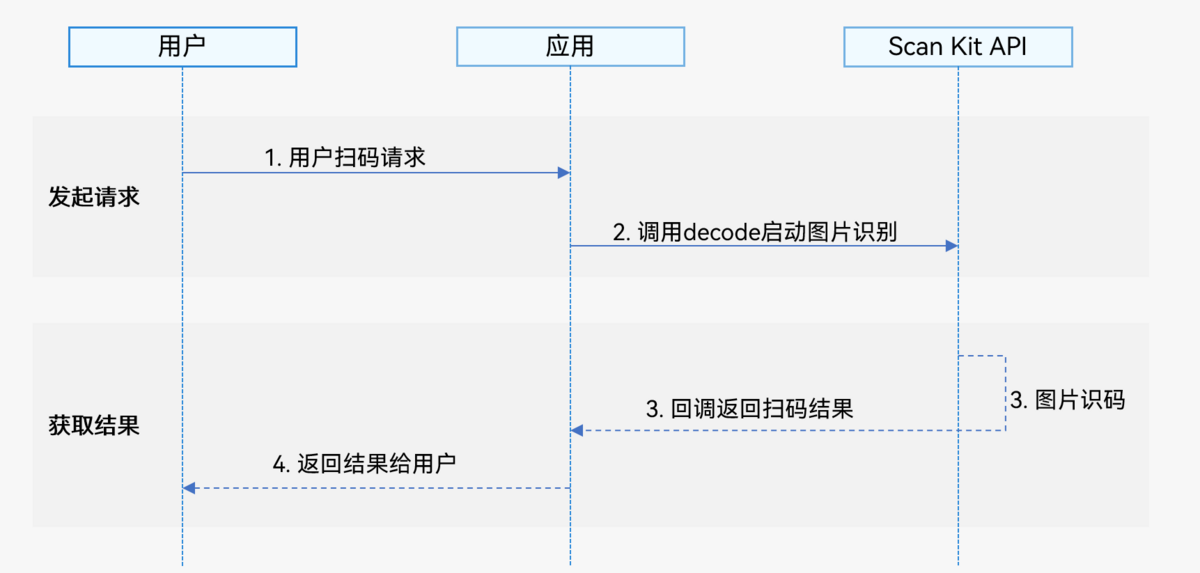
- 用户向开发者的应用发起图片识码请求。
- 应用通过调用Scan Kit的decode接口启动图片识码。
- Scan Kit通过回调返回图片识码结果。
- 应用向用户返回扫码结果。
接口说明
接口返回值有两种返回形式:Callback和Promise回调。下表中为启动图片识码Callback和Promise形式接口,Callback和Promise只是返回值方式不一样,功能相同。具体API说明详见接口文档。
| 接口名 | 描述 |
|---|---|
| decode(inputImage: InputImage, options?: scanBarcode.ScanOptions): Promise<Array<scanBarcode.ScanResult>> | 启动图片识码,通过InputImage传入图片信息,通过ScanOptions进行识码参数设置(options为可选参数),使用Promise异步回调返回识码结果。 |
| decode(inputImage: InputImage, options: scanBarcode.ScanOptions, callback: AsyncCallback<Array<scanBarcode.ScanResult>>): void | 启动图片识码,通过InputImage传入图片信息,通过ScanOptions进行识码参数设置,使用Callback异步回调返回识码结果。 |
| decode(inputImage: InputImage, callback: AsyncCallback<Array<scanBarcode.ScanResult>>): void | 启动图片识码,通过InputImage传入图片信息,使用Callback异步回调返回识码结果。 |
开发步骤
图片识码接口支持识别图库中的条形码,二维码以及MULTIFUNCTIONAL CODE,并返回图片中码类型,码值、码位置(码图最小外接矩形左上角和右下角的坐标)等信息。
为了方便开发者接入,我们提供了详细的样例工程供参考,推荐参考示例工程接入。
以下示例为调用图片识码的detectBarcode.decode接口获取码图信息。
-
导入图片识码接口和相关接口模块,该接口提供了图片识码参数和方法,导入方法如下。
// 导入图片识码需要的日志和picker模块import { scanCore, scanBarcode, detectBarcode } from '@kit.ScanKit';import { photoAccessHelper } from '@kit.MediaLibraryKit';import { hilog } from '@kit.PerformanceAnalysisKit';import { BusinessError } from '@kit.BasicServicesKit'; -
调用detectBarcode.decode接口解析码图。
-
通过Promise回调函数得到扫码结果,InputImage对象中uri参数推荐通过picker方式获取。
@Entry@Componentstruct DetectPage {build() {Column() {Button('Promise with options').backgroundColor('#0D9FFB').fontSize(20).fontColor($r('sys.color.comp_background_list_card')).fontWeight(FontWeight.Normal).align(Alignment.Center).type(ButtonType.Capsule).width('90%').height(40).margin({ top: 5, bottom: 5 }).onClick(() => {// 定义识码参数optionslet options: scanBarcode.ScanOptions = {scanTypes: [scanCore.ScanType.ALL],enableMultiMode: true,}// 通过picker拉起图库的图片let photoOption = new photoAccessHelper.PhotoSelectOptions();photoOption.MIMEType = photoAccessHelper.PhotoViewMIMETypes.IMAGE_TYPE;photoOption.maxSelectNumber = 1;let photoPicker = new photoAccessHelper.PhotoViewPicker();photoPicker.select(photoOption).then((data) => {// 定义识码参数inputImage,其中uri为picker选择图片let inputImage: detectBarcode.InputImage = { uri: data.photoUris[0] };try {// 调用图片识码接口detectBarcode.decode(inputImage, options).then((data: Array<scanBarcode.ScanResult>) => {hilog.info(0x0001, '[Scan Sample]',`Succeeded in getting ScanResult by promise with options, result is ${JSON.stringify(data)}`);}).catch((err: BusinessError) => {hilog.error(0x0001, '[Scan Sample]',`Failed to get ScanResult by promise with options. Code: ${err.code}, message: ${err.message}`);});} catch (err) {hilog.error(0x0001, '[Scan Sample]',`Failed to detectBarcode. Code: ${err.code}, message: ${err.message}`);}}).catch((err: BusinessError) => {hilog.error(0x0001, '[Scan Sample]',`Failed to select a photo. Code: ${err.code}, message: ${err.message}`);})});}.width('100%').height('100%').alignItems(HorizontalAlign.Center).justifyContent(FlexAlign.Center)}} -
通过Callback回调函数得到扫码结果,InputImage对象中uri参数推荐通过picker方式获取。
@Entry@Componentstruct DetectPage {build() {Column() {Button('Callback with options').backgroundColor('#0D9FFB').fontSize(20).fontColor($r('sys.color.comp_background_list_card')).fontWeight(FontWeight.Normal).align(Alignment.Center).type(ButtonType.Capsule).width('90%').height(40).margin({ top: 5, bottom: 5 }).onClick(() => {// 定义识码参数optionslet options: scanBarcode.ScanOptions = {scanTypes: [scanCore.ScanType.ALL],enableMultiMode: true,enableAlbum: true}// 通过选择模式拉起photoPicker界面,用户可以选择一个图片let photoOption = new photoAccessHelper.PhotoSelectOptions();photoOption.MIMEType = photoAccessHelper.PhotoViewMIMETypes.IMAGE_TYPE;photoOption.maxSelectNumber = 1;let photoPicker = new photoAccessHelper.PhotoViewPicker();photoPicker.select(photoOption).then((data) => {// 定义识码参数inputImage,其中uri为picker选择图片let inputImage: detectBarcode.InputImage = { uri: data.photoUris[0] };try {// 调用图片识码接口detectBarcode.decode(inputImage, options,(err: BusinessError, data: Array<scanBarcode.ScanResult>) => {if (err && err.code) {hilog.error(0x0001, '[Scan Sample]',`Failed to get ScanResult by callback with options. Code: ${err.code}, message: ${err.message}`);return;}hilog.info(0x0001, '[Scan Sample]',`Succeeded in getting ScanResult by callback with options, result is ${JSON.stringify(data)}`);});} catch (err) {hilog.error(0x0001, '[Scan Sample]',`Failed to detectBarcode. Code: ${err.code}, message: ${err.message}`);}}).catch((err: BusinessError) => {hilog.error(0x0001, '[Scan Sample]',`Failed to select a photo. Code: ${err.code}, message: ${err.message}`);})});}.width('100%').height('100%').alignItems(HorizontalAlign.Center).justifyContent(FlexAlign.Center)}}
-
模拟器开发
支持模拟器开发,模拟器使用指导请参见使用模拟器运行应用。