NavPushPathHelper
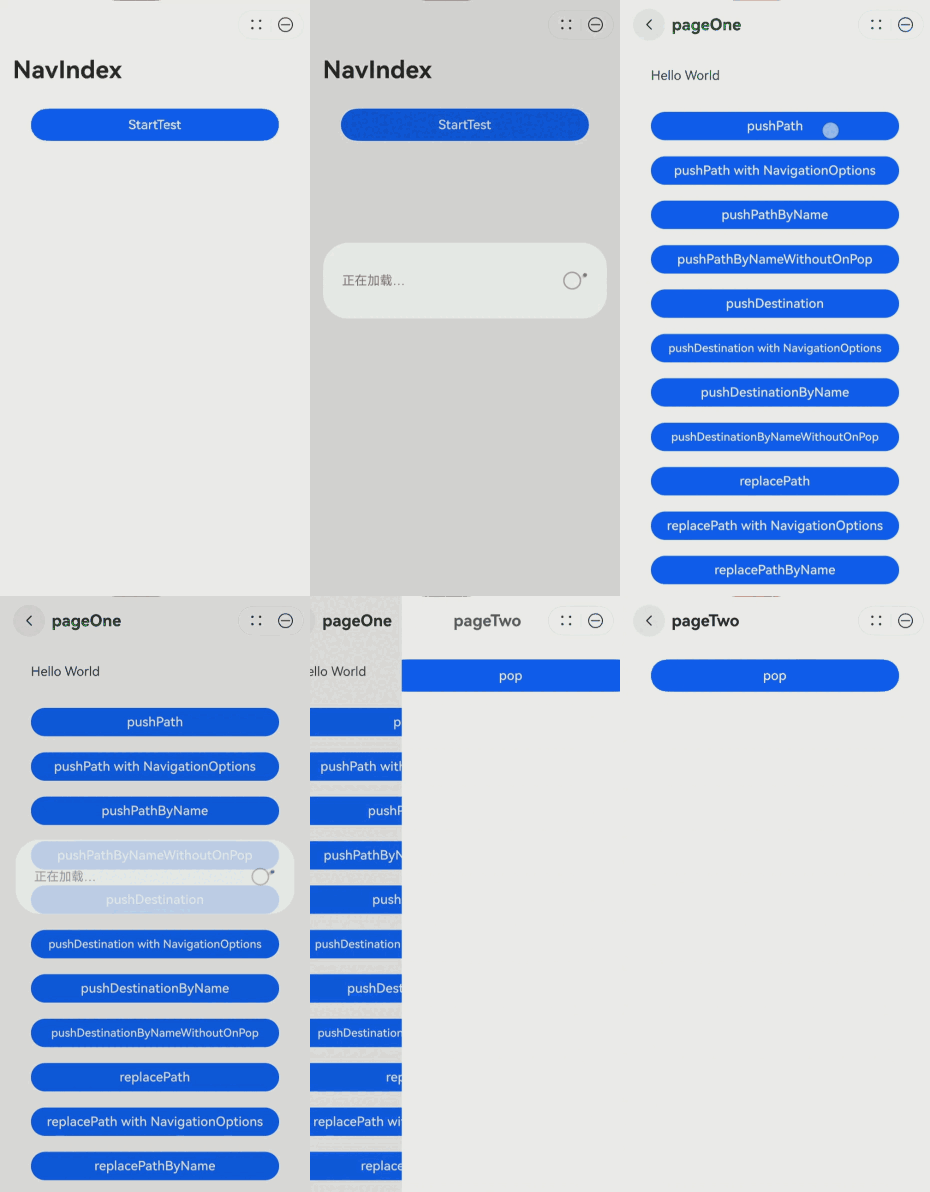
当跳转的目标NavDestination在不同的hsp分包,且未被主包依赖,首次运行元服务只会下载安装主包,需要使用NavPushPathHelper先下载安装相应hsp分包,再将指定的NavDestination页面信息入栈。使Navigation支持动态加载hsp分包后再跳转。

该组件从API version 12开始支持。后续版本如有新增内容,则采用上角标单独标记该内容的起始版本。
导入模块
import { NavPushPathHelper } from '@kit.ArkUI';
子组件
无
属性
不支持通用属性
NavPushPathHelper
对Navigation路由栈NavPathStack的所有路由跳转接口进行了封装,在NavPushPathHelper中持有一个NavPathStack对象,在封装的跳转接口中,去判断子包是否存在,如果不存在则进行动态下载子包,等结果返回后调用NavPathStack的相应的接口将指定的NavDestination页面信息入栈。使用示例参见示例。
constructor
constructor(navPathStack: NavPathStack)
NavPushPathHelper的构造函数。
元服务API: 从API version 12开始,该接口支持在元服务中使用。
系统能力: SystemCapability.ArkUI.ArkUI.Full
参数:
| 参数名 | 类型 | 必填 | 说明 |
|---|---|---|---|
| navPathStack | NavPathStack | 是 | Navigation路由栈。 |
pushPath
pushPath(moduleName: string, info: NavPathInfo, animated?: boolean): Promise<void>
先判断分包是否存在,若不存在,则通过moduleName下载分包,再将info指定的NavDestination页面信息入栈,使用Promise异步回调。
元服务API: 从API version 12开始,该接口支持在元服务中使用。
系统能力: SystemCapability.ArkUI.ArkUI.Full
参数:
| 参数名 | 类型 | 必填 | 说明 |
|---|---|---|---|
| moduleName | string | 是 | 目标NavDestination所在分包的moduleName。 |
| info | NavPathInfo | 是 | NavDestination页面的信息。 |
| animated | boolean | 否 | 是否支持转场动画。 默认值:true。 true:支持转场动画。 false:不支持转场动画。 |
返回值:
| 类型 | 说明 |
|---|---|
| Promise<void> | 异常返回结果。 |
错误码:
以下错误码的详细介绍请参见页面路由错误码。
| 错误码ID | 错误信息 |
|---|---|
| 300001 | hsp silent install fail. |
pushPath
pushPath(moduleName: string, info: NavPathInfo, options?: NavigationOptions): Promise<void>
先判断分包是否存在,若不存在,则通过moduleName下载分包,再将info指定的NavDestination页面信息入栈,使用Promise异步回调。
具体根据options中指定不同的LaunchMode,有不同的行为。
元服务API: 从API version 12开始,该接口支持在元服务中使用。
系统能力: SystemCapability.ArkUI.ArkUI.Full
参数:
| 参数名 | 类型 | 必填 | 说明 |
|---|---|---|---|
| moduleName | string | 是 | 目标NavDestination所在分包的moduleName。 |
| info | NavPathInfo | 是 | NavDestination页面的信息。 |
| options | NavigationOptions | 否 | 页面栈操作选项。默认值为{ launchMode: LaunchMode.STANDARD, animated: true }。 |
返回值:
| 类型 | 说明 |
|---|---|
| Promise<void> | 异常返回结果。 |
错误码:
以下错误码的详细介绍请参见页面路由错误码。
| 错误码ID | 错误信息 |
|---|---|
| 300001 | hsp silent install fail. |
pushPathByName
pushPathByName(moduleName: string, name: string, param: Object, animated?: boolean): Promise<void>
先判断分包是否存在,若不存在,则通过moduleName下载分包,再将name指定的NavDestination页面信息入栈,传递的数据为param,使用Promise异步回调。
元服务API: 从API version 12开始,该接口支持在元服务中使用。
系统能力: SystemCapability.ArkUI.ArkUI.Full
参数:
| 参数名 | 类型 | 必填 | 说明 |
|---|---|---|---|
| moduleName | string | 是 | 目标NavDestination所在分包的moduleName。 |
| name | string | 是 | NavDestination页面名称。 |
| param | Object | 是 | NavDestination页面详细参数。 |
| animated | boolean | 否 | 是否支持转场动画。 默认值:true。 true:支持转场动画。 false:不支持转场动画。 |
返回值:
| 类型 | 说明 |
|---|---|
| Promise<void> | 异常返回结果。 |
错误码:
以下错误码的详细介绍请参见页面路由错误码。
| 错误码ID | 错误信息 |
|---|---|
| 300001 | hsp silent install fail. |
pushPathByName
pushPathByName(moduleName: string, name: string, param: Object, onPop: Callback<PopInfo>, animated?: boolean): Promise<void>
先判断分包是否存在,若不存在,则通过moduleName下载分包,再将name指定的NavDestination页面信息入栈,传递的数据为param,添加onPop回调接收入栈页面出栈时的返回结果,并进行处理,使用Promise异步回调。
元服务API: 从API version 12开始,该接口支持在元服务中使用。
系统能力: SystemCapability.ArkUI.ArkUI.Full
参数:
| 参数名 | 类型 | 必填 | 说明 |
|---|---|---|---|
| moduleName | string | 是 | 目标NavDestination所在分包的moduleName。 |
| name | string | 是 | NavDestination页面名称。 |
| param | Object | 是 | NavDestination页面详细参数。 |
| onPop | Callback<PopInfo> | 是 | Callback回调,用于页面出栈时触发该回调处理返回结果。 |
| animated | boolean | 否 | 是否支持转场动画。 默认值:true。 true:支持转场动画。 false:不支持转场动画。 |
返回值:
| 类型 | 说明 |
|---|---|
| Promise<void> | 异常返回结果。 |
错误码:
以下错误码的详细介绍请参见页面路由错误码。
| 错误码ID | 错误信息 |
|---|---|
| 300001 | hsp silent install fail. |
pushDestination
pushDestination(moduleName: string, info: NavPathInfo, animated?: boolean): Promise<void>
先判断分包是否存在,若不存在,则通过moduleName下载分包,再将info指定的NavDestination页面信息入栈,使用Promise异步回调。
元服务API: 从API version 12开始,该接口支持在元服务中使用。
系统能力: SystemCapability.ArkUI.ArkUI.Full
参数:
| 参数名 | 类型 | 必填 | 说明 |
|---|---|---|---|
| moduleName | string | 是 | 目标NavDestination所在分包的moduleName。 |
| info | NavPathInfo | 是 | NavDestination页面的信息。 |
| animated | boolean | 否 | 是否支持转场动画。 默认值:true。 true:支持转场动画。 false:不支持转场动画。 |
返回值:
| 类型 | 说明 |
|---|---|
| Promise<void> | 异常返回结果。 |
错误码:
以下错误码的详细介绍请参见通用错误码、页面路由错误码和接口调用异常错误码。
| 错误码ID | 错误信息 |
|---|---|
| 401 | Parameter error. Possible causes: 1. Mandatory parameters are left unspecified. 2. Incorrect parameters types. 3. Parameter verification failed. |
| 100001 | Internal error. |
| 100005 | Builder function not registered. |
| 100006 | NavDestination not found. |
| 300001 | hsp silent install fail. |
pushDestination
pushDestination(moduleName: string, info: NavPathInfo, options?: NavigationOptions): Promise<void>
先判断分包是否存在,若不存在,则通过moduleName下载分包,再将info指定的NavDestination页面信息入栈,使用Promise异步回调。
具体根据options中指定不同的LaunchMode,有不同的行为。
元服务API: 从API version 12开始,该接口支持在元服务中使用。
系统能力: SystemCapability.ArkUI.ArkUI.Full
参数:
| 参数名 | 类型 | 必填 | 说明 |
|---|---|---|---|
| moduleName | string | 是 | 目标NavDestination所在分包的moduleName。 |
| info | NavPathInfo | 是 | NavDestination页面的信息。 |
| options | NavigationOptions | 否 | 页面栈操作选项。默认值为{ launchMode: LaunchMode.STANDARD, animated: true }。 |
返回值:
| 类型 | 说明 |
|---|---|
| Promise<void> | 异常返回结果。 |
错误码:
以下错误码的详细介绍请参见通用错误码、页面路由错误码和接口调用异常错误码。
| 错误码ID | 错误信息 |
|---|---|
| 401 | Parameter error. Possible causes: 1. Mandatory parameters are left unspecified. 2. Incorrect parameters types. 3. Parameter verification failed. |
| 100001 | Internal error. |
| 100005 | Builder function not registered. |
| 100006 | NavDestination not found. |
| 300001 | hsp silent install fail. |
pushDestinationByName
pushDestinationByName(moduleName: string, name: string, param: Object, animated?: boolean): Promise<void>
先判断分包是否存在,若不存在,则通过moduleName下载分包,再将name指定的NavDestination页面信息入栈,传递的数据为param,使用Promise异步回调。
元服务API: 从API version 12开始,该接口支持在元服务中使用。
系统能力: SystemCapability.ArkUI.ArkUI.Full
参数:
| 参数名 | 类型 | 必填 | 说明 |
|---|---|---|---|
| moduleName | string | 是 | 目标NavDestination所在分包的moduleName。 |
| name | string | 是 | NavDestination页面名称。 |
| param | Object | 是 | NavDestination页面详细参数。 |
| animated | boolean | 否 | 是否支持转场动画。 默认值:true。 true:支持转场动画。 false:不支持转场动画。 |
返回值:
| 类型 | 说明 |
|---|---|
| Promise<void> | 异常返回结果。 |
错误码:
以下错误码的详细介绍请参见通用错误码、页面路由错误码和接口调用异常错误码。
| 错误码ID | 错误信息 |
|---|---|
| 401 | Parameter error. Possible causes: 1. Mandatory parameters are left unspecified. 2. Incorrect parameters types. 3. Parameter verification failed. |
| 100001 | Internal error. |
| 100005 | Builder function not registered. |
| 100006 | NavDestination not found. |
| 300001 | hsp silent install fail. |
pushDestinationByName
pushDestinationByName(moduleName: string, name: string, param: Object, onPop: Callback<PopInfo>, animated?: boolean): Promise<void>
先判断分包是否存在,若不存在,则通过moduleName下载分包,再将name指定的NavDestination页面信息入栈,传递的数据为param,并且添加用于页面出栈时处理返回结果的OnPop回调,使用Promise异步回调。
元服务API: 从API version 12开始,该接口支持在元服务中使用。
系统能力: SystemCapability.ArkUI.ArkUI.Full
参数:
| 参数名 | 类型 | 必填 | 说明 |
|---|---|---|---|
| moduleName | string | 是 | 目标NavDestination所在分包的moduleName。 |
| name | string | 是 | NavDestination页面名称。 |
| param | Object | 是 | NavDestination页面详细参数。 |
| onPop | Callback<PopInfo> | 是 | Callback回调,用于页面出栈时处理返回结果。 |
| animated | boolean | 否 | 是否支持转场动画。 默认值:true。 true:支持转场动画。 false:不支持转场动画。 |
返回值:
| 类型 | 说明 |
|---|---|
| Promise<void> | 异常返回结果。 |
错误码:
以下错误码的详细介绍请参见通用错误码、页面路由错误码和接口调用异常错误码。
| 错误码ID | 错误信息 |
|---|---|
| 401 | Parameter error. Possible causes: 1. Mandatory parameters are left unspecified. 2. Incorrect parameters types. 3. Parameter verification failed. |
| 100001 | Internal error. |
| 100005 | Builder function not registered. |
| 100006 | NavDestination not found. |
| 300001 | hsp silent install fail. |
replacePath
replacePath(moduleName: string, info: NavPathInfo, animated?: boolean): Promise<void>
先判断分包是否存在,若不存在,则通过moduleName下载分包,再将当前页面栈栈顶退出,将info指定的NavDestination页面信息入栈,使用Promise异步回调。
元服务API: 从API version 12开始,该接口支持在元服务中使用。
系统能力: SystemCapability.ArkUI.ArkUI.Full
参数:
| 参数名 | 类型 | 必填 | 说明 |
|---|---|---|---|
| moduleName | string | 是 | 目标NavDestination所在分包的moduleName。 |
| info | NavPathInfo | 是 | 新栈顶页面参数信息 |
| animated | boolean | 否 | 是否支持转场动画。 默认值:true。 true:支持转场动画。 false:不支持转场动画。 |
返回值:
| 类型 | 说明 |
|---|---|
| Promise<void> | 异常返回结果。 |
错误码:
以下错误码的详细介绍请参见页面路由错误码。
| 错误码ID | 错误信息 |
|---|---|
| 300001 | hsp silent install fail. |
replacePath
replacePath(moduleName: string, info: NavPathInfo, options?: NavigationOptions): Promise<void>
先判断分包是否存在,若不存在,则通过moduleName下载分包,再将当前页面栈栈顶退出,使用Promise异步回调。
具体根据options中指定不同的LaunchMode,有不同的行为。
元服务API: 从API version 12开始,该接口支持在元服务中使用。
系统能力: SystemCapability.ArkUI.ArkUI.Full
参数:
| 参数名 | 类型 | 必填 | 说明 |
|---|---|---|---|
| moduleName | string | 是 | 目标NavDestination所在分包的moduleName。 |
| info | NavPathInfo | 是 | 新栈顶页面参数信息。 |
| options | NavigationOptions | 否 | 页面栈操作选项。默认值为{ launchMode: LaunchMode.STANDARD, animated: true }。 |
返回值:
| 类型 | 说明 |
|---|---|
| Promise<void> | 异常返回结果。 |
错误码:
以下错误码的详细介绍请参见页面路由错误码。
| 错误码ID | 错误信息 |
|---|---|
| 300001 | hsp silent install fail. |
replacePathByName
replacePathByName(moduleName: string, name: string, param: Object, animated?: boolean): Promise<void>
先判断分包是否存在,若不存在,则通过moduleName下载分包,再将当前页面栈栈顶退出,将name指定的页面入栈,使用Promise异步回调。
元服务API: 从API version 12开始,该接口支持在元服务中使用。
系统能力: SystemCapability.ArkUI.ArkUI.Full
参数:
| 参数名 | 类型 | 必填 | 说明 |
|---|---|---|---|
| moduleName | string | 是 | 目标NavDestination所在分包的moduleName。 |
| name | string | 是 | NavDestination页面名称。 |
| param | Object | 是 | NavDestination页面详细参数。 |
| animated | boolean | 否 | 是否支持转场动画。 默认值:true。 true:支持转场动画。 false:不支持转场动画。 |
返回值:
| 类型 | 说明 |
|---|---|
| Promise<void> | 异常返回结果。 |
错误码:
以下错误码的详细介绍请参见页面路由错误码。
| 错误码ID | 错误信息 |
|---|---|
| 300001 | hsp silent install fail. |
事件
不支持通用事件
示例
主包:
// Index.ets
import { NavPushPathHelper } from '@kit.ArkUI';
import { BusinessError } from '@kit.BasicServicesKit';
@Entry
@Component
struct NavigationExample {
  pageInfo: NavPathStack = new NavPathStack();
  helper: NavPushPathHelper = new NavPushPathHelper(this.pageInfo);

  build() {
    Navigation(this.pageInfo) {
      Column() {
        Button('StartTest', { stateEffect: true, type: ButtonType.Capsule })
          .width('80%')
          .height(40)
          .margin(20)
          .onClick(() => {
            this.helper.pushPath('hsptest1', { name: 'pageOne' }, false)
              .catch((error: BusinessError) => {
              console.error(`[pushPath]failed, error code = ${error.code}, error.message = ${error.message}.`);
            }).then(() => {
              console.error(`[pushPath]success.`);
            }); // 将name指定的NavDestination页面信息入栈。
          })
      }
    }.title('NavIndex')
  }
}
分包hsptest1:
// PageOne.ets
import { NavPushPathHelper } from '@kit.ArkUI';
import { BusinessError } from '@kit.BasicServicesKit';

class TmpClass {
  count: number = 10;
}

class ParamWithOp {
  operation: number = 1;
  count: number = 10;
}

@Builder
export function PageOneBuilder(name: string, param: Object) {
  PageOne();
}

@Component
export struct PageOne {
  pageInfo: NavPathStack = new NavPathStack();
  helper: NavPushPathHelper = new NavPushPathHelper(this.pageInfo);
  @State message: string = 'Hello World';

  build() {
    NavDestination() {
      Column() {
        Text(this.message)
          .width('80%')
          .height(50)
          .margin(10)

        Button('pushPath', { stateEffect: true, type: ButtonType.Capsule })
          .width('80%')
          .height(35)
          .margin(10)
          .onClick(() => {
            this.helper.pushPath('hsptest2', { name: 'pageTwo', param: new ParamWithOp(), onPop: (popInfo: PopInfo) => {
              this.message = '[pushPath]last page is: ' + popInfo.info.name + ', result: ' + JSON.stringify(popInfo.result);
            }}).catch((error: BusinessError) => {
              console.error(`[pushPath]failed, error code = ${error.code}, error.message = ${error.message}.`);
            }).then(() => {
              console.info(`[pushPath]success.`);
            });
          })

        Button('pushPath with NavigationOptions', { stateEffect: true, type: ButtonType.Capsule })
          .width('80%')
          .height(35)
          .margin(10)
          .onClick(() => {
            this.helper.pushPath('hsptest2', { name: 'pageTwo', param: new ParamWithOp(), onPop: (popInfo: PopInfo) => {
              this.message = '[pushPath with NavigationOptions]last page is: ' + popInfo.info.name + ', result: ' + JSON.stringify(popInfo.result);
            }}, {launchMode:0, animated:true}).catch((error: BusinessError) => {
              console.error(`[pushPath with NavigationOptions]failed, error code = ${error.code}, error.message = ${error.message}.`);
            }).then(() => {
              console.info(`[pushPath with NavigationOptions]success.`);
            });
          })

        Button('pushPathByName', { stateEffect: true, type: ButtonType.Capsule })
          .width('80%')
          .height(35)
          .margin(10)
          .onClick(() => {
            let tmp = new TmpClass();
            this.helper.pushPathByName('hsptest2', 'pageTwo', tmp, (popInfo) => {
              this.message = '[pushPathByName]last page is: ' + popInfo.info.name + ', result: ' + JSON.stringify(popInfo.result);
            }).catch((error: BusinessError) => {
              console.error(`[pushPathByName]failed, error code = ${error.code}, error.message = ${error.message}.`);
            }).then(() => {
              console.info(`[pushPathByName]success.`);
            });
          })

        Button('pushPathByNameWithoutOnPop', { stateEffect: true, type: ButtonType.Capsule })
          .width('80%')
          .height(35)
          .margin(10)
          .onClick(() => {
            let tmp = new TmpClass();
            this.helper.pushPathByName('hsptest2', 'pageTwo', tmp, true)
            .catch((error: BusinessError) => {
              console.error(`[pushPathByNameWithoutOnPop]failed, error code = ${error.code}, error.message = ${error.message}.`);
            }).then(() => {
              console.info(`[pushPathByNameWithoutOnPop]success.`);
            });
          })

        Button('pushDestination', { stateEffect: true, type: ButtonType.Capsule })
          .width('80%')
          .height(35)
          .margin(10)
          .onClick(() => {
            let tmp = new TmpClass()
            this.helper.pushDestination('hsptest2', { name: 'pageTwo', param: new ParamWithOp(), onPop: (popInfo: PopInfo) => {
              this.message = '[pushDestination]last page is: ' + popInfo.info.name + ', result: ' + JSON.stringify(popInfo.result);
            }}).catch((error: BusinessError) => {
              console.error(`[pushDestination]failed, error code = ${error.code}, error.message = ${error.message}.`);
            }).then(() => {
              console.error(`[pushDestination]success.`);
            });
          })

        Button('pushDestination with NavigationOptions', { stateEffect: true, type: ButtonType.Capsule })
          .width('80%')
          .height(35)
          .margin(10)
          .onClick(() => {
            let tmp = new TmpClass();
            this.helper.pushDestination('hsptest2', { name: 'pageTwo', param: new ParamWithOp(), onPop: (popInfo: PopInfo) => {
              this.message = '[pushDestination with NavigationOptions]last page is: ' + popInfo.info.name + ', result: ' + JSON.stringify(popInfo.result);
            }}, {launchMode:0, animated:true}).catch((error: BusinessError) => {
              console.error(`[pushDestination with NavigationOptions]failed, error code = ${error.code}, error.message = ${error.message}.`);
            }).then(() => {
              console.error(`[pushDestination with NavigationOptions]success.`);
            });
          })

        Button('pushDestinationByName', { stateEffect: true, type: ButtonType.Capsule })
          .width('80%')
          .height(35)
          .margin(10)
          .onClick(() => {
            let tmp = new TmpClass()
            this.helper.pushDestinationByName('hsptest2','pageTwo', tmp, (popInfo) => {
              this.message = '[pushDestinationByName]last page is: ' + popInfo.info.name + ', result: ' + JSON.stringify(popInfo.result);
            }).catch((error: BusinessError) => {
              console.error(`[pushDestinationByName]failed, error code = ${error.code}, error.message = ${error.message}.`);
            }).then(() => {
              console.error(`[pushDestinationByName]success.`);
            });
          })

        Button('pushDestinationByNameWithoutOnPop', { stateEffect: true, type: ButtonType.Capsule })
          .width('80%')
          .height(35)
          .margin(10)
          .onClick(() => {
            let tmp = new TmpClass()
            this.helper.pushDestinationByName('hsptest2','pageTwo', tmp, true)
              .catch((error: BusinessError) => {
                console.error(`[pushDestinationByNameWithoutOnPop]failed, error code = ${error.code}, error.message = ${error.message}.`);
              }).then(() => {
              console.error(`[pushDestinationByNameWithoutOnPop]success.`);
            });
          })

        Button('replacePath', { stateEffect: true, type: ButtonType.Capsule })
          .width('80%')
          .height(35)
          .margin(10)
          .onClick(() => {
            this.helper.replacePath('hsptest2', { name: 'pageTwo', param: new ParamWithOp(), onPop: (popInfo: PopInfo) => {
              this.message = '[replacePath]last page is: ' + popInfo.info.name + ', result: ' + JSON.stringify(popInfo.result);
            }}).catch((error: BusinessError) => {
              console.error(`[replacePath]failed, error code = ${error.code}, error.message = ${error.message}.`);
            }).then(() => {
              console.info(`[replacePath]success.`);
            });
          })

        Button('replacePath with NavigationOptions', { stateEffect: true, type: ButtonType.Capsule })
          .width('80%')
          .height(35)
          .margin(10)
          .onClick(() => {
            this.helper.replacePath('hsptest2', { name: 'pageTwo', param: new ParamWithOp(), onPop: (popInfo: PopInfo) => {
              this.message = '[replacePath with NavigationOptions]last page is: ' + popInfo.info.name + ', result: ' + JSON.stringify(popInfo.result);
            }}, {launchMode:0, animated:true}).catch((error: BusinessError) => {
              console.error(`[replacePath with NavigationOptions]failed, error code = ${error.code}, error.message = ${error.message}.`);
            }).then(() => {
              console.info(`[replacePath with NavigationOptions]success.`);
            });
          })

        Button('replacePathByName', { stateEffect: true, type: ButtonType.Capsule })
          .width('80%')
          .height(35)
          .margin(10)
          .onClick(() => {
            let tmp = new TmpClass();
            this.helper.replacePathByName('hsptest2', 'pageTwo', tmp)
              .catch((error: BusinessError) => {
              console.error(`[replacePathByName]failed, error code = ${error.code}, error.message = ${error.message}.`);
            }).then(() => {
              console.info(`[replacePathByName]success.`);
            });
          })

      }.width('100%').height('100%')
    }.title('pageOne')
    .onBackPressed(() => {
      this.pageInfo.pop({ number: 1 }) // 弹出路由栈栈顶元素。
      return true;
    }).onReady((context: NavDestinationContext) => {
      this.pageInfo = context.pathStack;
      this.helper = new NavPushPathHelper(this.pageInfo);
    })
  }
}
工程配置文件module.json5中配置 {"routerMap": "$profile:route_map"},在route_map.json文件配置如下:
{
  "routerMap": [
    {
      "name": "pageOne",
      "pageSourceFile": "src/main/ets/pages/PageOne.ets",
      "buildFunction": "PageOneBuilder",
      "data": {
        "description": "this is pageOne"
      }
    }
  ]
}
分包hsptest2:
// PageTwo.ets

class resultClass {
  constructor(count: number) {
    this.count = count;
  }
  count: number = 10
}

@Builder
export function PageTwoBuilder() {
  PageTwo()
}

@Component
export struct PageTwo {
  pathStack: NavPathStack = new NavPathStack()

  build() {
    NavDestination() {
      Column() {
        Button('pop', { stateEffect: true, type: ButtonType.Capsule })
          .width('80%')
          .height(40)
          .margin(20)
          .onClick(() => {
            this.pathStack.pop(new resultClass(1)); // 回退到上一个页面,将处理结果传入push的onPop回调中。
          })
      }.width('100%').height('100%')
    }.title('pageTwo')
    .onBackPressed(() => {
      this.pathStack.pop(new resultClass(0)); // 回退到上一个页面,将处理结果传入push的onPop回调。
      return true;
    }).onReady((context: NavDestinationContext) => {
      this.pathStack = context.pathStack
    })
  }
}
工程配置文件module.json5中配置 {"routerMap": "$profile:route_map"},在route_map.json文件配置如下:
{
  "routerMap": [
    {
      "name": "pageTwo",
      "pageSourceFile": "src/main/ets/pages/PageTwo.ets",
      "buildFunction": "PageTwoBuilder",
      "data": {
        "description": "this is pageTwo"
      }
    }
  ]
}