基于服务账号生成鉴权令牌
概述
服务账号(Service Account)是一种可实现服务器与服务器之间接口鉴权的账号,在华为开发者联盟的API Console上创建服务账号,您可根据返回的公私钥在业务应用中生成鉴权令牌,调用支持此类鉴权的华为公开API。
服务账号令牌为JWT(JSON Web Token)格式字符串,JWT数据格式包括三个部分:
- Header(头部)
- Payload(负载)
- Signature(签名)
这三个部分通过“.”进行连接,其中Signature为通过SHA256withRSA/PSS算法对Header与Payload拼接的字符串签名生成的字符串。
示例
eyJra*****JjNjBjMXXX.
eyJhd*****JodHRXXX.
BRNss*****7az5oU7-Zp5g9X2WJVXXX
更多JWT的相关知识请参见Introduction to JSON Web Tokens。
开发步骤
-
创建服务账号密钥文件。
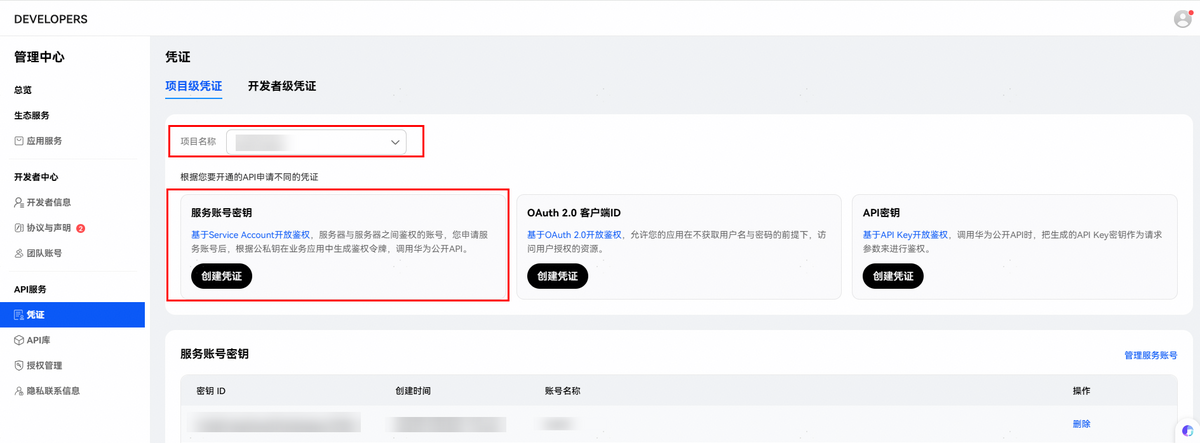
您需要在华为开发者联盟的API Console上创建并下载推送服务API的服务账号密钥文件,凭证创建入口如下图所示,选择所在项目,创建“服务账号密钥“凭证。相关创建步骤请参见API服务操作指南-服务账号密钥。
您申请后的服务账号密钥样例文件形式可参考(文件内容已经经过脱敏处理):
{"project_id": "*****","key_id": "*****","private_key": "-----BEGIN PRIVATE KEY-----\nMIIJQgIBADANBgkqhkiG9w0BAQEFAASCCSwwggkoAgEAAoICAQCKw6kJKtCh7qmMvp1u1dI27z2TKZrPOzHbQaXO/Eez0AWZ2EN+ouF496R3pfo7fQXC1XOT/YTbVC4DNZwWSMA54fu3/AOCY9Zzyi46OK*****==\n-----END PRIVATE KEY-----\n","sub_account": "*****","auth_uri": "https://oauth-login.cloud.huawei.com/oauth2/v3/authorize","token_uri": "https://oauth-login.cloud.huawei.com/oauth2/v3/token","auth_provider_cert_uri": "https://oauth-login.cloud.huawei.com/oauth2/v3/certs","client_cert_uri": "https://oauth-login.cloud.huawei.com/oauth2/v3/x509?client_id="} -
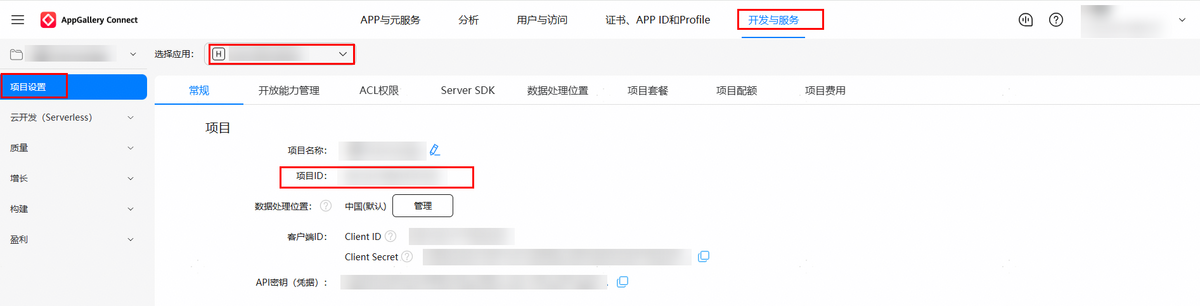
请确认以上密钥文件中的project_id是否与您的应用所属项目一致。
您的应用所属项目ID查看方法:登录AppGallery Connect网站,选择“开发与服务”,在项目列表中选择对应的项目,左侧导航栏选择“项目设置”,在该页面获取。
-
生成JWT Header数据。
根据服务账号密钥文件中的key_id(对应示例中的kid)字段拼接以下JSON体,对JSON体进行BASE64编码。
示例
{"kid": "*****","typ": "JWT","alg": "PS256"}字段名 描述 kid 服务账号密钥文件中key_id字段。 typ 数据类型,固定为:JWT。 alg 算法类型,固定为:PS256。 -
生成JWT Payload数据。
根据服务账号密钥文件中的sub_account(对应示例中的iss)字段拼接以下JSON体,对JSON体进行BASE64编码。
示例
{"aud": "https://oauth-login.cloud.huawei.com/oauth2/v3/token","iss": "*****","exp": 1581410664,"iat": 1581407064}字段名 描述 iss 服务账号密钥文件中sub_account字段,标识数据生成者。 aud 固定为: https://oauth-login.cloud.huawei.com/oauth2/v3/token。iat JWT签发UTC时间戳,为自UTC时间1970年1月1日00:00:00起的秒数(您的服务器时间需要校准为标准时间)。 exp JWT到期UTC时间戳,比iat晚3600秒。 -
生成JWT Token。
将完成BASE64编码后的Header字符串与Payload字符串,通过“.”进行连接,您可在业务应用中,通过服务账号密钥文件中的private_key(华为不进行存储,请您妥善保管),使用SHA256withRSA/PSS算法对拼接的字符串签名。
至此,您已经完成服务账号鉴权令牌JWT Token的生成。
调用推送服务REST API
您的应用调用推送服务REST API时,需要把已获得的服务账号鉴权令牌放在Authorization头部来进行鉴权。请使用v3版本调用推送服务REST API。
示例
POST "https://push-api.cloud.huawei.com/v3/3158882***52863/messages:send"
Authorization: Bearer eyJr*****OiIx---****.eyJh*****iJodHR--***.QRod*****4Gp---****
push-type:0

Authorization格式:Bearer后面拼接空格,再拼接获取的鉴权信息。
接口版本:请使用V3版本调用推送服务REST API。
场景化消息请求体中,接口URL版本为V3(https://push-api.cloud.huawei.com/v3/[projectId]/messages:send)时,仅支持给HarmonyOS Next/5.x及之后的系统版本推送通知;接口URL版本为V2(https://push-api.cloud.huawei.com/v2/[projectId]/messages:send)时,仅支持给HarmonyOS 3.x/4.x的系统版本推送通知。
示例代码
为了方便您生成服务账号鉴权令牌,我们提供了Java语言的示例代码,请按照说明替换参数运行。
如果您使用其他开发语言,请选择对应的JWT开源组件进行开发。
其中鉴权令牌生成步骤如下:
-
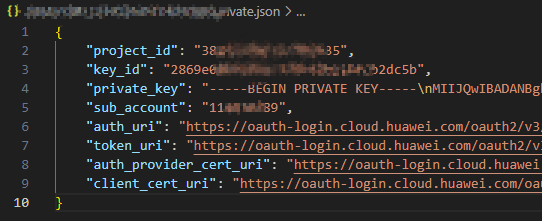
完成上述开发步骤中的步骤1创建服务账号密钥文件后,从华为开发者联盟的API Console上创建并下载推送服务API的服务账号密钥文件(.json文件),格式如下:
-
以上json文件复制至工程中,参考如下代码进行解析(以private.json为例,本示例基于io.jsonwebtoken:jjwt 0.11.5版本开发,该库各版本API差异较大,请根据实际依赖版本自行适配)。
Java:
/* 推荐的java版本为java8,maven依赖如下:
  <dependency>
   <groupId>com.fasterxml.jackson.core</groupId>
   <artifactId>jackson-databind</artifactId>
   <version>2.16.2</version>
  </dependency>
  <dependency>
   <groupId>io.jsonwebtoken</groupId>
   <artifactId>jjwt-api</artifactId>
   <version>0.11.5</version>
  </dependency>
  <dependency>
   <groupId>io.jsonwebtoken</groupId>
   <artifactId>jjwt-impl</artifactId>
   <version>0.11.5</version>
   <scope>runtime</scope>
  </dependency>
  <dependency>
   <groupId>io.jsonwebtoken</groupId>
   <artifactId>jjwt-jackson</artifactId>
   <version>0.11.5</version>
   <scope>runtime</scope>
  </dependency>
  <dependency>
   <groupId>org.bouncycastle</groupId>
   <artifactId>bcprov-jdk18on</artifactId>
   <version>1.78.1</version>
   <scope>runtime</scope>
  </dependency>
*/

import com.fasterxml.jackson.databind.JsonNode;
import com.fasterxml.jackson.databind.ObjectMapper;

import io.jsonwebtoken.*;
import io.jsonwebtoken.lang.Maps;

import java.io.File;
import java.io.IOException;
import java.net.URL;
import java.nio.charset.StandardCharsets;
import java.security.KeyFactory;
import java.security.NoSuchAlgorithmException;
import java.security.PrivateKey;
import java.security.interfaces.RSAPrivateKey;
import java.security.spec.InvalidKeySpecException;
import java.security.spec.PKCS8EncodedKeySpec;
import java.util.Base64;
import java.util.Map;

public class JsonWebTokenFactory {

    // 实际开发时请将公网地址存储在配置文件或数据库
    private static final String AUD = "https://oauth-login.cloud.huawei.com/oauth2/v3/token";

    public static String createJwt() throws NoSuchAlgorithmException, InvalidKeySpecException, IOException, NullPointerException {
        // 读取配置文件
        ObjectMapper mapper = new ObjectMapper();
        // 上述private.json文件放置于工程的src/main/resources路径下
        URL url = JsonWebTokenFactory.class.getClassLoader().getResource("private.json");
        if (url == null) {
            throw new NullPointerException("File not exist");
        }
        JsonNode rootNode = mapper.readTree(new File(url.getPath()));

        RSAPrivateKey privateKey = (RSAPrivateKey) generatePrivateKey(rootNode.get("private_key").asText()
                .replace("-----BEGIN PRIVATE KEY-----", "")
                .replace("-----END PRIVATE KEY-----", "")
                .replaceAll("\\s", ""));
        long iat = System.currentTimeMillis() / 1000;
        long exp = iat + 3600;

        Map<String, Object> header = Maps.<String, Object>of(JwsHeader.KEY_ID, rootNode.get("key_id").asText())
                .and(JwsHeader.TYPE, JwsHeader.JWT_TYPE)
                .and(JwsHeader.ALGORITHM, SignatureAlgorithm.PS256.getValue())
                .build();

        Map<String, Object> payload = Maps.<String, Object>of(Claims.ISSUER, rootNode.get("sub_account").asText())
                .and(Claims.ISSUED_AT, iat)
                .and(Claims.EXPIRATION, exp)
                .and(Claims.AUDIENCE, AUD)
                .build();

        return Jwts.builder()
                .setHeader(header)
                .setPayload(new ObjectMapper().writeValueAsString(payload))
                .signWith(privateKey, SignatureAlgorithm.PS256)
                .compact();
    }

    private static PrivateKey generatePrivateKey(String base64Key) throws NoSuchAlgorithmException, InvalidKeySpecException {
        PKCS8EncodedKeySpec keySpec = new PKCS8EncodedKeySpec(Base64.getDecoder().decode(base64Key.getBytes(StandardCharsets.UTF_8)));
        KeyFactory keyFactory = KeyFactory.getInstance("RSA");
        return keyFactory.generatePrivate(keySpec);
    }

    public static void main(String[] args) {
        try {
            // 获取鉴权令牌
            String jwt = createJwt();
        } catch (NoSuchAlgorithmException e) {
            // 异常处理流程1
        } catch (InvalidKeySpecException e) {
            // 异常处理流程2
        } catch (IOException e) {
            // 异常处理流程3
        } catch (NullPointerException e) {
            // 异常处理流程4
        }
    }
}
Node.js:
// 依赖:npm i jsonwebtoken
const jwt = require('jsonwebtoken');
const fs = require('fs');
let privateJson;
try {
  // readFileSync首个参数修改为private.json的实际路径
  const data = fs.readFileSync('private.json', 'utf8');
  privateJson = JSON.parse(data);
  // 自定义Header
  const header = {
    alg: 'PS256', // 建议使用PS256算法
    kid: privateJson?.key_id,
    typ: 'JWT'    // 类型为JWT
  };
  // 创建JWT载荷
  const payload = {
    iss: privateJson?.sub_account,
    aud: 'https://oauth-login.cloud.huawei.com/oauth2/v3/token', // 实际开发时请将公网地址存储在配置文件或数据库
    iat: Math.floor(Date.now() / 1000),
    exp: Math.floor(Date.now() / 1000) + 3600
  };
  const private_key = privateJson?.private_key;
  // 将字符串中的 \\n 替换成真正的换行符 \n,再按换行符分割为数组
  const lines = private_key.replace(/\\n/g, '\n').split('\n');
  // 取前三行
  const firstThreeLines = lines.slice(0, 3);
  // 重新拼接成一个三行的字符串:
  const PRIVATE_KEY = firstThreeLines.join('\n');
  // 获取鉴权令牌
  const token = jwt.sign(payload, PRIVATE_KEY, { algorithm: 'PS256', header: header });
} catch (error) {
  console.error("处理文件时出错:", error);
}
Go:
// 依赖:go get github.com/golang-jwt/jwt/v5

package main

import (
    "encoding/json"
    "encoding/pem"
    "errors"
    "fmt"
    "github.com/golang-jwt/jwt/v5"
    "log"
    "os"
    "strings"
    "time"
)

type ServiceAccountKey struct {
    KeyID      string `json:"key_id"`
    SubAccount string `json:"sub_account"`
    PrivateKey string `json:"private_key"`
}

func main() {
    // 替换为实际JSON文件路径,此处以本文件同级目录为例
    signedToken, err := generateJWTToken("private.json")
    if err != nil {
        log.Fatalf("Failed to generate JWT token: %v", err)
    }

    // signedToken为鉴权令牌,调用推送服务REST API时放在Authorization头部来进行鉴权。
    sendMessage(signedToken)
}

func sendMessage(token string) {
    // 自行实现业务流程
}

func generateJWTToken(keyFile string) (string, error) {
    saKey, err := loadServiceAccountKey(keyFile)
    if err != nil {
        return "", err
    }

    formattedPrivateKey, err := formatPrivateKey(saKey.PrivateKey)
    if err != nil {
        return "", err
    }

    privateKey, err := jwt.ParseRSAPrivateKeyFromPEM([]byte(formattedPrivateKey))
    if err != nil {
        return "", fmt.Errorf("failed to parse private key: %w", err)
    }

    token, err := buildJWTToken(saKey.KeyID, saKey.SubAccount)
    if err != nil {
        return "", err
    }

    return token.SignedString(privateKey)
}

// buildJWTToken 构造 JWT token 对象
func buildJWTToken(keyID, subAccount string) (*jwt.Token, error) {
    now := time.Now().UTC()
    iat := now.Unix()
    exp := iat + 3600 // token 过期时间:一小时后

    claims := jwt.MapClaims{
        // 实际开发时请将公网地址存储在配置文件或数据库
        "aud": "https://oauth-login.cloud.huawei.com/oauth2/v3/token",
        "iss": subAccount,
        "exp": exp,
        "iat": iat,
    }

    token := jwt.NewWithClaims(jwt.SigningMethodPS256, claims)

    // 设置 header
    token.Header["kid"] = keyID
    token.Header["typ"] = "JWT"
    token.Header["alg"] = "PS256"

    return token, nil
}

// loadServiceAccountKey 从 JSON 文件加载服务账号密钥
func loadServiceAccountKey(filename string) (*ServiceAccountKey, error) {
    data, err := os.ReadFile(filename)
    if err != nil {
        return nil, fmt.Errorf("failed to read key file: %w", err)
    }

    var saKey ServiceAccountKey
    if err := json.Unmarshal(data, &saKey); err != nil {
        return nil, fmt.Errorf("failed to parse key file: %w", err)
    }

    if saKey.KeyID == "" || saKey.SubAccount == "" || saKey.PrivateKey == "" {
        return nil, errors.New("invalid service account key file: missing required fields")
    }

    return &saKey, nil
}

// formatPrivateKey 格式化私钥字符串为 PEM 格式
func formatPrivateKey(privateKeyStr string) (string, error) {
    trimmed := strings.TrimSpace(privateKeyStr)

    // 如果已经是 PEM 格式,则直接返回
    if strings.HasPrefix(trimmed, "-----BEGIN PRIVATE KEY-----") &&
        strings.HasSuffix(trimmed, "-----END PRIVATE KEY-----") {
        return trimmed, nil
    }

    block, _ := pem.Decode([]byte(trimmed))
    if block == nil {
        return "", errors.New("failed to decode PEM block")
    }

    pemBytes := pem.EncodeToMemory(block)
    if pemBytes == nil {
        return "", errors.New("failed to encode private key to PEM format")
    }

    return string(pemBytes), nil
}
Python:
# 依赖:pip install PyJWT cryptography

import jwt
import json
import time
from cryptography.hazmat.primitives import serialization

def load_private_key_from_json(json_file_path):
    """
    从JSON文件中加载私钥信息
    :param json_file_path: JSON文件路径
    :return: (key_id, sub_account, private_key_pem)
    """
    with open(json_file_path, 'r') as f:
        data = json.load(f)

    # 获取KID和ISS
    key_id = data.get('key_id')
    sub_account = data.get('sub_account')

    # 将私钥转换为PEM格式
    private_key_str = data.get('private_key')
    private_key_pem = serialization.load_pem_private_key(
        private_key_str.encode(),
        password=None
    )

    return key_id, sub_account, private_key_pem

def generate_jwt_token(json_file_path):
    # 从JSON文件加载信息
    kid, iss, private_key = load_private_key_from_json(json_file_path)

    # 当前时间和过期时间(示例中使用固定值,实际应根据需求计算)
    iat = int(time.time())
    exp = iat + 3600

    # 构造Header
    header = {
        "kid": kid,
        "typ": "JWT",
        "alg": "PS256"
    }

    # 构造Payload
    payload = {
        # 实际开发时请将公网地址存储在配置文件或数据库
        "aud": "https://oauth-login.cloud.huawei.com/oauth2/v3/token",
        "iss": iss,
        "exp": exp,
        "iat": iat
    }

    # 生成JWT Token
    token = jwt.encode(
        payload=payload,
        key=private_key,
        algorithm='PS256',
        headers=header
    )

    return token

def send_message(jwt_token):
    # 自行实现业务流程
    pass

if __name__ == "__main__":
    json_file = "private.json"  # 替换为实际JSON文件路径,此处以本文件同级目录为例

    try:
        # jwt_token 为鉴权令牌,调用推送服务REST API时放在Authorization头部来进行鉴权。
        jwt_token = generate_jwt_token(json_file)
        send_message(jwt_token)
    except Exception as e:
        print(f"Error generating JWT token: {str(e)}")
PHP:
<?php
// 依赖:composer require lcobucci/jwt:^5.4.2
// 依赖:composer require lcobucci/jwt-rsassa-pss
// php: ~8.2.0 || ~8.3.0 || ~8.4.0
require 'vendor/autoload.php';

use Lcobucci\JWT\Configuration;
use Lcobucci\JWT\Signer\RsaPss\Sha256;
use Lcobucci\JWT\Signer\Key\InMemory;

class ServiceAccount
{
    public string $keyId;
    public string $subAccount;
    public string $privateKey;
    public string $tokenURI;

    public function __construct(string $keyId, string $subAccount, string $privateKey, string $tokenURI)
    {
        $this->keyId = $keyId;
        $this->subAccount = $subAccount;
        $this->privateKey = $privateKey;
        $this->tokenURI = $tokenURI;
    }
}

function loadServiceAccount(string $filePath): ServiceAccount
{
    if (!file_exists($filePath)) {
        throw new RuntimeException("配置文件不存在: $filePath");
    }

    $json = file_get_contents($filePath);
    $config = json_decode($json, true);
    if (json_last_error() !== JSON_ERROR_NONE) {
        throw new RuntimeException("JSON解析错误: " . json_last_error_msg());
    }

    // 验证必要字段
    $requiredKeys = ['key_id', 'sub_account', 'private_key', 'token_uri'];
    foreach ($requiredKeys as $key) {
        if (!isset($config[$key])) {
            throw new RuntimeException("配置缺少必要字段: $key");
        }
    }

    // 处理私钥中的换行符
    $privateKey = str_replace('\n', "\n", $config['private_key']);

    return new ServiceAccount(
        $config['key_id'],
        $config['sub_account'],
        $privateKey,
        $config['token_uri']
    );
}

function sendMessage()
{
    // 自行实现业务流程
}

function generateJWTToken(ServiceAccount $serviceAccount)
{
    $now = new DateTimeImmutable();
    $expire = $now->modify("+3600 seconds");

    $configuration = Configuration::forSymmetricSigner(
        new Sha256(),
        InMemory::plainText($serviceAccount->privateKey)
    );

    return $configuration->builder()
        ->withHeader('alg', 'PS256') // 指定PS256算法
        ->withHeader('typ', 'JWT')   // JWT类型
        ->withHeader('kid', $serviceAccount->keyId) // 密钥ID
        ->issuedBy($serviceAccount->subAccount) // iss
        ->permittedFor($serviceAccount->tokenURI) // aud
        ->issuedAt($now) // iat
        ->expiresAt($expire) // exp
        ->getToken($configuration->signer(), $configuration->signingKey())
        ->toString();
}

function main()
{
    try {
        // 替换为JSON文件实际路径,此处以与本文件同级目录为例
        $filePath = 'private.json';
        $serviceAccount = loadServiceAccount($filePath);
        $signedToken = generateJWTToken($serviceAccount);

        // signedToken为鉴权令牌,调用推送服务REST API时放在Authorization头部来进行鉴权。
        sendMessage($signedToken);
    } catch (Exception $e) {
        error_log("Error: " . $e->getMessage());
        exit(1);
    }
}

main();
?>