商户基础支付场景
场景介绍
从4.1.0(11)版本开始,新增支持商户基础支付场景。
例如用户出行需要提前预订酒店房间,此时用户可打开商户开发的APP应用/元服务,选好预订房间后发起支付,商户通过接入华为支付拉起华为支付收银台完成单个订单支付。
支持商户模型:直连商户、平台类商户、服务商
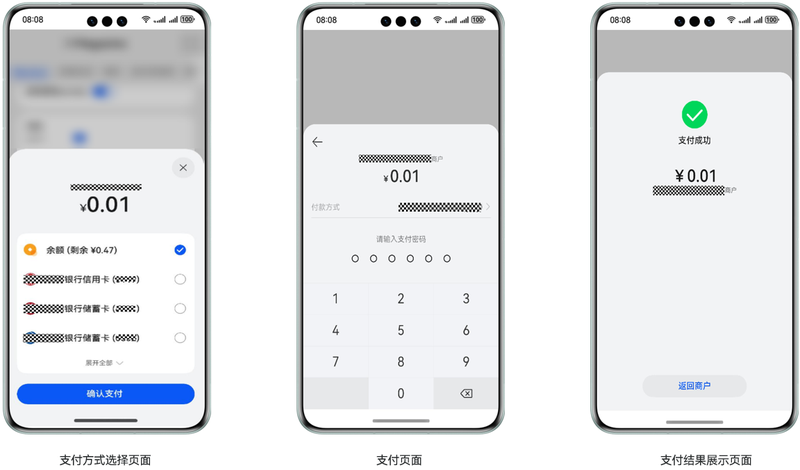
华为支付收银台展示:
业务流程
开发者通过接入Payment Kit基础支付,可以简便快捷的实现应用的支付能力。具体接入流程如下:
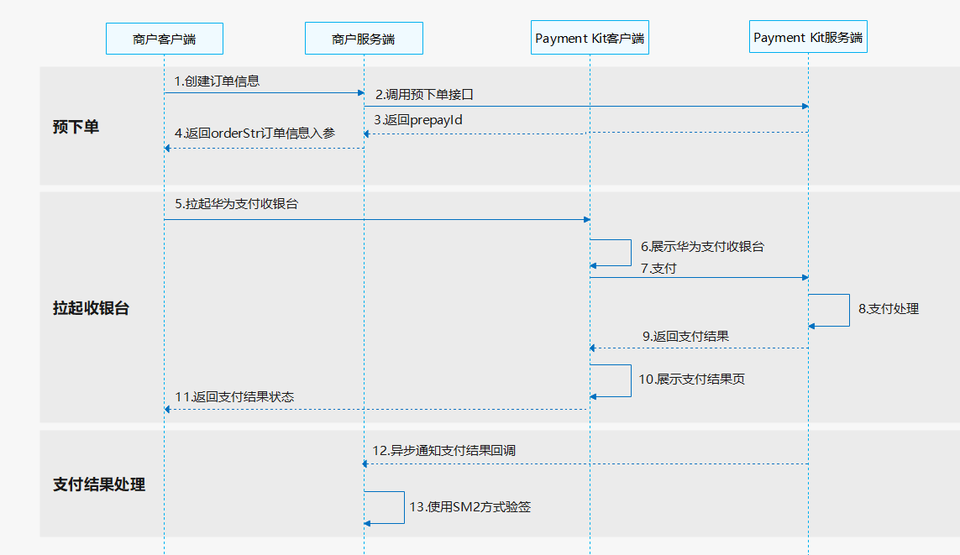
- 商户客户端请求商户服务器创建商品订单。
- 商户服务器按照商户模型调用Payment Kit服务端直连商户预下单或平台类商户/服务商预下单接口。
- Payment Kit服务端返回预支付ID(prepayId)。
- 商户服务端组建订单信息参数orderStr返回给商户客户端。
- 商户客户端调用requestPayment接口拉起Payment Kit支付收银台。
- Payment Kit客户端展示收银台。
- 用户通过收银台完成支付,Payment Kit客户端会收到支付结果信息并请求Payment Kit服务端处理支付。
- Payment Kit服务端成功受理支付订单并异步处理支付。
- Payment Kit服务端将支付结果返回给Payment Kit客户端。
- Payment Kit客户端展示支付结果页。
- 用户关闭支付结果页后Payment Kit客户端会返回支付状态给商户客户端。
- 支付处理完成后,Payment Kit服务端会调用回调接口返回支付结果信息给商户服务端。
- 商户服务端收到支付结果回调响应后,使用SM2验签方式对支付结果进行验签。
接口说明
接口返回值有两种返回形式:Promise和AsyncCallback。Promise和AsyncCallback只是返回方式不一样,功能相同。具体API说明详见接口文档。
| 接口名 | 描述 |
|---|---|
| requestPayment(context:common.UIAbilityContext, orderStr: string): Promise<void>; | 拉起Payment Kit支付收银台。 |
| requestPayment(context:common.UIAbilityContext, orderStr: string, callback: AsyncCallback<void>): void; | 拉起Payment Kit支付收银台。 |
开发步骤
预下单(服务器开发)
-
开发者按照商户模型调用直连商户预下单或平台类商户/服务商预下单接口获取预支付ID(prepayId)。
为保证支付订单的安全性和可靠性需要对请求body和请求头PayMercAuth对象内的入参排序拼接进行签名,可参考签名规则。
-
构建订单信息参数orderStr。
商户服务器需要将客户端支付接口入参orderStr签名后返回给客户端。

orderStr中sign字段签名规则是将除sign外的参数都做排序拼接后再签名(参见签名规则),签名值赋值给sign字段。
以下为开放API接口请求及orderStr构建示例代码片段:
import com.huawei.petalpay.paymentservice.apiservice.client.model.BaseGwRspWithSign;import com.huawei.petalpay.paymentservice.apiservice.client.model.PreOrderCreateRequestV2;import com.huawei.petalpay.paymentservice.apiservice.client.model.PreOrderCreateResponse;import com.huawei.petalpay.paymentservice.apiservice.client.model.PreSignRequestV2;import com.huawei.petalpay.paymentservice.apiservice.client.model.PreSignResponse;import com.huawei.petalpay.paymentservice.core.client.DefaultPetalPayClient;import com.huawei.petalpay.paymentservice.core.client.PetalPayClient;import com.huawei.petalpay.paymentservice.example.common.CommonResponse;import com.huawei.petalpay.paymentservice.example.common.MercConfigUtil;import lombok.extern.slf4j.Slf4j;public class MercApiController {private static PetalPayClient payClient = new DefaultPetalPayClient(MercConfigUtil.getMercConfig());/*** 预下单接口调用*/public CommonResponse aggrPreOrderForAppV2() {// 组装对象PreOrderCreateRequestV2 preOrderReq = getPreOrderCreateRequestV2();PreOrderCreateResponse response = null;try {response = payClient.execute("POST", "/api/v2/aggr/preorder/create/app", PreOrderCreateResponse.class,preOrderReq);} catch (Exception e) {// todo 异常处理log.error("request error ", e);return CommonResponse.buildErrorRsp(e.getMessage());}if (!validResponse(response)) {// todo 异常处理log.error("response is invalid ", response);return CommonResponse.buildFailRsp(response);}return CommonResponse.buildSuccessRsp(payClient.buildOrderStr(response.getPrepayId()));}public static boolean validResponse(BaseGwRspWithSign rsp) {return rsp != null && "000000".equals(rsp.getResultCode());}/*** 预下单接口请求参数组装,商户请根据业务自行实现*/public static PreOrderCreateRequestV2 getPreOrderCreateRequestV2() {return PreOrderCreateRequestV2.builder().mercOrderNo("pay-example-" + System.currentTimeMillis()) // 每次订单号都要变,请将pay-example-修改为商户自己的订单前缀.appId(MercConfigUtil.APP_ID) // appId,需要配置为与商户绑定的正确的appId.mercNo(MercConfigUtil.MERC_NO) // 商户的商户号.tradeSummary("请修改为对应的商品简称") // 请修改为商品简称.totalAmount(2L).callbackUrl("https://www.xxxxxx.com/hw/pay/callback") // 回调通知地址,通知URL必须为直接可访问的URL,要求为https地址。最大长度为512。请替换为格式正确的结果通知回调地址。.build();}}
拉起华为支付收银台(端侧开发)
商户客户端使用orderStr作为参数调用requestPayment接口拉起Payment Kit支付收银台。
当接口通过.then()方法返回时,则表示当前订单支付成功,通过.catch()方法返回表示订单支付失败。当此次请求有异常时,可通过error.code获取错误码,错误码相关信息请参见错误码。示例代码如下:
import { BusinessError } from '@kit.BasicServicesKit';
import { paymentService } from '@kit.PaymentKit';
import { common } from '@kit.AbilityKit';

@Entry
@Component
struct Index {
  context: common.UIAbilityContext = this.getUIContext().getHostContext() as common.UIAbilityContext;
  requestPaymentPromise() {
    // use your own orderStr
    const orderStr = '{"app_id":"***","merc_no":"***","prepay_id":"xxx","timestamp":"1680259863114","noncestr":"1487b8a60ed9f9ecc0ba759fbec23f4f","sign":"****","auth_id":"***"}';
    paymentService.requestPayment(this.context, orderStr)
      .then(() => {
        // pay success
        console.info('succeeded in paying');
      })
      .catch((error: BusinessError) => {
        // failed to pay
        console.error(`failed to pay, error.code: ${error.code}, error.message: ${error.message}`);
      });
  }

  build() {
    Column() {
      Button('requestPaymentPromise')
        .type(ButtonType.Capsule)
        .width('50%')
        .margin(20)
        .onClick(() => {
          this.requestPaymentPromise();
        })
      }
    .width('100%')
    .height('100%')
  }
}
- 如果用户没有提前登录,系统会自动拉起华为账号登录页面让用户登录。
- 支付成功,不建议以客户端返回作为用户的支付结果,需以服务器接收到的结果通知或者查询API返回为准。
支付结果回调通知(服务器开发)
支付成功后华为支付服务器会调用开发者提供的回调接口,将支付信息返回给开发者的服务器,回调详细信息按商户模式请参见直连商户支付结果回调通知或平台类商户/服务商支付结果回调通知。
回调接口是开发者调用预下单时的入参字段callbackUrl。
为保证信息合法性,商户服务器需要对返回的支付信息进行SM2验签,验签注意事项:
- 需直接使用通知的完整内容进行验签。
- 验签前需要对返回数据进行排序拼接,sign字段是签名值,排序拼接后的待验签内容需要排除sign字段。
- 验签公钥使用华为支付证书。
延伸和拓展
当开发者完成上述能力之后还可以调用以下API接口完成订单相关操作。
直连商户
查询支付订单、申请退款、查询退款订单、查询对账单、查询结算账单。