Neural Network Runtime对接AI推理框架开发指导
场景介绍
Neural Network Runtime作为AI推理引擎和加速芯片的桥梁,为AI推理引擎提供精简的Native接口,满足推理引擎通过加速芯片执行端到端推理的需求。
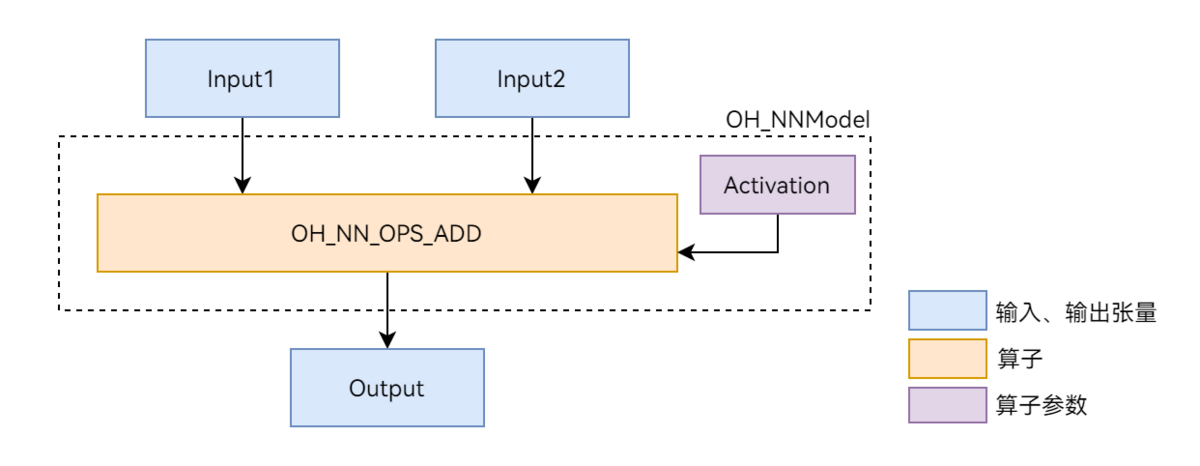
本文以图1展示的Add单算子模型为例,介绍Neural Network Runtime的开发流程。Add算子包含两个输入、一个参数和一个输出,其中的activation参数用于指定Add算子中激活函数的类型。
图1 Add单算子网络示意图
环境准备
环境要求
Neural Network Runtime部件的环境要求如下:
- 开发环境:Ubuntu 18.04及以上。
- 接入设备:系统定义的标准设备,系统中内置AI硬件驱动并已接入Neural Network Runtime。
由于Neural Network Runtime通过Native API对外开放,需要下载对应的SDK并通过Native开发套件编译Neural Network Runtime应用。可以使用DevEco Studio来搭建环境和编译代码。
环境搭建
- 使用Ubuntu编译服务器的终端。
- 指定native工具链路径来编译代码,可以使用DevEco Studio来下载对应的SDK来进行编译。
- DevEco Studio安装目录下的SDK路径可以在DevEco Studio工程界面,点击File > Settings... > 在settings中搜索SDK,下载对应的SDK即可。
接口说明
以下为Neural Network Runtime开发流程中的常用接口,具体可见NeuralNetworkRuntime。
结构体
| 结构体名称 | 描述 |
|---|---|
| typedef struct OH_NNModel OH_NNModel | Neural Network Runtime的模型句柄,用于构造模型。 |
| typedef struct OH_NNCompilation OH_NNCompilation | Neural Network Runtime的编译器句柄,用于编译AI模型。 |
| typedef struct OH_NNExecutor OH_NNExecutor | Neural Network Runtime的执行器句柄,用于在指定设备上执行推理计算。 |
| typedef struct NN_QuantParam NN_QuantParam | Neural Network Runtime的量化参数句柄,用于在构造模型时指定张量的量化参数。 |
| typedef struct NN_TensorDesc NN_TensorDesc | Neural Network Runtime的张量描述句柄,用于描述张量的各类属性,例如数据布局、数据类型、形状等。 |
| typedef struct NN_Tensor NN_Tensor | Neural Network Runtime的张量句柄,用于设置执行器的推理输入和输出张量。 |
模型构造接口
| 接口名称 | 描述 |
|---|---|
| OH_NNModel_Construct() | 创建OH_NNModel类型的模型实例。 |
| OH_NN_ReturnCode OH_NNModel_AddTensorToModel(OH_NNModel *model, const NN_TensorDesc *tensorDesc) | 向模型实例中添加张量。 |
| OH_NN_ReturnCode OH_NNModel_SetTensorData(OH_NNModel *model, uint32_t index, const void *dataBuffer, size_t length) | 设置张量的数值。 |
| OH_NN_ReturnCode OH_NNModel_AddOperation(OH_NNModel *model, OH_NN_OperationType op, const OH_NN_UInt32Array *paramIndices, const OH_NN_UInt32Array *inputIndices, const OH_NN_UInt32Array *outputIndices) | 向模型实例中添加算子。 |
| OH_NN_ReturnCode OH_NNModel_SpecifyInputsAndOutputs(OH_NNModel *model, const OH_NN_UInt32Array *inputIndices, const OH_NN_UInt32Array *outputIndices) | 指定模型的输入和输出张量的索引值。 |
| OH_NN_ReturnCode OH_NNModel_Finish(OH_NNModel *model) | 完成模型构图。 |
| void OH_NNModel_Destroy(OH_NNModel **model) | 销毁模型实例。 |
模型编译接口
| 接口名称 | 描述 |
|---|---|
| OH_NNCompilation *OH_NNCompilation_Construct(const OH_NNModel *model) | 基于模型实例创建OH_NNCompilation类型的编译实例。 |
| OH_NNCompilation *OH_NNCompilation_ConstructWithOfflineModelFile(const char *modelPath) | 基于离线模型文件路径创建OH_NNCompilation类型的编译实例。 |
| OH_NNCompilation *OH_NNCompilation_ConstructWithOfflineModelBuffer(const void *modelBuffer, size_t modelSize) | 基于离线模型文件内存创建OH_NNCompilation类型的编译实例。 |
| OH_NNCompilation *OH_NNCompilation_ConstructForCache() | 创建一个空的编译实例,以便稍后从模型缓存中恢复。 |
| OH_NN_ReturnCode OH_NNCompilation_ExportCacheToBuffer(OH_NNCompilation *compilation, const void *buffer, size_t length, size_t *modelSize) | 将模型缓存写入到指定内存区域。 |
| OH_NN_ReturnCode OH_NNCompilation_ImportCacheFromBuffer(OH_NNCompilation *compilation, const void *buffer, size_t modelSize) | 从指定内存区域读取模型缓存。 |
| OH_NN_ReturnCode OH_NNCompilation_AddExtensionConfig(OH_NNCompilation *compilation, const char *configName, const void *configValue, const size_t configValueSize) | 为自定义硬件属性添加扩展配置,具体硬件的扩展属性名称和属性值需要从硬件厂商的文档中获取。 |
| OH_NN_ReturnCode OH_NNCompilation_SetDevice(OH_NNCompilation *compilation, size_t deviceID) | 指定模型编译和计算的硬件,可通过设备管理接口获取。 |
| OH_NN_ReturnCode OH_NNCompilation_SetCache(OH_NNCompilation *compilation, const char *cachePath, uint32_t version) | 设置编译模型的缓存目录和版本。 |
| OH_NN_ReturnCode OH_NNCompilation_SetPerformanceMode(OH_NNCompilation *compilation, OH_NN_PerformanceMode performanceMode) | 设置模型计算的性能模式。 |
| OH_NN_ReturnCode OH_NNCompilation_SetPriority(OH_NNCompilation *compilation, OH_NN_Priority priority) | 设置模型计算的优先级。 |
| OH_NN_ReturnCode OH_NNCompilation_EnableFloat16(OH_NNCompilation *compilation, bool enableFloat16) | 是否以float16的浮点数精度计算。 |
| OH_NN_ReturnCode OH_NNCompilation_Build(OH_NNCompilation *compilation) | 执行模型编译。 |
| void OH_NNCompilation_Destroy(OH_NNCompilation **compilation) | 销毁编译实例。 |
张量描述接口
| 接口名称 | 描述 |
|---|---|
| NN_TensorDesc *OH_NNTensorDesc_Create() | 创建一个张量描述实例,用于后续创建张量。 |
| OH_NN_ReturnCode OH_NNTensorDesc_SetName(NN_TensorDesc *tensorDesc, const char *name) | 设置张量描述的名称。 |
| OH_NN_ReturnCode OH_NNTensorDesc_GetName(const NN_TensorDesc *tensorDesc, const char **name) | 获取张量描述的名称。 |
| OH_NN_ReturnCode OH_NNTensorDesc_SetDataType(NN_TensorDesc *tensorDesc, OH_NN_DataType dataType) | 设置张量描述的数据类型。 |
| OH_NN_ReturnCode OH_NNTensorDesc_GetDataType(const NN_TensorDesc *tensorDesc, OH_NN_DataType *dataType) | 获取张量描述的数据类型。 |
| OH_NN_ReturnCode OH_NNTensorDesc_SetShape(NN_TensorDesc *tensorDesc, const int32_t *shape, size_t shapeLength) | 设置张量描述的形状。 |
| OH_NN_ReturnCode OH_NNTensorDesc_GetShape(const NN_TensorDesc *tensorDesc, int32_t **shape, size_t *shapeLength) | 获取张量描述的形状。 |
| OH_NN_ReturnCode OH_NNTensorDesc_SetFormat(NN_TensorDesc *tensorDesc, OH_NN_Format format) | 设置张量描述的数据布局。 |
| OH_NN_ReturnCode OH_NNTensorDesc_GetFormat(const NN_TensorDesc *tensorDesc, OH_NN_Format *format) | 获取张量描述的数据布局。 |
| OH_NN_ReturnCode OH_NNTensorDesc_GetElementCount(const NN_TensorDesc *tensorDesc, size_t *elementCount) | 获取张量描述的元素个数。 |
| OH_NN_ReturnCode OH_NNTensorDesc_GetByteSize(const NN_TensorDesc *tensorDesc, size_t *byteSize) | 获取基于张量描述的形状和数据类型计算的数据占用字节数。 |
| OH_NN_ReturnCode OH_NNTensorDesc_Destroy(NN_TensorDesc **tensorDesc) | 销毁张量描述实例。 |
张量接口
| 接口名称 | 描述 |
|---|---|
| NN_Tensor* OH_NNTensor_Create(size_t deviceID, NN_TensorDesc *tensorDesc) | 从张量描述创建张量实例,会申请设备共享内存。 |
| NN_Tensor* OH_NNTensor_CreateWithSize(size_t deviceID, NN_TensorDesc *tensorDesc, size_t size) | 按照指定内存大小和张量描述创建张量实例,会申请设备共享内存。 |
| NN_Tensor* OH_NNTensor_CreateWithFd(size_t deviceID, NN_TensorDesc *tensorDesc, int fd, size_t size, size_t offset) | 按照指定共享内存的文件描述符和张量描述创建张量实例,从而可以复用其他张量的设备共享内存。 |
| NN_TensorDesc* OH_NNTensor_GetTensorDesc(const NN_Tensor *tensor) | 获取张量内部的张量描述实例指针,从而可读取张量的属性,例如数据类型、形状等。 |
| void* OH_NNTensor_GetDataBuffer(const NN_Tensor *tensor) | 获取张量数据的内存地址,可以读写张量数据。 |
| OH_NN_ReturnCode OH_NNTensor_GetFd(const NN_Tensor *tensor, int *fd) | 获取张量数据所在共享内存的文件描述符,文件描述符fd对应了一块设备共享内存。 |
| OH_NN_ReturnCode OH_NNTensor_GetSize(const NN_Tensor *tensor, size_t *size) | 获取张量数据所在共享内存的大小。 |
| OH_NN_ReturnCode OH_NNTensor_GetOffset(const NN_Tensor *tensor, size_t *offset) | 获取张量数据所在共享内存上的偏移量,张量数据可使用的大小为所在共享内存的大小减去偏移量。 |
| OH_NN_ReturnCode OH_NNTensor_Destroy(NN_Tensor **tensor) | 销毁张量实例。 |
执行推理接口
| 接口名称 | 描述 |
|---|---|
| OH_NNExecutor *OH_NNExecutor_Construct(OH_NNCompilation *compilation) | 创建OH_NNExecutor类型的执行器实例。 |
| OH_NN_ReturnCode OH_NNExecutor_GetOutputShape(OH_NNExecutor *executor, uint32_t outputIndex, int32_t **shape, uint32_t *shapeLength) | 获取输出张量的维度信息,用于输出张量具有动态形状的情况。 |
| OH_NN_ReturnCode OH_NNExecutor_GetInputCount(const OH_NNExecutor *executor, size_t *inputCount) | 获取输入张量的数量。 |
| OH_NN_ReturnCode OH_NNExecutor_GetOutputCount(const OH_NNExecutor *executor, size_t *outputCount) | 获取输出张量的数量。 |
| NN_TensorDesc* OH_NNExecutor_CreateInputTensorDesc(const OH_NNExecutor *executor, size_t index) | 由指定索引值创建一个输入张量的描述,用于读取张量的属性或创建张量实例。 |
| NN_TensorDesc* OH_NNExecutor_CreateOutputTensorDesc(const OH_NNExecutor *executor, size_t index) | 由指定索引值创建一个输出张量的描述,用于读取张量的属性或创建张量实例。 |
| OH_NN_ReturnCode OH_NNExecutor_GetInputDimRange(const OH_NNExecutor *executor, size_t index, size_t **minInputDims, size_t **maxInputDims, size_t *shapeLength) | 获取所有输入张量的维度范围。当输入张量具有动态形状时,不同设备可能支持不同的维度范围。 |
| OH_NN_ReturnCode OH_NNExecutor_SetOnRunDone(OH_NNExecutor *executor, NN_OnRunDone onRunDone) | 设置异步推理结束后的回调处理函数,回调函数定义详见接口文档。 |
| OH_NN_ReturnCode OH_NNExecutor_SetOnServiceDied(OH_NNExecutor *executor, NN_OnServiceDied onServiceDied) | 设置异步推理执行期间设备驱动服务突然死亡时的回调处理函数,回调函数定义详见接口文档。 |
| OH_NN_ReturnCode OH_NNExecutor_RunSync(OH_NNExecutor *executor, NN_Tensor *inputTensor[], size_t inputCount, NN_Tensor *outputTensor[], size_t outputCount) | 执行同步推理。 |
| OH_NN_ReturnCode OH_NNExecutor_RunAsync(OH_NNExecutor *executor, NN_Tensor *inputTensor[], size_t inputCount, NN_Tensor *outputTensor[], size_t outputCount, int32_t timeout, void *userData) | 执行异步推理。 |
| void OH_NNExecutor_Destroy(OH_NNExecutor **executor) | 销毁执行器实例。 |
设备管理接口
| 接口名称 | 描述 |
|---|---|
| OH_NN_ReturnCode OH_NNDevice_GetAllDevicesID(const size_t **allDevicesID, uint32_t *deviceCount) | 获取对接到Neural Network Runtime的所有硬件ID。 |
| OH_NN_ReturnCode OH_NNDevice_GetName(size_t deviceID, const char **name) | 获取指定硬件的名称。 |
| OH_NN_ReturnCode OH_NNDevice_GetType(size_t deviceID, OH_NN_DeviceType *deviceType) | 获取指定硬件的类别信息。 |
开发步骤
Neural Network Runtime的开发流程主要包含模型构造、模型编译和推理执行三个阶段。以下开发步骤以Add单算子模型为例,介绍调用Neural Network Runtime接口,开发应用的过程。
-
创建应用样例文件。
首先,创建Neural Network Runtime应用样例的源文件。在项目目录下执行以下命令,创建nnrt_example/目录,并在目录下创建 nnrt_example.cpp 源文件。
mkdir ~/nnrt_example && cd ~/nnrt_exampletouch nnrt_example.cpp -
导入Neural Network Runtime。
在 nnrt_example.cpp 文件的开头添加以下代码,引入Neural Network Runtime。
#include <iostream>#include <cstdarg>#include "neural_network_runtime/neural_network_runtime.h" -
定义日志打印、设置输入数据、数据打印等辅助函数。
// 返回值检查宏#define CHECKNEQ(realRet, expectRet, retValue, ...) \do { \if ((realRet) != (expectRet)) { \printf(__VA_ARGS__); \return (retValue); \} \} while (0)#define CHECKEQ(realRet, expectRet, retValue, ...) \do { \if ((realRet) == (expectRet)) { \printf(__VA_ARGS__); \return (retValue); \} \} while (0)// 设置输入数据用于推理OH_NN_ReturnCode SetInputData(NN_Tensor* inputTensor[], size_t inputSize){OH_NN_DataType dataType(OH_NN_FLOAT32);OH_NN_ReturnCode ret{OH_NN_FAILED};size_t elementCount = 0;for (size_t i = 0; i < inputSize; ++i) {// 获取张量的数据内存auto data = OH_NNTensor_GetDataBuffer(inputTensor[i]);CHECKEQ(data, nullptr, OH_NN_FAILED, "Failed to get data buffer.");// 获取张量的描述auto desc = OH_NNTensor_GetTensorDesc(inputTensor[i]);CHECKEQ(desc, nullptr, OH_NN_FAILED, "Failed to get desc.");// 获取张量的数据类型ret = OH_NNTensorDesc_GetDataType(desc, &dataType);CHECKNEQ(ret, OH_NN_SUCCESS, OH_NN_FAILED, "Failed to get data type.");// 获取张量的元素个数ret = OH_NNTensorDesc_GetElementCount(desc, &elementCount);CHECKNEQ(ret, OH_NN_SUCCESS, OH_NN_FAILED, "Failed to get element count.");switch(dataType) {case OH_NN_FLOAT32: {float* floatValue = reinterpret_cast<float*>(data);for (size_t j = 0; j < elementCount; ++j) {floatValue[j] = static_cast<float>(j);}break;}case OH_NN_INT32: {int* intValue = reinterpret_cast<int*>(data);for (size_t j = 0; j < elementCount; ++j) {intValue[j] = static_cast<int>(j);}break;}default:return OH_NN_FAILED;}}return OH_NN_SUCCESS;}OH_NN_ReturnCode Print(NN_Tensor* outputTensor[], size_t outputSize){OH_NN_DataType dataType(OH_NN_FLOAT32);OH_NN_ReturnCode ret{OH_NN_FAILED};size_t elementCount = 0;for (size_t i = 0; i < outputSize; ++i) {auto data = OH_NNTensor_GetDataBuffer(outputTensor[i]);CHECKEQ(data, nullptr, OH_NN_FAILED, "Failed to get data buffer.");auto desc = OH_NNTensor_GetTensorDesc(outputTensor[i]);CHECKEQ(desc, nullptr, OH_NN_FAILED, "Failed to get desc.");ret = OH_NNTensorDesc_GetDataType(desc, &dataType);CHECKNEQ(ret, OH_NN_SUCCESS, OH_NN_FAILED, "Failed to get data type.");ret = OH_NNTensorDesc_GetElementCount(desc, &elementCount);CHECKNEQ(ret, OH_NN_SUCCESS, OH_NN_FAILED, "Failed to get element count.");switch(dataType) {case OH_NN_FLOAT32: {float* floatValue = reinterpret_cast<float*>(data);for (size_t j = 0; j < elementCount; ++j) {std::cout << "Output index: " << j << ", value is: " << floatValue[j] << "." << std::endl;}break;}case OH_NN_INT32: {int* intValue = reinterpret_cast<int*>(data);for (size_t j = 0; j < elementCount; ++j) {std::cout << "Output index: " << j << ", value is: " << intValue[j] << "." << std::endl;}break;}default:return OH_NN_FAILED;}}return OH_NN_SUCCESS;} -
构造模型。
使用Neural Network Runtime的模型构造接口,构造Add单算子样例模型。
OH_NN_ReturnCode BuildModel(OH_NNModel** pmodel){// 创建模型实例model,进行模型构造OH_NNModel* model = OH_NNModel_Construct();CHECKEQ(model, nullptr, OH_NN_FAILED, "Create model failed.");// 添加Add算子的第一个输入张量,类型为float32,张量形状为[1, 2, 2, 3]NN_TensorDesc* tensorDesc = OH_NNTensorDesc_Create();CHECKEQ(tensorDesc, nullptr, OH_NN_FAILED, "Create TensorDesc failed.");int32_t inputDims[4] = {1, 2, 2, 3};auto returnCode = OH_NNTensorDesc_SetShape(tensorDesc, inputDims, 4);CHECKNEQ(returnCode, OH_NN_SUCCESS, OH_NN_FAILED, "Set TensorDesc shape failed.");returnCode = OH_NNTensorDesc_SetDataType(tensorDesc, OH_NN_FLOAT32);CHECKNEQ(returnCode, OH_NN_SUCCESS, OH_NN_FAILED, "Set TensorDesc data type failed.");returnCode = OH_NNTensorDesc_SetFormat(tensorDesc, OH_NN_FORMAT_NONE);CHECKNEQ(returnCode, OH_NN_SUCCESS, OH_NN_FAILED, "Set TensorDesc format failed.");returnCode = OH_NNModel_AddTensorToModel(model, tensorDesc);CHECKNEQ(returnCode, OH_NN_SUCCESS, OH_NN_FAILED, "Add first TensorDesc to model failed.");returnCode = OH_NNModel_SetTensorType(model, 0, OH_NN_TENSOR);CHECKNEQ(returnCode, OH_NN_SUCCESS, OH_NN_FAILED, "Set model tensor type failed.");// 添加Add算子的第二个输入张量,类型为float32,张量形状为[1, 2, 2, 3]tensorDesc = OH_NNTensorDesc_Create();CHECKEQ(tensorDesc, nullptr, OH_NN_FAILED, "Create TensorDesc failed.");returnCode = OH_NNTensorDesc_SetShape(tensorDesc, inputDims, 4);CHECKNEQ(returnCode, OH_NN_SUCCESS, OH_NN_FAILED, "Set TensorDesc shape failed.");returnCode = OH_NNTensorDesc_SetDataType(tensorDesc, OH_NN_FLOAT32);CHECKNEQ(returnCode, OH_NN_SUCCESS, OH_NN_FAILED, "Set TensorDesc data type failed.");returnCode = OH_NNTensorDesc_SetFormat(tensorDesc, OH_NN_FORMAT_NONE);CHECKNEQ(returnCode, OH_NN_SUCCESS, OH_NN_FAILED, "Set TensorDesc format failed.");returnCode = OH_NNModel_AddTensorToModel(model, tensorDesc);CHECKNEQ(returnCode, OH_NN_SUCCESS, OH_NN_FAILED, "Add second TensorDesc to model failed.");returnCode = OH_NNModel_SetTensorType(model, 1, OH_NN_TENSOR);CHECKNEQ(returnCode, OH_NN_SUCCESS, OH_NN_FAILED, "Set model tensor type failed.");// 添加Add算子的参数张量,该参数张量用于指定激活函数的类型,张量的数据类型为int8。tensorDesc = OH_NNTensorDesc_Create();CHECKEQ(tensorDesc, nullptr, OH_NN_FAILED, "Create TensorDesc failed.");int32_t activationDims = 1;returnCode = OH_NNTensorDesc_SetShape(tensorDesc, &activationDims, 1);CHECKNEQ(returnCode, OH_NN_SUCCESS, OH_NN_FAILED, "Set TensorDesc shape failed.");returnCode = OH_NNTensorDesc_SetDataType(tensorDesc, OH_NN_INT8);CHECKNEQ(returnCode, OH_NN_SUCCESS, OH_NN_FAILED, "Set TensorDesc data type failed.");returnCode = OH_NNTensorDesc_SetFormat(tensorDesc, OH_NN_FORMAT_NONE);CHECKNEQ(returnCode, OH_NN_SUCCESS, OH_NN_FAILED, "Set TensorDesc format failed.");returnCode = OH_NNModel_AddTensorToModel(model, tensorDesc);CHECKNEQ(returnCode, OH_NN_SUCCESS, OH_NN_FAILED, "Add second TensorDesc to model failed.");returnCode = OH_NNModel_SetTensorType(model, 2, OH_NN_ADD_ACTIVATIONTYPE);CHECKNEQ(returnCode, OH_NN_SUCCESS, OH_NN_FAILED, "Set model tensor type failed.");// 将激活函数类型设置为OH_NN_FUSED_NONE,表示该算子不添加激活函数。int8_t activationValue = OH_NN_FUSED_NONE;returnCode = OH_NNModel_SetTensorData(model, 2, &activationValue, sizeof(int8_t));CHECKNEQ(returnCode, OH_NN_SUCCESS, OH_NN_FAILED, "Set model tensor data failed.");// 设置Add算子的输出张量,类型为float32,张量形状为[1, 2, 2, 3]tensorDesc = OH_NNTensorDesc_Create();CHECKEQ(tensorDesc, nullptr, OH_NN_FAILED, "Create TensorDesc failed.");returnCode = OH_NNTensorDesc_SetShape(tensorDesc, inputDims, 4);CHECKNEQ(returnCode, OH_NN_SUCCESS, OH_NN_FAILED, "Set TensorDesc shape failed.");returnCode = OH_NNTensorDesc_SetDataType(tensorDesc, OH_NN_FLOAT32);CHECKNEQ(returnCode, OH_NN_SUCCESS, OH_NN_FAILED, "Set TensorDesc data type failed.");returnCode = OH_NNTensorDesc_SetFormat(tensorDesc, OH_NN_FORMAT_NONE);CHECKNEQ(returnCode, OH_NN_SUCCESS, OH_NN_FAILED, "Set TensorDesc format failed.");returnCode = OH_NNModel_AddTensorToModel(model, tensorDesc);CHECKNEQ(returnCode, OH_NN_SUCCESS, OH_NN_FAILED, "Add forth TensorDesc to model failed.");returnCode = OH_NNModel_SetTensorType(model, 3, OH_NN_TENSOR);CHECKNEQ(returnCode, OH_NN_SUCCESS, OH_NN_FAILED, "Set model tensor type failed.");// 指定Add算子的输入张量、参数张量和输出张量的索引uint32_t inputIndicesValues[2] = {0, 1};uint32_t paramIndicesValues = 2;uint32_t outputIndicesValues = 3;OH_NN_UInt32Array paramIndices = {¶mIndicesValues, 1};OH_NN_UInt32Array inputIndices = {inputIndicesValues, 2};OH_NN_UInt32Array outputIndices = {&outputIndicesValues, 1};// 向模型实例添加Add算子returnCode = OH_NNModel_AddOperation(model, OH_NN_OPS_ADD, ¶mIndices, &inputIndices, &outputIndices);CHECKNEQ(returnCode, OH_NN_SUCCESS, OH_NN_FAILED, "Add operation to model failed.");// 设置模型实例的输入张量、输出张量的索引returnCode = OH_NNModel_SpecifyInputsAndOutputs(model, &inputIndices, &outputIndices);CHECKNEQ(returnCode, OH_NN_SUCCESS, OH_NN_FAILED, "Specify model inputs and outputs failed.");// 完成模型实例的构建returnCode = OH_NNModel_Finish(model);CHECKNEQ(returnCode, OH_NN_SUCCESS, OH_NN_FAILED, "Build model failed.");// 返回模型实例*pmodel = model;return OH_NN_SUCCESS;} -
查询Neural Network Runtime已经对接的AI加速芯片。
Neural Network Runtime支持通过HDI接口,对接多种AI加速芯片。在执行模型编译前,需要查询当前设备下,Neural Network Runtime已经对接的AI加速芯片。每个AI加速芯片对应唯一的ID值,在编译阶段需要通过设备ID,指定模型编译的芯片。
void GetAvailableDevices(std::vector<size_t>& availableDevice){availableDevice.clear();// 获取可用的硬件IDconst size_t* devices = nullptr;uint32_t deviceCount = 0;OH_NN_ReturnCode ret = OH_NNDevice_GetAllDevicesID(&devices, &deviceCount);if (ret != OH_NN_SUCCESS) {std::cout << "GetAllDevicesID failed, get no available device." << std::endl;return;}for (uint32_t i = 0; i < deviceCount; i++) {availableDevice.emplace_back(devices[i]);}} -
在指定的设备上编译模型。
Neural Network Runtime使用抽象的模型表达描述AI模型的拓扑结构。在AI加速芯片上执行前,需要通过Neural Network Runtime提供的编译模块来创建编译实例,并由编译实例将抽象的模型表达下发至芯片驱动层,转换成可以直接推理计算的格式,即模型编译。
OH_NN_ReturnCode CreateCompilation(OH_NNModel* model, const std::vector<size_t>& availableDevice,OH_NNCompilation** pCompilation){// 创建编译实例compilation,将构图的模型实例或MSLite传下来的模型实例传入OH_NNCompilation* compilation = OH_NNCompilation_Construct(model);CHECKEQ(compilation, nullptr, OH_NN_FAILED, "OH_NNCore_ConstructCompilationWithNNModel failed.");// 设置编译的硬件、缓存路径、性能模式、计算优先级、是否开启float16低精度计算等选项// 选择在第一个设备上编译模型auto returnCode = OH_NNCompilation_SetDevice(compilation, availableDevice[0]);CHECKNEQ(returnCode, OH_NN_SUCCESS, OH_NN_FAILED, "OH_NNCompilation_SetDevice failed.");// 将模型编译结果缓存在/data/local/tmp目录下,版本号指定为1returnCode = OH_NNCompilation_SetCache(compilation, "/data/local/tmp", 1);CHECKNEQ(returnCode, OH_NN_SUCCESS, OH_NN_FAILED, "OH_NNCompilation_SetCache failed.");// 设置硬件性能模式returnCode = OH_NNCompilation_SetPerformanceMode(compilation, OH_NN_PERFORMANCE_EXTREME);CHECKNEQ(returnCode, OH_NN_SUCCESS, OH_NN_FAILED, "OH_NNCompilation_SetPerformanceMode failed.");// 设置推理执行优先级returnCode = OH_NNCompilation_SetPriority(compilation, OH_NN_PRIORITY_HIGH);CHECKNEQ(returnCode, OH_NN_SUCCESS, OH_NN_FAILED, "OH_NNCompilation_SetPriority failed.");// 是否开启FP16计算模式returnCode = OH_NNCompilation_EnableFloat16(compilation, false);CHECKNEQ(returnCode, OH_NN_SUCCESS, OH_NN_FAILED, "OH_NNCompilation_EnableFloat16 failed.");// 执行模型编译returnCode = OH_NNCompilation_Build(compilation);CHECKNEQ(returnCode, OH_NN_SUCCESS, OH_NN_FAILED, "OH_NNCompilation_Build failed.");*pCompilation = compilation;return OH_NN_SUCCESS;} -
创建执行器。
完成模型编译后,需要调用Neural Network Runtime的执行模块,通过编译实例创建执行器。模型推理阶段中的设置模型输入、触发推理计算以及获取模型输出等操作均需要围绕执行器完成。
OH_NNExecutor* CreateExecutor(OH_NNCompilation* compilation){// 通过编译实例compilation创建执行器executorOH_NNExecutor *executor = OH_NNExecutor_Construct(compilation);CHECKEQ(executor, nullptr, nullptr, "OH_NNExecutor_Construct failed.");return executor;} -
执行推理计算,并打印推理结果。
通过执行模块提供的接口,将推理计算所需要的输入数据传递给执行器,触发执行器完成一次推理计算,获取模型的推理结果并打印。
OH_NN_ReturnCode Run(OH_NNExecutor* executor, const std::vector<size_t>& availableDevice){// 从executor获取输入输出信息// 获取输入张量的个数size_t inputCount = 0;auto returnCode = OH_NNExecutor_GetInputCount(executor, &inputCount);CHECKNEQ(returnCode, OH_NN_SUCCESS, OH_NN_FAILED, "OH_NNExecutor_GetInputCount failed.");std::vector<NN_TensorDesc*> inputTensorDescs;NN_TensorDesc* tensorDescTmp = nullptr;for (size_t i = 0; i < inputCount; ++i) {// 创建输入张量的描述tensorDescTmp = OH_NNExecutor_CreateInputTensorDesc(executor, i);CHECKEQ(tensorDescTmp, nullptr, OH_NN_FAILED, "OH_NNExecutor_CreateInputTensorDesc failed.");inputTensorDescs.emplace_back(tensorDescTmp);}// 获取输出张量的个数size_t outputCount = 0;returnCode = OH_NNExecutor_GetOutputCount(executor, &outputCount);CHECKNEQ(returnCode, OH_NN_SUCCESS, OH_NN_FAILED, "OH_NNExecutor_GetOutputCount failed.");std::vector<NN_TensorDesc*> outputTensorDescs;for (size_t i = 0; i < outputCount; ++i) {// 创建输出张量的描述tensorDescTmp = OH_NNExecutor_CreateOutputTensorDesc(executor, i);CHECKEQ(tensorDescTmp, nullptr, OH_NN_FAILED, "OH_NNExecutor_CreateOutputTensorDesc failed.");outputTensorDescs.emplace_back(tensorDescTmp);}// 创建输入和输出张量NN_Tensor* inputTensors[inputCount];NN_Tensor* tensor = nullptr;for (size_t i = 0; i < inputCount; ++i) {tensor = nullptr;tensor = OH_NNTensor_Create(availableDevice[0], inputTensorDescs[i]);CHECKEQ(tensor, nullptr, OH_NN_FAILED, "OH_NNTensor_Create failed.");inputTensors[i] = tensor;}NN_Tensor* outputTensors[outputCount];for (size_t i = 0; i < outputCount; ++i) {tensor = nullptr;tensor = OH_NNTensor_Create(availableDevice[0], outputTensorDescs[i]);CHECKEQ(tensor, nullptr, OH_NN_FAILED, "OH_NNTensor_Create failed.");outputTensors[i] = tensor;}// 设置输入张量的数据returnCode = SetInputData(inputTensors, inputCount);CHECKNEQ(returnCode, OH_NN_SUCCESS, OH_NN_FAILED, "SetInputData failed.");// 执行推理returnCode = OH_NNExecutor_RunSync(executor, inputTensors, inputCount, outputTensors, outputCount);CHECKNEQ(returnCode, OH_NN_SUCCESS, OH_NN_FAILED, "OH_NNExecutor_RunSync failed.");// 打印输出张量的数据Print(outputTensors, outputCount);// 清理输入和输出张量以及张量描述for (size_t i = 0; i < inputCount; ++i) {returnCode = OH_NNTensor_Destroy(&inputTensors[i]);CHECKNEQ(returnCode, OH_NN_SUCCESS, OH_NN_FAILED, "OH_NNTensor_Destroy failed.");returnCode = OH_NNTensorDesc_Destroy(&inputTensorDescs[i]);CHECKNEQ(returnCode, OH_NN_SUCCESS, OH_NN_FAILED, "OH_NNTensorDesc_Destroy failed.");}for (size_t i = 0; i < outputCount; ++i) {returnCode = OH_NNTensor_Destroy(&outputTensors[i]);CHECKNEQ(returnCode, OH_NN_SUCCESS, OH_NN_FAILED, "OH_NNTensor_Destroy failed.");returnCode = OH_NNTensorDesc_Destroy(&outputTensorDescs[i]);CHECKNEQ(returnCode, OH_NN_SUCCESS, OH_NN_FAILED, "OH_NNTensorDesc_Destroy failed.");}return OH_NN_SUCCESS;} -
构建端到端模型构造-编译-执行流程。
步骤4-步骤8实现了模型的模型构造、编译和执行流程,并封装成多个函数,便于模块化开发。以下示例代码将串联这些函数, 形成一个完整的Neural Network Runtime使用流程。
int main(int argc, char** argv){OH_NNModel* model = nullptr;OH_NNCompilation* compilation = nullptr;OH_NNExecutor* executor = nullptr;std::vector<size_t> availableDevices;// 模型构造OH_NN_ReturnCode ret = BuildModel(&model);if (ret != OH_NN_SUCCESS) {std::cout << "BuildModel failed." << std::endl;OH_NNModel_Destroy(&model);return -1;}// 获取可执行的设备GetAvailableDevices(availableDevices);if (availableDevices.empty()) {std::cout << "No available device." << std::endl;OH_NNModel_Destroy(&model);return -1;}// 模型编译ret = CreateCompilation(model, availableDevices, &compilation);if (ret != OH_NN_SUCCESS) {std::cout << "CreateCompilation failed." << std::endl;OH_NNModel_Destroy(&model);OH_NNCompilation_Destroy(&compilation);return -1;}// 销毁模型实例OH_NNModel_Destroy(&model);// 创建模型的推理执行器executor = CreateExecutor(compilation);if (executor == nullptr) {std::cout << "CreateExecutor failed, no executor is created." << std::endl;OH_NNCompilation_Destroy(&compilation);return -1;}// 销毁编译实例OH_NNCompilation_Destroy(&compilation);// 使用上一步创建的执行器,执行推理计算ret = Run(executor, availableDevices);if (ret != OH_NN_SUCCESS) {std::cout << "Run failed." << std::endl;OH_NNExecutor_Destroy(&executor);return -1;}// 销毁执行器实例OH_NNExecutor_Destroy(&executor);return 0;}
调测验证
-
准备应用样例的编译配置文件。
新建一个 CMakeLists.txt 文件,为开发步骤中的应用样例文件 nnrt_example.cpp 添加编译配置。以下提供简单的 CMakeLists.txt 示例:
cmake_minimum_required(VERSION 3.16)project(nnrt_example C CXX)add_executable(nnrt_example./nnrt_example.cpp)target_link_libraries(nnrt_exampleneural_network_runtimeneural_network_core) -
编译应用样例。
执行以下命令,在当前目录下新建build/目录,在build/目录下编译 nnrt_example.cpp,得到二进制文件 nnrt_example。
mkdir build && cd buildcmake -DCMAKE_TOOLCHAIN_FILE={交叉编译工具链的路径}/build/cmake/ohos.toolchain.cmake -DOHOS_ARCH=arm64-v8a -DOHOS_PLATFORM=OHOS -DOHOS_STL=c++_static ..make -
执行以下代码,将样例推送到设备上执行。
# 将编译得到的 `nnrt_example` 推送到设备上,执行样例。hdc_std file send ./nnrt_example /data/local/tmp/.# 给测试用例可执行文件加上权限。hdc_std shell "chmod +x /data/local/tmp/nnrt_example"# 执行测试用例hdc_std shell "/data/local/tmp/nnrt_example"如果样例执行正常,应该得到以下输出。
Output index: 0, value is: 0.000000.Output index: 1, value is: 2.000000.Output index: 2, value is: 4.000000.Output index: 3, value is: 6.000000.Output index: 4, value is: 8.000000.Output index: 5, value is: 10.000000.Output index: 6, value is: 12.000000.Output index: 7, value is: 14.000000.Output index: 8, value is: 16.000000.Output index: 9, value is: 18.000000.Output index: 10, value is: 20.000000.Output index: 11, value is: 22.000000. -
检查模型缓存(可选)。
如果在调测环境下,Neural Network Runtime对接的HDI服务支持模型缓存功能,执行完 nnrt_example, 可以在 /data/local/tmp 目录下找到生成的缓存文件。

模型的IR需要传递到硬件驱动层,由HDI服务将统一的IR图,编译成硬件专用的计算图,编译的过程非常耗时。Neural Network Runtime支持计算图缓存的特性,可以将HDI服务编译生成的计算图,缓存到设备存储中。当下一次在同一个加速芯片上编译同一个模型时,通过指定缓存的路径,Neural Network Runtime可以直接加载缓存文件中的计算图,减少编译消耗的时间。
检查缓存目录下的缓存文件:
ls /data/local/tmp以下为打印结果:
# 0.nncache 1.nncache 2.nncache cache_info.nncache如果缓存不再使用,需要手动删除缓存,可以参考以下命令,删除缓存文件。
rm /data/local/tmp/*nncache