动态轨迹
场景介绍
本章节将向您介绍如何在地图上绘制动态轨迹。
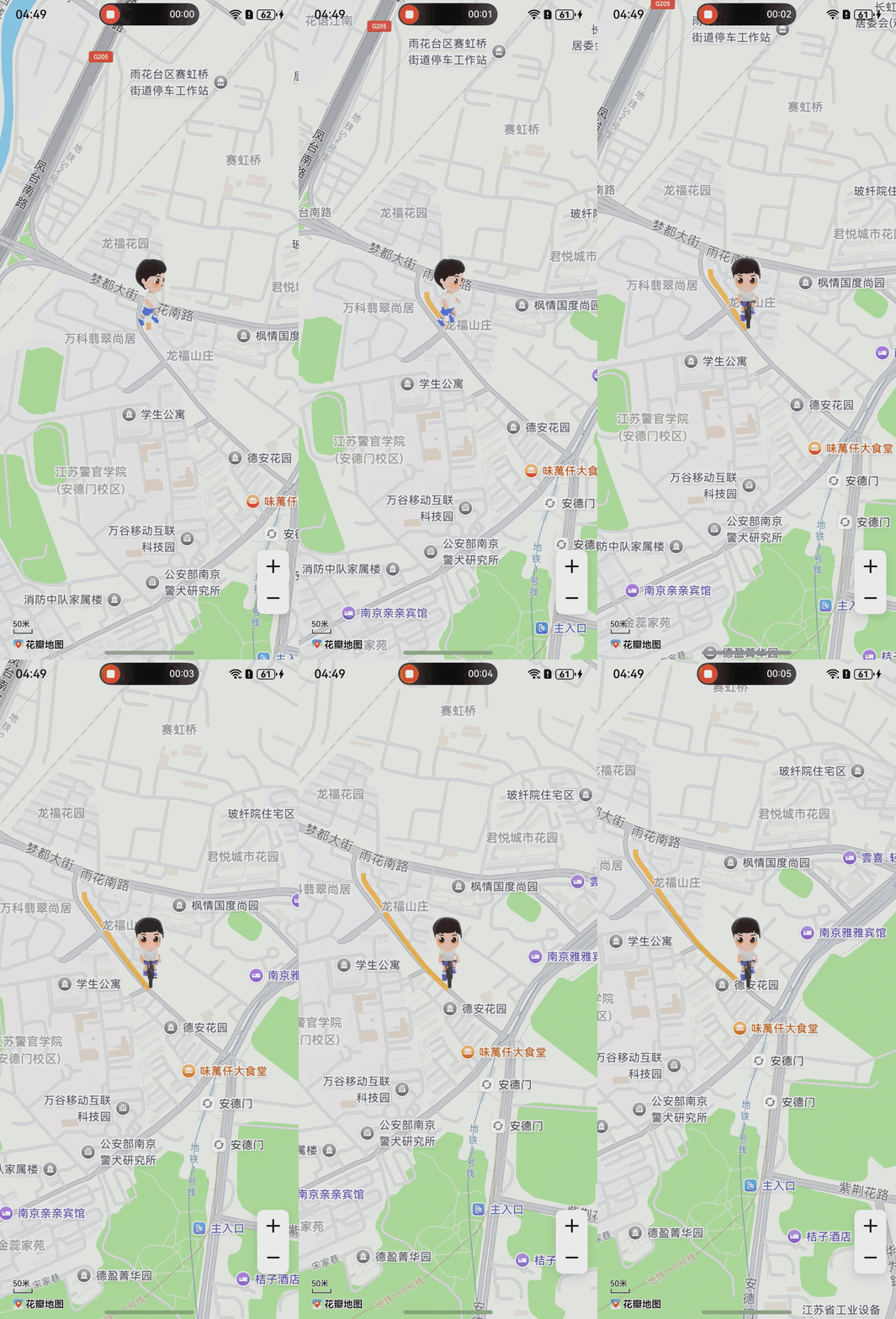
接口说明
绘制动态轨迹功能主要由TraceOverlayParams、addTraceOverlay、Marker和TraceOverlay提供,更多接口及使用方法请参见接口文档。
| 接口名 | 描述 |
|---|---|
| TraceOverlayParams | 动态轨迹参数。 |
| addTraceOverlay(params: mapCommon.TraceOverlayParams, markers?: Array<Marker>): Promise<TraceOverlay> | 绘制动态轨迹。 |
| Marker | 动态轨迹的一组标记。 |
| TraceOverlay | 动态轨迹,支持暂停和删除等功能。 |
开发步骤
-
导入相关模块。
import { mapCommon, map, MapComponent } from '@kit.MapKit';import { AsyncCallback } from '@kit.BasicServicesKit'; -
绘制动态轨迹。
@Entry@Componentstruct TraceOverlayDemo {private TAG = "OHMapSDK_TraceOverlayDemo";private mapOptions?: mapCommon.MapOptions;private mapController?: map.MapComponentController;private callback?: AsyncCallback<map.MapComponentController>;aboutToAppear(): void {// 初始化地图参数this.mapOptions = {position: {target: {latitude: 31.99227173519985,longitude: 118.7622219990476},zoom: 16},scaleControlsEnabled: true}this.callback = async (err, mapController) => {console.info(this.TAG, "mapCallback err=" + JSON.stringify(err) +"; mapController=" + JSON.stringify(mapController));if (!err) {this.mapController = mapController;// marker1的参数let markerOptions1: mapCommon.MarkerOptions = {position: {latitude: 31.99227173519985,longitude: 118.7622219990476},icon: $r("app.media.track_setting_sport_map_marker_22"),anchorU: 0.5,anchorV: 1,visible: true};// 新增marker1let markerBoy1 = await this.mapController.addMarker(markerOptions1);let boyImages1: map.PlayImageAnimation = new map.PlayImageAnimation();boyImages1.setDuration(1000);let resourceArray: Array<Resource> = new Array();// 需要替换您自己的资源图片,存放在resources/base/media目录下resourceArray.push($r("app.media.side_0"));resourceArray.push($r("app.media.side_1"));resourceArray.push($r("app.media.side_2"));resourceArray.push($r("app.media.side_3"));resourceArray.push($r("app.media.side_4"));resourceArray.push($r("app.media.side_5"));resourceArray.push($r("app.media.side_6"));resourceArray.push($r("app.media.side_7"));resourceArray.push($r("app.media.side_8"));resourceArray.push($r("app.media.side_9"));resourceArray.push($r("app.media.side_10"));resourceArray.push($r("app.media.side_11"));resourceArray.push($r("app.media.side_12"));resourceArray.push($r("app.media.side_13"));resourceArray.push($r("app.media.side_14"));resourceArray.push($r("app.media.side_15"));resourceArray.push($r("app.media.side_16"));resourceArray.push($r("app.media.side_17"));resourceArray.push($r("app.media.side_18"));resourceArray.push($r("app.media.side_19"));resourceArray.push($r("app.media.side_20"));await boyImages1.addImages(resourceArray);boyImages1.setRepeatCount(-1);// marker1添加动画markerBoy1.setAnimation(boyImages1);markerBoy1.startAnimation();// marker2的参数let markerOptions2: mapCommon.MarkerOptions = {position: {latitude: 31.99227173519985,longitude: 118.7622219990476},icon: $r("app.media.track_setting_sport_map_marker_22"),anchorU: 0.5,anchorV: 1,visible: false};// 新增marker2let markerBoy2 = await this.mapController.addMarker(markerOptions2);let boyImages2: map.PlayImageAnimation = new map.PlayImageAnimation();boyImages2.setDuration(1000);let resourceArray2: Array<Resource> = new Array();// 需要替换您自己的资源图片,存放在resources/base/media目录下resourceArray2.push($r("app.media.behavior_front_cycling_boy_000"));resourceArray2.push($r("app.media.behavior_front_cycling_boy_001"));resourceArray2.push($r("app.media.behavior_front_cycling_boy_002"));resourceArray2.push($r("app.media.behavior_front_cycling_boy_003"));resourceArray2.push($r("app.media.behavior_front_cycling_boy_004"));resourceArray2.push($r("app.media.behavior_front_cycling_boy_005"));resourceArray2.push($r("app.media.behavior_front_cycling_boy_006"));resourceArray2.push($r("app.media.behavior_front_cycling_boy_007"));resourceArray2.push($r("app.media.behavior_front_cycling_boy_008"));resourceArray2.push($r("app.media.behavior_front_cycling_boy_009"));resourceArray2.push($r("app.media.behavior_front_cycling_boy_010"));resourceArray2.push($r("app.media.behavior_front_cycling_boy_011"));resourceArray2.push($r("app.media.behavior_front_cycling_boy_012"));resourceArray2.push($r("app.media.behavior_front_cycling_boy_013"));resourceArray2.push($r("app.media.behavior_front_cycling_boy_014"));resourceArray2.push($r("app.media.behavior_front_cycling_boy_015"));resourceArray2.push($r("app.media.behavior_front_cycling_boy_016"));resourceArray2.push($r("app.media.behavior_front_cycling_boy_017"));resourceArray2.push($r("app.media.behavior_front_cycling_boy_018"));await boyImages2.addImages(resourceArray2);boyImages2.setRepeatCount(-1);// marker2添加动画markerBoy2.setAnimation(boyImages2);markerBoy2.startAnimation();let points: Array<mapCommon.LatLng> = new Array();points.push({ latitude: 31.99685233070878, longitude: 118.75846023442728 });points.push({ latitude: 31.99671325810786, longitude: 118.75846738985165 });points.push({ latitude: 31.99659191076709, longitude: 118.7585347621686 });points.push({ latitude: 31.99648202537233, longitude: 118.7586266510386 });points.push({ latitude: 31.99637707201552, longitude: 118.75872004590596 });points.push({ latitude: 31.996278207010903, longitude: 118.75880449946251 });points.push({ latitude: 31.996187481969695, longitude: 118.7588781960278 });points.push({ latitude: 31.996092248919354, longitude: 118.75895330554488 });points.push({ latitude: 31.995962740450565, longitude: 118.75904721407304 });points.push({ latitude: 31.995792921394, longitude: 118.75916904998051 });points.push({ latitude: 31.995601885713416, longitude: 118.7593235241019 });points.push({ latitude: 31.995398221178277, longitude: 118.75949998588176 });points.push({ latitude: 31.995185902197715, longitude: 118.7596871082939 });points.push({ latitude: 31.994983473052656, longitude: 118.75987334062296 });points.push({ latitude: 31.99482433699269, longitude: 118.76002095184032 });points.push({ latitude: 31.994709073721708, longitude: 118.76012902920532 });points.push({ latitude: 31.99460732100702, longitude: 118.76023892576234 });points.push({ latitude: 31.99449284962087, longitude: 118.7603694232856 });points.push({ latitude: 31.99435358179254, longitude: 118.76053622438056 });points.push({ latitude: 31.99420771148339, longitude: 118.76072790126692 });points.push({ latitude: 31.994075194901523, longitude: 118.7609100960977 });points.push({ latitude: 31.993952686158877, longitude: 118.7610741329013 });points.push({ latitude: 31.993840180644217, longitude: 118.7612193418965 });points.push({ latitude: 31.993733787150244, longitude: 118.76135383115654 });points.push({ latitude: 31.993617206525155, longitude: 118.76150529647698 });// 动态轨迹的入参let traceOptions: mapCommon.TraceOverlayParams = {// 轨迹点points: points,// 轨迹的动画时长animationDuration: 5000,// 相机是否跟随动画移动isMapMoving: true,// 轨迹的颜色color: 0xAAFFAA00,// 轨迹的宽度width: 20,// 轨迹的动画回调(回调轨迹点的index)animationCallback: (pointIndex) => {// 换成骑行if (pointIndex === 10) {markerBoy1.setVisible(false);markerBoy2.setVisible(true);}}}let markers: Array<map.Marker> = new Array();markers.push(markerBoy1, markerBoy2);// 新增轨迹点动画try {let traceOverlay = await this.mapController.addTraceOverlay(traceOptions, markers);} catch (e) {console.error(`Failed to create the traceOverlay, code is:${e.code}, message is ${e.message}`);}} else {console.error(`Failed to initialize the map, code is:${err.code}, message is ${err.message}`);}}}build() {Stack() {Column() {MapComponent({mapOptions: this.mapOptions,mapCallback: this.callback,}).width('100%').height('100%');}.width('100%')}.height('100%')}}