设置地图元素压盖顺序
场景介绍
本章节将向您介绍如何设置地图元素的层级压盖关系。
设置地图元素的显示顺序,按照从低到高排列,即后面的地图元素会压盖前面的地图元素。
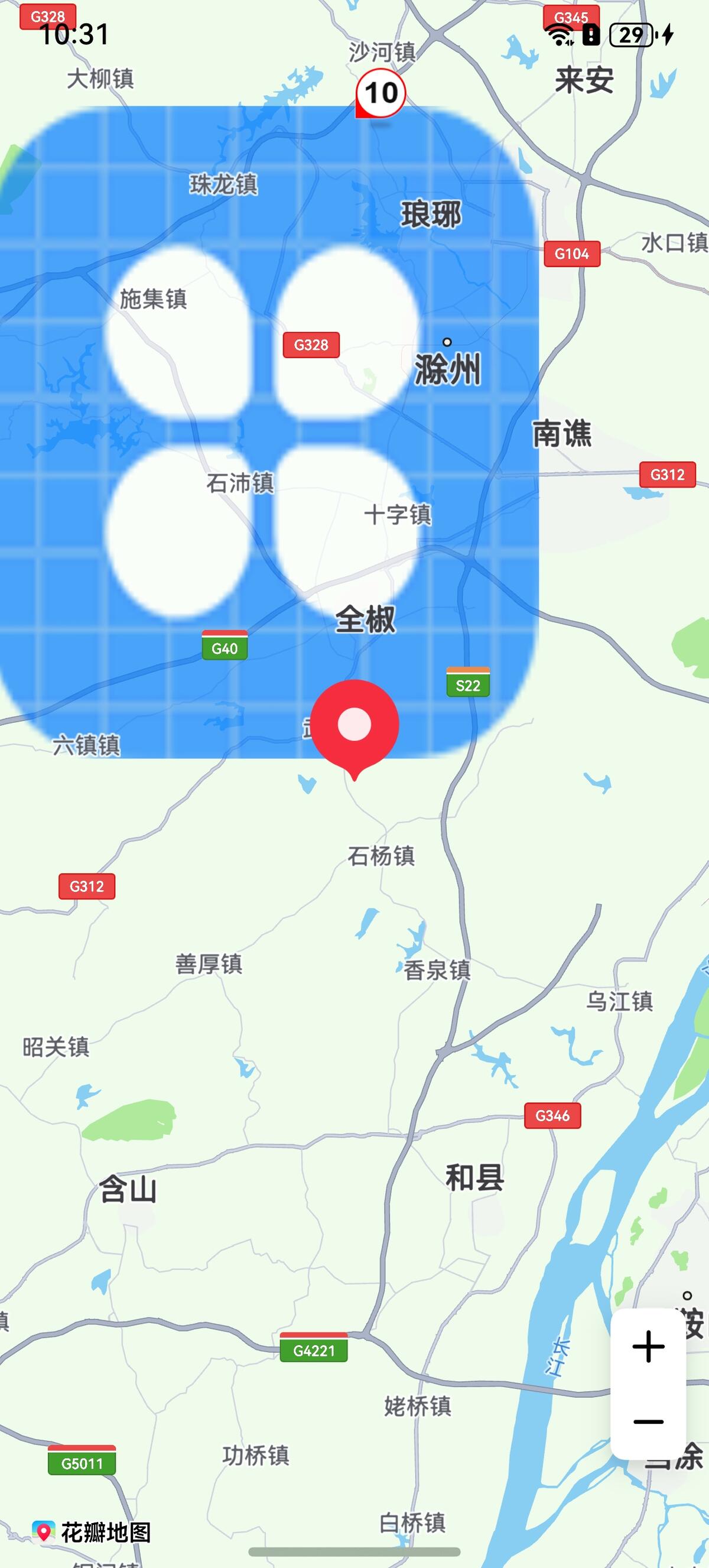
表1 地图元素类型压盖顺序
| 枚举 | 枚举值 | 枚举含义 |
|---|---|---|
| OVERLAY | 1 | 覆盖物,包括MapCircle、MapPolygon、MapPolyline、MapArc、ImageOverlay、TraceOverlay。 |
| POI | 2 | 底图Poi。 |
| CUSTOM_POI | 3 | 支持碰撞的覆盖物,包括PointAnnotation、Bubble。 |
| MARKER | 4 | 包括Marker、ClusterOverlay。 |
接口说明
设置层级压盖关系功能主要由MapElementType、setDisplayOrder提供,更多接口及使用方法请参见接口文档。
| 接口名 | 描述 |
|---|---|
| mapCommon.MapElementType | 地图元素类型。 |
| setDisplayOrder(types: Array<mapCommon.MapElementType>): void | 设置地图元素的显示顺序。 |
开发步骤
-
导入相关模块。
import { mapCommon, map, MapComponent } from '@kit.MapKit';import { AsyncCallback } from '@kit.BasicServicesKit'; -
设置地图元素层级压盖关系。
@Entry@Componentstruct MarkerDemo {private mapOptions?: mapCommon.MapOptions;private mapController?: map.MapComponentController;private callback?: AsyncCallback<map.MapComponentController>;private mapEventManager?: map.MapEventManager;private marker?: map.Marker;private bubble?: map.Bubble;aboutToAppear(): void {// 地图初始化参数this.mapOptions = {position: {target: {latitude: 31.984410259206815,longitude: 118.26625379397866},zoom: 10}};this.callback = async (err, mapController) => {if (!err) {this.mapController = mapController;this.mapEventManager = this.mapController.getEventManager();// Marker初始化参数let markerOptions: mapCommon.MarkerOptions = {position: {latitude: 31.984410259206815,longitude: 118.26625379397866},rotation: 0,visible: true,zIndex: 0,alpha: 1,anchorU: 0.5,anchorV: 1,clickable: true,draggable: true,flat: false};// 创建Markertry {this.marker = await this.mapController.addMarker(markerOptions);} catch (e) {console.error(`Failed to create the marker, code is:${e.code}, message is ${e.message}`);}let bubbleOptions: mapCommon.BubbleParams = {// 气泡位置positions: [[{latitude: 32.384410259206815,longitude: 118.26625379397866}]],// 设置图标,必须提供4个方向的图标,图标存放在resources/rawfileicons: ['speed_limit_10.png','speed_limit_20.png','speed_limit_30.png','speed_limit_40.png'],// 定义气泡的显示属性,为true时,在被碰撞后仍能显示forceVisible: true,// 定义气泡碰撞优先级,数值越大,优先级越低priority: 3,// 定义气泡展示的最小层级minZoom: 2,// 定义气泡展示的最大层级maxZoom: 20,// 定义气泡是否可见visible: true,// 定义气泡叠加层级属性zIndex: 1}// 添加气泡try {this.bubble = await this.mapController.addBubble(bubbleOptions);} catch (e) {console.error(`Failed to create the bubble, code is:${e.code}, message is ${e.message}`);}let imageOverlayParams: mapCommon.ImageOverlayParams = {// 覆盖物范围bounds: {southwest: {latitude: 32,longitude: 118},northeast: {latitude: 32.4,longitude: 118.4}},// 覆盖物图片image: 'icon/icon.png',transparency: 0.3,zIndex: 101,anchorU: 0.5,anchorV: 0.5,clickable: true,visible: true,bearing: 0};// 添加覆盖物try {await this.mapController?.addImageOverlay(imageOverlayParams);} catch (e) {console.error(`Failed to create the imageOverlay, code is:${e.code}, message is ${e.message}`);}// 设置压盖顺序,最底层的是覆盖物,后面依次是POI、支持碰撞的覆盖物和Marker,Marker在最表面一层let mapElementTypeArr: Array<mapCommon.MapElementType> = [mapCommon.MapElementType.OVERLAY,mapCommon.MapElementType.POI,mapCommon.MapElementType.CUSTOM_POI,mapCommon.MapElementType.MARKER];this.mapController.setDisplayOrder(mapElementTypeArr);} else {console.error(`Failed to initialize the map, code is:${err.code}, message is ${err.message}`);}}}build() {Stack() {Column() {MapComponent({ mapOptions: this.mapOptions, mapCallback: this.callback });}.width('100%')}.height('100%')}}