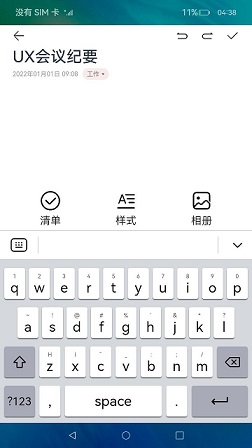
实现一个输入法应用
InputMethodExtensionAbility提供了onCreate()和onDestroy()生命周期回调,根据需要重写对应的回调方法。InputMethodExtensionAbility的生命周期如下:
-
onCreate()
服务被首次创建时触发该回调,开发者可以在此进行一些初始化的操作,例如注册公共事件监听等。

如果服务已创建,再次启动该InputMethodExtensionAbility不会触发onCreate()回调。
-
onDestroy()
当不再使用服务且准备将该实例销毁时,触发该回调。开发者可以在该回调中清理资源,如注销监听等。
开发步骤
开发者在实现一个输入法应用时,需要在DevEco Studio工程中新建一个InputMethodExtensionAbility,具体步骤如下:
-
在工程Module对应的ets目录下,右键选择“New > Directory”,新建一个目录,并命名为InputMethodExtensionAbility。
-
在InputMethodExtensionAbility目录下,右键选择“New > File”,新建四个文件,分别为KeyboardController.ets、InputMethodService.ets、Index.ets以及KeyboardKeyData.ets。目录如下:
/src/main/├── ets/InputMethodExtensionAbility│ └──model/KeyboardController.ets # 显示键盘│ └──InputMethodService.ets # 自定义类继承InputMethodExtensionAbility并加上需要的生命周期回调│ └──pages│ └── Index.ets # 绘制键盘,添加输入删除功能│ └── KeyboardKeyData.ets # 键盘属性定义├── resources/base/profile/main_pages.json
文件介绍
-
InputMethodService.ets文件。
在InputMethodService.ets文件中,增加导入InputMethodExtensionAbility的依赖包,自定义类继承InputMethodExtensionAbility并加上需要的生命周期回调。
import { InputMethodExtensionAbility } from '@kit.IMEKit';import Log from '../model/Log';import { keyboardController } from '../InputMethodExtensionAbility/model/KeyboardController';import { Want } from '@kit.AbilityKit';const TAG: string = 'ServiceExtAbility->';export default class ServiceExtAbility extends InputMethodExtensionAbility {onCreate(want: Want): void {this.addLog(`onCreate want: ${want.abilityName}`);keyboardController.onCreate(this.context);}onDestroy(): void {this.addLog('onDestroy');keyboardController.onDestroy();}addLog(message: string): void {Log.showInfo(TAG, `kikaInput-new: ${message}`);}} -
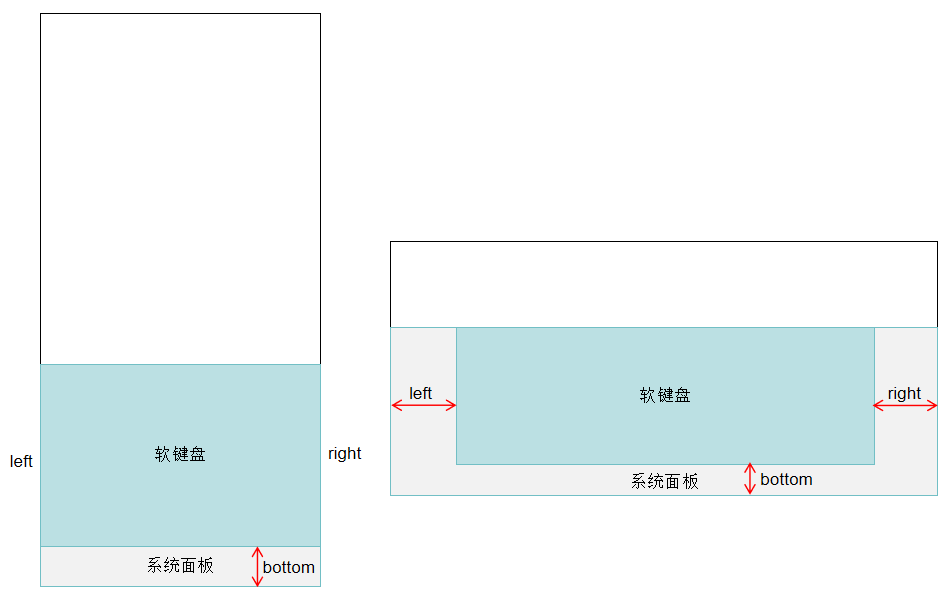
KeyboardController.ets文件。KeyboardController中除创建输入法窗口,设置输入法事件监听,实现文本插入、删除之外,还可以获取输入法键盘与系统面板的偏移区域,输入法系统面板在不同设备上存在差异,当设备有系统面板时,输入法软键盘相对系统面板的偏移区域如图所示:
 class KeyboardController {private barPosition: number = 0;private keyCodes: Array<number> = [];private mContext: InputMethodExtensionContext | undefined;private panel: inputMethodEngine.Panel | undefined;private isSpecialKeyPress: boolean = false;private isKeyboardShow: boolean = false;private inputHandle: InputHandler = InputHandler.getInstance();private mKeyboardDelegate: inputMethodEngine.KeyboardDelegate | undefined;constructor() {this.mContext = undefined;this.panel = undefined;this.mKeyboardDelegate = undefined;}public onCreate(context: InputMethodExtensionContext): void {this.mContext = context;this.inputHandle.addLog('onCreate');this.initWindow();this.registerListener();}public onDestroy(): void {this.inputHandle.addLog('onDestroy');this.unRegisterListener();this.destroyPanel();}private initWindow(): void {if (this.mContext === undefined) {return;}this.inputHandle.addLog('initWindow');let dis: display.Display | undefined = undefined;try {dis = display.getDefaultDisplaySync();} catch (err) {let error = err as BusinessError;Log.showError(TAG, `getDefaultDisplaySync catch error: ${error.code} ${error.message}`);return;}if (dis == undefined) {return;}this.inputHandle.addLog("initWindow-oncall display");let dWidth = dis.width;let dHeight = dis.height;let navigationBar_height = NAVIGATIONBAR_HEIGHT_DEFAULT;let keyHeightRate = KEYBOARD_HEIGHT_RATE_DEFAULT;AppStorage.setOrCreate('windowWidth', dis.width);AppStorage.setOrCreate('windowHeight', dis.height);let isLandscape = false;let isRkDevice = false;if (dis.width > dis.height) {isLandscape = true;AppStorage.setOrCreate('isLandscape', true);} else {AppStorage.setOrCreate('isLandscape', false);}if (dWidth === DEVICE_PHONE.width && dHeight === DEVICE_PHONE.height) {navigationBar_height = 0;keyHeightRate = KEYBOARD_HEIGHT_RATE_PHONE;} else if (dWidth === DEVICE_PHONE.height && dHeight === DEVICE_PHONE.width) {navigationBar_height = 0;keyHeightRate = KEYBOARD_HEIGHT_RATE_PHONE_LAND;} else if (dWidth === DEVICE_RK.width && dHeight === DEVICE_RK.height) {navigationBar_height = KEYBOARD_HEIGHT_RATE_DEFAULT;AppStorage.setOrCreate('isRkDevice', true);isRkDevice = true;} else if (dWidth === DEVICE_BIG.width && dHeight === DEVICE_BIG.height) {navigationBar_height = 0;keyHeightRate = KEYBOARD_HEIGHT_RATE_BIG_LAND;} else if (dWidth === DEVICE_BIG.height && dHeight === DEVICE_BIG.width) {navigationBar_height = 0;keyHeightRate = KEYBOARD_HEIGHT_RATE_BIG;}let keyHeight = dHeight * keyHeightRate;this.barPosition = dHeight - keyHeight - navigationBar_height;this.inputHandle.addLog(`initWindow-dWidth = ${dWidth};dHeight = ${dHeight};keyboard height = ${keyHeight};;navibar height = navigationBar_height`);this.inputHandle.addLog(`initWindow-deviceType = ${deviceInfo.deviceType}`);let panelInfo: inputMethodEngine.PanelInfo = {type: inputMethodEngine.PanelType.SOFT_KEYBOARD,flag: inputMethodEngine.PanelFlag.FLG_FIXED}let inputStyle = StyleConfiguration.getInputStyle(isLandscape, isRkDevice, deviceInfo.deviceType);AppStorage.setOrCreate('inputStyle', inputStyle);inputMethodAbility.createPanel(this.mContext, panelInfo).then((panel: inputMethodEngine.Panel) => {this.panel = panel;panel.resize(dWidth, keyHeight).then(() => {panel.setUiContent('InputMethodExtensionAbility/pages/Index').then(() => {this.inputHandle.addLog('loadContent finished');})}).catch((err: BusinessError) => {Log.showError(TAG, `Failed to setUiContent: ${err.code} ${err.message}`);});}).catch((err: BusinessError) => {Log.showError(TAG, `Failed to resize: ${err.code} ${err.message}`);});}private destroyPanel(): void {this.inputHandle.addLog('destroyPanel');if (this.panel) {inputMethodAbility.destroyPanel(this.panel).then(() => {this.inputHandle.addLog('Succeeded in destroyPanel.');}).catch((err: BusinessError) => {Log.showError(TAG, `Failed to destroyPanel: ${err.code} ${err.message}`);});}}private resizePanel(): void {this.inputHandle.addLog('resizeWindow');let dis: display.Display | undefined = undefined;try {dis = display.getDefaultDisplaySync();} catch (err) {let error = err as BusinessError;Log.showError(TAG, `getDefaultDisplaySync catch error: ${error.code} ${error.message}`);return;}if (dis == undefined) {return;}this.inputHandle.addLog('resizeWindow-oncall display');let dWidth = dis.width;let dHeight = dis.height;let keyHeightRate = KEYBOARD_HEIGHT_RATE_DEFAULT;AppStorage.setOrCreate<number>('windowWidth', dis.width);AppStorage.setOrCreate<number>('windowHeight', dis.height);let isLandscape = false;let isRkDevice = false;if (dis.width > dis.height) {isLandscape = true;AppStorage.setOrCreate('isLandscape', true);} else {AppStorage.setOrCreate('isLandscape', false);}if (dWidth === DEVICE_PHONE.width && dHeight === DEVICE_PHONE.height) {keyHeightRate = KEYBOARD_HEIGHT_RATE_PHONE;} else if (dWidth === DEVICE_PHONE.height && dHeight === DEVICE_PHONE.width) {keyHeightRate = KEYBOARD_HEIGHT_RATE_PHONE_LAND;} else if (dWidth === DEVICE_RK.width && dHeight === DEVICE_RK.height) {AppStorage.setOrCreate('isRkDevice', true);isRkDevice = true;} else if (dWidth === DEVICE_BIG.width && dHeight === DEVICE_BIG.height) {keyHeightRate = KEYBOARD_HEIGHT_RATE_BIG_LAND;} else if (dWidth === DEVICE_BIG.height && dHeight === DEVICE_BIG.width) {keyHeightRate = KEYBOARD_HEIGHT_RATE_BIG;}let keyHeight = dHeight * keyHeightRate;let inputStyle = StyleConfiguration.getInputStyle(isLandscape, isRkDevice, deviceInfo.deviceType);AppStorage.setOrCreate('inputStyle', inputStyle);if (this.panel) {this.panel.resize(dWidth, keyHeight).then(() => {}).catch((err: BusinessError) => {this.inputHandle.addLog(`resizePanel err = ${err.code} ${err.message}`);})}}private registerListener(): void {this.inputHandle.addLog('registerListener');try {display.on('change', () => {this.inputHandle.addLog('screenChangeEvent');this.resizePanel();});} catch (err) {let error = err as BusinessError;Log.showError(TAG, `display on change catch error: ${error.code} ${error.message}`);}inputMethodAbility.on('inputStart',(kbController: inputMethodEngine.KeyboardController, textInputClient: inputMethodEngine.InputClient) => {this.inputHandle.addLog('keyboard inputStart');this.inputHandle.onInputStart(kbController, textInputClient);})// 设置监听子类型事件,改变输入法应用界面inputMethodAbility.on('setSubtype', (inputMethodSubtype: InputMethodSubtype) => {if (inputMethodSubtype.id === 'InputMethodExtAbility') {AppStorage.setOrCreate('subtypeChange', 0);}if (inputMethodSubtype.id === 'InputMethodExtAbility1') {AppStorage.setOrCreate('subtypeChange', 1);}});inputMethodAbility.on('inputStop', () => {this.inputHandle.addLog('keyboard inputStop');this.onDestroy();if (this.mContext) {this.mContext.destroy();}});this.inputHandle.addLog('pre on privateCommand');try {inputMethodAbility.on('privateCommand', (record: Record<string, inputMethodEngine.CommandDataType>) => {this.inputHandle.addLog(`keyboard privateCommand : ${record}`);Object.keys(record).forEach((key: string) => {this.inputHandle.addLog(`onPageShow private command key: ${key}, value: ${record[key]}`);})});} catch (err) {let error = err as BusinessError;this.inputHandle.addLog(`on privateCommand sendPrivateCommand catch error: ${error.code} ${error.message}`);}this.mKeyboardDelegate = inputMethodEngine.getKeyboardDelegate();this.mKeyboardDelegate.on('keyDown', (keyEvent: inputMethodEngine.KeyEvent) => {if (this.isKeyboardShow) {this.inputHandle.hideKeyboardSelf();}this.inputHandle.addLog(`keyDown: code = ${keyEvent.keyCode}`);let result = this.onKeyDown(keyEvent);this.inputHandle.addLog(`keyDown: result = ${result}`);return result;});this.mKeyboardDelegate.on('keyUp', (keyEvent: inputMethodEngine.KeyEvent) => {this.inputHandle.addLog(`keyUp: code = ${keyEvent.keyCode}`);let result = this.onKeyUp(keyEvent);this.inputHandle.addLog(`keyUp: result = ${result}`);return result;});this.mKeyboardDelegate.on('cursorContextChange', (x: number, y: number, height: number) => {let cursorInfo: CursorInfo = { x: x, y: y, height: height };this.inputHandle.setCursorInfo(cursorInfo);});if (isDebug) {this.mKeyboardDelegate.on('selectionChange',(oldBegin: number, oldEnd: number, newBegin: number, newEnd: number) => {this.inputHandle.setSelectInfo('selectInfo: from(' + oldBegin + ',' + oldEnd + ') to (' + newBegin + ',' +newEnd + ')');});this.mKeyboardDelegate.on('textChange', (text: string) => {this.inputHandle.setTextInfo('textInfo: ' + text);});}}public isShiftKeyHold(): boolean {if (this.keyCodes.length === 0) {return false;}let preDownKey = this.keyCodes[0];return preDownKey === KeyCode.KEYCODE_SHIFT_LEFT || preDownKey === KeyCode.KEYCODE_SHIFT_RIGHT;}public onKeyDown(keyEvent: inputMethodEngine.KeyEvent): boolean {this.inputHandle.addLog('onKeyDown: code = ' + keyEvent.keyCode);let keyCode = keyEvent.keyCode;let idx = this.keyCodes.indexOf(keyCode);if (idx === -1) {this.keyCodes.push(keyCode);} else {this.inputHandle.addLog(`keyCode down is intercepted: ${keyCode}}`);}if (this.isShiftKeyHold() && this.keyCodes.length === 2 && !this.isKeyCodeAZ(keyCode)) {this.isSpecialKeyPress = true;return false;}if (this.isSpecialKeyPress || keyCode === KeyCode.KEYCODE_ALT_LEFT || keyCode === KeyCode.KEYCODE_ALT_RIGHT) {return false;}let keyValue: string = getHardKeyValue(keyCode, this.isShiftKeyHold());if (keyValue === '') {this.inputHandle.addLog('onKeyDown: unknown keyCode');this.isSpecialKeyPress = true;return false;}return this.inputHardKeyCode(keyValue, keyCode);}public onKeyUp(keyEvent: inputMethodEngine.KeyEvent): boolean {this.inputHandle.addLog('OnKeyUp: code = ' + keyEvent.keyCode);let keyCode = keyEvent.keyCode;let idx = this.keyCodes.indexOf(keyCode);if (idx !== -1) {this.keyCodes.splice(idx, 1);} else {this.inputHandle.addLog(`keyCode KeyUp is intercepted: ${keyCode}`);}// For KEYCODE_DEL/KEYCODE_FORWARD_DEL, processed in OnKeyDown, so just intercept itif (keyCode === 2055 || keyCode === 2071 || (keyCode >= 2012 && keyCode <= 2016)) {this.inputHandle.addLog(`special code: ${keyCode}`);return true;}if (this.isSpecialKeyPress) {let keyValue = getHardKeyValue(keyCode, this.isShiftKeyHold());if (!keyValue) {this.isSpecialKeyPress = true;}if (this.keyCodes.length === 0) {this.isSpecialKeyPress = false;}this.inputHandle.addLog(`OnKeyUp: this.isSpecialKeyPress: ${this.isSpecialKeyPress}`);return false;}return true;}public isKeyCodeAZ(keyCode: number): boolean {return keyCode >= KeyCode.KEYCODE_A && keyCode <= KeyCode.KEYCODE_Z;}public isKeyCodeNumber(keyCode: number): boolean {return (keyCode >= KeyCode.KEYCODE_0 && keyCode <= KeyCode.KEYCODE_9) ||(keyCode >= KeyCode.KEYCODE_NUMPAD_0 && keyCode <= KeyCode.KEYCODE_NUMPAD_9);}public inputHardKeyCode(keyValue: string, keyCode: number): boolean {this.inputHandle.addLog(`inputHardKeyCode keyValue is: ${keyValue}`);if (this.processFunctionKeys(keyValue)) {return true;}if (this.shiftKeys(keyValue)) {return false;}this.inputHandle.insertText(keyValue);return true;}public shiftKeys(keyValue: string): boolean {this.inputHandle.addLog(`shiftKeys keyValue is: ${keyValue}`);switch (keyValue) {case 'KEYCODE_SHIFT_LEFT':case 'KEYCODE_SHIFT_RIGHT':return true;default:return false;}}public processFunctionKeys(keyValue: string): boolean {this.inputHandle.addLog(`processFunctionKeys keyValue is: ${keyValue}`);switch (keyValue) {case "KEYCODE_DEL":this.inputHandle.deleteForward(1);return true;case "KEYCODE_FORWARD_DEL":this.inputHandle.deleteBackward(1);return true;case "KEYCODE_DPAD_UP":this.inputHandle.moveCursor(inputMethodEngine.Direction.CURSOR_UP);return true;case "KEYCODE_DPAD_DOWN":this.inputHandle.moveCursor(inputMethodEngine.Direction.CURSOR_DOWN);return true;case "KEYCODE_DPAD_LEFT":this.inputHandle.moveCursor(inputMethodEngine.Direction.CURSOR_LEFT);return true;case "KEYCODE_DPAD_RIGHT":this.inputHandle.moveCursor(inputMethodEngine.Direction.CURSOR_RIGHT);return true;default:return false;}}private unRegisterListener(): void {this.inputHandle.addLog('unRegisterListener');inputMethodAbility.off('inputStop', () => {this.inputHandle.addLog('inputStop off');});if (this.mKeyboardDelegate) {this.mKeyboardDelegate.off('keyDown');this.mKeyboardDelegate.off('keyUp');if (isDebug) {this.mKeyboardDelegate.off('cursorContextChange');this.mKeyboardDelegate.off('selectionChange');this.mKeyboardDelegate.off('textChange');}}}}export const keyboardController: KeyboardController = new KeyboardController();
 -
KeyboardKeyData.ets文件。
定义软键盘的按键显示内容。
export interface keySourceListType {title: string,content: string,upperContent: string}export interface sourceListType {content: string}export enum MenuKey {NUMBER_KEY = '?123',NORMAL_KEY = 'ABC',SPECIAL_KEY = '=/\<'}export enum SubMenuType {NORMAL = 0,MENU = 1,EDIT = 2}export enum MenuType {NORMAL = 0,NUMBER = 1,SPECIAL = 2}export enum KeyState {LOWER_CASE = 0,ONCE_UPPER_CASE = 1,UPPER_CASE = 2}export let keySourceListData: keySourceListType[] = [{title: '1',content: 'q',upperContent: 'Q'},{title: '2',content: 'w',upperContent: 'W'},{title: '3',content: 'e',upperContent: 'E'},{title: '4',content: 'r',upperContent: 'R'},{title: '5',content: 't',upperContent: 'T'},{title: '6',content: 'y',upperContent: 'Y'},{title: '7',content: 'u',upperContent: 'U'},{title: '8',content: 'i',upperContent: 'I'},{title: '9',content: 'o',upperContent: 'O'},{title: '0',content: 'p',upperContent: 'P'},{title: String.fromCharCode(126),content: 'a',upperContent: 'A'},{title: String.fromCharCode(33),content: 's',upperContent: 'S'},{title: '@',content: 'd',upperContent: 'D'},{title: String.fromCharCode(35),content: 'f',upperContent: 'F'},{title: '%',content: 'g',upperContent: 'G'},{title: String.fromCharCode(39),content: 'h',upperContent: 'H'},{title: '&',content: 'j',upperContent: 'J'},{title: '*',content: 'k',upperContent: 'K'},{title: '?',content: 'l',upperContent: 'L'},{title: String.fromCharCode(72),content: 'z',upperContent: 'Z'},{title: String.fromCharCode(73),content: 'x',upperContent: 'X'},{title: String.fromCharCode(175),content: 'c',upperContent: 'C'},{title: String.fromCharCode(95),content: 'v',upperContent: 'V'},{title: String.fromCharCode(58),content: 'b',upperContent: 'B'},{title: String.fromCharCode(59),content: 'n',upperContent: 'N'},{title: String.fromCharCode(47),content: 'm',upperContent: 'M'}]export let numberSourceListData: sourceListType[] = [{content: '1'},{content: '2'},{content: '3'},{content: '4'},{content: '5'},{content: '6'},{content: '7'},{content: '8'},{content: '9'},{content: '0'},{content: '@'},{content: '#'},{content: '$'},{content: '%'},{content: '&'},{content: '-'},{content: '+'},{content: '('},{content: ')'},{content: '/'},{content: '*'},{content: '"'},{content: "'"},{content: ':'},{content: ';'},{content: '!'},{content: '?'},]export let symbolSourceListData: sourceListType[] = [{content: '~'},{content: '`'},{content: '|'},{content: '\u2022'},{content: '\u221A'},{content: '\u03A0'},{content: '\u00F7'},{content: '\u00D7'},{content: String.fromCharCode(182)},{content: '\u2206'},{content: String.fromCharCode(163)},{content: '\u20ac'},{content: String.fromCharCode(165)},{content: String.fromCharCode(162)},{content: String.fromCharCode(94)},{content: '\u00B0'},{content: '='},{content: String.fromCharCode(123)},{content: String.fromCharCode(125)},{content: String.fromCharCode(44)},{content: String.fromCharCode(92)},{content: String.fromCharCode(169)},{content: String.fromCharCode(174)},{content: '\u2122'},{content: '\u2105'},{content: '['},{content: ']'}] -
Index.ets文件。
主要描绘了具体按键功能。如按下数字键,就会将数字内容在输入框中打印出来,按下删除键,就会将内容删除。
import { deviceInfo } from '@kit.BasicServicesKit';import Log from '../../model/Log';import { EditView } from '../../components/EditView';import { InputHandler } from '../model/KeyboardController';import {MenuType,SubMenuType,} from '../../model/KeyboardKeyData';import { KeyMenu } from '../../components/KeyMenu';import { NumberMenu } from '../../components/NumberMenu';import { StyleConfiguration, KeyStyle } from '../../common/StyleConfiguration';import { SymbolMenu } from '../../components/SymbolMenu';import { Submenu } from '../../components/Submenu';import { TopMenu } from '../../components/TopMenu';import { inputMethodEngine } from '@kit.IMEKit';const DEVICE_TYPE: string = deviceInfo.deviceType;const TAG: string = 'index->';@Entry@Componentstruct Index {@Provide menuType: number = MenuType.NORMAL;@StorageLink('inputPattern') @Watch('inputPatternChange') inputPattern: InputType = InputType.Normal@StorageLink('submenuType') submenuType: number = SubMenuType.NORMAL;@StorageLink('isLandscape') @Watch('change') isLandscape: boolean = false;@StorageLink('isRkDevice') isRkDevice: boolean = true;@StorageLink('inputStyle') inputStyle: KeyStyle = StyleConfiguration.getInputStyle(this.isLandscape, this.isRkDevice, DEVICE_TYPE);private panel: inputMethodEngine.Panel | undefined;@StorageLink('subtypeChange') subtypeChange: number = 0;aboutToAppear(): void {// 感知是否设置沉浸模式,如果是沉浸模式选择沉浸模式类型inputMethodEngine.getKeyboardDelegate().on("editorAttributeChanged", (attr : inputMethodEngine.EditorAttribute) => {console.info('recv editorAttributeChanged, immersiveMode: ', attr.immersiveMode);if (attr.immersiveMode == 1) {this.panel?.setImmersiveMode(inputMethodEngine.ImmersiveMode.DARK_IMMERSIVE);console.info('recv editorAttributeChanged, panel:', this.panel?.getImmersiveMode());}})}onBackPress(): boolean {Log.showInfo(TAG, 'kikaInput onBackPress');this.submenuType = SubMenuType.NORMAL;InputHandler.getInstance().hideKeyboardSelf();return true;}inputPatternChange(): void {if (this.inputPattern === InputType.Number || this.inputPattern === InputType.PhoneNumber) {this.menuType = MenuType.NUMBER;} else {this.menuType = MenuType.NORMAL;}}change(): void {AppStorage.set('inputStyle', StyleConfiguration.getInputStyle(this.isLandscape, this.isRkDevice, DEVICE_TYPE));}build() {Stack() {Column() {TopMenu()Column() {if (this.submenuType > SubMenuType.NORMAL) {if (this.submenuType === SubMenuType.MENU) {Submenu()} else {EditView();}} else {if (this.menuType === MenuType.NORMAL) {if (this.subtypeChange == 0) {KeyMenu()} else {NumberMenu()}} else if (this.menuType === MenuType.NUMBER) {NumberMenu()} else {SymbolMenu()}}}.width('100%').layoutWeight(1).justifyContent(FlexAlign.Center).backgroundColor('#D5D8DD')}.height('100%')}.height('100%').backgroundColor(Color.White)}} -
main_pages.json文件。对应ets/InputMethodExtensionAbility/pages/路径下键盘的绘制页面。
{"src": ["InputMethodExtensionAbility/pages/Index"]} -
在工程Module对应的module.json5配置文件中注册InputMethodExtensionAbility,type标签需要设置为“inputMethod”,srcEntry标签表示当前InputMethodExtensionAbility组件所对应的代码路径。
"extensionAbilities": [{"srcEntry": "./ets/InputMethodExtensionAbility/InputMethodService.ets","name": "InputMethodService","label": "$string:MainAbility_label","description": "$string:extension_ability_descriptor","type": "inputMethod","exported": true,"metadata": [{"name": "ohos.extension.input_method","resource": "$profile:input_method_config"}]}],
约束与限制
为了降低InputMethodExtensionAbility能力被三方应用滥用的风险,现通过基础访问模式的功能约束对输入法应用进行安全管控。
严格遵从基础访问模式的功能约束。在此模式下,开发者应仅提供基础打字功能,不应提供任何形式与网络交互相关的功能。系统会逐步增加基础访问模式的安全管控能力,包括但不限于:以独立进程和沙箱的方式运行Extension进程;禁止Extension进程创建子进程;进程间通信与网络访问等。因此未遵从此约定可能会导致功能异常。
示例效果图