拉起运动健康App隐私授权
场景介绍
用户在设备上首次使用运动健康服务时,需要用户同意运动健康服务隐私协议,当前隐私授权依赖运动健康App,需引导用户打开运动健康App并完成隐私授权。
开发者调用后续章节的接口后,如果返回错误码1002703001,可参考本章节,引导用户同意运动健康服务隐私授权。
开发步骤
-
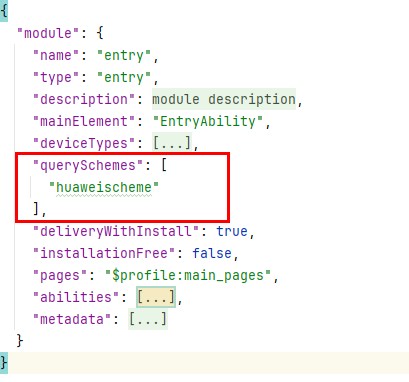
在module.json5文件中增加querySchemes字段,并在列表中配置"huaweischeme"。
"huaweischeme"为需要跳转到的运动健康App首页的scheme,页面参考如下:
-
导入相关功能模块。
import { bundleManager, common, Want } from '@kit.AbilityKit';import { BusinessError } from '@kit.BasicServicesKit';import { productViewManager } from '@kit.AppGalleryKit';import { hilog } from '@kit.PerformanceAnalysisKit'; -
调用canOpenLink判断运动健康App是否安装。
try {// 请在组件内获取context,确保this.getUIContext().getHostContext()返回结果为UIAbilityContextlet result = bundleManager.canOpenLink('huaweischeme://healthapp/home/main');let context = this.getUIContext().getHostContext() as common.UIAbilityContext;if (result) {// 拉起运动健康App首页,进行隐私授权let link: string = 'huaweischeme://healthapp/home/main';await context.openLink(link)} else {// 拉起应用市场推荐,引导用户下载运动健康App,进行隐私授权const wantParam: Want = {parameters: {bundleName: 'com.huawei.hmos.health'}};const callback: productViewManager.ProductViewCallback = {onError: (error: BusinessError) => {hilog.error(0x0001, 'TAG', `Failed to open AppGallery.Code: ${error.code}, message: ${error.message}`);}}productViewManager.loadProduct(context, wantParam, callback);}} catch (err) {hilog.error(0x0000, 'testTag', `Failed to agree user privacy.Code: ${err.code}, message: ${err.message}`);}