开发指导(C/C++)
游戏场景感知包括:
- Game Service Kit通过游戏提供的精细化场景信息、配置信息和网络信息等数据,以及当前负载情况使用不同策略优化系统资源调度。
- Game Service Kit通过感知游戏设备的系统状态信息(包括温度变化趋势数据、GPU性能信息和CPU性能信息等),并将其反馈给游戏应用,游戏应用可以基于当前设备状态自行调整游戏设置等内容,在系统资源有限的情况下优化玩家的游戏体验。
业务流程
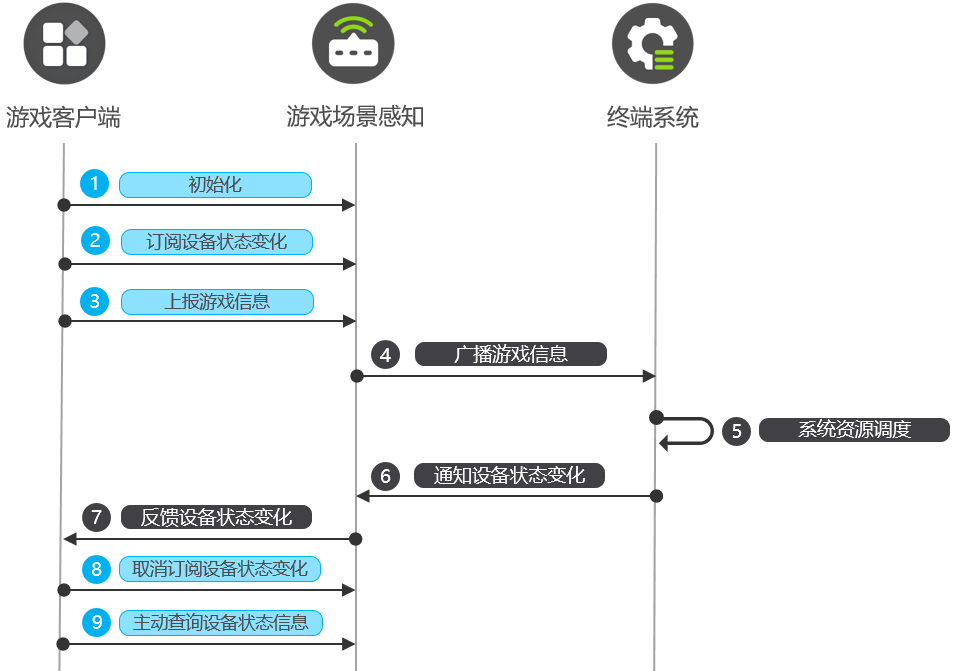
-
游戏启动后调用HMS_GamePerformance_Init接口对游戏场景感知进行初始化。
-
初始化成功后,游戏调用HMS_GamePerformance_RegisterThermalLevelChangedCallback接口注册设备状态变化事件监听,订阅设备状态变化通知。
-
游戏调用以下接口向游戏场景感知上报各种游戏信息。
-
游戏场景感知广播游戏信息给终端系统。
-
终端系统根据游戏信息进行系统资源调度。
-
终端系统会将设备状态变化通知游戏场景感知。
-
游戏场景感知向游戏客户端反馈设备状态变化。
-
如不再需要订阅,游戏可调用HMS_GamePerformance_UnregisterThermalLevelChangedCallback接口或HMS_GamePerformance_UnregisterAllThermalLevelChangedCallbacks接口取消设备状态变化事件监听。
-
游戏调用以下接口向游戏场景感知主动查询设备状态信息。
- 设备GPU性能信息:HMS_GamePerformance_QueryGpuInfo
- 设备CPU性能信息:HMS_GamePerformance_QueryCpuInfo
- 设备温度相关信息:HMS_GamePerformance_QueryThermalInfo

Mali系列GPU不支持采集GPU性能信息,调用订阅和查询设备状态信息接口时无法获取设备GPU性能信息。
接口说明
具体API说明详见接口文档。
接入步骤
在 CMake 脚本中链接动态库
target_include_directories(entry PUBLIC ${HMOS_SDK_NATIVE}/sysroot/usr/include)
target_link_directories(entry PUBLIC ${HMOS_SDK_NATIVE}/sysroot/usr/lib/aarch64-linux-ohos)
target_link_libraries(entry PUBLIC libgame_performance.z.so)
导入模块
导入Game Service Kit。
#include <GameServiceKit/game_performance.h>
#include <cstdlib>
初始化
导入相关模块后,需先调用HMS_GamePerformance_Init接口对游戏场景感知进行初始化。
HMS_GamePerformance_Init接口是调用其他接口的前提,如果未初始化或初始化失败,将无法调用其他接口。
// 创建初始化参数
GamePerformance_InitParameters *initParameters = NULL;
HMS_GamePerformance_CreateInitParameters(&initParameters);

// 设置参数,所有SetXXX接口的第二个参数均为示例,请替换成实际参数
GamePerformance_ErrorCode appVersionSetCode = HMS_GamePerformance_InitParameters_SetAppVersion(initParameters, "1.0");

// 所有SetXXX接口,如果参数设置错误,将会返回错误码401;为确保参数设置无误,建议接收返回值并判断错误码
if (appVersionSetCode != GAME_PERFORMANCE_SUCCESS) {
    // 异常处理
}
HMS_GamePerformance_InitParameters_SetBundleName(initParameters, "com.example.demo");

// 初始化
GamePerformance_ErrorCode ret = HMS_GamePerformance_Init(initParameters);
if (ret != GAME_PERFORMANCE_SUCCESS) {
    // 异常处理
}

// 使用完释放内存
HMS_GamePerformance_DestroyInitParameters(&initParameters);
注册温度变化回调
调用HMS_GamePerformance_RegisterThermalLevelChangedCallback接口可以注册温度变化回调,获取设备状态信息的通知,包括温度相关信息、GPU负载和CPU负载信息。
// 定义回调函数
static void onThermalLevelChanged(GamePerformance_DeviceInfo *deviceInfo, void *userData) {
// 获取GPU负载等级(须订阅设备信息类型:GAME_PERFORMANCE_DEVICEINFO_TYPE_GPU)
(void) userData;
GamePerformance_GpuInfo *gpuInfo = NULL;
HMS_GamePerformance_DeviceInfo_GetGpuInfo(deviceInfo, &gpuInfo);
int32_t gpuloadLevel = -1;
int32_t vertexLevel = -1;
int32_t fragmentLoadLevel = -1;
int32_t bandwidthLoadLevel = -1;
int32_t textureLoadLevel = -1;
int32_t currentFrequency = -1;
HMS_GamePerformance_GpuInfo_GetGpuLoadLevel(gpuInfo, &gpuloadLevel);
HMS_GamePerformance_GpuInfo_GetVertexLoadLevel(gpuInfo, &vertexLevel);
HMS_GamePerformance_GpuInfo_GetFragmentLoadLevel(gpuInfo, &fragmentLoadLevel);
HMS_GamePerformance_GpuInfo_GetBandwidthLoadLevel(gpuInfo, &bandwidthLoadLevel);
HMS_GamePerformance_GpuInfo_GetTextureLoadLevel(gpuInfo, &textureLoadLevel);
HMS_GamePerformance_GpuInfo_GetCurrentFrequency(gpuInfo, ¤tFrequency);
// 获取温度相关信息(须订阅设备信息类型:GAME_PERFORMANCE_DEVICEINFO_TYPE_THERMAL)
GamePerformance_ThermalInfo *thermalInfo = NULL;
HMS_GamePerformance_DeviceInfo_GetThermalInfo(deviceInfo, &thermalInfo);
int32_t margin = INT32_MIN;
int32_t trend = INT32_MIN;
int32_t level = -1;
int32_t recommendNormalizedCurrent = 0;
int32_t nowNormalizedCurrent = 0;
int32_t recommendMaxNormalizedCurrent = 0;
HMS_GamePerformance_ThermalInfo_GetThermalMargin(thermalInfo, &margin);
HMS_GamePerformance_ThermalInfo_GetThermalTrend(thermalInfo, &trend);
HMS_GamePerformance_ThermalInfo_GetThermalLevel(thermalInfo, &level);
HMS_GamePerformance_ThermalInfo_GetRecommendNormalizedCurrent(thermalInfo, &recommendNormalizedCurrent);
HMS_GamePerformance_ThermalInfo_GetNowNormalizedCurrent(thermalInfo, &nowNormalizedCurrent);
HMS_GamePerformance_ThermalInfo_GetRecommendMaxNormalizedCurrent(thermalInfo, &recommendMaxNormalizedCurrent);
// 获取CPU使用率(须订阅设备信息类型:GAME_PERFORMANCE_DEVICEINFO_TYPE_CPU)
GamePerformance_CpuInfo *cpuInfo = NULL;
HMS_GamePerformance_DeviceInfo_GetCpuInfo(deviceInfo, &cpuInfo);
int32_t cpuLoadLevel = 0;
int32_t singleThreadLoadLevel = 0;
HMS_GamePerformance_CpuInfo_GetCpuLoadLevel(cpuInfo, &cpuLoadLevel);
HMS_GamePerformance_CpuInfo_GetSingleThreadLoadLevel(cpuInfo, &singleThreadLoadLevel);
// 使用完释放内存
HMS_GamePerformance_DestroyGpuInfo(&gpuInfo);
HMS_GamePerformance_DestroyThermalInfo(&thermalInfo);
HMS_GamePerformance_DestroyCpuInfo(&cpuInfo);
}
// 注册回调
void registerCallback() {
// 按需订阅设备信息类型
int size = 2; // 订阅的设备信息类型的数量,即下文array数组的长度
GamePerformance_DeviceInfoType **array = (GamePerformance_DeviceInfoType **)malloc(sizeof(GamePerformance_DeviceInfoType *) * size);
if (array == NULL) {
// 异常处理
}
array[0] = (GamePerformance_DeviceInfoType *)malloc(sizeof(GamePerformance_DeviceInfoType));
array[1] = (GamePerformance_DeviceInfoType *)malloc(sizeof(GamePerformance_DeviceInfoType));
if (!array[0] || !array[1]) {
// 异常处理
}
*(array[0]) = GAME_PERFORMANCE_DEVICEINFO_TYPE_GPU;
*(array[1]) = GAME_PERFORMANCE_DEVICEINFO_TYPE_THERMAL;
void *userData = (void *)"mydata"; // 用户自定义任意类型,callback透传返回
GamePerformance_ErrorCode ret =
HMS_GamePerformance_RegisterThermalLevelChangedCallback(array, size, onThermalLevelChanged, userData);
free(array);
if (ret != GAME_PERFORMANCE_SUCCESS) {
// 异常处理
}
}
取消注册指定温度变化回调
调用HMS_GamePerformance_UnregisterThermalLevelChangedCallback接口可以取消注册指定温度变化回调。
// 取消注册
GamePerformance_ErrorCode ret = HMS_GamePerformance_UnregisterThermalLevelChangedCallback(onThermalLevelChanged);
if (ret != GAME_PERFORMANCE_SUCCESS) {
    // 异常处理
}
取消注册所有温度变化回调
可以通过调用HMS_GamePerformance_UnregisterAllThermalLevelChangedCallbacks接口可以取消注册所有温度变化回调。
// 取消所有注册的函数
GamePerformance_ErrorCode ret = HMS_GamePerformance_UnregisterAllThermalLevelChangedCallbacks();
if (ret != GAME_PERFORMANCE_SUCCESS) {
    // 异常处理
}
上报游戏包信息
初始化成功后,可以通过调用HMS_GamePerformance_UpdatePackageInfo接口上报游戏包信息。
GamePerformance_PackageInfo *packageInfo = NULL;
HMS_GamePerformance_CreatePackageInfo(&packageInfo);

// SetXXX接口的第二个参数均为示例,请替换成实际参数
// 设置必选参数
HMS_GamePerformance_PackageInfo_SetBundleName(packageInfo, "com.example.demo");
HMS_GamePerformance_PackageInfo_SetAppVersion(packageInfo, "1.0");

// 按需设置可选参数
HMS_GamePerformance_PackageInfo_SetEngineType(packageInfo, GAME_PERFORMANCE_ENGINE_TYPE_COCOS);
HMS_GamePerformance_PackageInfo_SetEngineVersion(packageInfo, "2.0");
HMS_GamePerformance_PackageInfo_SetGameType(packageInfo, GAME_PERFORMANCE_GAME_TYPE_FPS);

// 上报游戏包信息
GamePerformance_ErrorCode ret = HMS_GamePerformance_UpdatePackageInfo(packageInfo);
if (ret != GAME_PERFORMANCE_SUCCESS) {
    // 异常处理
}

// 使用完释放内存
HMS_GamePerformance_DestroyPackageInfo(&packageInfo);
上报游戏配置信息
初始化成功后,可以通过调用HMS_GamePerformance_UpdateConfigInfo接口上报游戏配置信息。
GamePerformance_ConfigInfo *configInfo = NULL;
HMS_GamePerformance_CreateConfigInfo(&configInfo);

// 如需多次上报,若使用同一个实例上报,只需通过set方法更新参数即可(同一个实例将保留上一次设置的数据)
// SetXXX接口的第二个参数均为示例,请替换成实际参数
// 按需设置下列可选字段
HMS_GamePerformance_ConfigInfo_SetMaxPictureQualityLevel(configInfo, GAME_PERFORMANCE_PQL_BALANCED);
HMS_GamePerformance_ConfigInfo_SetCurrentPictureQualityLevel(configInfo, GAME_PERFORMANCE_PQL_HD);
HMS_GamePerformance_ConfigInfo_SetMaxFrameRate(configInfo, 120);
HMS_GamePerformance_ConfigInfo_SetCurrentFrameRate(configInfo, 60);
HMS_GamePerformance_ConfigInfo_SetMaxResolution(configInfo, "1260*2720");
HMS_GamePerformance_ConfigInfo_SetCurrentResolution(configInfo, "1260*2720");
HMS_GamePerformance_ConfigInfo_SetAntiAliasingEnabled(configInfo, true);
HMS_GamePerformance_ConfigInfo_SetShadowEnabled(configInfo, true);
HMS_GamePerformance_ConfigInfo_SetMultithreadingEnabled(configInfo, true);
HMS_GamePerformance_ConfigInfo_SetParticleEnabled(configInfo, true);
HMS_GamePerformance_ConfigInfo_SetHdModeEnabled(configInfo, true);

// 上报游戏配置信息
GamePerformance_ErrorCode ret = HMS_GamePerformance_UpdateConfigInfo(configInfo);
if (ret != GAME_PERFORMANCE_SUCCESS) {
    // 异常处理
}

// 使用完释放内存
HMS_GamePerformance_DestroyConfigInfo(&configInfo);
上报游戏场景信息
初始化成功后,可以通过调用HMS_GamePerformance_UpdateSceneInfo接口上报游戏场景信息。
// SetXXX接口的第二个参数均为示例,请替换成实际参数
GamePerformance_SceneInfo *sceneInfo = NULL;
HMS_GamePerformance_CreateSceneInfo(&sceneInfo);

// 如需多次上报,若使用同一个实例上报,只需通过set方法更新参数即可(同一个实例将保留上一次设置的数据)
// 设置必选字段
HMS_GamePerformance_SceneInfo_SetSceneID(sceneInfo, 1);
HMS_GamePerformance_SceneInfo_SetImportanceLevel(sceneInfo, GAME_PERFORMANCE_SIL_LEVEL1);

// 按需设置下列可选字段
HMS_GamePerformance_SceneInfo_SetDescription(sceneInfo, "this is description of scene");
HMS_GamePerformance_SceneInfo_SetSubSceneID(sceneInfo, "20101020304");
HMS_GamePerformance_SceneInfo_SetSubDescription(sceneInfo, "this is description of subScene");
HMS_GamePerformance_SceneInfo_SetSceneFrequency(sceneInfo, 2);
HMS_GamePerformance_SceneInfo_SetSceneTime(sceneInfo, 15);
HMS_GamePerformance_SceneInfo_SetRecommendedCpuLevel(sceneInfo, GAME_PERFORMANCE_CPU_LEVEL_HIGH);
HMS_GamePerformance_SceneInfo_SetRecommendedGpuLevel(sceneInfo, GAME_PERFORMANCE_GPU_LEVEL_HIGH);
HMS_GamePerformance_SceneInfo_SetRecommendedDdrLevel(sceneInfo, GAME_PERFORMANCE_DDR_LEVEL_HIGH);
HMS_GamePerformance_SceneInfo_SetKeyThread(sceneInfo, "render");
HMS_GamePerformance_SceneInfo_SetDrawCallCount(sceneInfo, 100);
HMS_GamePerformance_SceneInfo_SetVertexCount(sceneInfo, 100);
HMS_GamePerformance_SceneInfo_SetTriangleCount(sceneInfo, 100);
HMS_GamePerformance_SceneInfo_SetShaderCount(sceneInfo, 100);
HMS_GamePerformance_SceneInfo_SetTextureCount(sceneInfo, 100);
HMS_GamePerformance_SceneInfo_SetMeshCount(sceneInfo, 100);
HMS_GamePerformance_SceneInfo_SetChannelCount(sceneInfo, 100);
HMS_GamePerformance_SceneInfo_SetParticipantCount(sceneInfo, 5);

// 上报游戏场景信息
GamePerformance_ErrorCode ret = HMS_GamePerformance_UpdateSceneInfo(sceneInfo);
if (ret != GAME_PERFORMANCE_SUCCESS) {
    // 异常处理
}

// 使用完释放内存
HMS_GamePerformance_DestroySceneInfo(&sceneInfo);
上报游戏网络信息
初始化成功后,可以通过调用HMS_GamePerformance_UpdateNetInfo接口上报游戏网络信息。
// SetXXX接口的第二个参数均为示例,请替换成实际参数
GamePerformance_NetInfo *netInfo = NULL;
HMS_GamePerformance_CreateNetInfo(&netInfo);

// 如需多次上报,若使用同一个实例上报,只需通过set方法更新参数即可(同一个实例将保留上一次设置的数据)
// 设置必选字段
HMS_GamePerformance_NetInfo_SetTotalLatency(netInfo, 60);

// 按需设置下列可选字段
HMS_GamePerformance_NetInfo_SetNetLoad(netInfo, GAME_PERFORMANCE_NET_LOAD_HEAVY);
HMS_GamePerformance_NetInfo_SetUplinkLatency(netInfo, 10);
HMS_GamePerformance_NetInfo_SetDownlinkLatency(netInfo, 20);
HMS_GamePerformance_NetInfo_SetServerLatency(netInfo, 30);

// 上报游戏网络信息
GamePerformance_ErrorCode ret = HMS_GamePerformance_UpdateNetInfo(netInfo);
if (ret != GAME_PERFORMANCE_SUCCESS) {
    // 异常处理
}

// 使用完释放内存
HMS_GamePerformance_DestroyNetInfo(&netInfo);
上报游戏玩家信息
初始化成功后,可以通过调用HMS_GamePerformance_UpdatePlayerInfo接口上报游戏玩家信息。
// SetXXX接口的第二个参数均为示例,请替换成实际参数
GamePerformance_PlayerInfo *playerInfo = NULL;
HMS_GamePerformance_CreatePlayerInfo(&playerInfo);

// 下列三个参数至少设置一个
HMS_GamePerformance_PlayerInfo_SetGamePlayerId(playerInfo, "43JIOdok74***3980sd9453");
HMS_GamePerformance_PlayerInfo_SetTeamPlayerId(playerInfo, "s2546dgs38***374dgwa5g3");
HMS_GamePerformance_PlayerInfo_SetThirdOpenId(playerInfo, "k854Cs367***937efwhi03");

// 上报游戏玩家信息
GamePerformance_ErrorCode ret = HMS_GamePerformance_UpdatePlayerInfo(playerInfo);
if (ret != GAME_PERFORMANCE_SUCCESS) {
    // 异常处理
}

// 使用完释放内存
HMS_GamePerformance_DestroyPlayerInfo(&playerInfo);
查询GPU性能信息
除订阅设备状态变化的方式外,也可以通过调用HMS_GamePerformance_QueryGpuInfo接口主动查询设备GPU性能信息。
// 查询GPU性能信息
GamePerformance_GpuInfo *gpuInfo = NULL;
GamePerformance_ErrorCode ret = HMS_GamePerformance_QueryGpuInfo(&gpuInfo);
if (ret != GAME_PERFORMANCE_SUCCESS) {
// 异常处理
}
// 获取指标数据值
int32_t gpuloadLevel = -1;
int32_t bandwidth = -1;
int32_t currentFrequency = -1;
int32_t fragmentLoadLevel = -1;
int32_t textureLoadLevel = -1;
int32_t vertexLoadLevel = -1;
HMS_GamePerformance_GpuInfo_GetGpuLoadLevel(gpuInfo, &gpuloadLevel);
HMS_GamePerformance_GpuInfo_GetBandwidthLoadLevel(gpuInfo, &bandwidth);
HMS_GamePerformance_GpuInfo_GetCurrentFrequency(gpuInfo, ¤tFrequency);
HMS_GamePerformance_GpuInfo_GetFragmentLoadLevel(gpuInfo, &fragmentLoadLevel);
HMS_GamePerformance_GpuInfo_GetTextureLoadLevel(gpuInfo, &textureLoadLevel);
HMS_GamePerformance_GpuInfo_GetVertexLoadLevel(gpuInfo, &vertexLoadLevel);
// 使用完释放内存
HMS_GamePerformance_DestroyGpuInfo(&gpuInfo);
查询CPU性能信息
除订阅设备状态变化的方式外,也可以通过调用HMS_GamePerformance_QueryCpuInfo接口主动查询设备CPU性能信息。
// 查询CPU性能信息
GamePerformance_CpuInfo *cpuInfo = NULL;
GamePerformance_ErrorCode ret = HMS_GamePerformance_QueryCpuInfo(&cpuInfo);
if (ret != GAME_PERFORMANCE_SUCCESS) {
    // 异常处理
}

int32_t cpuLoadLevel = 0;
int32_t singleThreadLoadLevel = 0;
HMS_GamePerformance_CpuInfo_GetCpuLoadLevel(cpuInfo, &cpuLoadLevel);
HMS_GamePerformance_CpuInfo_GetSingleThreadLoadLevel(cpuInfo, &singleThreadLoadLevel);

// 使用完释放内存
HMS_GamePerformance_DestroyCpuInfo(&cpuInfo);
查询温度相关信息
除订阅设备状态变化的方式外,也可以通过调用HMS_GamePerformance_QueryThermalInfo接口主动查询设备温控档位、温升趋势、当前的工作电流、系统建议的工作电流和系统建议的最大工作电流。
// 查询温度和温升趋势
GamePerformance_ThermalInfo *thermalInfo = NULL;
GamePerformance_ThermalInfoQueryParameters *parameters = NULL;
// 创建查询参数
HMS_GamePerformance_CreateThermalInfoQueryParameters(¶meters);
// 设置是否预测温升趋势。true:将查询温升趋势预测信息,false:不会查询温升趋势预测信息,默认为false。
HMS_GamePerformance_ThermalInfoQueryParameters_SetNeedsPrediction(parameters, true);
// needsPrediction=true时可选设置该参数。设置预测温升趋势的目标温度等级,设置后将以该温度等级作为目标温度等级进行温升趋势预测,若不设置,将使用系统默认档位进行预测。
HMS_GamePerformance_ThermalInfoQueryParameters_SetTargetThermalLevel(parameters, 4);
// 查询温度信息
GamePerformance_ErrorCode ret = HMS_GamePerformance_QueryThermalInfo(parameters, &thermalInfo);
if (ret != GAME_PERFORMANCE_SUCCESS) {
// 异常处理
}
int32_t margin = INT32_MIN;
int32_t trend = INT32_MIN;
int32_t level = -1;
int32_t recommendNormalizedCurrent = 0;
int32_t nowNormalizedCurrent = 0;
int32_t recommendMaxNormalizedCurrent = 0;
HMS_GamePerformance_ThermalInfo_GetThermalLevel(thermalInfo, &level);
HMS_GamePerformance_ThermalInfo_GetThermalMargin(thermalInfo, &margin); // needsPrediction=true时,返回有效值
HMS_GamePerformance_ThermalInfo_GetThermalTrend(thermalInfo, &trend); // needsPrediction=true时,返回有效值
HMS_GamePerformance_ThermalInfo_GetRecommendNormalizedCurrent(thermalInfo, &recommendNormalizedCurrent);
HMS_GamePerformance_ThermalInfo_GetNowNormalizedCurrent(thermalInfo, &nowNormalizedCurrent);
HMS_GamePerformance_ThermalInfo_GetRecommendMaxNormalizedCurrent(thermalInfo, &recommendMaxNormalizedCurrent);
// 使用完释放内存
HMS_GamePerformance_DestroyThermalInfo(&thermalInfo);
HMS_GamePerformance_DestroyThermalInfoQueryParameters(¶meters);
查询温度变化趋势需要历史数据作为计算依据,调用HMS_GamePerformance_QueryThermalInfo接口时请保证设备已启动至少一分钟,否则会返回1010300001错误。