监听游戏手柄的轴和按键事件(C/C++)

须先完成监听设备上下线功能的开发后,才能进行游戏手柄轴事件和按键事件的监听注册。
功能介绍
Game Controller Kit提供游戏手柄轴事件和按键事件的监听能力。通过轴事件和按键事件的监听注册,在玩家操作手柄按键和摇杆时可获得对应回调通知。
按键
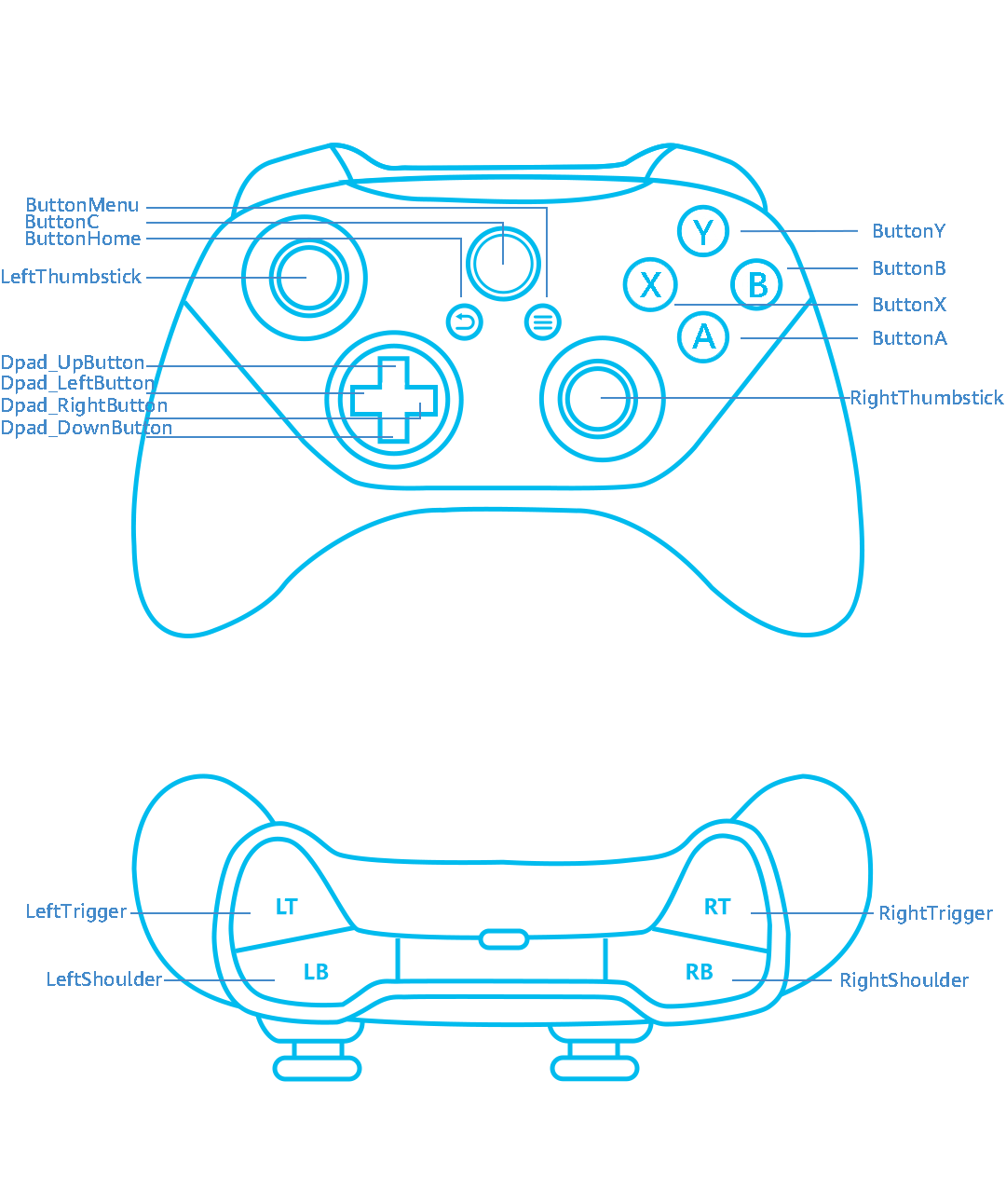
Game Controller Kit支持的手柄键位参考图如下:
接口说明
接口详细介绍请参考API参考。
| 接口名 | 描述 |
|---|---|
| OH_GamePad_LeftShoulder_RegisterButtonInputMonitor | 注册LeftShoulder按键事件的监听。 |
| OH_GamePad_RightShoulder_RegisterButtonInputMonitor | 注册RightShoulder按键事件的监听。 |
| OH_GamePad_LeftTrigger_RegisterButtonInputMonitor | 注册LeftTrigger按键事件的监听。 |
| OH_GamePad_RightTrigger_RegisterButtonInputMonitor | 注册RightTrigger按键事件的监听。 |
| OH_GamePad_ButtonMenu_RegisterButtonInputMonitor | 注册Menu按键事件的监听。 |
| OH_GamePad_ButtonHome_RegisterButtonInputMonitor | 注册Home按键事件的监听。 |
| OH_GamePad_ButtonA_RegisterButtonInputMonitor | 注册A按键事件的监听。 |
| OH_GamePad_ButtonB_RegisterButtonInputMonitor | 注册B按键事件的监听。 |
| OH_GamePad_ButtonX_RegisterButtonInputMonitor | 注册X按键事件的监听。 |
| OH_GamePad_ButtonY_RegisterButtonInputMonitor | 注册Y按键事件的监听。 |
| OH_GamePad_ButtonC_RegisterButtonInputMonitor | 注册C按键事件的监听。 |
| OH_GamePad_Dpad_LeftButton_RegisterButtonInputMonitor | 注册方向按键的向左按键事件的监听。 |
| OH_GamePad_Dpad_RightButton_RegisterButtonInputMonitor | 注册方向按键的向右按键事件的监听。 |
| OH_GamePad_Dpad_UpButton_RegisterButtonInputMonitor | 注册方向按键的向上按键事件的监听。 |
| OH_GamePad_Dpad_DownButton_RegisterButtonInputMonitor | 注册方向按键的向下按键事件的监听。 |
| OH_GamePad_LeftThumbstick_RegisterButtonInputMonitor | 注册LeftThumbstick按键事件的监听。 |
| OH_GamePad_RightThumbstick_RegisterButtonInputMonitor | 注册RightThumbstick按键事件的监听。 |
| OH_GamePad_LeftTrigger_RegisterAxisInputMonitor | 注册LeftTrigger轴事件的监听。 |
| OH_GamePad_RightTrigger_RegisterAxisInputMonitor | 注册RightTrigger轴事件的监听。 |
| OH_GamePad_Dpad_RegisterAxisInputMonitor | 注册方向按键轴事件的监听。 |
| OH_GamePad_LeftThumbstick_RegisterAxisInputMonitor | 注册LeftThumbstick轴事件的监听。 |
| OH_GamePad_RightThumbstick_RegisterAxisInputMonitor | 注册RightThumbstick轴事件的监听。 |
开发步骤
链接动态库
target_link_libraries(entry PUBLIC libohgame_controller.z.so)
导入模块
#include <GameControllerKit/game_pad.h>
注册和取消注册轴事件的监听
调用相应接口注册或取消注册轴事件回调,通过回调函数获取轴值。
物理轴及其对应的轴值获取接口如下:
| 物理轴 | 轴值获取接口 |
|---|---|
| LeftThumbstick | 通过OH_GamePad_AxisEvent_GetXAxisValue获取X轴的轴值。 通过OH_GamePad_AxisEvent_GetYAxisValue获取Y轴的轴值。 |
| RightThumbstick | 通过OH_GamePad_AxisEvent_GetZAxisValue获取Z轴的轴值。 通过OH_GamePad_AxisEvent_GetRZAxisValue获取RZ轴的轴值。 |
| DPAD | 通过OH_GamePad_AxisEvent_GetHatXAxisValue获取HatX轴的轴值。 通过OH_GamePad_AxisEvent_GetHatYAxisValue获取HatY轴的轴值。 |
| LeftTrigger | 通过OH_GamePad_AxisEvent_GetBrakeAxisValue获取Brake轴的轴值。 |
| RightTrigger | 通过OH_GamePad_AxisEvent_GetGasAxisValue获取Gas轴的轴值。 |
以LeftThumbstick轴事件为例。
napi_value GamePad::LeftThumbstick_RegisterAxisInputMonitor(napi_env env, napi_callback_info info) {
    napi_value result;
    GameController_ErrorCode errorCode =
        OH_GamePad_LeftThumbstick_RegisterAxisInputMonitor(GamePad::LeftThumbstick_OnAxisEvent);
    if (errorCode != GameController_ErrorCode::GAME_CONTROLLER_SUCCESS) {
        OH_LOG_ERROR(LOG_APP, "LeftThumbstick_RegisterAxisInputMonitor Failed, %{public}d", errorCode);
        napi_create_double(env, errorCode, &result);
        return result;
    }
    OH_LOG_INFO(LOG_APP, "LeftThumbstick_RegisterAxisInputMonitor Success");
    napi_create_double(env, 0, &result);
    return result;
}

napi_value GamePad::LeftThumbstick_UnregisterAxisInputMonitor(napi_env env, napi_callback_info info) {
    napi_value result;
    GameController_ErrorCode errorCode = OH_GamePad_LeftThumbstick_UnregisterAxisInputMonitor();
    if (errorCode != GameController_ErrorCode::GAME_CONTROLLER_SUCCESS) {
        OH_LOG_ERROR(LOG_APP, "LeftThumbstick_UnregisterAxisInputMonitor Failed, %{public}d", errorCode);
        napi_create_double(env, errorCode, &result);
        return result;
    }
    OH_LOG_INFO(LOG_APP, "LeftThumbstick_UnregisterAxisInputMonitor Success");
    napi_create_double(env, 0, &result);
    return result;
}

void GamePad::LeftThumbstick_OnAxisEvent(const struct GamePad_AxisEvent *axisEvent) {
    std::string val = "X";
    double xAxisValue;
    OH_GamePad_AxisEvent_GetXAxisValue(axisEvent, &xAxisValue);
    val.append(std::to_string(xAxisValue)).append("_Y");
    double yAxisValue;
    OH_GamePad_AxisEvent_GetYAxisValue(axisEvent, &yAxisValue);
    val.append(std::to_string(yAxisValue));
    OnAxisEvent(axisEvent, "LeftThumbstick_OnAxisEvent", val);
}
注册按键事件的监听和取消注册
调用相应接口注册或取消注册按键事件回调,从回调函数中获取按键值。
以下是按键名称与对应按键值:
| 按键名称 | 按键值 |
|---|---|
| LeftShoulder | 2307 |
| RightShoulder | 2308 |
| LeftTrigger | 2309 |
| RightTrigger | 2310 |
| LeftThumbstick | 2314 |
| RightThumbstick | 2315 |
| ButtonHome | 2311 |
| ButtonMenu | 2312 |
| ButtonA | 2301 |
| ButtonB | 2302 |
| ButtonC | 2303 |
| ButtonX | 2304 |
| ButtonY | 2305 |
| Dpad_UpButton | 2012 |
| Dpad_DownButton | 2013 |
| Dpad_LeftButton | 2014 |
| Dpad_RightButton | 2015 |
以LeftShoulder按键事件为例。
napi_value GamePad::LeftShoulder_RegisterButtonInputMonitor(napi_env env, napi_callback_info info) {
    napi_value result;
    GameController_ErrorCode errorCode =
        OH_GamePad_LeftShoulder_RegisterButtonInputMonitor(GamePad::LeftShoulder_OnButtonEvent);
    if (errorCode != GameController_ErrorCode::GAME_CONTROLLER_SUCCESS) {
        OH_LOG_ERROR(LOG_APP, "LeftShoulder_RegisterButtonInputMonitor Failed, %{public}d", errorCode);
        napi_create_double(env, errorCode, &result);
        return result;
    }
    OH_LOG_INFO(LOG_APP, "LeftShoulder_RegisterButtonInputMonitor Success");
    napi_create_double(env, 0, &result);
    return result;
}

napi_value GamePad::LeftShoulder_UnregisterButtonInputMonitor(napi_env env, napi_callback_info info) {
    napi_value result;
    GameController_ErrorCode errorCode = OH_GamePad_LeftShoulder_UnregisterButtonInputMonitor();
    if (errorCode != GameController_ErrorCode::GAME_CONTROLLER_SUCCESS) {
        OH_LOG_ERROR(LOG_APP, "LeftShoulder_UnregisterButtonInputMonitor Failed, %{public}d", errorCode);
        napi_create_double(env, errorCode, &result);
        return result;
    }
    OH_LOG_INFO(LOG_APP, "LeftShoulder_UnregisterButtonInputMonitor Success");
    napi_create_double(env, 0, &result);
    return result;
}

void GamePad::LeftShoulder_OnButtonEvent(const struct GamePad_ButtonEvent *buttonEvent) {
    OnButtonEvent(buttonEvent, "LeftShoulder_OnButtonEvent");
}

void GamePad::OnButtonEvent(const struct GamePad_ButtonEvent *buttonEvent, const std::string &buttonName) {
    std::string temp;
    temp.append("OnButtonEvent:").append(buttonName);
    char *deviceId;
    OH_GamePad_ButtonEvent_GetDeviceId(buttonEvent, &deviceId);
    temp.append(" ,deviceId:").append(deviceId);
    free(deviceId);
    GamePad_Button_ActionType action;
    OH_GamePad_ButtonEvent_GetButtonAction(buttonEvent, &action);
    temp.append(" ,action:").append(std::to_string(action));
    std::int32_t buttonCode;
    OH_GamePad_ButtonEvent_GetButtonCode(buttonEvent, &buttonCode);
    temp.append(" ,code:").append(std::to_string(buttonCode));
    char *buttonCodeName;
    OH_GamePad_ButtonEvent_GetButtonCodeName(buttonEvent, &buttonCodeName);
    temp.append(" ,codeName:").append(buttonCodeName);
    free(buttonCodeName);
    std::int64_t actionTime;
    OH_GamePad_ButtonEvent_GetActionTime(buttonEvent, &actionTime);
    temp.append(" ,actionTime:").append(std::to_string(actionTime));
    std::int32_t count;
    OH_GamePad_PressedButtons_GetCount(buttonEvent, &count);
    temp.append(" ,count:").append(std::to_string(count));
    std::string pressedButtonCodes;
    for (std::int32_t idx = 0; idx < count; idx++) {
        GamePad_PressedButton *pressedButton;
        OH_GamePad_PressedButtons_GetButtonInfo(buttonEvent, idx, &pressedButton);
        int code;
        OH_GamePad_PressedButton_GetButtonCode(pressedButton, &code);
        char *name;
        OH_GamePad_PressedButton_GetButtonCodeName(pressedButton, &name);
        if (idx != 0) {
            pressedButtonCodes = pressedButtonCodes.append(";");
        }
        pressedButtonCodes = pressedButtonCodes.append(std::to_string(code) + "|").append(name);
        free(name);
        OH_GamePad_DestroyPressedButton(&pressedButton);
    }
    temp.append(" ,pressedButtonCodes:").append(pressedButtonCodes);
    OH_LOG_INFO(LOG_APP, "%{public}s", temp.c_str());
    Log::GetInstance()->PrintLog(temp);
}