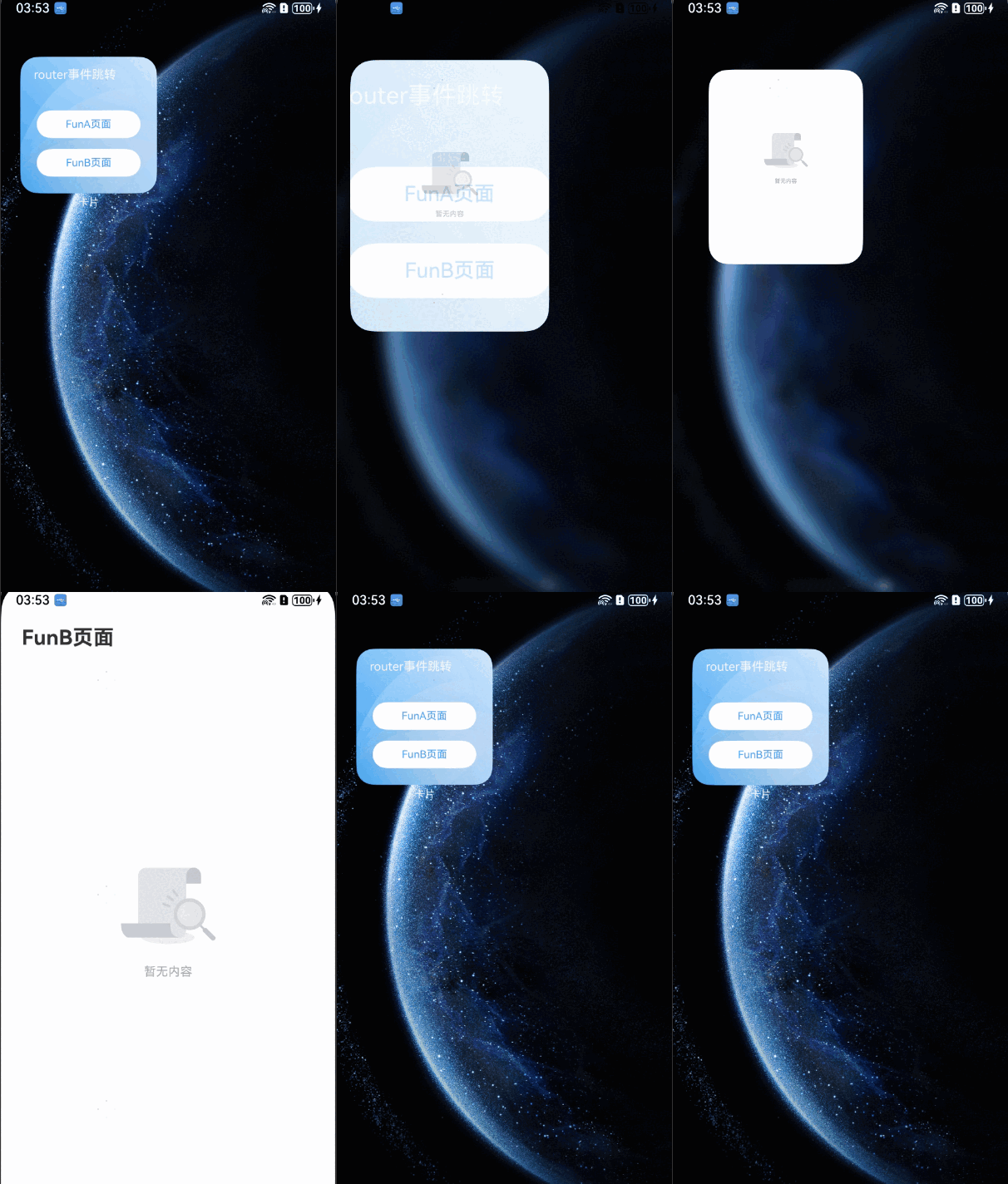
卡片跳转到应用页面(router事件)
在动态卡片中使用postCardAction接口的router能力,能够快速拉起动态卡片提供方应用的指定UIAbility(页面),因此UIAbility较多的应用往往会通过卡片提供不同的跳转按钮,实现一键直达的效果。例如相机卡片,卡片上提供拍照、录像等按钮,点击不同按钮将拉起相机应用的不同UIAbility,从而提升用户的体验。


本文主要介绍动态卡片的事件开发。对于静态卡片,请参见FormLink。
开发步骤
-
创建动态卡片,在工程的entry模块中,新建名为WidgetEventRouterCard的ArkTS卡片。
-
构建ArkTS卡片页面代码布局,卡片页面布局中有两个按钮,点击其中一个按钮时调用postCardAction向指定UIAbility发送router事件,并在事件内定义需要传递的内容。
// src/main/ets/widgeteventrouter/pages/WidgetEventRouterCard.ets@Entry@Componentstruct WidgetEventRouterCard {build() {Column() {// $r('app.string.JumpLabel')需要替换为开发者所需的资源文件Text($r('app.string.JumpLabel')).fontColor('#FFFFFF').opacity(0.9).fontSize(14).margin({ top: '8%', left: '10%' })Row() {Column() {Button() {// $r('app.string.ButtonA_label')需要替换为开发者所需的资源文件Text($r('app.string.ButtonA_label')).fontColor('#45A6F4').fontSize(12)}.width(120).height(32).margin({ top: '20%' }).backgroundColor('#FFFFFF').borderRadius(16).onClick(() => {postCardAction(this, {action: 'router',abilityName: 'EntryAbility',params: { targetPage: 'funA' }});})Button() {// $r('app.string.ButtonB_label')需要替换为开发者所需的资源文件Text($r('app.string.ButtonB_label')).fontColor('#45A6F4').fontSize(12)}.width(120).height(32).margin({ top: '8%', bottom: '15vp' }).backgroundColor('#FFFFFF').borderRadius(16).onClick(() => {postCardAction(this, {action: 'router',abilityName: 'EntryAbility',params: { targetPage: 'funB' }});})}}.width('100%').height('80%').justifyContent(FlexAlign.Center)}.width('100%').height('100%').alignItems(HorizontalAlign.Start)// $r('app.media.CardEvent')需要替换为开发者所需的资源文件.backgroundImage($r('app.media.CardEvent')).backgroundImageSize(ImageSize.Cover)}} -
处理router事件,在UIAbility中接收router事件并获取参数,根据传递的params不同,选择拉起不同的页面。
// src/main/ets/entryability/EntryAbility.tsimport { AbilityConstant, UIAbility, Want } from '@kit.AbilityKit';import { window } from '@kit.ArkUI';import { hilog } from '@kit.PerformanceAnalysisKit';const TAG: string = 'EntryAbility';const DOMAIN_NUMBER: number = 0xFF00;export default class EntryAbility extends UIAbility {private selectPage: string = 'funA';private currentWindowStage: window.WindowStage | null = null;onCreate(want: Want, launchParam: AbilityConstant.LaunchParam): void {// 获取router事件中传递的targetPage参数hilog.info(DOMAIN_NUMBER, TAG, `Ability onCreate, ${JSON.stringify(want)}`);if (want?.parameters?.params) {// want.parameters.params 对应 postCardAction() 中 params 内容let params: Record<string, Object> = JSON.parse(want.parameters.params as string);this.selectPage = params.targetPage as string;hilog.info(DOMAIN_NUMBER, TAG, `onCreate selectPage: ${this.selectPage}`);}}// 如果UIAbility已在后台运行,在收到Router事件后会触发onNewWant生命周期回调onNewWant(want: Want, launchParam: AbilityConstant.LaunchParam): void {hilog.info(DOMAIN_NUMBER, TAG, `onNewWant Want: ${JSON.stringify(want)}`);if (want?.parameters?.params) {// want.parameters.params 对应 postCardAction() 中 params 内容let params: Record<string, Object> = JSON.parse(want.parameters.params as string);this.selectPage = params.targetPage as string;hilog.info(DOMAIN_NUMBER, TAG, `onNewWant selectPage: ${this.selectPage}`);}if (this.currentWindowStage !== null) {this.onWindowStageCreate(this.currentWindowStage);}}onWindowStageCreate(windowStage: window.WindowStage): void {// Main window is created, set main page for this abilitylet targetPage: string;// 根据传递的targetPage不同,选择拉起不同的页面switch (this.selectPage) {case 'funA':targetPage = 'funpages/FunA';break;case 'funB':targetPage = 'funpages/FunB';break;default:targetPage = 'pages/Index';}if (this.currentWindowStage === null) {this.currentWindowStage = windowStage;}windowStage.loadContent(targetPage, (err, data) => {if (err.code) {hilog.error(DOMAIN_NUMBER, TAG, 'Failed to load the content. Cause: %{public}s', JSON.stringify(err) ?? '');return;}hilog.info(DOMAIN_NUMBER, TAG, 'Succeeded in loading the content. Data: %{public}s', JSON.stringify(data) ?? '');});}} -
创建跳转后的UIAbility页面,新建FunA.ets和FunB.ets,构建页面布局。
// src/main/ets/funpages/FunA.ets@Entry@Componentstruct FunA {build() {Column() {Row() {// $r('app.string.ButtonA_label')需要替换为开发者所需的资源文件Text(($r('app.string.ButtonA_label'))).fontSize(24).fontWeight(FontWeight.Bold).textAlign(TextAlign.Start).margin({top: 12,bottom: 11,right: 24,left: 24})}.width('100%').height(56).justifyContent(FlexAlign.Start)// $r('app.media.pic_empty')需要替换为开发者所需的资源文件Image($r('app.media.pic_empty')).width(120).height(120).margin({ top: 224 })// $r('app.string.NoContentAvailable')需要替换为开发者所需的资源文件Text($r('app.string.NoContentAvailable')).fontSize(14)// $r('app.color.text_color')需要替换为开发者所需的资源文件.fontColor($r('app.color.text_color')).opacity(0.4).margin({top: 8,bottom: 317,right: 152,left: 152})}.width('100%').height('100%')}}// src/main/ets/funpages/FunB.ets@Entry@Componentstruct FunB {build() {Column() {Row() {// $r('app.string.ButtonB_label')需要替换为开发者所需的资源文件Text(($r('app.string.ButtonB_label'))).fontSize(24).fontWeight(FontWeight.Bold).textAlign(TextAlign.Start).margin({top: 12,bottom: 11,right: 24,left: 24})}.width('100%').height(56).justifyContent(FlexAlign.Start)// $r('app.media.pic_empty')需要替换为开发者所需的资源文件Image($r('app.media.pic_empty')).width(120).height(120).margin({ top: 224 })// $r('app.string.NoContentAvailable')需要替换为开发者所需的资源文件Text($r('app.string.NoContentAvailable')).fontSize(14)// $r('app.color.text_color')需要替换为开发者所需的资源文件.fontColor($r('app.color.text_color')).opacity(0.4).margin({top: 8,bottom: 317,right: 152,left: 152})}.width('100%').height('100%')}} -
在resources/base/profile下的main_pages.json文件中配置FunA.ets和FunB.ets页面。
// src/main/resources/base/profile/main_pages.json{"src": ["pages/Index","funpages/FunA","funpages/FunB"]} -
资源文件如下,请开发者替换为实际使用的资源。
// src/main/resources/zh_CN/element/string.json{"string": [// ...{"name": "ButtonA_label","value": "FunA页面"},{"name": "ButtonB_label","value": "FunB页面"},{"name": "JumpLabel","value": "router事件跳转"},{"name": "NoContentAvailable","value": "暂无内容"}]}
运行效果