主体分割
适用场景
主体分割,可以检测出图片中区别于背景的前景物体或区域(即“显著主体”),并将其从背景中分离出来,适用于需要识别和提取图像主要信息的场景,广泛使用于前景目标检测和前景主体分离的场景。例如:
- 主体贴纸,从图片中提取显著性的主体,去掉背景。
- 背景替换,替换并提取出主体对象的背景。
- 显著性检测,快速定位图片中显著性区域。
- 辅助图片编辑,例如单独对主体进行美化处理。
效果如下图所示:
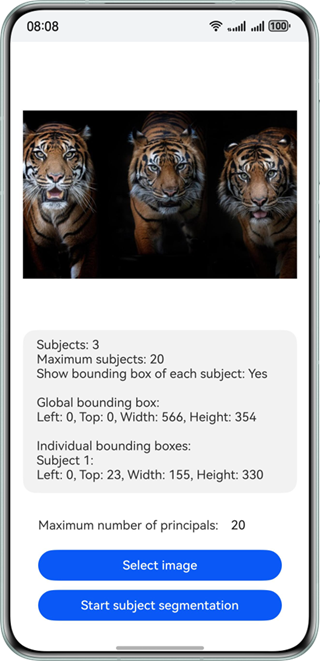
约束与限制
该能力当前不支持模拟器。
| AI能力 | 约束 |
|---|---|
| 主体分割 | - 某个物体占比不小于原图大小的千分之五才会被认定为“主体”,才会支持分割。 - 不建议用于处理包含较多文字内容的图片分析场景。 - 输入图像具有合适成像的质量(建议720p以上),20px<高度<9000px,20px<宽度<9000px,高宽比例建议3:1以下(高度小于宽度的3倍),接近手机屏幕高宽比例为宜。 |
开发步骤
-
引用相关类添加至工程。
import { subjectSegmentation } from '@kit.CoreVisionKit';import { image } from '@kit.ImageKit';import { hilog } from '@kit.PerformanceAnalysisKit';import { BusinessError } from '@kit.BasicServicesKit';import { fileIo } from '@kit.CoreFileKit';import { photoAccessHelper } from '@kit.MediaLibraryKit'; -
准备预处理的图片资源,将图片转换为PixelMap,并添加初始化和释放方法。
async aboutToAppear(): Promise<void> {const initResult = await subjectSegmentation.init();hilog.info(0x0000, 'subjectSegmentationSample', `Subject segmentation initialization result:${initResult}`);}async aboutToDisappear(): Promise<void> {await subjectSegmentation.release();hilog.info(0x0000, 'subjectSegmentationSample', 'Subject segmentation released successfully');}private async selectImage() {let uri = await this.openPhoto()if (uri === undefined) {hilog.error(0x0000, TAG, "uri is undefined");}this.loadImage(uri);}private async openPhoto(): Promise<Array<string>> {return new Promise<Array<string>>((resolve, reject) => {let PhotoSelectOptions = new photoAccessHelper.PhotoSelectOptions();PhotoSelectOptions.MIMEType = photoAccessHelper.PhotoViewMIMETypes.IMAGE_TYPE;PhotoSelectOptions.maxSelectNumber = 1;let photoPicker: photoAccessHelper.PhotoViewPicker = new photoAccessHelper.PhotoViewPicker();hilog.info(0x0000, TAG, 'PhotoViewPicker.select successfully, PhotoSelectResult uri: ');photoPicker.select(PhotoSelectOptions).then((PhotoSelectResult) => {hilog.info(0x0000, TAG, `PhotoViewPicker.select successfully, PhotoSelectResult uri: ${PhotoSelectResult.photoUris}`);resolve(PhotoSelectResult.photoUris)}).catch((err: BusinessError) => {hilog.error(0x0000, TAG, `PhotoViewPicker.select failed with errCode: ${err.code}, errMessage: ${err.message}`);reject();});})}private loadImage(names: string[]) {setTimeout(async () => {let imageSource: image.ImageSource | undefined = undefinedlet fileSource = await fileIo.open(names[0], fileIo.OpenMode.READ_ONLY)imageSource = image.createImageSource(fileSource.fd)this.chooseImage = await imageSource.createPixelMap()}, 100)} -
实例化待分割的入参项VisionInfo,并传入待检测图片的PixelMap。
let visionInfo: subjectSegmentation.VisionInfo = {pixelMap: this.chooseImage,}; -
配置通用文本识别的配置项SegmentationConfig,包括最大分割主体个数、是否输出每个主体的分割信息,以及是否输出分割后的前景图。
let config: subjectSegmentation.SegmentationConfig = {maxCount: parseInt(this.maxNum),enableSubjectDetails: true,enableSubjectForegroundImage: true,}; -
调用subjectSegmentation的subjectSegmentation.doSegmentation接口,实现主体分割。
let data: subjectSegmentation.SegmentationResult = await subjectSegmentation.doSegmentation(visionInfo, config);let outputString = `Subject count: ${data.subjectCount}\n`;outputString += `Max subject count: ${config.maxCount}\n`;outputString += `Enable subject details: ${config.enableSubjectDetails ? 'Yes' : 'No'}\n\n`;let segBox : subjectSegmentation.Rectangle = data.fullSubject.subjectRectangle;let segBoxString = `Full subject box:\nLeft: ${segBox.left}, Top: ${segBox.top}, Width: ${segBox.width}, Height: ${segBox.height}\n\n`;outputString += segBoxString;if (config.enableSubjectDetails) {outputString += 'Individual subject boxes:\n';if (data.subjectDetails) {for (let i = 0; i < data.subjectDetails.length; i++) {let detailSegBox: subjectSegmentation.Rectangle = data.subjectDetails[i].subjectRectangle;outputString += `Subject ${i + 1}:\nLeft: ${detailSegBox.left}, Top: ${detailSegBox.top}, Width: ${detailSegBox.width}, Height: ${detailSegBox.height}\n\n`;}}}
开发实例
Index.ets
import { subjectSegmentation } from '@kit.CoreVisionKit';
import { image } from '@kit.ImageKit';
import { hilog } from '@kit.PerformanceAnalysisKit';
import { BusinessError } from '@kit.BasicServicesKit';
import { fileIo } from '@kit.CoreFileKit';
import { photoAccessHelper } from '@kit.MediaLibraryKit';
const TAG: string = "ImageSegmentationSample";
@Entry
@Component
struct Index {
@State chooseImage: PixelMap | undefined = undefined
@State dataValues: string = ''
@State segmentedImage: PixelMap | undefined = undefined
// 设置识别主体数量的上限
@State maxNum: string = '20'
build() {
Column() {
Image(this.chooseImage)
.objectFit(ImageFit.Fill)
.height('30%')
.accessibilityDescription("Image to be segmented")
Scroll() {
Text(this.dataValues)
.copyOption(CopyOptions.LocalDevice)
.margin(10)
.width('100%')
}
.height('20%')
Image(this.segmentedImage)
.objectFit(ImageFit.Fill)
.height('30%')
.accessibilityDescription("Segmented subject image")
Row() {
Text('Max subject count:')
.fontSize(16)
TextInput({ placeholder: 'Enter max subject count', text: this.maxNum })
.type(InputType.Number)
.placeholderColor(Color.Gray)
.fontSize(16)
.backgroundColor(Color.White)
.onChange((value: string) => {
this.maxNum = value
})
}
.width('80%')
.margin(10)
Button('Select Image')
.type(ButtonType.Capsule)
.fontColor(Color.White)
.alignSelf(ItemAlign.Center)
.width('80%')
.margin(10)
.onClick(() => {
void this.selectImage()
})
Button('Image Segmentation')
.type(ButtonType.Capsule)
.fontColor(Color.White)
.alignSelf(ItemAlign.Center)
.width('80%')
.margin(10)
.onClick(() => {
if (!this.chooseImage) {
hilog.error(0x0000, TAG, "imageSegmentation not have chooseImage");
return
}
let visionInfo: subjectSegmentation.VisionInfo = {
  pixelMap: this.chooseImage,
};
let config: subjectSegmentation.SegmentationConfig = {
  maxCount: parseInt(this.maxNum),
  enableSubjectDetails: true,
  enableSubjectForegroundImage: true,
};
subjectSegmentation.doSegmentation(visionInfo, config)
.then((data: subjectSegmentation.SegmentationResult) => {
let outputString = `Subject count: ${data.subjectCount}\n`;
outputString += `Max subject count: ${config.maxCount}\n`;
outputString += `Enable subject details: ${config.enableSubjectDetails ? 'Yes' : 'No'}\n\n`;
let segBox : subjectSegmentation.Rectangle = data.fullSubject.subjectRectangle;
let segBoxString = `Full subject box:\nLeft: ${segBox.left}, Top: ${segBox.top}, Width: ${segBox.width}, Height: ${segBox.height}\n\n`;
outputString += segBoxString;
if (config.enableSubjectDetails) {
outputString += 'Individual subject boxes:\n';
if (data.subjectDetails) {
for (let i = 0; i < data.subjectDetails.length; i++) {
let detailSegBox: subjectSegmentation.Rectangle = data.subjectDetails[i].subjectRectangle;
outputString += `Subject ${i + 1}:\nLeft: ${detailSegBox.left}, Top: ${detailSegBox.top}, Width: ${detailSegBox.width}, Height: ${detailSegBox.height}\n\n`;
}
}
}
hilog.info(0x0000, TAG, "Segmentation result: " + outputString);
this.dataValues = outputString;
if (data.fullSubject && data.fullSubject.foregroundImage) {
this.segmentedImage = data.fullSubject.foregroundImage;
} else {
hilog.warn(0x0000, TAG, "No foreground image in segmentation result");
}
})
.catch((error: BusinessError) => {
hilog.error(0x0000, TAG, `Image segmentation failed errCode: ${error.code}, errMessage: ${error.message}`);
this.dataValues = `Error: ${error.message}`;
this.segmentedImage = undefined;
});
})
}
.width('100%')
.height('80%')
.justifyContent(FlexAlign.Center)
}
private async selectImage() {
let uri = await this.openPhoto()
if (uri === undefined) {
hilog.error(0x0000, TAG, "uri is undefined");
}
this.loadImage(uri);
}
private async openPhoto(): Promise<Array<string>> {
return new Promise<Array<string>>((resolve, reject) => {
let PhotoSelectOptions = new photoAccessHelper.PhotoSelectOptions();
PhotoSelectOptions.MIMEType = photoAccessHelper.PhotoViewMIMETypes.IMAGE_TYPE;
PhotoSelectOptions.maxSelectNumber = 1;
let photoPicker: photoAccessHelper.PhotoViewPicker = new photoAccessHelper.PhotoViewPicker();
photoPicker.select(PhotoSelectOptions).then((PhotoSelectResult) => {
hilog.info(0x0000, TAG, `PhotoViewPicker.select successfully, PhotoSelectResult uri: ${PhotoSelectResult.photoUris}`);
resolve(PhotoSelectResult.photoUris)
}).catch((err: BusinessError) => {
hilog.error(0x0000, TAG, `PhotoViewPicker.select failed with errCode: ${err.code}, errMessage: ${err.message}`);
reject();
});
})
}
private loadImage(names: string[]) {
setTimeout(async () => {
let imageSource: image.ImageSource | undefined = undefined
try {
let fileSource = await fileIo.open(names[0], fileIo.OpenMode.READ_ONLY)
imageSource = image.createImageSource(fileSource.fd)
this.chooseImage = await imageSource.createPixelMap()
await fileIo.close(fileSource);
} catch (error) {
hilog.error(0x0000, TAG, `Failed to open file. Error: ${error}`);
}
}, 100
)
}
}