人脸检测
适用场景
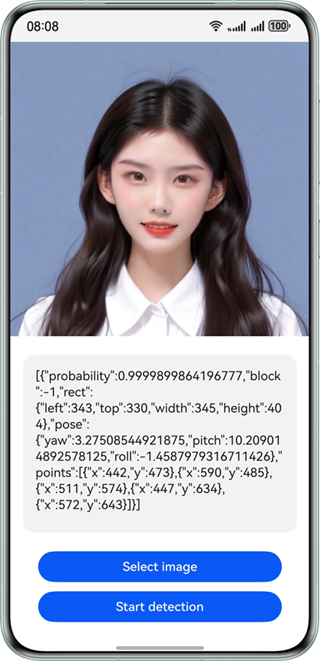
检测图片中的人脸,返回高精度人脸矩形框坐标、人脸五官位置、人脸朝向、人脸置信度。可通过对人脸的定位,实现对人脸特定位置的美化修饰。广泛应用于各类人脸识别场景,如人脸聚类、美颜等场景中。
效果如下图所示:
约束与限制
该能力当前不支持模拟器。
| AI能力 | 约束 |
|---|---|
| 人脸检测 | - 输入图像具有合适的成像质量(建议720p以上),224px<高度<15210px,100px<宽度<10000px,高宽比例建议10:1以下(高度小于宽度的10倍),接近手机屏幕高宽比例为宜。 - 接口调用耗时较久,不适合在需要实时检测的场景下使用。 - 不支持同一用户启用多个线程。 |
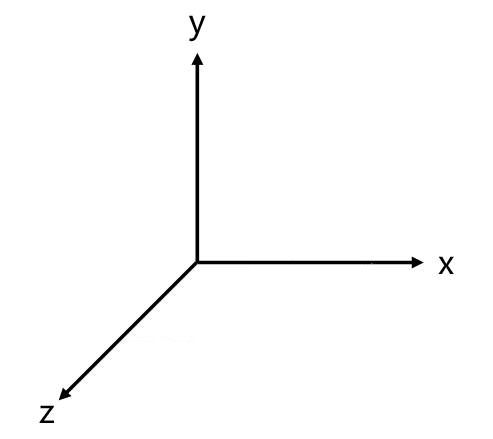
世界坐标系
以下方图片指示坐标系辅助表示人脸朝向。
开发步骤
-
在使用人脸检测时,将实现人脸检测相关的类添加至工程。
import { faceDetector } from '@kit.CoreVisionKit';import { image } from '@kit.ImageKit';import { hilog } from '@kit.PerformanceAnalysisKit';import { BusinessError } from '@kit.BasicServicesKit';import { fileIo } from '@kit.CoreFileKit';import { photoAccessHelper } from '@kit.MediaLibraryKit'; -
简单配置页面的布局,并在Button组件添加点击事件,拉起图库,选择图片。
Button('选择图片').type(ButtonType.Capsule).fontColor(Color.White).alignSelf(ItemAlign.Center).width('80%').margin(10).onClick(() => {// 拉起图库,获取图片资源void this.selectImage();}) -
通过图库获取图片资源,将图片转换为PixelMap。
private async selectImage() {let uri = await this.openPhoto()if (uri === undefined) {hilog.error(0x0000, 'faceDetector', "Failed to get uri.");}this.loadImage(uri)}private async openPhoto(): Promise<string> {return new Promise<string>((resolve) => {let photoPicker: photoAccessHelper.PhotoViewPicker = new photoAccessHelper.PhotoViewPicker();photoPicker.select({MIMEType: photoAccessHelper.PhotoViewMIMETypes.IMAGE_TYPE,maxSelectNumber: 1}).then(res => {resolve(res.photoUris[0])}).catch((err: BusinessError) => {hilog.error(0x0000, 'faceDetector', `Failed to get photo image uri.code: ${err.code}, message: ${err.message}`);resolve('');})})}private loadImage(name: string) {setTimeout(async () => {let imageSource: image.ImageSource | undefined = undefined;let fileSource = await fileIo.open(name, fileIo.OpenMode.READ_ONLY);imageSource = image.createImageSource(fileSource.fd);this.chooseImage = await imageSource.createPixelMap();this.dataValues = "";}, 100)} -
实例化VisionInfo对象,并传入待检测图片的PixelMap,实现人脸检测功能。
// 初始化并调用人脸检测接口void faceDetector.init();let visionInfo: faceDetector.VisionInfo = {pixelMap: this.chooseImage,};let data:faceDetector.Face[] = await faceDetector.detect(visionInfo); -
(可选)如果需要将结果展示在界面上,可以使用下列代码。
let data:faceDetector.Face[] = await faceDetector.detect(visionInfo);if (data.length === 0) {this.dataValues = "No face is detected in the image. Select an image that contains a face.";} else {let faceString = JSON.stringify(data);hilog.info(0x0000, 'testTag', "faceString data is " + faceString);this.dataValues = faceString;}
开发实例
Index.ets
import { faceDetector } from '@kit.CoreVisionKit';
import { image } from '@kit.ImageKit';
import { hilog } from '@kit.PerformanceAnalysisKit';
import { BusinessError } from '@kit.BasicServicesKit';
import { fileIo } from '@kit.CoreFileKit';
import { photoAccessHelper } from '@kit.MediaLibraryKit';
@Entry
@Component
struct Index {
@State chooseImage: PixelMap | undefined = undefined
@State dataValues: string = ''
build() {
Column() {
Image(this.chooseImage)
.objectFit(ImageFit.Fill)
.height('60%')
Text(this.dataValues)
.copyOption(CopyOptions.LocalDevice)
.height('15%')
.margin(10)
.width('60%')
Button('选择图片')
.type(ButtonType.Capsule)
.fontColor(Color.White)
.alignSelf(ItemAlign.Center)
.width('80%')
.margin(10)
.onClick(() => {
// 拉起图库
void this.selectImage()
})
Button('人脸检测')
.type(ButtonType.Capsule)
.fontColor(Color.White)
.alignSelf(ItemAlign.Center)
.width('80%')
.margin(10)
.onClick(() => {
if(!this.chooseImage) {
hilog.error(0x0000, 'faceDetectorSample', "Failed to detect face.");
return;
}
// 调用人脸检测接口
void faceDetector.init();
let visionInfo: faceDetector.VisionInfo = {
pixelMap: this.chooseImage,
};
faceDetector.detect(visionInfo)
.then((data: faceDetector.Face[]) => {
if (data.length === 0) {
this.dataValues = "No face is detected in the image. Select an image that contains a face.";
} else {
let faceString = JSON.stringify(data);
hilog.info(0x0000, 'faceDetectorSample', "faceString data is " + faceString);
this.dataValues = faceString;
}
})
.catch((error: BusinessError) => {
hilog.error(0x0000, 'faceDetectorSample', `Face detection failed. Code: ${error.code}, message: ${error.message}`);
this.dataValues = `Error: ${error.message}`;
});
void faceDetector.release();
})
}
.width('100%')
.height('100%')
.justifyContent(FlexAlign.Center)
}
private async selectImage() {
let uri = await this.openPhoto()
if (uri === undefined) {
hilog.error(0x0000, 'faceDetectorSample', "Failed to get uri.");
}
this.loadImage(uri);
}
private async openPhoto(): Promise<string> {
return new Promise<string>((resolve) => {
let photoPicker: photoAccessHelper.PhotoViewPicker = new photoAccessHelper.PhotoViewPicker();
photoPicker.select({
MIMEType: photoAccessHelper.PhotoViewMIMETypes.IMAGE_TYPE,
maxSelectNumber: 1
}).then(res => {
resolve(res.photoUris[0])
}).catch((err: BusinessError) => {
hilog.error(0x0000, 'faceDetectorSample', `Failed to get photo image uri.code: ${err.code}, message: ${err.message}`);
resolve('');
})
})
}
private loadImage(name: string) {
setTimeout(async () => {
let imageSource: image.ImageSource | undefined = undefined;
try {
let fileSource = await fileIo.open(name, fileIo.OpenMode.READ_ONLY);
imageSource = image.createImageSource(fileSource.fd);
this.chooseImage = await imageSource.createPixelMap();
this.dataValues = "";
await fileIo.close(fileSource);
} catch (error) {
hilog.error(0x0000, 'faceDetectorSample', `Failed to open file. Error: ${error}`);
}
}, 100
)
}
}