fdsan使用指导
功能介绍
fdsan主要用于检测不同使用者对相同文件描述符的错误操作,如多次关闭(double-close)和关闭后使用(use-after-close)。这些文件描述符可以是操作系统中的文件、目录、网络套接字或其他I/O设备等。在程序中,打开文件或套接字会生成一个文件描述符。如果此文件描述符在使用后出现反复关闭或关闭后使用等情形,会导致内存泄露或文件句柄泄露等安全隐患。这类问题非常隐蔽,难以排查。为此,引入了fdsan这种检测工具。
实现原理
设计思路:当打开已有文件或创建一个新文件的时候,在得到返回fd后,设置一个关联的tag,来标记fd的属主信息;关闭文件前,检测fd关联的tag,判断是否符合预期(属主信息一致),符合就继续走正常文件关闭流程;如果不符合就是检测到异常,根据设置,调用对应的异常处理。
tag由两部分组成,最高位的8-bit构成type,后面的56-bit构成value。
type标识fd通过何种封装形式进行管理,例如FDSAN_OWNER_TYPE_FILE表示fd通过普通文件进行管理。类型在fdsan_owner_type中定义。
value用于标识实际的owner tag。
tag构成图示

接口说明
fdsan_set_error_level
enum fdsan_error_level fdsan_set_error_level(enum fdsan_error_level new_level);
描述: 可以通过fdsan_set_error_level设定error_level,error_level用于控制检测到异常后的处理行为。默认error_level为FDSAN_ERROR_LEVEL_WARN_ALWAYS。
参数: fdsan_error_level
| 名称 | 说明 |
|---|---|
| FDSAN_ERROR_LEVEL_DISABLED | disabled,此level代表什么都不处理。 |
| FDSAN_ERROR_LEVEL_WARN_ONCE | warn-once,第一次出现错误时在hilog中发出警告,然后将级别降低为disabled(FDSAN_ERROR_LEVEL_DISABLED)。 |
| FDSAN_ERROR_LEVEL_WARN_ALWAYS | warn-always,每次出现错误时都在hilog中发出警告。 |
| FDSAN_ERROR_LEVEL_FATAL | fatal,出现错误时调用abort异常退出。 |
返回值: 返回旧的error_level。
fdsan_get_error_level
enum fdsan_error_level fdsan_get_error_level();
描述: 可以通过fdsan_get_error_level获取error level。
返回值: 当前的error_level。
fdsan_create_owner_tag
uint64_t fdsan_create_owner_tag(enum fdsan_owner_type type, uint64_t tag);
描述: 通过传入的type和tag字段,拼接成一个有效的文件描述符的关闭tag。
参数: fdsan_owner_type
| 名称 | 说明 |
|---|---|
| FDSAN_OWNER_TYPE_GENERIC_00 | 默认未使用fd对应的type值。 |
| FDSAN_OWNER_TYPE_GENERIC_FF | 默认非法fd对应的type值。 |
| FDSAN_OWNER_TYPE_FILE | 默认普通文件对应的type值,使用fopen或fdopen打开的文件具有该类型。 |
| FDSAN_OWNER_TYPE_DIRECTORY | 默认文件夹对应的type值,使用opendir或fdopendir打开的文件具有该类型。 |
| FDSAN_OWNER_TYPE_UNIQUE_FD | 默认unique_fd对应的type值,保留暂未使用。 |
| FDSAN_OWNER_TYPE_ZIPARCHIVE | 默认zip压缩文件对应的type值,保留暂未使用。 |
返回值: 返回创建的tag,可以用于fdsan_exchange_owner_tag函数的输入。
fdsan_exchange_owner_tag
void fdsan_exchange_owner_tag(int fd, uint64_t expected_tag, uint64_t new_tag);
描述: 修改文件描述符的关闭tag。
通过fd找到对应的FdEntry,判断close_tag值与expected_tag是否一致。如果一致,说明符合预期,可以使用new_tag值重新设定对应的FdEntry。
如果不符合,说明检测到异常,后续进行对应的异常处理。
参数:
| 名称 | 类型 | 说明 |
|---|---|---|
| fd | int | fd句柄,作为FdEntry的索引。 |
| expected_tag | uint64_t | 期望的ownership tag值。 |
| new_tag | uint64_t | 设置新的ownership tag值。 |
fdsan_close_with_tag
int fdsan_close_with_tag(int fd, uint64_t tag);
描述: 根据tag描述符关闭文件描述符。
通过fd找到匹配的FdEntry。如果close_tag与tag相同,则符合预期,可以继续执行文件描述符关闭流程;否则,表示检测到异常。
参数:
| 名称 | 类型 | 说明 |
|---|---|---|
| fd | int | 待关闭的fd句柄。 |
| tag | uint64_t | 期望的ownership tag。 |
返回值: 0或者-1,0表示close成功,-1表示close失败。
fdsan_get_owner_tag
uint64_t fdsan_get_owner_tag(int fd);
描述: 根据文件描述符获取tag信息。
通过fd找到匹配的FdEntry,并获取其close_tag。
参数:
| 名称 | 类型 | 说明 |
|---|---|---|
| fd | int | 文件描述符。 |
返回值: 返回对应fd的tag。
fdsan_get_tag_type
const char* fdsan_get_tag_type(uint64_t tag);
描述: 根据tag计算出对应的type类型。
获取tag信息后,计算并获取对应tag的type信息。
参数:
| 名称 | 类型 | 说明 |
|---|---|---|
| tag | uint64_t | ownership tag。 |
返回值: 返回对应tag的type。
fdsan_get_tag_value
uint64_t fdsan_get_tag_value(uint64_t tag);
描述: 根据tag计算出对应的owner value。
通过获取到的tag信息,通过偏移计算获取对应tag中的value信息。
参数:
| 名称 | 类型 | 说明 |
|---|---|---|
| tag | uint64_t | ownership tag。 |
返回值: 返回对应tag的value。
使用示例
如何使用fdsan?这是一个简单的double-close问题:
#include <unistd.h>
#include <fcntl.h>
#include <hilog/log.h>
#include <vector>
#include <thread>

void good_write()
{
    sleep(1);
    int fd = open("log", O_WRONLY | O_APPEND);
    sleep(3);
    ssize_t ret = write(fd, "fdsan test", 11);
    if (ret == -1) {
        OH_LOG_ERROR(LOG_APP, "good write but failed?!");
    }
    close(fd);
}

void bad_close()
{
    int fd = open("/dev/null", O_RDONLY);
    close(fd);
    sleep(2);
    // This close expected to be detect by fdsan
    close(fd);
}

void functional_test()
{
    std::vector<std::thread> threads;
    for (auto function : { good_write, bad_close }) {
        threads.emplace_back(function);
    }
    for (auto& thread : threads) {
        thread.join();
    }
}

int main()
{
    functional_test();
    return 0;
}
上述代码中的good_write函数会打开一个文件并写入一些字符串,而bad_close函数中也会打开一个文件同时包含double-close问题,这两个线程同时运行执行情况如下图。
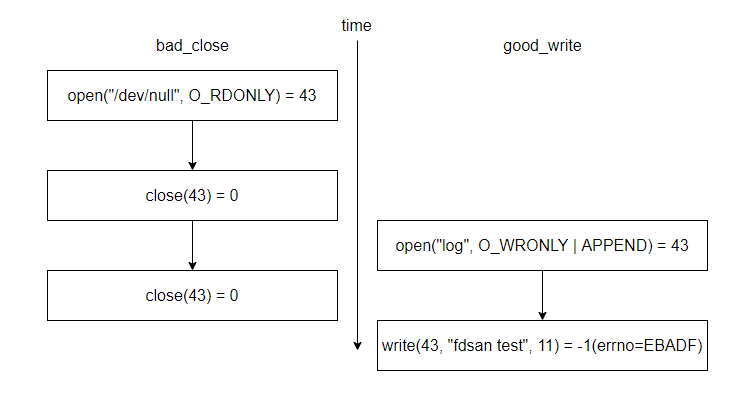
由于每次open返回的文件描述符(fd)是顺序分配的,进入主函数后第一个可用的fd是43。在bad_close 函数中,第一次open返回的fd也是43。关闭之后,43变成可用的fd。在good_write函数中,open返回了第一个可用的fd,即43。然而,由于bad_close函数中存在重复关闭问题,错误地关闭了另一个线程中打开的文件,导致写入失败。
引入fdsan后,有两种检测方法:使用标准库接口或实现带有fdsan的函数接口。
使用标准库接口
标准库接口中,fopen、fdopen、opendir、fdopendir已集成fdsan。使用这些接口而非直接使用open有助于检测问题。例如,可以使用fopen替代open。
#include <stdio.h>
#include <errno.h>
#define TEMP_FILE "/data/local/tmp/test.txt"

void good_write()
{
    // fopen is protected by fdsan, replace open with fopen
    // int fd = open(TEMP_FILE, O_RDWR);
    FILE *f = fopen(TEMP_FILE, "w+");
    if (f == NULL) {
        printf("fopen failed errno=%d\n", errno);
        return;
    }
    // ssize_t ret = write(fd, "fdsan test\n", 11);
    int ret = fprintf(f, "fdsan test %d\n", 11);
    if (ret < 0) {
        printf("fprintf failed errno=%d\n", errno);
    }
    // close(fd);
    fclose(f);
}
日志信息
使用fopen打开的每个文件描述符都需要有一个与之对应的 tag 。fdsan 在 close 时会检查关闭的 fd 是否与 tag 匹配,不匹配就会默认提示相关日志信息。下面是上述代码的日志信息:
# hilog | grep MUSL-FDSAN
04-30 15:03:41.760 10933  1624 E C03f00/MUSL-FDSAN: attempted to close file descriptor 43,                             expected to be unowned, actually owned by FILE* 0x00000000f7b90aa2
从这里的错误信息中可以看出,FILE接口的文件被其他人错误地关闭了。FILE接口的地址可以协助进一步定位。
此外,可以在代码中使用fdsan_set_error_level设置错误等级error_level。设置为Fatal之后,如果fdsan检测到错误,会提示日志信息并crash生成堆栈信息,用于定位。下面是 error_level 设置为Fatal之后生成的crash堆栈信息:
Reason:Signal:SIGABRT(SI_TKILL)@0x0000076e from:1902:20010043
Fault thread info:
Tid:15312, Name:e.myapplication
#00 pc 000e65bc /system/lib/ld-musl-arm.so.1(raise+176)(3de40c79448a2bbced06997e583ef614)
#01 pc 0009c3bc /system/lib/ld-musl-arm.so.1(abort+16)(3de40c79448a2bbced06997e583ef614)
#02 pc 0009de4c /system/lib/ld-musl-arm.so.1(fdsan_error+116)(3de40c79448a2bbced06997e583ef614)
#03 pc 0009e2e8 /system/lib/ld-musl-arm.so.1(fdsan_close_with_tag+836)(3de40c79448a2bbced06997e583ef614)
#04 pc 0009e56c /system/lib/ld-musl-arm.so.1(close+20)(3de40c79448a2bbced06997e583ef614)
#05 pc 000055d8 /data/storage/el1/bundle/libs/arm/libentry.so(bad_close()+96)(f3339aac824c099f449153e92718e1b56f80b2ba)
#06 pc 00006cf4 /data/storage/el1/bundle/libs/arm/libentry.so(decltype(std::declval<void (*)()>()()) std::__n1::__invoke[abi:v15004]<void (*)()>(void (*&&)())+24)(f3339aac824c099f449153e92718e1b56f80b2ba)
#07 pc 00006c94 /data/storage/el1/bundle/libs/arm/libentry.so(f3339aac824c099f449153e92718e1b56f80b2ba)
#08 pc 000067b8 /data/storage/el1/bundle/libs/arm/libentry.so(void* std::__n1::__thread_proxy[abi:v15004]<std::__n1::tuple<std::__n1::unique_ptr<std::__n1::__thread_struct, std::__n1::default_delete<std::__n1::__thread_struct>>, void (*)()>>(void*)+100)(f3339aac824c099f449153e92718e1b56f80b2ba)
#09 pc 00105a6c /system/lib/ld-musl-arm.so.1(start+248)(3de40c79448a2bbced06997e583ef614)
#10 pc 000700b0 /system/lib/ld-musl-arm.so.1(3de40c79448a2bbced06997e583ef614)
此时,从crash信息中可以看到bad_close存在问题,同时crash中包含所有打开的文件,协助定位问题,提升效率。
OpenFiles列出所有打开的文件
字段说明:
fd->对象描述:文件描述符fd关联的内核对象标识。
[方括号内容]:对象内部标识:
- 对于socket/pipe:内核分配的伪文件系统ID;
- 对于普通文件:文件系统inode编号(操作系统用于管理该文件元数据及数据块的数据结构);
- 对于anon_inode:对象类型名称。
native object of unknown type 0:该fd对应的tag标签值为0。
OpenFiles:
0->/dev/null native object of unknown type 0
1->/dev/null native object of unknown type 0
2->/dev/null native object of unknown type 0
3->socket:[28102] native object of unknown type 0
4->socket:[28103] native object of unknown type 0
5->anon_inode:[eventpoll] native object of unknown type 0
6->/sys/kernel/debug/tracing/trace_marker native object of unknown type 0
7->anon_inode:[eventpoll] native object of unknown type 0
8->anon_inode:[eventpoll] native object of unknown type 0
9->/dev/console native object of unknown type 0
10->pipe:[95598] native object of unknown type 0
11->pipe:[95598] native object of unknown type 0
12->socket:[18542] native object of unknown type 0
13->pipe:[96594] native object of unknown type 0
14->socket:[18545] native object of unknown type 0
15->pipe:[96594] native object of unknown type 0
16->anon_inode:[eventfd] native object of unknown type 0
17->/dev/binder native object of unknown type 0
18->/data/storage/el1/bundle/entry.hap native object of unknown type 0
19->anon_inode:[eventpoll] native object of unknown type 0
20->anon_inode:[signalfd] native object of unknown type 0
21->socket:[29603] native object of unknown type 0
22->anon_inode:[eventfd] native object of unknown type 0
23->anon_inode:[eventpoll] native object of unknown type 0
24->anon_inode:[eventfd] native object of unknown type 0
25->anon_inode:[eventpoll] native object of unknown type 0
26->anon_inode:[eventfd] native object of unknown type 0
27->anon_inode:[eventpoll] native object of unknown type 0
28->anon_inode:[eventfd] native object of unknown type 0
29->anon_inode:[eventpoll] native object of unknown type 0
30->anon_inode:[eventfd] native object of unknown type 0
31->anon_inode:[eventpoll] native object of unknown type 0
32->anon_inode:[eventfd] native object of unknown type 0
33->anon_inode:[eventpoll] native object of unknown type 0
34->anon_inode:[eventfd] native object of unknown type 0
35->socket:[97409] native object of unknown type 0
36->socket:[94716] native object of unknown type 0
38->socket:[94720] native object of unknown type 0
40->/data/storage/el1/bundle/entry_test.hap native object of unknown type 0
41->socket:[95617] native object of unknown type 0
42->/sys/kernel/debug/tracing/trace_marker native object of unknown type 0
43->/dev/null FILE* 4155724704
44->socket:[94737] native object of unknown type 0
45->pipe:[95634] native object of unknown type 0
46->pipe:[95634] native object of unknown type 0
47->pipe:[95635] native object of unknown type 0
49->pipe:[95636] native object of unknown type 0
50->pipe:[95636] native object of unknown type 0
实现具有fdsan的函数接口
除了使用标准库函数,还可以实现具有fdsan的函数接口。fdsan机制通过fdsan_exchange_owner_tag和fdsan_close_with_tag实现。fdsan_exchange_owner_tag设置fd的tag,fdsan_close_with_tag检查关闭文件时的tag。
下面是一个实现具有fdsan功能的函数接口的示例:
#include <errno.h>
#include <stdio.h>
#include <fcntl.h>
#include <unistd.h>

#include <utility>

struct fdsan_fd {
    fdsan_fd() = default;

    explicit fdsan_fd(int fd)
    {
        reset(fd);
    }

    fdsan_fd(const fdsan_fd& copy) = delete;
    fdsan_fd(fdsan_fd&& move)
    {
        *this = std::move(move);
    }

    ~fdsan_fd()
    {
        reset();
    }

    fdsan_fd& operator=(const fdsan_fd& copy) = delete;
    fdsan_fd& operator=(fdsan_fd&& move)
    {
        if (this == &move) {
            return *this;
        }
        reset();
        if (move.fd_ != -1) {
            fd_ = move.fd_;
            move.fd_ = -1;
            // Acquire ownership from the moved-from object.
            exchange_tag(fd_, move.tag(), tag());
        }
        return *this;
    }

    int get()
    {
        return fd_;
    }

    void reset(int new_fd = -1)
    {
        if (fd_ != -1) {
            close(fd_, tag());
            fd_ = -1;
        }
        if (new_fd != -1) {
            fd_ = new_fd;
            // Acquire ownership of the presumably unowned fd.
            exchange_tag(fd_, 0, tag());
        }
    }

  private:
    int fd_ = -1;

    // Use the address of object as the file tag
    uint64_t tag()
    {
        return reinterpret_cast<uint64_t>(this);
    }

    static void exchange_tag(int fd, uint64_t old_tag, uint64_t new_tag)
    {
        if (&fdsan_exchange_owner_tag) {
            fdsan_exchange_owner_tag(fd, old_tag, new_tag);
        }
    }

    static int close(int fd, uint64_t tag)
    {
        if (&fdsan_close_with_tag) {
            return fdsan_close_with_tag(fd, tag);
        }
    }
};
这里的实现中使用fdsan_exchange_owner_tag在开始时将fd与结构体对象地址绑定,然后在关闭文件时使用fdsan_close_with_tag进行检测,预期tag是结构体对象地址。
在实现具有fdsan的函数接口后,可以使用该接口包装fd。
#define TEMP_FILE "/data/local/tmp/test.txt"

void good_write()
{
    // int fd = open(DEV_NULL_FILE, O_RDWR);
    fdsan_fd fd(open(TEMP_FILE, O_CREAT | O_RDWR));
    if (fd.get() == -1) {
        printf("fopen failed errno=%d\n", errno);
        return;
    }
    ssize_t ret = write(fd.get(), "fdsan test\n", 11);
    if (ret == -1) {
        printf("write failed errno=%d\n", errno);
    }
    fd.reset();
}
此时运行该程序可以检测到另一个线程的double-close问题,详细信息可以参考日志。同样也可以设置error_level为fatal,这样可以使fdsan在检测到crash之后主动crash以获取更多信息。
多线程场景下的注意事项
在多线程环境中使用fdsan时,由于文件描述符(fd)的分配和回收是全局性的,fdsan检测到的tag不匹配错误信息可能存在与实际根因不一致的情况。开发者需要注意以下场景:
fd快速回收导致报错指向错误属主: 当线程A关闭一个fd后,该fd可能立即被线程B回收并绑定新的tag。此时如果线程A(或系统中其他模块)对该fd执行了非法close或double close,fdsan报错信息中显示的owner将是线程B的tag,而非原始属主的信息。这并不意味着线程B的tag设置有误,而是当前进程内其他业务逻辑存在非法close或double close的问题。
检测与执行的竞态窗口: fdsan_close_with_tag内部在"校验tag"与"执行close"之间存在极小的时间窗口。在多线程并发场景下,fd可能在该窗口内被回收并重新分配给其他线程,导致校验结果指向的属主并非当前fd的实际使用者。
排查建议: 当看到fdsan报错时,不应直接认定日志中显示的owner就是问题的直接责任方。建议结合fd的生命周期、调用栈信息以及系统中其他模块对fd的使用情况进行综合排查,确认是否存在其他模块的非法close或double close行为。
close函数信号安全性说明
在POSIX标准中,close函数原本被定义为信号安全函数(async-signal-safe),这意味着它可以安全地在信号处理函数(signal handler)中调用。然而,在集成了fdsan(File Descriptor Sanitizer)机制的系统实现中,这一性质发生了变化。
由于fdsan的实现依赖于mmap系统调用,而mmap本身不是信号安全函数,这会导致close函数也不再是信号安全的。因此,在信号处理函数中避免使用 close,可以通过其他系统调用来实现相同功能。