NativeBundle开发指导
场景介绍
开发者可以通过本指导了解在HarmonyOS应用中,如何使用Native Bundle接口获取应用自身相关信息。
接口说明
常用接口如下表所示,具体API说明详见Native_Bundle。
| 接口名 | 描述 |
|---|---|
| OH_NativeBundle_GetCurrentApplicationInfo | 获取应用自身相关信息。 |
| OH_NativeBundle_GetAppId | 获取自身应用的appId信息。 |
| OH_NativeBundle_GetAppIdentifier | 获取自身应用的appIdentifier信息。 |
| OH_NativeBundle_GetMainElementName | 获取自身应用入口的信息。 |
| OH_NativeBundle_GetCompatibleDeviceType | 获取自身应用适用的设备类型。 |
| OH_NativeBundle_IsDebugMode | 查询当前应用的调试模式。从API version 20开始支持。 |
| OH_NativeBundle_GetModuleMetadata | 获取当前应用的元数据信息。从API version 20开始支持。 |
| OH_NativeBundle_GetAbilityResourceInfo | 获取支持打开特定文件类型的组件资源信息列表。从API version 21开始支持。 |
开发步骤
1. 创建工程
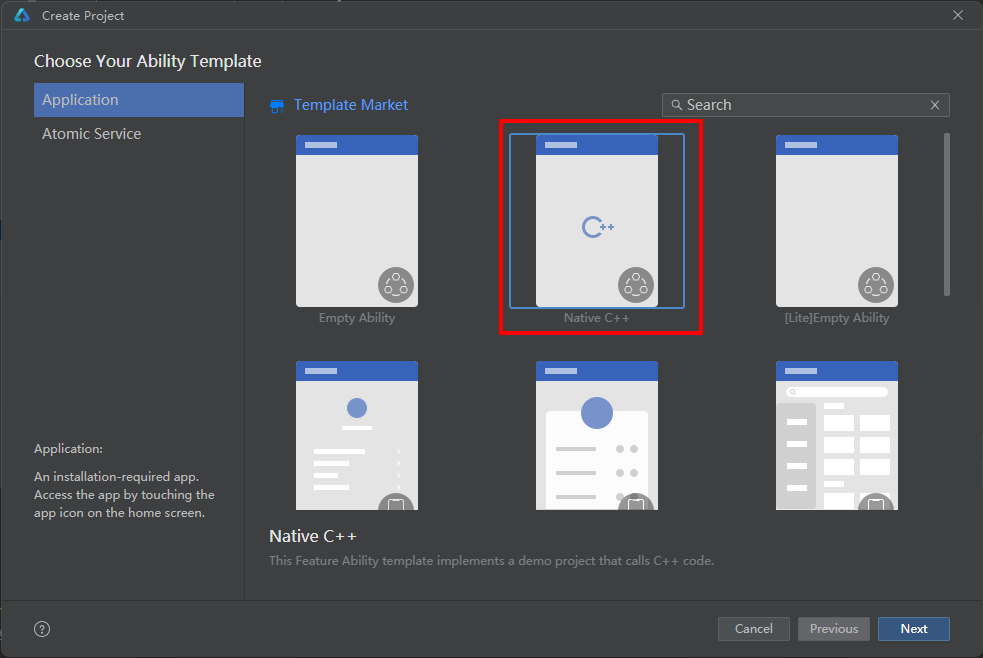
2. 添加依赖
创建完成后,DevEco Studio会在工程生成cpp目录,目录中包含types/libentry/index.d.ts、napi_init.cpp、CMakeLists.txt等文件。
-
打开src/main/cpp/CMakeLists.txt,在target_link_libraries依赖中添加包管理的libbundle_ndk.so。
target_link_libraries(entry PUBLIC libace_napi.z.so libbundle_ndk.so) -
打开src/main/cpp/napi_init.cpp文件,添加头文件。
// napi依赖头文件#include "napi/native_api.h"// native接口依赖头文件#include "bundle/ability_resource_info.h"#include "bundle/native_interface_bundle.h"// free()函数依赖的基础库#include <cstdlib>
3. 修改源文件
-
打开src/main/cpp/napi_init.cpp文件,文件Init会对当前方法进行初始化映射,这里定义对外的接口。
EXTERN_C_STARTstatic napi_value Init(napi_env env, napi_value exports){napi_property_descriptor desc[] = {{ "add", nullptr, Add, nullptr, nullptr, nullptr, napi_default, nullptr },// 新增方法getCurrentApplicationInfo{ "getCurrentApplicationInfo", nullptr, GetCurrentApplicationInfo, nullptr,nullptr, nullptr, napi_default, nullptr},// 新增方法getAppId{ "getAppId", nullptr, GetAppId, nullptr, nullptr, nullptr, napi_default, nullptr},// 新增方法getAppIdentifier{ "getAppIdentifier", nullptr, GetAppIdentifier, nullptr, nullptr, nullptr, napi_default, nullptr},// 新增方法getMainElementName{ "getMainElementName", nullptr, GetMainElementName, nullptr, nullptr, nullptr, napi_default, nullptr},// 新增方法getCompatibleDeviceType{ "getCompatibleDeviceType", nullptr, GetCompatibleDeviceType, nullptr,nullptr, nullptr, napi_default, nullptr},// 新增方法isDebugMode{ "isDebugMode", nullptr, IsDebugMode, nullptr, nullptr, nullptr, napi_default, nullptr},// 新增方法getModuleMetadata{ "getModuleMetadata", nullptr, GetModuleMetadata, nullptr, nullptr, nullptr, napi_default, nullptr},// 新增方法getAbilityResourceInfo{ "getAbilityResourceInfo", nullptr, GetAbilityResourceInfo, nullptr, nullptr, nullptr, napi_default, nullptr}};napi_define_properties(env, exports, sizeof(desc) / sizeof(desc[0]), desc);return exports;}EXTERN_C_END -
在src/main/cpp/napi_init.cpp文件中获取Native的包信息对象,并转为js的包信息对象,即可在js侧获取应用的信息:
static napi_value GetCurrentApplicationInfo(napi_env env, napi_callback_info info){// 调用Native接口获取应用信息OH_NativeBundle_ApplicationInfo nativeApplicationInfo = OH_NativeBundle_GetCurrentApplicationInfo();napi_value result = nullptr;napi_create_object(env, &result);// Native接口获取的应用包名转为js对象里的bundleName属性napi_value bundleName;napi_create_string_utf8(env, nativeApplicationInfo.bundleName, NAPI_AUTO_LENGTH, &bundleName);napi_set_named_property(env, result, "bundleName", bundleName);// Native接口获取的指纹信息转为js对象里的fingerprint属性napi_value fingerprint;napi_create_string_utf8(env, nativeApplicationInfo.fingerprint, NAPI_AUTO_LENGTH, &fingerprint);napi_set_named_property(env, result, "fingerprint", fingerprint);// 最后为了防止内存泄漏,手动释放free(nativeApplicationInfo.bundleName);free(nativeApplicationInfo.fingerprint);return result;}static napi_value GetAppId(napi_env env, napi_callback_info info){// 调用Native接口获取应用appIdchar* appId = OH_NativeBundle_GetAppId();// Native接口转成nAppId返回napi_value nAppId;napi_create_string_utf8(env, appId, NAPI_AUTO_LENGTH, &nAppId);// 最后为了防止内存泄漏,手动释放free(appId);return nAppId;}static napi_value GetAppIdentifier(napi_env env, napi_callback_info info){// 调用Native接口获取应用appIdentifierchar* appIdentifier = OH_NativeBundle_GetAppIdentifier();// Native接口转成nAppIdentifier返回napi_value nAppIdentifier;napi_create_string_utf8(env, appIdentifier, NAPI_AUTO_LENGTH, &nAppIdentifier);// 最后为了防止内存泄漏,手动释放free(appIdentifier);return nAppIdentifier;}static napi_value GetMainElementName(napi_env env, napi_callback_info info){// 调用Native接口获取应用入口的信息OH_NativeBundle_ElementName elementName = OH_NativeBundle_GetMainElementName();napi_value result = nullptr;napi_create_object(env, &result);// Native接口获取的应用包名转为js对象里的bundleName属性napi_value bundleName;napi_create_string_utf8(env, elementName.bundleName, NAPI_AUTO_LENGTH, &bundleName);napi_set_named_property(env, result, "bundleName", bundleName);// Native接口获取的模块名称转为js对象里的moduleName属性napi_value moduleName;napi_create_string_utf8(env, elementName.moduleName, NAPI_AUTO_LENGTH, &moduleName);napi_set_named_property(env, result, "moduleName", moduleName);// Native接口获取的ability名称转为js对象里的abilityName属性napi_value abilityName;napi_create_string_utf8(env, elementName.abilityName, NAPI_AUTO_LENGTH, &abilityName);napi_set_named_property(env, result, "abilityName", abilityName);// 最后为了防止内存泄漏,手动释放free(elementName.bundleName);free(elementName.moduleName);free(elementName.abilityName);return result;}static napi_value GetCompatibleDeviceType(napi_env env, napi_callback_info info){// 调用Native接口获取应用deviceTypechar* deviceType = OH_NativeBundle_GetCompatibleDeviceType();// Native接口转成nDeviceType返回napi_value nDeviceType;napi_create_string_utf8(env, deviceType, NAPI_AUTO_LENGTH, &nDeviceType);// 最后为了防止内存泄漏,手动释放free(deviceType);return nDeviceType;}static napi_value IsDebugMode(napi_env env, napi_callback_info info){bool isDebug = false;// 调用Native接口获取应用DebugMode的信息,该接口从API version 20开始支持bool isSuccess = OH_NativeBundle_IsDebugMode(&isDebug);// 调用Native接口失败抛出异常if (isSuccess == false) {napi_throw_error(env, nullptr, "call failed");return nullptr;}// Native接口转成debug返回napi_value debug;napi_get_boolean(env, isDebug, &debug);return debug;}static napi_value GetModuleMetadata(napi_env env, napi_callback_info info){size_t moduleCount = 0;// 调用Native接口获取应用元数据的信息,该接口从API version 20开始支持OH_NativeBundle_ModuleMetadata* modules = OH_NativeBundle_GetModuleMetadata(&moduleCount);if (modules == nullptr || moduleCount == 0) {napi_throw_error(env, nullptr, "no metadata found");return nullptr;}napi_value result;napi_create_array(env, &result);for (size_t i = 0; i < moduleCount; i++) {napi_value moduleObj;napi_create_object(env, &moduleObj);// Native接口获取的模块名转为js对象里的moduleName属性napi_value moduleName;napi_create_string_utf8(env, modules[i].moduleName, NAPI_AUTO_LENGTH, &moduleName);napi_set_named_property(env, moduleObj, "moduleName", moduleName);napi_value metadataArray;napi_create_array(env, &metadataArray);for (size_t j = 0; j < modules[i].metadataArraySize; j++) {napi_value metadataObj;napi_create_object(env, &metadataObj);napi_value name;napi_value value;napi_value resource;napi_create_string_utf8(env, modules[i].metadataArray[j].name, NAPI_AUTO_LENGTH, &name);napi_create_string_utf8(env, modules[i].metadataArray[j].value, NAPI_AUTO_LENGTH, &value);napi_create_string_utf8(env, modules[i].metadataArray[j].resource, NAPI_AUTO_LENGTH, &resource);// Native接口获取的元数据名称转为js对象里的name属性napi_set_named_property(env, metadataObj, "name", name);// Native接口获取的元数据值名称转为js对象里的value属性napi_set_named_property(env, metadataObj, "value", value);// Native接口获取的元数据资源转为js对象里的resource属性napi_set_named_property(env, metadataObj, "resource", resource);napi_set_element(env, metadataArray, j, metadataObj);}napi_set_named_property(env, moduleObj, "metadata", metadataArray);napi_set_element(env, result, i, moduleObj);}// 最后为了防止内存泄漏,手动释放for (size_t i = 0; i < moduleCount; i++) {free(modules[i].moduleName);for (size_t j = 0; j < modules[i].metadataArraySize; j++) {free(modules[i].metadataArray[j].name);free(modules[i].metadataArray[j].value);free(modules[i].metadataArray[j].resource);}free(modules[i].metadataArray);}free(modules);return result;}static void AddDefaultApp(napi_env env,napi_value &infoObj,OH_NativeBundle_AbilityResourceInfo* temp){bool isDefaultApp = true;// 该接口从API version 21开始支持OH_NativeBundle_CheckDefaultApp(temp, &isDefaultApp);napi_value defaultAppValue;napi_get_boolean(env, isDefaultApp, &defaultAppValue);napi_set_named_property(env, infoObj, "isDefaultApp", defaultAppValue);}static void AddAppIndex(napi_env env,napi_value &infoObj,OH_NativeBundle_AbilityResourceInfo* temp){int appIndex = -1;// 该接口从API version 21开始支持OH_NativeBundle_GetAppIndex(temp, &appIndex);napi_value appIndexValue;napi_create_int32(env, appIndex, &appIndexValue);napi_set_named_property(env, infoObj, "appIndex", appIndexValue);}static void AddLabel(napi_env env,napi_value &infoObj,OH_NativeBundle_AbilityResourceInfo* temp){char *label = nullptr;// 该接口从API version 21开始支持OH_NativeBundle_GetLabel(temp, &label);napi_value labelValue;if (label) {napi_create_string_utf8(env, label, NAPI_AUTO_LENGTH, &labelValue);free(label);} else {napi_get_null(env, &labelValue);}napi_set_named_property(env, infoObj, "label", labelValue);}static void AddBundleName(napi_env env,napi_value &infoObj,OH_NativeBundle_AbilityResourceInfo* temp){char *bundleName = nullptr;// 该接口从API version 21开始支持OH_NativeBundle_GetBundleName(temp, &bundleName);napi_value bundleNameValue;if (bundleName) {napi_create_string_utf8(env, bundleName, NAPI_AUTO_LENGTH, &bundleNameValue);free(bundleName);} else {napi_get_null(env, &bundleNameValue);}napi_set_named_property(env, infoObj, "bundleName", bundleNameValue);}static void AddModuleName(napi_env env,napi_value &infoObj,OH_NativeBundle_AbilityResourceInfo* temp){char *moduleName = nullptr;// 该接口从API version 21开始支持OH_NativeBundle_GetModuleName(temp, &moduleName);napi_value moduleNameValue;if (moduleName) {napi_create_string_utf8(env, moduleName, NAPI_AUTO_LENGTH, &moduleNameValue);free(moduleName);} else {napi_get_null(env, &moduleNameValue);}napi_set_named_property(env, infoObj, "moduleName", moduleNameValue);}static void AddAbilityName(napi_env env,napi_value &infoObj,OH_NativeBundle_AbilityResourceInfo* temp){char *abilityName = nullptr;// 该接口从API version 21开始支持OH_NativeBundle_GetAbilityName(temp, &abilityName);napi_value abilityNameValue;if (abilityName) {napi_create_string_utf8(env, abilityName, NAPI_AUTO_LENGTH, &abilityNameValue);free(abilityName);} else {napi_get_null(env, &abilityNameValue);}napi_set_named_property(env, infoObj, "abilityName", abilityNameValue);}static void GetDrawableDescriptor(OH_NativeBundle_AbilityResourceInfo* temp){ArkUI_DrawableDescriptor *rawDrawable = nullptr;// 该接口从API version 21开始支持OH_NativeBundle_GetDrawableDescriptor(temp, &rawDrawable);if (rawDrawable) {// 使用ArkUI_DrawableDescriptor对象绘制图标}}static void AssemblyAbilityResourceInfo(napi_env env,napi_value &infoObj,OH_NativeBundle_AbilityResourceInfo* temp){// 1. 添加Default AppAddDefaultApp(env, infoObj, temp);// 2. 添加App IndexAddAppIndex(env, infoObj, temp);// 3. 添加LabelAddLabel(env, infoObj, temp);// 4. 添加Bundle NameAddBundleName(env, infoObj, temp);// 5. 添加Module NameAddModuleName(env, infoObj, temp);// 6. 添加Ability NameAddAbilityName(env, infoObj, temp);// 7. 获取ArkUI_DrawableDescriptor对象GetDrawableDescriptor(temp);}static napi_value GetAbilityResourceInfo(napi_env env, napi_callback_info info){size_t argc = 1;napi_value args[1];napi_status status;// 获取传入的参数status = napi_get_cb_info(env, info, &argc, args, nullptr, nullptr);if (status != napi_ok || argc < 1) {napi_throw_error(env, nullptr, "Invalid arguments. Expected fileType string.");return nullptr;}// 检查参数类型是否为字符串napi_valuetype valuetype;status = napi_typeof(env, args[0], &valuetype);if (status != napi_ok || valuetype != napi_string) {napi_throw_error(env, nullptr, "Argument must be a string");return nullptr;}// 获取字符串参数char fileType[256] = {0}; // 假设文件类型不会超过255个字符size_t strLen;status = napi_get_value_string_utf8(env, args[0], fileType, sizeof(fileType) - 1, &strLen);if (status != napi_ok) {napi_throw_error(env, nullptr, "Failed to get fileType string");return nullptr;}size_t infosCount = 0;OH_NativeBundle_AbilityResourceInfo *infos = nullptr;// 调用Native接口获取组件资源信息,使用传入的fileType,该接口从API version 21开始支持BundleManager_ErrorCode ret = OH_NativeBundle_GetAbilityResourceInfo(fileType, &infos, &infosCount);if (ret == BUNDLE_MANAGER_ERROR_CODE_PERMISSION_DENIED) {napi_throw_error(env, nullptr, "BUNDLE_MANAGER_ERROR_CODE_PERMISSION_DENIED");return nullptr;}if (infos == nullptr || infosCount == 0) {napi_throw_error(env, nullptr, "no metadata found");return nullptr;}napi_value result;napi_create_array(env, &result);for (size_t i = 0; i < infosCount; i++) {auto temp = (OH_NativeBundle_AbilityResourceInfo *)((char *)infos + OH_NativeBundle_GetSize() * i);napi_value infoObj;napi_create_object(env, &infoObj);AssemblyAbilityResourceInfo(env, infoObj, temp);napi_set_element(env, result, i, infoObj);}// 释放内存,该接口从API version 21开始支持OH_AbilityResourceInfo_Destroy(infos, infosCount);return result;}
4. 接口暴露
-
在src/main/cpp/types/libentry/Index.d.ts文件中,声明暴露接口。
export const add: (a: number, b: number) => number;export const getCurrentApplicationInfo: () => object; // 新增暴露方法 getCurrentApplicationInfoexport const getAppId: () => string; // 新增暴露方法 getAppIdexport const getAppIdentifier: () => string; // 新增暴露方法 getAppIdentifierexport const getMainElementName: () => object; // 新增暴露方法 getMainElementNameexport const getCompatibleDeviceType: () => string; // 新增暴露方法 getCompatibleDeviceTypeexport const isDebugMode: () => boolean; // 新增暴露方法 isDebugModeexport const getModuleMetadata: () => object; // 新增暴露方法 getModuleMetadataexport const getAbilityResourceInfo: (fileType: string) => object; // 新增暴露方法 getAbilityResourceInfo
5. js侧调用
-
打开src/main/ets/pages/Index.ets,导入"libentry.so",调用Native接口打印出获取的信息内容。示例如下:
import { hilog } from '@kit.PerformanceAnalysisKit';import testNapi from 'libentry.so';const DOMAIN = 0x0000;@Entry@Componentstruct Index {@State message: string = 'Hello World';build() {Row() {Column() {Text(this.message).fontSize($r('app.float.page_text_font_size')).fontWeight(FontWeight.Bold).onClick(() => {this.message = 'Welcome';hilog.info(DOMAIN, 'testTag', 'Test NAPI 2 + 3 = %{public}d', testNapi.add(2, 3));let appInfo = testNapi.getCurrentApplicationInfo();console.info("bundleNative getCurrentApplicationInfo success, data is " + JSON.stringify(appInfo));let appId = testNapi.getAppId();console.info("bundleNative getAppId success, appId is " + appId);let appIdentifier = testNapi.getAppIdentifier();console.info("bundleNative getAppIdentifier success, appIdentifier is " + appIdentifier);let mainElement = testNapi.getMainElementName();console.info("bundleNative getMainElementName success, data is " + JSON.stringify(mainElement));let deviceType = testNapi.getCompatibleDeviceType();console.info("bundleNative getCompatibleDeviceType success, deviceType is " + deviceType);let isDebugMode = testNapi.isDebugMode();console.info("bundleNative isDebugMode success, isDebugMode is " + isDebugMode);let moduleMetadata = testNapi.getModuleMetadata();console.info("bundleNative getModuleMetadata success, data is " + JSON.stringify(moduleMetadata));let fileType: string = '.png';let abilityResourceInfo = testNapi.getAbilityResourceInfo(fileType);console.info("bundleNative getAbilityResourceInfo success, data is " + JSON.stringify(abilityResourceInfo));})}.width('100%')}.height('100%')}}
关于包管理NDK接口说明,可参考Native_Bundle模块介绍。