调用函数
约束与限制
支持Phone、Tablet设备。并且从5.1.0(18)版本开始,新增支持Wearable设备;从5.1.1(19)版本开始,新增支持TV设备;从6.1.0(23)版本开始,新增支持PC/2in1设备。
设置云函数配置项
在“entry/src/main/module.json5”文件中添加网络权限。
"requestPermissions": [
  {
    "name": "ohos.permission.INTERNET"
  }
]
查询函数名和版本
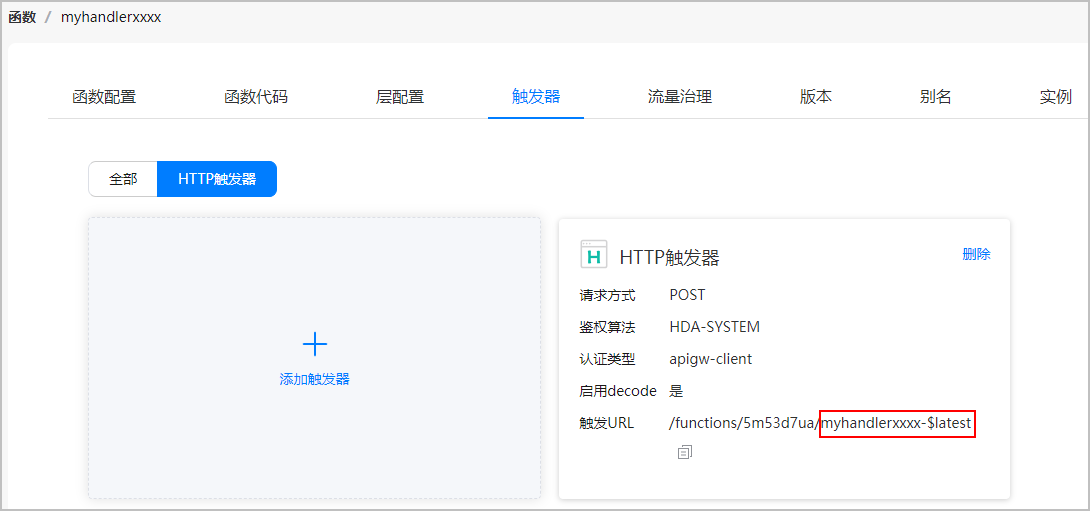
在函数的触发器页面点击“HTTP触发器”,查看“触发URL”的后缀,获取触发器的标识,格式为“函数名-版本号”。如下图所示,“myhandlerxxxx-$latest”即为HTTP触发器标识,其中“myhandlerxxxx”为函数名,“$latest”为版本号。
在应用中调用函数
-
在项目中导入cloudFunction组件。
import { cloudFunction } from '@kit.CloudFoundationKit';import { BusinessError } from '@kit.BasicServicesKit'; -
调用call()方法设置函数,在方法中传入函数名称,返回调用结果。
- (可选)通过设置timeout属性对云函数设置超时时长,单位为毫秒。
- (可选)通过设置version属性对云函数设置函数版本号,默认为最新版本'$latest'。
- (可选)如果函数有入参,可以将data参数转化为JSON对象或JSON字符串传入,如果没有参数则不传。
使用Promise异步回调:
import { hilog } from '@kit.PerformanceAnalysisKit';import { cloudFunction } from '@kit.CloudFoundationKit';import { BusinessError } from '@kit.BasicServicesKit';function callFunction() {cloudFunction.call({name: 'functionName', // functionName需替换为实际的函数名version: '$latest', // 如果不传入版本号,默认为“$latest”。timeout: 10 * 1000, // 单位为毫秒,默认为70*1000毫秒。data: { // data为函数请求体param1: 'val1',param2: 'val2'}}).then((value: cloudFunction.FunctionResult) => {hilog.info(0x0000, 'testTag', `Succeeded in calling the function, result: ${JSON.stringify(value.result)}`);}).catch((err: BusinessError) => {hilog.error(0x0000, 'testTag', `Failed to call the function, code: ${err.code}, message: ${err.message}`);})}或者,使用callback异步回调:
import { hilog } from '@kit.PerformanceAnalysisKit';import { cloudFunction } from '@kit.CloudFoundationKit';import { BusinessError } from '@kit.BasicServicesKit';function callFunction() {cloudFunction.call({name: 'functionName', // functionName需替换成实际的函数名version: '$latest', // 如果不传入版本号,默认为“$latest”。timeout: 10 * 1000, // 单位为毫秒,默认为70*1000毫秒。data: { // data为函数请求体param1: 'val1',param2: 'val2'}}, (err: BusinessError, value: cloudFunction.FunctionResult) => {if (err) {hilog.error(0x0000, 'testTag', `Failed to call the function, code: ${err.code}, message: ${err.message}`);return;}hilog.info(0x0000, 'testTag', `Succeeded in calling the function, result: ${JSON.stringify(value.result)}`);})} -
如果需要关注函数的返回值,可调用result属性获取。
let returnValue = value.result;value为步骤2中调用call()方法返回的cloudFunction.FunctionResult对象,返回值为云函数body返回的值,以测试函数时返回的结果为例,value.result = {"simple":"example"}。