插件式量化
简介
插件式量化不区分模型类型,包含语言类视觉类,可以针对各种Transform结构的模型进行快速量化。
插件式整体流程
PTQ和QAT是两种量化参数优化策略,PTQ使用推理工程即可完成量化校准,QAT需要结合训练工程来进行量化感知训练。
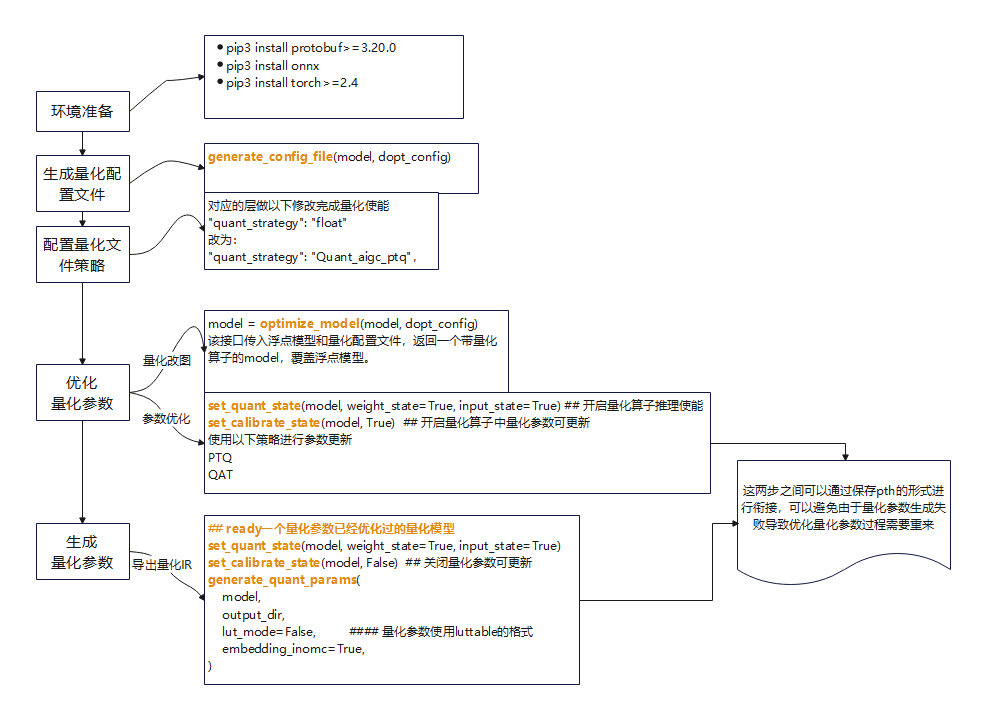
接口使用说明
import os
import sys
sys.path.append('path/to/dopt_torch_py3')
## 接口导入
from dopt.dopt_lm.do_opt import (
    generate_config_file,   ## 生成量化配置文件
    optimize_model,         ## 使用生成和配置好的量化配置文件将浮点nn.module 转成插入量化算子的nn.module
    set_quant_state,        ## 分别对激活和量化设置量化推理使能
    set_calibrate_state,    ## 设置量化参数可更新状态
    generate_quant_params,  ## 导出量化参数接口
)
## 量化算子插入  首次调用该接口会生成量化配置文件,完成配置后进行PTQ或者QAT
def get_quant_model(model, dopt_config):
    ## model: nn.module实例对象 浮点模型定义
    ## dopt_config: "path/to/config.json"  生成路径
    if not os.path.exists(dopt_config):
        generate_config_file(model, dopt_config)
        exit()
    model = optimize_model(model, dopt_config)
    return model
量化策略配置:
{
    "layer_strategy": {
        "node_name": {
            "type": "<class 'torch.nn.modules.linear.Linear'>",
            "quant_strategy": "need to set",
            "weight": {
                "bit": 4,
                "group_size": 128,
                "weight_algo": "group_min_max",
            },
            "input" : {
                "bit" : 8,
                "input_algo":  "min_max",
                "unsigned_quant": True
            }
        }
    }
}
配置说明:
quant_strategy 不同策略有默认的配置,可参考下表1进行配置修改,需要逐层配置。
表1 配置参数说明
| 配置信息 | 配置信息 | 可选项 | 选项说明 |
|---|---|---|---|
| quant_strategy | N/A | Quant_aigc_ptq Quant_aigc_qat Quant_act_weight_eco Quant_lm_head Quant_Embed_MinMax | PTQ量化策略,默认U8S8。量化器为minmax QAT量化策略,默认U8S8。量化器为omni_minmax 16-4grouplinear 量化策略。默认groupsize128,针对llm大模型,QAT量化器 16-4grouplinear 量化策略。默认groupsize128,针对llm大模型,QAT量化器 8bit embedding量化 |
| weight | bit | 4, 8 | 权重量化位宽 |
| weight | group_size | 128 , 256 | 权重bit为4时,属于低比特量化范畴, 使用grouplinear量化,可配置此信息,否则请别配置该键值对 |
| weight | weight_algo | min_max group_min_max omni_min_max omni_group_min_max | perchannel量化,最大最小值统计用于PTQ量化 pergroup量化,最大最小值统计,用于PTQ量化 QAT量化器, perchannel量化 QAT量化器, pergroup量化 |
| input | bit | 8, 16 | 激活量化位宽 |
| input | input_algo | min_max ema omni_min_max | pertensor量化,最大最小值统计用于PTQ量化,clip误差小 pertensor量化,滑动平均统计用于PTQ量化,round误差小 pertensor量化,QAT量化器 |
| input | unsigned_quant | True False | 非对称量化 对称量化 |
量化参数优化-PTQ
生成的quant_config中每一层默认都是float策略。需要将其改为Quant_aigc_ptq即可,高阶配置请参考上表。
请使用推理工程并选择合适数量的数据对get_quant_model接口返回的模型进行前向推理 即可完成对模型的量化优化如下:
## 首次调用会生成config文件,需要手动配置量化策略
model = get_quant_model(model, quant_config)
model.eval()
## 打开量化器
set_quant_state(model, weight_state=True, input_state=True)
## 打开量化参数可标定状态
set_calibrate_state(model, True)
## 使用实际推理数据进行推理 即量化标定###
for data in datasets:
    model(data)
set_calibrate_state(model, False)
torch.save(model.state_dict(), 'pth_save_path')
量化参数优化-QAT
生成的quant_config中每一层默认都是float策略。需要将其改为Quant_aigc_qat,高阶配置请参考上表。
请使用训练工程对插有量化算子的模型进行训练。
model = get_quant_model(model, quant_config)
model.train()
set_quant_state(model, weight_state=True, input_state=True)
set_calibrate_state(model, True)
"""
do training
"""
set_calibrate_state(model, False)
torch.save(model.state_dict(), 'pth_save_path')
量化参数提取导出
from dopt.dopt_lm.do_opt import generate_quant_params, optimize_model
## model: 浮点 nn.module 实例对象, quant_config:量化配置文件
model = optimize_model(model, quant_config)
## 加载量化标定后保存的pth
model.load_state_dict(
    torch.load('pth_save_path', map_location=torch.device('cpu')),
    strict=True,
)
## 关闭量化参数更新,导出量化参数
## Tips:也可以在标定完成后直接到这一步,进行参数导出,步骤分离的目的是为了防止过程中有错误,导致前面步骤重来。
set_quant_state(model, weight_state=True, input_state=True)
set_calibrate_state(model, False)
generate_quant_params(
    model,
    output_dir,
    quant_param_2=False,
    embedding_separate=True,
)
## output_dir 下会生成 fake_quant_weight.pth 以及量化参数文件, fake_quant_weight.pth 仅用作导出onnx图时替换权重
ONNX 导出:
使用torch.onnx.export 对浮点model进行导出(需要加载fake_quant_weight.pth),必要时完成ONNX模型简化,以及确保conv和linear算子名和torch定义名同步。