快速入门
本节以一个简单算子为例,带开发者体验从算子工程创建、代码编写、编译部署到运行验证的开发全流程,让开发者对算子开发工程有个宏观的认识,此处我们以输入是动态shape的Add算子实现为例,为了与内置Add算子区分,定义算子类型为AddCustom。
工程创建
DDK软件包中提供了工程创建工具msOpGen,开发者可以输入算子原型定义文件生成AscendC算子开发工程。
-
编写AddCustom算子的原型定义json文件。
假设AddCustom算子的原型定义文件命名为add_custom.json,存储路径为: $HOME/sample,文件内容如下。
[{"op": "AddCustom","input_desc": [{"name": "x","param_type": "required","format": ["ND"],"type": ["fp16"]},{"name": "y","param_type": "required","format": ["ND"],"type": ["fp16"]}],"output_desc": [{"name": "z","param_type": "required","format": ["ND"],"type": ["fp16"]}]}] -
注意先设置环境变量,执行source ${install_path}/ddk/ tools/tools_ascendc/set_ascendc_env.sh命令,其中${install_path}为tools包的解压目录。
-
使用msOpGen工具生成AddCustom算子的开发工程。
msopgen gen -i $HOME/sample/add_custom.json -c ai_core-<soc_version> -out $HOME/sample/AddCustom-
-i:算子原型定义文件add_custom.json所在路径。
-
-c:ai_core-<soc_version>代表算子在AI Core上执行,<soc_version>为Kirin AI处理器的型号,可在运行环境通过命令进行查询:
hdc -t ${target} shell param get ohos.boot.chiptypetarget:设备的SN码,可以通过hdc list targets获取当前运行环境上所有设备的SN码。
样例:
msopgen gen -i ./add_custom.json -c ai_core-kirin9020 -out ./AddCustom基于同系列的AI处理器型号创建的算子工程,其基础能力通用。命令执行完后,会在$HOME/sample目录下生成算子工程目录AddCustom,工程中包含算子实现的模板文件,编译脚本等,如下所示。
AddCustom├── build_devices.sh // 开发者无需关注,在线编译场景预留,编译device侧交付件脚本├── build.sh // 编译入口脚本├── cmake│ ├── config.cmake│ ├── util // 算子工程编译所需脚本及公共编译文件存放目录├── CMakeLists.txt // 算子工程的CMakeLists.txt├── CMakePresets.json // 编译配置项├── framework // 算子插件实现文件目录,单算子模型文件的生成不依赖算子适配插件,无需关注├── op_host // host侧实现文件│ ├── add_custom_tiling.h // 算子tiling定义文件│ ├── add_custom.cpp // 算子原型注册、shape推导、信息库、tiling实现等内容文件│ ├── CMakeLists.txt├── op_kernel // kernel侧实现文件│ ├── CMakeLists.txt│ ├── add_custom.cpp // 算子核函数实现文件├── scripts // 自定义算子工程打包相关脚本所在目录
上述目录结构中的粗体文件op_host/add_custom_tiling.h、op_host/add_custom.cpp、op_kernel/add_custom.cpp为后续算子开发过程中需要修改的文件,其他文件无需修改。
-
算子核函数实现
在工程存储目录的"AddCustom/op_kernel/add_custom.cpp"文件中实现算子的核函数,完整的样例代码开发者可以在add_custom.cpp中查看,下面介绍关键实现代码。
算子核函数实现代码的内部调用关系示意图如下。
图1 核函数调用关系图
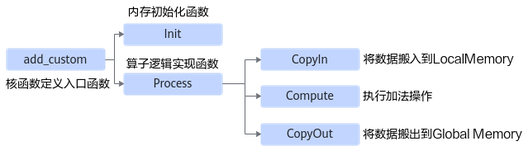
由此可见除了Init函数完成初始化外,Process中完成了对流水任务 : 搬入、计算、搬出的调用,开发者可以重点关注三个流水任务的实现。
-
进行核函数的定义, 并在核函数中调用算子类的Init和Process函数。
extern "C" __global__ __aicore__ void add_custom(GM_ADDR x, GM_ADDR y, GM_ADDR z, GM_ADDR workspace, GM_ADDR tiling){// 获取Host侧传入的Tiling参数GET_TILING_DATA(tiling_data, tiling);// 初始化算子类KernelAdd op;// 算子类的初始化函数,完成内存初始化相关工作op.Init(x, y, z, tiling_data.totalLength, tiling_data.tileNum);// 完成算子实现的核心逻辑op.Process();} -
定义KernelAdd算子类,其具体成员及成员函数实现如下。
#include "kernel_operator.h"constexpr int32_t BUFFER_NUM = 2;class KernelAdd {public:__aicore__ inline KernelAdd() {}// 初始化函数,完成内存初始化相关操作__aicore__ inline void Init(GM_ADDR x, GM_ADDR y, GM_ADDR z, uint32_t totalLength, uint32_t tileNum){// 使用获取到的TilingData计算得到singleCoreSize(每个核上总计算数据大小)、tileNum(每个核上分块个数)、singleTileLength(每个分块大小)等变量this->blockLength = totalLength / AscendC::GetBlockNum();this->tileNum = tileNum;this->tileLength = this->blockLength / tileNum / BUFFER_NUM;// 获取当前核的起始索引xGm.SetGlobalBuffer((__gm__ DTYPE_X*)x + this->blockLength * AscendC::GetBlockIdx(), this->blockLength);yGm.SetGlobalBuffer((__gm__ DTYPE_Y*)y + this->blockLength * AscendC::GetBlockIdx(), this->blockLength);zGm.SetGlobalBuffer((__gm__ DTYPE_Z*)z + this->blockLength * AscendC::GetBlockIdx(), this->blockLength);// 通过Pipe内存管理对象为输入输出Queue分配内存pipe.InitBuffer(inQueueX, BUFFER_NUM, this->tileLength * sizeof(DTYPE_X));pipe.InitBuffer(inQueueY, BUFFER_NUM, this->tileLength * sizeof(DTYPE_Y));pipe.InitBuffer(outQueueZ, BUFFER_NUM, this->tileLength * sizeof(DTYPE_Z));}// 核心处理函数,实现算子逻辑,调用私有成员函数CopyIn、Compute、CopyOut完成矢量算子的三级流水操作__aicore__ inline void Process(){int32_t loopCount = this->tileNum * BUFFER_NUM;for (int32_t i = 0; i < loopCount; i++) {CopyIn(i);Compute(i);CopyOut(i);}}private:// 搬入函数,完成CopyIn阶段的处理,被核心Process函数调用__aicore__ inline void CopyIn(int32_t progress){// 从Queue中分配输入TensorAscendC::LocalTensor<DTYPE_X> xLocal = inQueueX.AllocTensor<DTYPE_X>();AscendC::LocalTensor<DTYPE_Y> yLocal = inQueueY.AllocTensor<DTYPE_Y>();// 将GlobalTensor数据拷贝到LocalTensorAscendC::DataCopy(xLocal, xGm[progress * this->tileLength], this->tileLength);AscendC::DataCopy(yLocal, yGm[progress * this->tileLength], this->tileLength);// 将LocalTensor放入VECIN(代表矢量编程中搬入数据的逻辑存放位置)的Queue中inQueueX.EnQue(xLocal);inQueueY.EnQue(yLocal);}// 计算函数,完成Compute阶段的处理,被核心Process函数调用__aicore__ inline void Compute(int32_t progress){// 将Tensor从队列中取出,用于后续计算AscendC::LocalTensor<DTYPE_X> xLocal = inQueueX.DeQue<DTYPE_X>();AscendC::LocalTensor<DTYPE_Y> yLocal = inQueueY.DeQue<DTYPE_Y>();// 从Queue中分配输出TensorAscendC::LocalTensor<DTYPE_Z> zLocal = outQueueZ.AllocTensor<DTYPE_Z>();// 调用Add接口进行计算AscendC::Add(zLocal, xLocal, yLocal, this->tileLength);// 将计算结果LocalTensor放入到VecOut的Queue中outQueueZ.EnQue<DTYPE_Z>(zLocal);// 释放输入TensorinQueueX.FreeTensor(xLocal);inQueueY.FreeTensor(yLocal);}// 搬出函数,完成CopyOut阶段的处理,被核心Process函数调用__aicore__ inline void CopyOut(int32_t progress){// 从VecOut的Queue中取出输出TensorAscendC::LocalTensor<DTYPE_Z> zLocal = outQueueZ.DeQue<DTYPE_Z>();// 将输出Tensor拷贝到GlobalTensor中AscendC::DataCopy(zGm[progress * this->tileLength], zLocal, this->tileLength);// 将不再使用的LocalTensor释放outQueueZ.FreeTensor(zLocal);}private:// Pipe内存管理对象AscendC::TPipe pipe;// 输入数据Queue队列管理对象,QuePosition为VECINAscendC::TQue<AscendC::QuePosition::VECIN, 1> inQueueX, inQueueY;// 输出数据Queue队列管理对象,QuePosition为VECOUTAscendC::TQue<AscendC::QuePosition::VECOUT, 1> outQueueZ;// 管理输入输出Global Memory内存地址的对象,其中xGm, yGm为输入,zGm为输出AscendC::GlobalTensor<DTYPE_X> xGm;AscendC::GlobalTensor<DTYPE_Y> yGm;AscendC::GlobalTensor<DTYPE_Z> zGm;// 每个核上总计算数据大小uint32_t blockLength;// 每个核上总计算数据分块个数uint32_t tileNum;// 每个分块大小uint32_t tileLength;};
Host侧算子实现
核函数开发并验证完成后,下一步就是进行Host侧的实现,对应“AddCustom/op_host”目录下的add_custom_tiling.h文件与add_custom.cpp文件。下面简要介绍下两个文件的关键实现,完整的样例代码可参见add_custom_tiling.h与add_custom.cpp。
-
修改“add_custom_tiling.h”文件,在此文件中增加粗体部分的代码,进行Tiling参数的定义。
#ifndef ADD_CUSTOM_TILING_H#define ADD_CUSTOM_TILING_H#include "register/tilingdata_base.h"namespace optiling {BEGIN_TILING_DATA_DEF(AddCustomTilingData)// AddCustom算子使用了2个tiling参数:totalLength与tileNumTILING_DATA_FIELD_DEF(uint32_t, totalLength); // 总计算数据量TILING_DATA_FIELD_DEF(uint32_t, tileNum); // 每个核上总计算数据分块个数END_TILING_DATA_DEF;// 注册tiling数据到对应的算子REGISTER_TILING_DATA_CLASS(AddCustom, AddCustomTilingData)}#endif // ADD_CUSTOM_TILING_H -
修改“add_custom.cpp”文件,进行Tiling的实现。
修改“TilingFunc”函数,实现Tiling上下文的获取,并通过上下文获取输入输出shape信息,并根据shape信息设置TilingData,序列化保存TilingData,并设置TilingKey。
namespace optiling {const uint32_t BLOCK_DIM = 1;const uint32_t TILE_NUM = 8;static ge::graphStatus TilingFunc(gert::TilingContext* context){AddCustomTilingData tiling;uint32_t totalLength = context->GetInputShape(0)->GetOriginShape().GetShapeSize();context->SetBlockDim(BLOCK_DIM);tiling.set_totalLength(totalLength);tiling.set_tileNum(TILE_NUM);tiling.SaveToBuffer(context->GetRawTilingData()->GetData(), context->GetRawTilingData()->GetCapacity());context->GetRawTilingData()->SetDataSize(tiling.GetDataSize());size_t *currentWorkspace = context->GetWorkspaceSizes(1);currentWorkspace[0] = 0;return ge::GRAPH_SUCCESS;}} // namespace optiling -
在“add_custom.cpp”文件中实现AddCustom算子的shape推导。
Add算子的输出shape等于输入shape,所以直接将输入shape赋给输出shape,当前msOpGen工具生成的代码“InferShape”函数无需修改。
-
修改“add_custom.cpp”文件中的算子原型注册,此函数为入口函数。
namespace ops {class AddCustom : public OpDef {public:explicit AddCustom(const char* name) : OpDef(name){// Add算子的第一个输入this->Input("x").ParamType(REQUIRED) // 代表输入必选.DataType({ ge::DT_FLOAT16, ge::DT_FLOAT, ge::DT_INT32 }) // 输入支持的数据类型.Format({ ge::FORMAT_ND, ge::FORMAT_ND, ge::FORMAT_ND }); // 输入支持的数据格式// Add算子的第二个输入this->Input("y").ParamType(REQUIRED).DataType({ ge::DT_FLOAT16, ge::DT_FLOAT, ge::DT_INT32 }).Format({ ge::FORMAT_ND, ge::FORMAT_ND, ge::FORMAT_ND });this->Output("z").ParamType(REQUIRED).DataType({ ge::DT_FLOAT16, ge::DT_FLOAT, ge::DT_INT32 }).Format({ ge::FORMAT_ND, ge::FORMAT_ND, ge::FORMAT_ND });// 关联InferShape函数this->SetInferShape(ge::InferShape);// 关联Tiling函数this->AICore().SetTiling(optiling::TilingFunc);// 注册算子支持的AI处理器型号,请替换为实际支持的AI处理器型号,如kirin9020this->AICore().AddConfig("kirinxxx");}};// 结束算子注册OP_ADD(AddCustom);} // namespace ops
算子工程编译部署
编译AddCustom工程,生成自定义算子安装包,并将其安装到算子库中。
-
编译自定义算子工程,构建生成自定义算子包。
在算子工程AddCustom目录下执行如下命令,进行算子工程编译。
./build.sh编译成功后,会在当前目录下创建build_out目录,在build_out/autogen目录下生成自定义算子交付件。
-
自定义算子安装包部署。
在执行编译的同时,会将交付件安装到DDK安装目录${DDK_INSTALL_PATH}下的指定目录。
${DDK_INSTALL_PATH}/tools/platform查看部署后的目录结构,如下所示:
platform // 平台插件目录├── kirin9020 // Kirin AI处理器类型│ ├── config│ │ └── npu_custom_opinfo.json // 算子信息库│ ├── lib64│ │ └── libcustom_op.so // host侧二进制文件│ ├── ops│ │ └── impl│ │ ├── custom // kernel交付件│ │ │ ├── add_custom.cpp│ │ │ ├── add_custom.py│ │ │ └── op_proto.h│ │ └── impl│ └── simulator└── README.md