适配相机旋转角度(C/C++)
屏幕处于不同的屏幕状态时,原始图像需旋转不同的角度,以确保图像在合适的方向显示,效果如图所示。
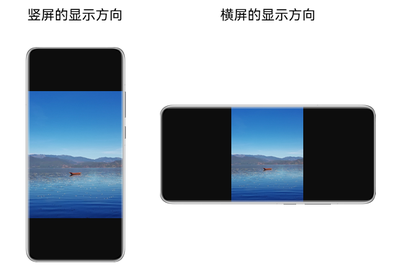
本开发指导将指导开发者在预览、拍照、录像等不同场景下,如何适配相机的旋转角度。
-
在预览时,图像旋转角度与屏幕显示旋转角度(NativeDisplayManager_Rotation)相关。具体开发指导:创建会话 > 预览。
-
在拍照、录像时,图像旋转角度与设备重力方向(即设备旋转角度)相关。
详细的API参考说明,请参考Camera API文档。
创建会话
-
导入相机等相关模块。
#include "hilog/log.h"#include "ohcamera/camera.h"#include "ohcamera/camera_manager.h"#include "ohcamera/capture_session.h" -
创建Session会话。
相机使用预览等功能前,均需创建相机会话,调用camera_manager.h中的OH_CameraManager_CreateCaptureSession方法创建一个会话,创建会话时需指定创建Camera_SceneMode为NORMAL_PHOTO或NORMAL_VIDEO,创建的session处于拍照或者录像模式。
void createPhotosession(Camera_Manager *cameraManager) {Camera_CaptureSession *captureSession;Camera_SceneMode sceneMode = NORMAL_PHOTO;Camera_ErrorCode ret = OH_CameraManager_CreateCaptureSession(cameraManager, &captureSession);if (captureSession == nullptr || ret != CAMERA_OK) {OH_LOG_INFO(LOG_APP, "Create captureSession failed.");}ret = OH_CaptureSession_SetSessionMode(captureSession, sceneMode);if (ret != CAMERA_OK) {OH_LOG_INFO(LOG_APP, "OH_CaptureSession_SetSessionMode failed.");}}void createVideosession(Camera_Manager *cameraManager) {Camera_CaptureSession *captureSession;Camera_SceneMode sceneMode = NORMAL_VIDEO;Camera_ErrorCode ret = OH_CameraManager_CreateCaptureSession(cameraManager, &captureSession);if (captureSession == nullptr || ret != CAMERA_OK) {OH_LOG_INFO(LOG_APP, "Create captureSession failed.");}ret = OH_CaptureSession_SetSessionMode(captureSession, sceneMode);if (ret != CAMERA_OK) {OH_LOG_INFO(LOG_APP, "OH_CaptureSession_SetSessionMode failed.");}}
预览
完成会话创建后,开发者可根据实际需求,配置输出流。
-
调用preview_output.h中的OH_PreviewOutput_GetPreviewRotation接口,获取预览旋转角度。
displayRotation:显示设备的屏幕旋转角度,可通过OH_NativeDisplayManager_GetDefaultDisplayRotation获取默认屏幕的顺时针旋转角度,并将对应角度填入。
例:OH_NativeDisplayManager_GetDefaultDisplayRotation获取结果为1,表示显示设备屏幕顺时针旋转为90°,此处imageRotation填入90。
#include "hilog/log.h"#include "ohcamera/camera.h"#include "ohcamera/preview_output.h"#include <window_manager/oh_display_info.h>#include <window_manager/oh_display_manager.h>int32_t GetDefaultDisplayRotation() {int32_t imageRotation = 0;NativeDisplayManager_Rotation displayRotation = DISPLAY_MANAGER_ROTATION_0;int32_t ret = OH_NativeDisplayManager_GetDefaultDisplayRotation(&displayRotation);if (ret != DISPLAY_MANAGER_OK) {OH_LOG_INFO(LOG_APP, "OH_NativeDisplayManager_GetDefaultDisplayRotation failed.");}imageRotation = displayRotation * IAMGE_ROTATION_90;return imageRotation;}该接口需要在session调用OH_CaptureSession_CommitConfig完成配流后调用,如果存在异步执行的情况,previewOutput未添加到session里或者已调用OH_CaptureSession_Release,导致两者关系未绑定,此时调用OH_PreviewOutput_GetPreviewRotation,则会调用失败,并抛出错误码CAMERA_SERVICE_FATAL_ERROR。
Camera_ImageRotation GetPreviewRotation(Camera_PreviewOutput* previewOutput, int32_t imageRotation) {Camera_ImageRotation previewRotation = IAMGE_ROTATION_0;Camera_ErrorCode ret = OH_PreviewOutput_GetPreviewRotation(previewOutput, imageRotation, &previewRotation);if (ret != CAMERA_OK) {OH_LOG_INFO(LOG_APP, "OH_PreviewOutput_GetPreviewRotation failed.");}return previewRotation;} -
调用preview_output.h中的OH_PreviewOutput_SetPreviewRotation,设置图像的预览旋转角度。
该接口需要在session调用OH_CaptureSession_CommitConfig完成配流后调用,如果多次调用,以最新调用设置的图像预览旋转角度为准。
- previewRotation:预览旋转角度,取上一步OH_PreviewOutput_GetPreviewRotation的返回值。
- isDisplayLocked:Surface在屏幕旋转时是否锁定方向。当设置为false,即屏幕方向未锁定,预览旋转角度将根据相机镜头角度+屏幕显示旋转角度的值计算;当设置为true,Surface旋转锁定,不跟随窗口变化,旋转角度仅取相机镜头角度计算。
void SetPreviewRotation(Camera_PreviewOutput* previewOutput, Camera_ImageRotation previewRotation, bool isDisplayLocked) {Camera_ErrorCode ret = OH_PreviewOutput_SetPreviewRotation(previewOutput, previewRotation, isDisplayLocked);if (ret != CAMERA_OK) {OH_LOG_INFO(LOG_APP, "OH_PreviewOutput_SetPreviewRotation failed.");}}
预览流旋转接口适配场景及示例:
-
在会话管理过程中调用预览旋转接口,即:使用OH_CaptureSession_CommitConfig接口提交相关配置后调用,建议在OH_CaptureSession_Start起流前调用。
#include "hilog/log.h"#include "ohcamera/camera.h"#include "ohcamera/preview_output.h"#include <window_manager/oh_display_info.h>#include <window_manager/oh_display_manager.h>int32_t GetDefaultDisplayRotation() {int32_t imageRotation = 0;NativeDisplayManager_Rotation displayRotation = DISPLAY_MANAGER_ROTATION_0;int32_t ret = OH_NativeDisplayManager_GetDefaultDisplayRotation(&displayRotation);if (ret != DISPLAY_MANAGER_OK) {OH_LOG_INFO(LOG_APP, "OH_NativeDisplayManager_GetDefaultDisplayRotation failed.");}imageRotation = displayRotation * IAMGE_ROTATION_90;return imageRotation;}void InitPreviewRotation(Camera_PreviewOutput* previewOutput) {// previewOutput是创建的预览输出Camera_ImageRotation previewRotation = IAMGE_ROTATION_0;int32_t imageRotation = GetDefaultDisplayRotation();Camera_ErrorCode ret = OH_PreviewOutput_GetPreviewRotation(previewOutput, imageRotation, &previewRotation);if (ret != CAMERA_OK) {OH_LOG_INFO(LOG_APP, "OH_PreviewOutput_GetPreviewRotation failed.");}ret = OH_PreviewOutput_SetPreviewRotation(previewOutput, previewRotation, false);if (ret != CAMERA_OK) {OH_LOG_INFO(LOG_APP, "OH_PreviewOutput_SetPreviewRotation failed.");}} -
应用使用相机时,通过监听监听屏幕状态变化,感知窗口当前状态,如当前相机窗口发生旋转时,需对预览流进行角度修正。推荐在会话管理中完成调用预览旋转接口后,直接创建监听。
#include "hilog/log.h"#include "ohcamera/camera.h"#include "ohcamera/preview_output.h"#include <window_manager/oh_display_info.h>#include <window_manager/oh_display_manager.h>int32_t GetDefaultDisplayRotation() {int32_t imageRotation = 0;NativeDisplayManager_Rotation displayRotation = DISPLAY_MANAGER_ROTATION_0;int32_t ret = OH_NativeDisplayManager_GetDefaultDisplayRotation(&displayRotation);if (ret != DISPLAY_MANAGER_OK) {OH_LOG_INFO(LOG_APP, "OH_NativeDisplayManager_GetDefaultDisplayRotation failed.");}imageRotation = displayRotation * IAMGE_ROTATION_90;return imageRotation;}// 应用需监听屏幕状态变化,使用如下回调函数对预览流进行角度修正void DisplayChangeCallback(uint64_t displayId){// previewOutput是创建的预览输出OH_LOG_INFO(LOG_APP, "DisplayChangeCallback displayId=%{public}lu.", displayId);Camera_ImageRotation previewRotation = IAMGE_ROTATION_0;int32_t imageRotation = GetDefaultDisplayRotation();Camera_ErrorCode ret = OH_PreviewOutput_GetPreviewRotation(previewOutput, imageRotation, &previewRotation);if (ret != CAMERA_OK) {OH_LOG_INFO(LOG_APP, "OH_PreviewOutput_GetPreviewRotation failed.");}ret = OH_PreviewOutput_SetPreviewRotation(previewOutput, previewRotation, false);if (ret != CAMERA_OK) {OH_LOG_INFO(LOG_APP, "OH_PreviewOutput_SetPreviewRotation failed.");}}
拍照
完成会话创建后,开发者可根据实际需求,配置输出流。
-
调用photo_output.h中的OH_PhotoOutput_GetPhotoRotation可以获取到拍照旋转角度。
该接口需要在session调用OH_CaptureSession_CommitConfig完成配流后调用。
deviceDegree:设备旋转角度。拍照的旋转角度与重力方向(即设备旋转角度)相关,获取方式请见计算设备旋转角度。
#include "hilog/log.h"#include "ohcamera/camera.h"#include "ohcamera/photo_output.h"Camera_ImageRotation GetPhotoRotation(Camera_PhotoOutput* photoOutput, int32_t deviceDegree) {Camera_ImageRotation photoRotation = IAMGE_ROTATION_0;Camera_ErrorCode ret = OH_PhotoOutput_GetPhotoRotation(photoOutput, deviceDegree, &photoRotation);if (ret != CAMERA_OK) {OH_LOG_INFO(LOG_APP, "OH_PhotoOutput_GetPhotoRotation failed.");}return photoRotation;} -
应用将拍照角度写入Camera_PhotoCaptureSetting的rotation。
-
其余参数的配置及拍照,可参考拍照开发指导。
录像
完成会话创建后,开发者可根据实际需求,配置输出流。
-
调用video_output.h中的OH_VideoOutput_GetVideoRotation可以获取到录像的旋转角度。
该接口需要在session调用OH_CaptureSession_CommitConfig完成配流后调用。
deviceDegree:设备旋转角度。录像的旋转角度与重力方向(即设备旋转角度)相关,获取方式请见计算设备旋转角度。
#include "hilog/log.h"#include "ohcamera/camera.h"#include "ohcamera/video_output.h"Camera_ImageRotation GetVideoRotation(Camera_VideoOutput* videoOutput, int32_t deviceDegree) {Camera_ImageRotation videoRotation = IAMGE_ROTATION_0;Camera_ErrorCode ret = OH_VideoOutput_GetVideoRotation(videoOutput, deviceDegree, &videoRotation);if (ret != CAMERA_OK) {OH_LOG_INFO(LOG_APP, "OH_PhotoOutput_GetPhotoRotation failed.");}return videoRotation;} -
在OH_AVRecorder_Prepare后使用OH_AVRecorder_UpdateRotation设置录像角度。
-
其余参数的配置及启动录像,可参考录像开发指导。
录像流旋转接口适配示例代码:
#include "hilog/log.h"
#include "ohcamera/camera.h"
#include "ohcamera/video_output.h"
#include <multimedia/player_framework/avrecorder.h>
#include <multimedia/player_framework/avrecorder_base.h>

void GetVideoRotationAndUpdate(Camera_VideoOutput* videoOutput, int32_t deviceDegree, OH_AVRecorder* recorder, OH_AVRecorder_State state) {
    Camera_ImageRotation videoRotation = IAMGE_ROTATION_0;
    Camera_ErrorCode ret = OH_VideoOutput_GetVideoRotation(videoOutput, deviceDegree, &videoRotation);
    if (ret != CAMERA_OK) {
        OH_LOG_INFO(LOG_APP, "OH_PhotoOutput_GetPhotoRotation failed.");
    }
    if (state == OH_AVRecorder_State::AVRECORDER_PREPARED) {
        OH_AVErrCode retCode = OH_AVRecorder_UpdateRotation(recorder, videoRotation);
        if (retCode != AV_ERR_OK) {
            OH_LOG_INFO(LOG_APP, "OH_AVRecorder_UpdateRotation failed.");
        }
    }
}
计算设备旋转角度
当前可通过监听OH_Sensor_Subscribe获取重力传感器在x、y、z三个方向上的数据,计算得出设备旋转角度deviceDegree,示例如下所示。
如果无法获得重力传感器数据,需要申请重力传感器权限ohos.permission.ACCELEROMETER。权限申请请参考声明权限,如何获取传感器数据请参考传感器开发指导。
#include "hilog/log.h"
#include <sensors/oh_sensor.h>
#include <cmath>
#include <thread>

Sensor_SubscriptionId *id;
Sensor_Subscriber *subscriber;
Sensor_SubscriptionAttribute *attr;

// Sensor获取方式为注册监听获取单次数据后解注册,监听回调为异步触发,等待g_isDegreeReady设置为true后说明获取设备角度成功;
// 角度保存在g_deviceDegree,使用角度后将g_isDegreeReady置为false;
float g_deviceDegree = 0.0f;
bool g_isDegreeReady = false;

float GetDeviceDegreeFromXYZ(float x, float y, float z)
{
    // 判断条件 (x * x + y * y) * 3 < z * z
    if ((x * x + y * y) * 3 < z * z) {
        return -1.0f;
    } else {
        // 计算 atan2(y, -x) 并转换为角度
        float sd = std::atan2(y, -x);                      // 返回弧度
        float sc = std::round(sd / 3.141592653589f * 180); // 转换为角度并四舍五入
        float getDeviceDegree = 90.0f - sc;

        // 保证角度在 0 到 360 之间
        if (getDeviceDegree >= 0) {
            getDeviceDegree = fmod(getDeviceDegree, 360.0f); // 取模,保证结果在 0 到 360 之间
        } else {
            getDeviceDegree = fmod(getDeviceDegree, 360.0f) + 360.0f; // 如果小于0,加上360
        }
        OH_LOG_INFO(LOG_APP, "GetDeviceDegreeFromXYZ getDeviceDegree:%{public}f", getDeviceDegree);
        return getDeviceDegree;
    }
}

void SensorDataCallback(Sensor_Event *event)
{
    OH_LOG_INFO(LOG_APP, "SensorDataCallbackImpl start");
    // SENSOR_TYPE_GRAVITY:data[0]、data[1]、data[2]分别表示设备x、y、z轴的重力加速度分量,单位m/s²;
    float *data = nullptr;
    uint32_t length = 0;
    OH_SensorEvent_GetData(event, &data, &length); // 获取传感器数据。
    for (uint32_t i = 0; i < length; ++i) {
        OH_LOG_INFO(LOG_APP, "SensorDataCallbackImpl data[%{public}d]:%{public}f", i, data[i]);
    }
    float x = data[0];
    float y = data[1];
    float z = data[2];
    g_deviceDegree = GetDeviceDegreeFromXYZ(x, y, z);
    g_isDegreeReady = true;

    OH_Sensor_Unsubscribe(id, subscriber); // 取消订阅传感器数据。
    if (id != nullptr) {
        OH_Sensor_DestroySubscriptionId(id); // 销毁Sensor_SubscriptionId实例并回收内存。
    }
    if (attr != nullptr) {
        OH_Sensor_DestroySubscriptionAttribute(attr); // 销毁Sensor_SubscriptionAttribute实例并回收内存。
    }
    if (subscriber != nullptr) {
        OH_Sensor_DestroySubscriber(subscriber); // 销毁Sensor_Subscriber实例并回收内存。
        subscriber = nullptr;
    }
}

void GetCurGravity()
{
    Sensor_Type SENSOR_ID{ SENSOR_TYPE_GRAVITY };
    id = OH_Sensor_CreateSubscriptionId(); // 创建一个Sensor_SubscriptionId实例。
    if (id == nullptr) {
        OH_LOG_ERROR(LOG_APP, "sensor error0");
    }
    int32_t res = OH_SensorSubscriptionId_SetType(id, SENSOR_ID); // 设置传感器类型为重力。
    if (res != 0) {
        OH_LOG_ERROR(LOG_APP, "sensor error1");
    }
    attr = OH_Sensor_CreateSubscriptionAttribute(); // 创建Sensor_SubscriptionAttribute实例。
    if (attr == nullptr) {
        OH_LOG_ERROR(LOG_APP, "sensor error2");
    }
    int64_t sensorSamplePeriod = 15000000;
    res = OH_SensorSubscriptionAttribute_SetSamplingInterval(attr, sensorSamplePeriod); // 设置传感器数据报告间隔。
    if (res != 0) {
        OH_LOG_ERROR(LOG_APP, "sensor error3");
    }
    subscriber = OH_Sensor_CreateSubscriber();
    if (subscriber == nullptr) {
        OH_LOG_ERROR(LOG_APP, "sensor error2");
    }
    OH_SensorSubscriber_SetCallback(subscriber, SensorDataCallback);
    Sensor_Result sensorRes = OH_Sensor_Subscribe(id, attr, subscriber); // 订阅传感器数据。
    if (sensorRes != SENSOR_SUCCESS) {
        OH_LOG_INFO(LOG_APP, "sensor error:%{public}d", sensorRes);
    }
}

int32_t CalDeviceDegree()
{
    float deviceDegree = 0.0f;
    GetCurGravity();
    while (!g_isDegreeReady) {
        std::this_thread::sleep_for(std::chrono::milliseconds(10));
    }
    deviceDegree = g_deviceDegree;
    g_isDegreeReady = false;
    return deviceDegree;
}
视频通话送远端场景
两个设备之间进行视频通话,存在设备间持握方向不一致问题,建议在本端将画面转正,再通过网络发送到对端。
实现相机无损出图
在部分折叠屏设备上,不同折叠状态下的设备自然方向会发生改变,导致不同折叠状态下的相机镜头安装角度不同。为了屏蔽不同设备间的差异,使得不同折叠状态下的相机镜头安装角度一致,系统会自动调整部分折叠状态下的相机采集图像方向(通过旋转裁切的方式)和相机镜头安装角度,因此会存在视场角(Field of View, FOV)损失,可能会导致相机预览、拍照、录像可见范围降低,因此如果需要实现相机无损出图,可以通过OH_CameraInput_UsePhysicalCameraOrientation接口来实现相机无损出图。具体方式如下:
设备是否支持无损出图,首先需要确认设备的相机镜头安装角度是否可变,可以通过OH_CameraInput_IsPhysicalCameraOrientationVariable接口查询。
- 当相机镜头安装角度不可变时,不同折叠状态下的相机出图均为无损出图。
- 当相机镜头安装角度可变时:
- 如应用需要实现相机无损出图,由于相机镜头安装角度与相机旋转相关,需要应用完成相机旋转的适配后,通过OH_CameraInput_GetPhysicalCameraOrientation接口获取设备当前折叠状态下真实的相机镜头安装角度,并通过OH_CameraInput_UsePhysicalCameraOrientation接口实现相机无损出图(相机镜头安装角度不可变时使用OH_CameraInput_UsePhysicalCameraOrientation将会返回7400102错误码,未适配相机旋转时使用相机无损出图会导致预览、拍照、录像旋转异常),推荐在OH_CameraManager_CreateCameraInput后直接使用OH_CameraInput_UsePhysicalCameraOrientation接口实现相机无损出图。
示例代码如下:
#include "ohcamera/camera.h"
#include "ohcamera/camera_input.h"
#include "hilog/log.h"

Camera_ErrorCode EnablePhysicalCameraOrientation(Camera_Input* cameraInput)
{
    bool isVariable = false;
    // 查询设备的相机镜头安装角度是否可变
    Camera_ErrorCode ret = OH_CameraInput_IsPhysicalCameraOrientationVariable(cameraInput, &isVariable);
    if (ret != CAMERA_OK) {
        OH_LOG_ERROR(LOG_APP, "OH_CameraInput_IsPhysicalCameraOrientationVariable failed.");
        return ret;
    }
    if (!isVariable) {
        OH_LOG_INFO(LOG_APP, "Physical Camera Orientation is not variable.");
        return CAMERA_OK;
    }
    // 获取设备当前折叠状态下真实的相机镜头安装角度
    uint32_t physicalOrientation = 0;
    ret = OH_CameraInput_GetPhysicalCameraOrientation(cameraInput, &physicalOrientation);
    if (ret != CAMERA_OK) {
        OH_LOG_ERROR(LOG_APP, "OH_CameraInput_GetPhysicalCameraOrientation failed.");
        return ret;
    }
    // 选择是否使用真实的相机镜头安装角度, 以实现无损出图
    bool isUsed = true;
    ret = OH_CameraInput_UsePhysicalCameraOrientation(cameraInput, isUsed);
        if (ret != CAMERA_OK) {
        OH_LOG_ERROR(LOG_APP, "OH_CameraInput_UsePhysicalCameraOrientation failed.");
        return ret;
    }
}