在Worker线程中使用相机(ArkTS)
Worker主要作用是为应用程序提供一个多线程的运行环境,可满足应用程序在执行过程中与主线程分离,在后台线程中运行一个脚本进行耗时操作,极大避免类似计算密集型或高延迟的任务阻塞主线程的运行。
通常开发者使用相机功能需要创建相机会话,并持续接收处理预览流、拍照流、录像流等从而实现相关相机功能,这些密集型操作如果都放在主线程即UI线程,可能会阻塞UI绘制,推荐开发者在worker线程中实现相机功能。
开发步骤
-
导入依赖,本篇文档需要用到worker和相机框架等相关依赖包。
import { BusinessError } from '@kit.BasicServicesKit';import { camera } from '@kit.CameraKit';import { ErrorEvent, MessageEvents, ThreadWorkerGlobalScope, worker } from '@kit.ArkTS'; -
创建相机服务代理类,调用CameraKit方法都放在这个类里执行。
class CameraService {private imageWidth: number = 1920;private imageHeight: number = 1080;private cameraManager: camera.CameraManager | undefined = undefined;private cameras: Array<camera.CameraDevice> = [];private cameraInput: camera.CameraInput | undefined = undefined;private previewOutput: camera.PreviewOutput | undefined = undefined;private photoOutput: camera.PhotoOutput | undefined = undefined;private session: camera.PhotoSession | camera.VideoSession | undefined = undefined;// 初始化相机。async initCamera(context: Context, surfaceId: string): Promise<void> {console.info(`initCamera surfaceId: ${surfaceId}`);try {await this.releaseCamera();// 获取相机管理器实例。this.cameraManager = camera.getCameraManager(context);if (this.cameraManager === undefined) {console.error('cameraManager is undefined');return;}this.cameras = this.cameraManager.getSupportedCameras();if (!this.cameras || this.cameras.length <= 0) {console.error("cameraManager.getSupportedCameras error");return;}// 创建cameraInput输出对象。this.cameraInput = this.cameraManager.createCameraInput(this.cameras[0]);if (this.cameraInput === undefined) {console.error('Failed to create the camera input.');return;}// 打开相机。await this.cameraInput.open();let previewProfile: camera.Profile = {format: camera.CameraFormat.CAMERA_FORMAT_YUV_420_SP,size: {width: this.imageWidth,height: this.imageHeight}};// 创建预览流输出。this.previewOutput = this.cameraManager.createPreviewOutput(previewProfile, surfaceId);if (this.previewOutput === undefined) {console.error('Failed to create the preview stream.');this.releaseCamera();return;}let photoProfile: camera.Profile = {format: camera.CameraFormat.CAMERA_FORMAT_JPEG,size: {width: this.imageWidth,height: this.imageHeight}};// 创建拍照流输出。this.photoOutput = this.cameraManager.createPhotoOutput(photoProfile);if (this.photoOutput === undefined) {console.error('Failed to create the photoOutput.');this.releaseCamera();return;}// 创建相机会话,启动会话。let session = this.cameraManager.createSession(camera.SceneMode.NORMAL_PHOTO);if (!session) {console.error('session is null');this.releaseCamera();return;}this.session = session as camera.PhotoSession;this.session.beginConfig();this.session.addInput(this.cameraInput);this.session.addOutput(this.previewOutput);this.session.addOutput(this.photoOutput);await this.session.commitConfig();await this.session.start();} catch (error) {let err = error as BusinessError;console.error(`initCamera fail: ${err}`);this.releaseCamera();}}// 释放相机资源。async releaseCamera(): Promise<void> {console.info('releaseCamera is called');// 停止当前会话。await this.session?.stop().catch((e: BusinessError) => {console.error('Failed to stop session: ', e)});// 释放相机输入流。await this.cameraInput?.close().catch((e: BusinessError) => {console.error('Failed to close the camera: ', e)});// 释放预览输出流。await this.previewOutput?.release().catch((e: BusinessError) => {console.error('Failed to stop the preview stream: ', e)});// 释放拍照输出流。await this.photoOutput?.release().catch((e: BusinessError) => {console.error('Stop Photo Stream Failure: ', e)});// 释放会话。await this.session?.release().catch((e: BusinessError) => {console.error('Failed to release session: ', e)});console.info('releaseCamera success');}} -
创建worker线程文件,配置worker。
DevEco Studio支持一键生成Worker,在对应的{moduleName}目录下任意位置,点击鼠标右键 > New > Worker,即可自动生成Worker的模板文件及配置信息,无需再手动在build-profile.json5中进行相关配置。
CameraWorker.ets实现参考:
let cameraService = new CameraService();const workerPort: ThreadWorkerGlobalScope = worker.workerPort;// 自定义消息格式。interface MessageInfo {hasResolve: boolean;type: string;context: Context; // 注意worker线程中无法使用getContext()直接获取宿主线程context,需要通过消息从宿主线程通信到worker线程使用。surfaceId: string;}workerPort.onmessage = async (e: MessageEvents) => {const messageInfo: MessageInfo = e.data;console.info(`worker onmessage type:${messageInfo.type}`)if ('initCamera' === messageInfo.type) {// 在worker线程中收到宿主线程初始化相机的消息。console.info(`worker initCamera surfaceId:${messageInfo.surfaceId}`)// 在worker线程中初始化相机。await cameraService.initCamera(messageInfo.context, messageInfo.surfaceId);} else if ('releaseCamera' === messageInfo.type) {// 在worker线程中收到宿主线程释放相机的消息。console.info('worker releaseCamera.');// 在worker线程中释放相机。await cameraService.releaseCamera();}}workerPort.onmessageerror = (e: MessageEvents) => {}workerPort.onerror = (e: ErrorEvent) => {} -
创建组件,用于显示预览流,在页面相关生命周期中构造ThreadWorker实例,在worker线程中完成相机初始化和释放。
@Entry@Componentstruct Index {private mXComponentController: XComponentController = new XComponentController();private surfaceId: string = '';@State imageWidth: number = 1920;@State imageHeight: number = 1080;// 创建ThreadWorker对象获取worker实例。private workerInstance: worker.ThreadWorker = new worker.ThreadWorker('entry/ets/workers/CameraWorker.ets');private uiContext: UIContext = this.getUIContext();private context: Context | undefined = this.uiContext.getHostContext();private mXComponentOptions: XComponentOptions = {type: XComponentType.SURFACE,controller: this.mXComponentController}onPageShow(): void {if ('' !== this.surfaceId) {// 通过worker实例向worker线程发送消息初始化相机。this.workerInstance.postMessage({type: 'initCamera',context: this.context,surfaceId: this.surfaceId,})}}onPageHide(): void {// 通过worker实例向worker线程发送消息销毁相机。this.workerInstance.postMessage({type: 'releaseCamera',})}build() {Column() {Column() {XComponent(this.mXComponentOptions).onLoad(async () => {console.info('onLoad is called');// 初始化XComponent获取预览流surfaceId。this.surfaceId = this.mXComponentController.getXComponentSurfaceId();let surfaceRect: SurfaceRect = {surfaceWidth: this.imageHeight,surfaceHeight: this.imageWidth};this.mXComponentController.setXComponentSurfaceRect(surfaceRect);console.info(`onLoad surfaceId: ${this.surfaceId}`);if (!this.workerInstance) {console.error('create stage worker failed');return;}// 宿主线程向worker线程发送初始化相机消息。this.workerInstance.postMessage({type: 'initCamera',context: this.context, // 将宿主线程的context传给worker线程使用。surfaceId: this.surfaceId, // 将surfaceId传给worker线程使用。})})// The width and height of the surface are opposite to those of the XComponent..width(this.uiContext.px2vp(this.imageHeight)).height(this.uiContext.px2vp(this.imageWidth))}.justifyContent(FlexAlign.Center).height('90%')Text('WorkerDemo').fontSize(36)}.justifyContent(FlexAlign.End).height('100%').width('100%')}}
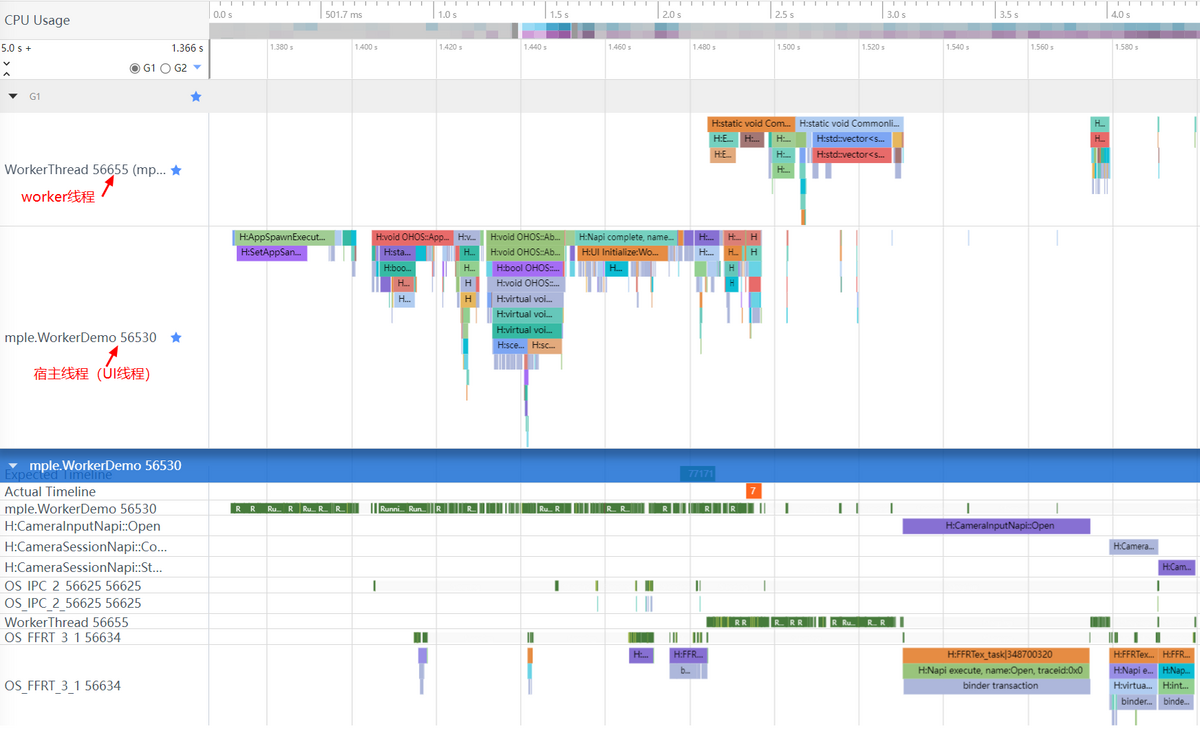
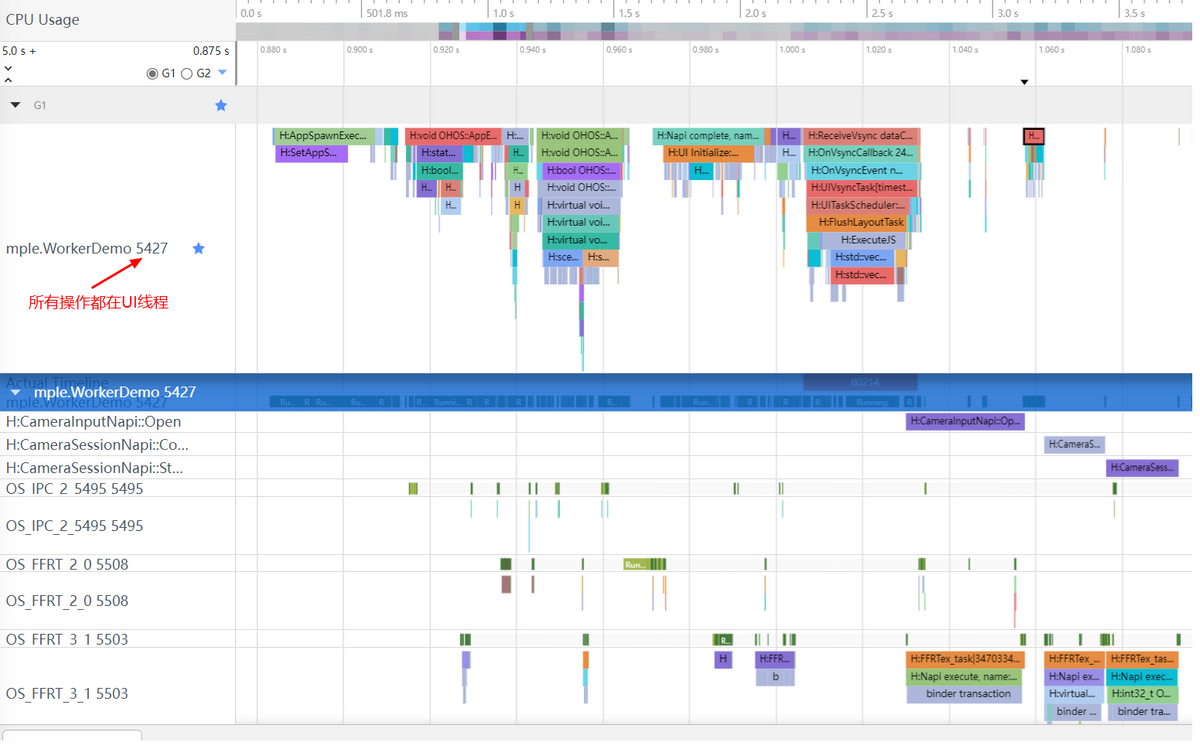
trace对比
不使用Worker:
使用Worker: