双路预览(ArkTS)
在开发相机应用时,需要先申请相关权限。
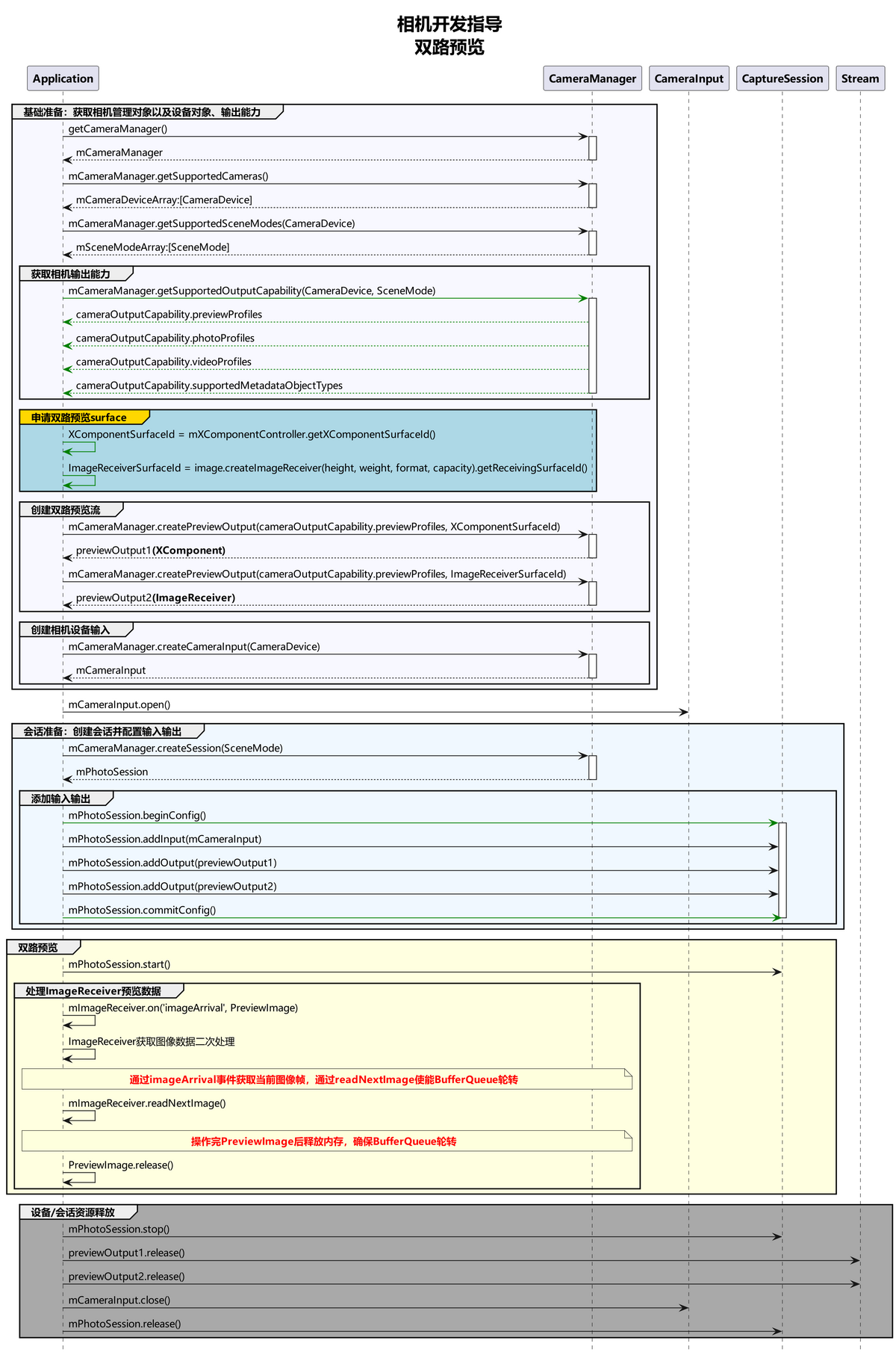
双路预览,即应用可同时使用两路预览流,一路用于在屏幕上显示,一路用于图像处理等其他操作,提升处理效率。
相机应用通过控制相机,实现图像显示(预览)、照片保存(拍照)、视频录制(录像)等基础操作。相机开发模型为Surface模型,即应用通过Surface进行数据传递,通过ImageReceiver的Surface获取拍照流的数据、通过XComponent的Surface获取预览流的数据。
如果要实现双路预览,可以先参考拍照,在双路预览中将拍照流改为另一路预览流,通过ImageReceiver的Surface创建另一个previewOutput,其余流程与拍照一致。
详细的API说明请参考@ohos.multimedia.camera (相机管理)。
约束与限制
- 暂不支持动态添加流,即不能在没有调用session.stop的情况下,调用addOutput添加流。
- 对ImageReceiver组件获取到的图像数据处理后,需要将对应的图像Buffer释放,确保Surface的BufferQueue正常轮转。
调用流程
双路方案调用流程图建议如下:
开发步骤
- 用于处理图像的第一路预览流:创建ImageReceiver对象,获取SurfaceId创建第一路预览流,注册图像监听,按需处理预览流每帧图像。
- 用于显示画面的第二路预览流:创建XComponent组件,获取SurfaceId创建第二路预览流,预览流画面直接在组件内渲染。
- 创建预览流获取数据:创建上述两路预览流,配置进相机会话,启动会话后,两路预览流同时获取数据。
以下各步骤示例为片段代码,可通过点击示例代码右下方的链接获取完整工程示例。
用于处理图像的第一路预览流
-
导入依赖,本篇文档需要用到图片和相机框架等相关依赖包。
import { image } from '@kit.ImageKit';import { camera } from '@kit.CameraKit';import { display } from '@kit.ArkUI';import { BusinessError } from '@kit.BasicServicesKit'; -
获取第一路预览流SurfaceId:创建ImageReceiver对象,通过ImageReceiver对象可获取其SurfaceId。
async init(size: Size, format = image.ImageFormat.JPEG, capacity = 8) {const receiver = image.createImageReceiver(size, format, capacity);const surfaceId = await receiver.getReceivingSurfaceId();this.onImageArrival(receiver);return surfaceId;} -
ImageReceiver接收预览流图像数据获取图像格式请参考Image中的format参数,PixelMap格式请参考PixelMapFormat。
// Image格式与PixelMap格式映射关系。let formatToPixelMapFormatMap = new Map<number, image.PixelMapFormat>([[12, image.PixelMapFormat.RGBA_8888],[25, image.PixelMapFormat.NV21],[35, image.PixelMapFormat.YCBCR_P010],[36, image.PixelMapFormat.YCRCB_P010]]);// PixelMapFormat格式的单个像素点大小映射关系。let pixelMapFormatToSizeMap = new Map<image.PixelMapFormat, number>([[image.PixelMapFormat.RGBA_8888, 4],[image.PixelMapFormat.NV21, 1.5],[image.PixelMapFormat.YCBCR_P010, 3],[image.PixelMapFormat.YCRCB_P010, 3]]); -
注册监听处理预览流每帧图像数据:通过ImageReceiver组件中imageArrival事件监听获取底层返回的图像数据,详细的API说明请参考ImageReceiver。

- 在通过createPixelMap接口创建PixelMap实例时,设置的Size、srcPixelFormat等属性必须和相机预览输出流previewProfile中配置的Size、Format属性保持一致,ImageReceiver图片像素格式请参考PixelMapFormat,相机预览输出流previewProfile输出格式请参考CameraFormat。
- 由于不同设备产品差异性,应用开发者在创建相机预览输出流前,必须先通过getSupportedOutputCapability方法获取当前设备支持的预览输出流previewProfile,再根据实际业务需求选择CameraFormat和Size适合的预览输出流previewProfile。
- ImageReceiver接收预览流图像数据实际format格式由应用开发者在创建预览输出流相机预览输出流时,根据实际业务需求选择的previewProfile中format格式参数影响,详细步骤请参考创建预览流获取数据。
onImageArrival(receiver: image.ImageReceiver): void {receiver.on('imageArrival', () => {Logger.info(TAG, 'image arrival');receiver.readNextImage((err: BusinessError, nextImage: image.Image) => {if (err || nextImage === undefined) {Logger.error(TAG, 'readNextImage failed');return;}nextImage.getComponent(image.ComponentType.JPEG, async (err: BusinessError, imgComponent: image.Component) => {if (err || imgComponent === undefined) {Logger.error(TAG, 'getComponent failed');}if (imgComponent.byteBuffer) {// ...} else {Logger.error(TAG, 'byteBuffer is null');}// ...});});});}通过 image.Component 解析图片buffer数据参考:

需要确认图像的宽width是否与行距rowStride一致,如果不一致可参考以下方式处理:
方式一:去除imgComponent.byteBuffer中stride数据,拷贝得到新的buffer,调用不支持stride的接口处理buffer。
async getPixelMap(imgComponent: image.Component, width: number, height: number, stride: number) {if (stride === width) {return await image.createPixelMap(imgComponent.byteBuffer, {size: { height: height, width: width },srcPixelFormat: image.PixelMapFormat.NV21,});}const dstBufferSize = width * height * 1.5;const dstArr = new Uint8Array(dstBufferSize);for (let j = 0; j < height * 1.5; j++) {const srcBuf = new Uint8Array(imgComponent.byteBuffer, j * stride, width);dstArr.set(srcBuf, j * width);}return await image.createPixelMap(dstArr.buffer, {size: { height: height, width: width },srcPixelFormat: image.PixelMapFormat.NV21,});}方式二:根据stride*height创建pixelMap,然后调用pixelMap的cropSync方法裁剪掉多余的像素。
// 创建pixelMap,width宽传行距stride的值。let pixelMap = await image.createPixelMap(imgComponent.byteBuffer, {size:{height: height, width: stride}, srcPixelFormat: pixelMapFormat});// 裁剪多余的像素。pixelMap.cropSync({size:{width:width, height:height}, x:0, y:0});方式三:将原始imgComponent.byteBuffer和stride信息一起传给支持stride的接口处理。
用于显示画面的第二路预览流
获取第二路预览流SurfaceId:创建XComponent组件用于预览流显示,获取SurfaceId请参考XComponent组件提供的getXComponentSurfaceId方法,而XComponent的能力由UI提供,相关介绍可参考XComponent组件参考。
XComponent({
type: XComponentType.SURFACE,
controller: this.previewVM.xComponentController
})
.size({ height: '100%', width: '100%' })
.onLoad(async () => {
// ...
this.previewVM.surfaceId = this.previewVM.xComponentController.getXComponentSurfaceId();
this.previewVM.setPreviewSize();
this.previewVM.xComponentController.setXComponentSurfaceRotation({ lock: true });
// ...
})
创建预览流获取数据
通过两个SurfaceId分别创建两路预览流输出,加入相机会话,启动相机会话,获取预览流数据。
async createOutput(config: CreateOutputConfig) {
const cameraOutputCap = config.cameraManager.getSupportedOutputCapability(config.device, config.sceneMode);
const displayRatio = config.profile.size.width / config.profile.size.height;
const profileWidth = config.profile.size.width;
const previewProfile = cameraOutputCap.previewProfiles
.sort((a, b) => Math.abs(a.size.width - profileWidth) - Math.abs(b.size.width - profileWidth))
.find(pf => {
const pfDisplayRatio = pf.size.width / pf.size.height;
return pf.format === config.profile.format &&
Math.abs(pfDisplayRatio - displayRatio) <= CameraConstant.PROFILE_DIFFERENCE;
});
if (!previewProfile) {
Logger.error(TAG_LOG, 'Failed to get preview profile');
return;
}
this.output = config.cameraManager.createPreviewOutput(previewProfile, config.surfaceId);
this.addOutputListener(this.output);
return this.output;
}
完整示例
import { image } from '@kit.ImageKit';
import { camera } from '@kit.CameraKit';
import { display } from '@kit.ArkUI';
import { BusinessError } from '@kit.BasicServicesKit';
import { Logger } from 'commons';
import OutputManager, { CreateOutputConfig } from './OutputManager';
import CameraConstant from '../constants/CameraConstants';
const TAG = 'ImageReceiverManager';
export class ImageReceiverManager implements OutputManager {
public output?: camera.PreviewOutput;
public isActive: boolean = true;
public callback: (px: PixelMap) => void;
private position: camera.CameraPosition = camera.CameraPosition.CAMERA_POSITION_BACK;
constructor(cb: (px: PixelMap) => void) {
this.callback = cb;
}
async createOutput(config: CreateOutputConfig) {
const cameraOutputCap = config.cameraManager.getSupportedOutputCapability(config.device, config.sceneMode);
const displayRatio = config.profile.size.width / config.profile.size.height;
const profileWidth = config.profile.size.width;
const previewProfile = cameraOutputCap.previewProfiles
.sort((a, b) => Math.abs(a.size.width - profileWidth) - Math.abs(b.size.width - profileWidth))
.find(pf => {
const pfDisplayRatio = pf.size.width / pf.size.height;
return pf.format === config.profile.format &&
Math.abs(pfDisplayRatio - displayRatio) <= CameraConstant.PROFILE_DIFFERENCE;
});
if (!previewProfile) {
Logger.error(TAG, 'Failed to get preview profile');
return;
}
const surfaceId = await this.init(config.profile.size);
this.output = config.cameraManager.createPreviewOutput(previewProfile, surfaceId);
this.position = config.device.cameraPosition;
return this.output;
}
async release() {
await this.output?.release();
this.output = undefined;
}
async init(size: Size, format = image.ImageFormat.JPEG, capacity = 8) {
  const receiver = image.createImageReceiver(size, format, capacity);
  const surfaceId = await receiver.getReceivingSurfaceId();
  this.onImageArrival(receiver);
  return surfaceId;
}
async getPixelMap(imgComponent: image.Component, width: number, height: number, stride: number) {
  if (stride === width) {
    return await image.createPixelMap(imgComponent.byteBuffer, {
      size: { height: height, width: width },
      srcPixelFormat: image.PixelMapFormat.NV21,
    });
  }
  const dstBufferSize = width * height * 1.5;
  const dstArr = new Uint8Array(dstBufferSize);
  for (let j = 0; j < height * 1.5; j++) {
    const srcBuf = new Uint8Array(imgComponent.byteBuffer, j * stride, width);
    dstArr.set(srcBuf, j * width);
  }
  return await image.createPixelMap(dstArr.buffer, {
    size: { height: height, width: width },
    srcPixelFormat: image.PixelMapFormat.NV21,
  });
}
onImageArrival(receiver: image.ImageReceiver): void {
receiver.on('imageArrival', () => {
Logger.info(TAG, 'image arrival');
receiver.readNextImage((err: BusinessError, nextImage: image.Image) => {
if (err || nextImage === undefined) {
Logger.error(TAG, 'readNextImage failed');
return;
}
nextImage.getComponent(image.ComponentType.JPEG, async (err: BusinessError, imgComponent: image.Component) => {
if (err || imgComponent === undefined) {
Logger.error(TAG, 'getComponent failed');
}
if (imgComponent.byteBuffer) {
const width = nextImage.size.width;
const height = nextImage.size.height;
const stride = imgComponent.rowStride;
Logger.info(TAG, `getComponent with width:${width} height:${height} stride:${stride}`);
const pixelMap = await this.getPixelMap(imgComponent, width, height, stride);
const displayRotation = display.getDefaultDisplaySync().rotation * camera.ImageRotation.ROTATION_90;
const rotation = this.output!.getPreviewRotation(displayRotation);
if (this.position === camera.CameraPosition.CAMERA_POSITION_FRONT) {
if (displayRotation === 90 || displayRotation === 270) {
await pixelMap.rotate((rotation + 180) % 360);
} else {
await pixelMap.rotate(rotation);
}
await pixelMap.flip(true, false);
} else {
await pixelMap.rotate(rotation);
}
this.callback(pixelMap);
} else {
Logger.error(TAG, 'byteBuffer is null');
}
nextImage.release().then(() => {Logger.info(TAG, 'image release done');}).catch((error: BusinessError) => {
Logger.error(TAG, `Release failed! Code ${error.code},message is ${error.message}`);
});
Logger.info(TAG, 'image process done');
});
});
});
}
}