相机基础动效(ArkTS)
在使用相机过程中,当遇到相机模式切换、前后置镜头切换等场景时,会不可避免地出现预览流替换。为优化用户体验,可合理使用动效过渡。本文主要介绍如何使用预览流截图,并通过ArkUI提供的animateToImmediately接口触发显式动画功能,实现下方三种核心场景动效。
-
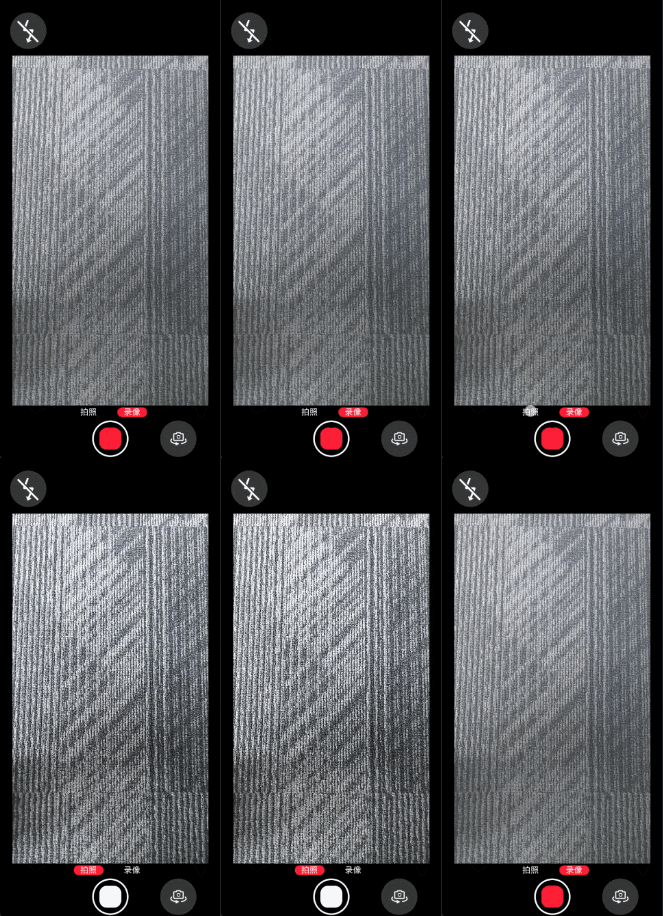
模式切换动效,使用预览流截图做模糊动效过渡。
图片为从录像模式切换为拍照模式的效果。
-
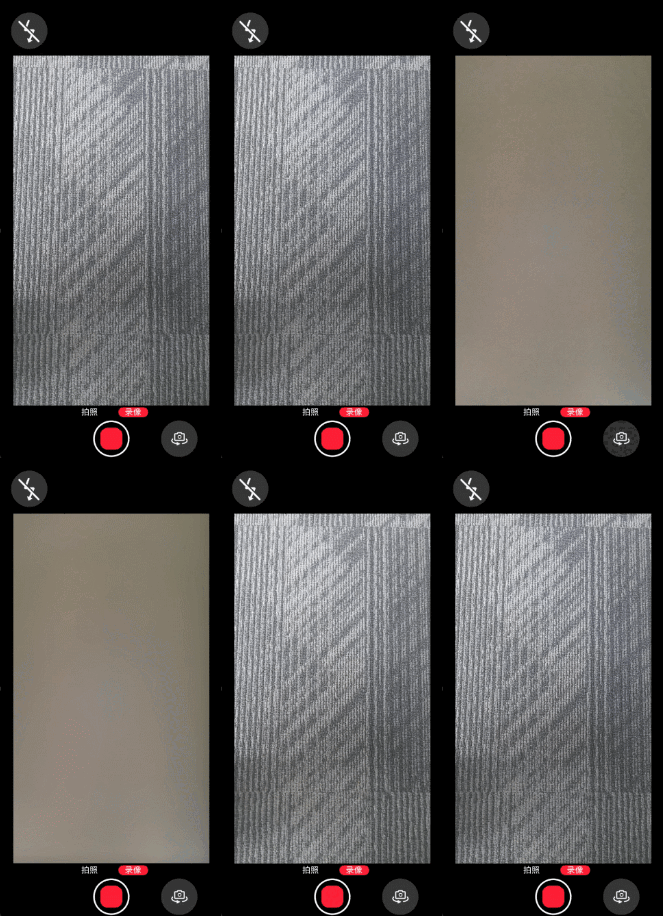
前后置切换动效,使用预览流截图做翻转模糊动效过渡。
图片为从前置相机切换为后置相机的效果。
-
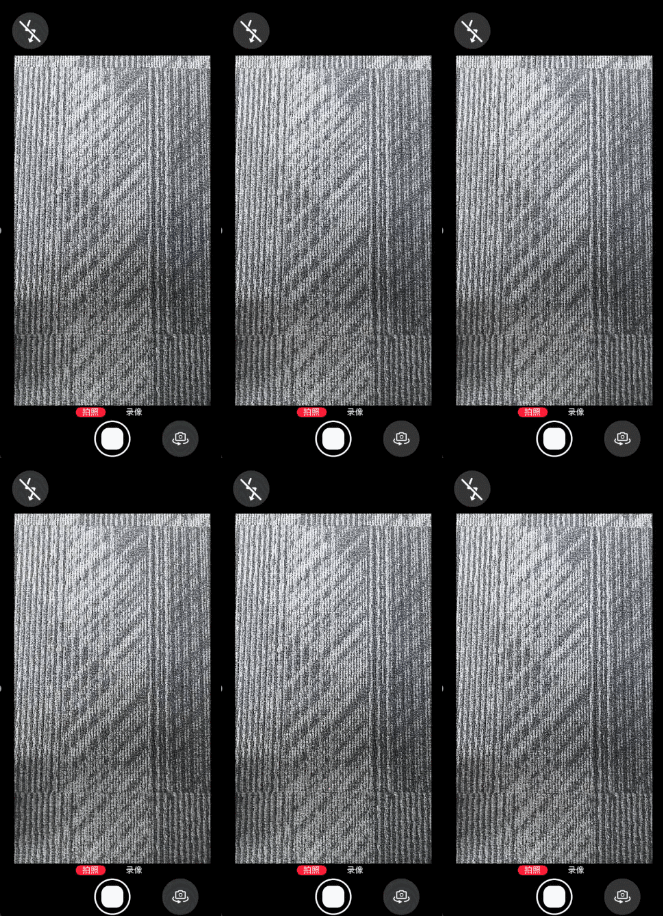
拍照闪黑动效,使用闪黑组件覆盖预览流实现闪黑动效过渡。
图片为点击完成拍摄的效果。
闪黑动效
使用组件覆盖的形式实现闪黑效果。
以下步骤中的示例代码均为自定义组件(即被@Component修饰的组件)的内部方法或逻辑。
-
导入依赖,需要导入相机框架、图片、ArkUI相关领域依赖。
import { camera } from '@kit.CameraKit';import { image } from '@kit.ImageKit';import { curves } from '@kit.ArkUI'; -
构建闪黑组件。
此处定义一个闪黑组件,在拍照闪黑及前后置切换时显示,用来遮挡XComponent组件。
属性定义:
@State isShowBlur: boolean = false;@State isShowBlack: boolean = false;@StorageLink('modeChange') @Watch('onModeChange') modeChangeFlag: number = 0;@StorageLink('switchCamera') @Watch('onSwitchCamera') switchCameraFlag: number = 0;@StorageLink('frameStart') @Watch('onFrameStart') frameStartFlag: number = 0;@StorageLink('captureClick') @Watch('onCaptureClick') captureClickFlag: number = 0;@StorageLink('surfaceShot') screenshotPixelMap: image.PixelMap | undefined = undefined; // 预览流截图。@StorageLink('curPosition') curPosition: number = 0; // 当前镜头前后置状态。@State shotImgBlur: number = 0;@State shotImgOpacity: number = 1;@State shotImgScale: ScaleOptions = { x: 1, y: 1 };@State shotImgRotation: RotateOptions = { y: BlurAnimateUtil.ROTATE_AXIS, angle: BlurAnimateUtil.IMG_FLIP_ANGLE_0 }@State flashBlackOpacity: number = 1;闪黑组件的实现逻辑参考:
// 拍照闪黑及前后置切换时显示,用来遮挡XComponent组件。if (this.isShowBlack) {Column().key('black').width(this.getUIContext().px2vp(Constants.X_COMPONENT_SURFACE_HEIGHT)).height(this.getUIContext().px2vp(Constants.X_COMPONENT_SURFACE_WIDTH)).backgroundColor(Color.Black).opacity(this.flashBlackOpacity)} -
实现闪黑动效。
private flashBlackAnim() {Logger.info(TAG, 'flashBlackAnim E');this.flashBlackOpacity = 1;this.isShowBlack = true;animateToImmediately({curve: curves.interpolatingSpring(1, 1, 410, 38),delay: 50,onFinish: () => {this.isShowBlack = false;this.flashBlackOpacity = 1;Logger.info(TAG, 'flashBlackAnim X');}}, () => {this.flashBlackOpacity = 0;})} -
触发闪黑动效。
点击或触控拍照按钮,更新@StorageLink绑定CaptureClick的值,触发onCaptureClick方法,动效开始播放。
onCaptureClick(): void {Logger.info(TAG, 'onCaptureClick');this.flashBlackAnim();}
模糊动效
通过预览流截图,实现模糊动效,从而完成模式切换,或是前后置切换的动效。
以下除了步骤2,其他步骤中的示例代码均为自定义组件(即被@Component修饰的组件)的内部方法或逻辑。
-
导入依赖,需要导入相机框架、图片、ArkUI相关领域依赖。
import { camera } from '@kit.CameraKit';import { image } from '@kit.ImageKit';import { curves } from '@kit.ArkUI'; -
获取预览流截图。
预览流截图通过图形提供的image.createPixelMapFromSurface接口实现,surfaceId为当前预览流的surfaceId,size为当前预览流profile的宽高。创建截图工具类(ts文件),导入依赖,导出获取截图方法供页面使用,截图工具类实现参考:
export class BlurAnimateUtil {public static surfaceShot: image.PixelMap;// .../*** 获取surface截图* @param surfaceId* @returns*/public static async doSurfaceShot(surfaceId: string) {Logger.info(TAG, `doSurfaceShot surfaceId:${surfaceId}.`);if ('' === surfaceId) {Logger.error(TAG, 'surface not ready!');return;}try {if (this.surfaceShot) {await this.surfaceShot.release();}this.surfaceShot = await image.createPixelMapFromSurface(surfaceId, {size: { width: Constants.X_COMPONENT_SURFACE_WIDTH, height: Constants.X_COMPONENT_SURFACE_HEIGHT }, // 取预览流profile的宽高。x: 0,y: 0});let imageInfo: image.ImageInfo = await this.surfaceShot.getImageInfo();Logger.info('doSurfaceShot surfaceShot:' + JSON.stringify(imageInfo.size));} catch (err) {Logger.error(JSON.stringify(err))}}public static getSurfaceShot() {return this.surfaceShot;}} -
构建截图组件。
此处定义一个截图组件,置于预览流XComponent组件之上,用来遮挡XComponent组件。
属性定义:
@State isShowBlur: boolean = false;@State isShowBlack: boolean = false;@StorageLink('modeChange') @Watch('onModeChange') modeChangeFlag: number = 0;@StorageLink('switchCamera') @Watch('onSwitchCamera') switchCameraFlag: number = 0;@StorageLink('frameStart') @Watch('onFrameStart') frameStartFlag: number = 0;@StorageLink('captureClick') @Watch('onCaptureClick') captureClickFlag: number = 0;@StorageLink('surfaceShot') screenshotPixelMap: image.PixelMap | undefined = undefined; // 预览流截图。@StorageLink('curPosition') curPosition: number = 0; // 当前镜头前后置状态。@State shotImgBlur: number = 0;@State shotImgOpacity: number = 1;@State shotImgScale: ScaleOptions = { x: 1, y: 1 };@State shotImgRotation: RotateOptions = { y: BlurAnimateUtil.ROTATE_AXIS, angle: BlurAnimateUtil.IMG_FLIP_ANGLE_0 }@State flashBlackOpacity: number = 1;截图组件的实现参考:
if (this.isShowBlur) {Column() {Image(this.screenshotPixelMap).blur(this.shotImgBlur).opacity(this.shotImgOpacity).rotate(this.shotImgRotation)// ArkUI提供的旋转,用于组件沿指定坐标系进行旋转。.scale(this.shotImgScale).width(this.getUIContext().px2vp(Constants.X_COMPONENT_SURFACE_HEIGHT)).height(this.getUIContext().px2vp(Constants.X_COMPONENT_SURFACE_WIDTH)).syncLoad(true)}.width(this.getUIContext().px2vp(Constants.X_COMPONENT_SURFACE_HEIGHT)).height(this.getUIContext().px2vp(Constants.X_COMPONENT_SURFACE_WIDTH))} -
(按实际情况选择)实现模糊出现动效。
模式切换动效分两段实现,模糊出现动效和模糊消失动效。
模糊出现动效:用户点击或触控事件触发预览流截图,显示截图组件,截图清晰到模糊,覆盖旧预览流。

由于图形提供的image.createPixelMapFromSurface接口是通过截取surface内容获取PixelMap,其内容和XComponent组件绘制逻辑不同,需要根据前后置镜头做不同的图片内容旋转补偿和组件旋转补偿。
private async showBlurAnim() {Logger.info(TAG, 'showBlurAnim E');// 获取已完成的surface截图。let shotPixel = BlurAnimateUtil.getSurfaceShot();// 后置。if (this.curPosition === 0) {Logger.info(TAG, 'showBlurAnim BACK');// 直板机后置截图旋转补偿90°。await shotPixel.rotate(BlurAnimateUtil.IMG_ROTATE_ANGLE_90);// 直板机后置截图初始翻转0°。this.shotImgRotation = { y: BlurAnimateUtil.ROTATE_AXIS, angle: BlurAnimateUtil.IMG_FLIP_ANGLE_0 };} else {Logger.info(TAG, 'showBlurAnim FRONT');// 直板机前置截图旋转补偿270°。await shotPixel.rotate(BlurAnimateUtil.IMG_ROTATE_ANGLE_270);// 直板机前置截图镜像补偿。this.shotImgRotation = { y: BlurAnimateUtil.ROTATE_AXIS, angle: BlurAnimateUtil.IMG_FLIP_ANGLE_180 };}this.screenshotPixelMap = shotPixel;// 初始化动效参数。this.shotImgBlur = 0; // 无模糊。this.shotImgOpacity = 1; // 不透明。// 触发页面渲染。this.isShowBlur = true;animateToImmediately({duration: BlurAnimateUtil.SHOW_BLUR_DURATION,curve: Curve.Friction,onFinish: async () => {Logger.info(TAG, 'showBlurAnim X');}},() => {// 截图模糊度变化动效。this.shotImgBlur = BlurAnimateUtil.ANIM_MODE_SWITCH_BLUR;});} -
实现模糊消失动效。
模糊消失动效:由新模式预览流首帧回调on('frameStart')触发,截图组件模糊到清晰,显示新预览流。
private hideBlurAnim(): void {this.isShowBlack = false;Logger.info(TAG, 'hideBlurAnim E');animateToImmediately({duration: BlurAnimateUtil.HIDE_BLUR_DURATION,curve: Curve.FastOutSlowIn,onFinish: () => {// 模糊组件下树。this.isShowBlur = false;this.shotImgBlur = 0;this.shotImgOpacity = 1;Logger.info(TAG, 'hideBlurAnim X');}}, () => {// 截图透明度变化动效。this.shotImgOpacity = 0;});} -
(按实际情况选择)实现模糊翻转动效。
模糊翻转动效分两段实现,模糊翻转动效和模糊消失动效,其中模糊消失动效同第5步。
模糊翻转动效:分两段组件翻转实现,先向外翻转90°再向内翻转90°,同时还执行了模糊度、透明度、比例缩放等动效。
为保证预览流在翻转时不露出,需要构建一个闪黑组件用于遮挡XComponent组件,构建方式参考闪黑动效-步骤2。
/*** 先向外翻转90°,前后置切换触发*/private async rotateFirstAnim() {Logger.info(TAG, 'rotateFirstAnim E');// 获取已完成的surface截图。let shotPixel = BlurAnimateUtil.getSurfaceShot();// 后置切前置。if (this.curPosition === 1) {Logger.info(TAG, 'rotateFirstAnim BACK');// 直板机后置切前置截图旋转补偿90°。await shotPixel.rotate(BlurAnimateUtil.IMG_ROTATE_ANGLE_90); // Image Kit提供的旋转,用于处理图片本身的旋转。// 直板机后置切前置截图初始翻转0°。this.shotImgRotation = { y: BlurAnimateUtil.ROTATE_AXIS, angle: BlurAnimateUtil.IMG_FLIP_ANGLE_0 };} else {Logger.info(TAG, 'rotateFirstAnim FRONT');// 直板机前置切后置截图旋转补偿270°。await shotPixel.rotate(BlurAnimateUtil.IMG_ROTATE_ANGLE_270);// 直板机前置切后置截图初始翻转180°。this.shotImgRotation = { y: BlurAnimateUtil.ROTATE_AXIS, angle: BlurAnimateUtil.IMG_FLIP_ANGLE_180 };}this.screenshotPixelMap = shotPixel;// 触发页面渲染。this.isShowBlack = true;this.isShowBlur = true;animateToImmediately({duration: BlurAnimateUtil.ROTATION_DURATION,delay: BlurAnimateUtil.FLIP_DELAY, // 时延保证组件缩放模糊动效先行,再翻转后视觉效果更好。curve: curves.cubicBezierCurve(0.20, 0.00, 0.83, 1.00),onFinish: () => {Logger.info(TAG, 'rotateFirstAnim X');// 在onFinish后触发二段旋转。this.rotateSecondAnim();}},() => {// 截图向翻转动效。if (this.curPosition === 1) {this.shotImgRotation = { y: BlurAnimateUtil.ROTATE_AXIS, angle: BlurAnimateUtil.IMG_FLIP_ANGLE_90 };} else {this.shotImgRotation = { y: BlurAnimateUtil.ROTATE_AXIS, angle: BlurAnimateUtil.IMG_FLIP_ANGLE_270 };}})}/*** 再向内翻转90°*/async rotateSecondAnim() {Logger.info(TAG, 'rotateSecondAnim E');// 获取已完成的surface截图。let shotPixel = BlurAnimateUtil.getSurfaceShot();// 后置。if (this.curPosition === 1) {// 直板机后置镜头旋转补偿90°。await shotPixel.rotate(BlurAnimateUtil.IMG_ROTATE_ANGLE_90); // Image Kit提供的旋转,用于处理图片本身的旋转。// 瞬时调整为-90°,保证二段旋转后,图片不是镜像的。this.shotImgRotation = { y: BlurAnimateUtil.ROTATE_AXIS, angle: BlurAnimateUtil.IMG_FLIP_ANGLE_MINUS_90 };} else { // 前置。// 直板机前置截图旋转补偿270°。await shotPixel.rotate(BlurAnimateUtil.IMG_ROTATE_ANGLE_270);// 直板机前置截图镜像补偿。this.shotImgRotation = { y: BlurAnimateUtil.ROTATE_AXIS, angle: BlurAnimateUtil.IMG_FLIP_ANGLE_180 };}this.screenshotPixelMap = shotPixel;animateToImmediately({duration: BlurAnimateUtil.ROTATION_DURATION,curve: curves.cubicBezierCurve(0.17, 0.00, 0.20, 1.00),onFinish: () => {Logger.info(TAG, 'rotateSecondAnim X');}},() => {// 截图翻转为初始状态。if (this.curPosition === 1) {this.shotImgRotation = { y: BlurAnimateUtil.ROTATE_AXIS, angle: BlurAnimateUtil.IMG_FLIP_ANGLE_0 };} else {this.shotImgRotation = { y: BlurAnimateUtil.ROTATE_AXIS, angle: BlurAnimateUtil.IMG_FLIP_ANGLE_180 };}})}/*** 向外翻转90°同时*/blurFirstAnim() {Logger.info(TAG, 'blurFirstAnim E');// 初始化动效参数。this.shotImgBlur = 0; // 无模糊。this.shotImgOpacity = 1; // 不透明。this.shotImgScale = { x: 1, y: 1 };animateToImmediately({duration: BlurAnimateUtil.ROTATION_DURATION,curve: Curve.Sharp,onFinish: () => {Logger.info(TAG, 'blurFirstAnim X');this.blurSecondAnim();}},() => {// 截图模糊度变化动效。this.shotImgBlur = BlurAnimateUtil.ANIM_MODE_SWITCH_BLUR;// 截图比例动效。this.shotImgScale = { x: BlurAnimateUtil.IMG_SCALE, y: BlurAnimateUtil.IMG_SCALE };});}/*** 向内翻转90°同时*/blurSecondAnim() {Logger.info(TAG, 'blurSecondAnim E');animateToImmediately({duration: BlurAnimateUtil.ROTATION_DURATION,curve: Curve.Sharp,onFinish: () => {Logger.info(TAG, 'blurSecondAnim X');}},() => {this.shotImgScale = { x: 1, y: 1 };})} -
按需触发动效。
模式切换动效触发:点击或触控模式按钮立即执行doSurfaceShot截图方法,更新@StorageLink绑定modeChange的值,触发onModeChange方法,开始动效。
onModeChange(): void {Logger.info(TAG, 'onModeChange');this.showBlurAnim();}前后置切换动效触发:点击或触控前后置切换按钮立即执行doSurfaceShot截图方法,更新@StorageLink绑定switchCamera的值,触发onSwitchCamera方法,开始动效。
onSwitchCamera(): void {Logger.info(TAG, 'onSwitchCamera');this.blurFirstAnim();this.rotateFirstAnim();}模糊消失动效触发:监听预览流首帧回调on('frameStart'),更新@StorageLink绑定frameStart的值,触发onFrameStart方法,开始动效。
onFrameStart(): void {Logger.info(TAG, 'onFrameStart');this.hideBlurAnim();}