视频解码同步模式
从API version 20开始,支持视频解码同步模式。
开发者可以调用本模块的Native API接口,完成同步模式的视频解码。
具体实现可参考示例工程。
当前支持的解码能力,请参考AVCodec支持的格式。
视频解码的限制约束、支持的能力、状态机调用关系请参考视频解码。
适用场景
通常情况下,推荐使用异步模式。若需要主动请求buffer去送帧,则可以采用同步模式。
开发指导
详细的API说明请参考VideoDecoder。
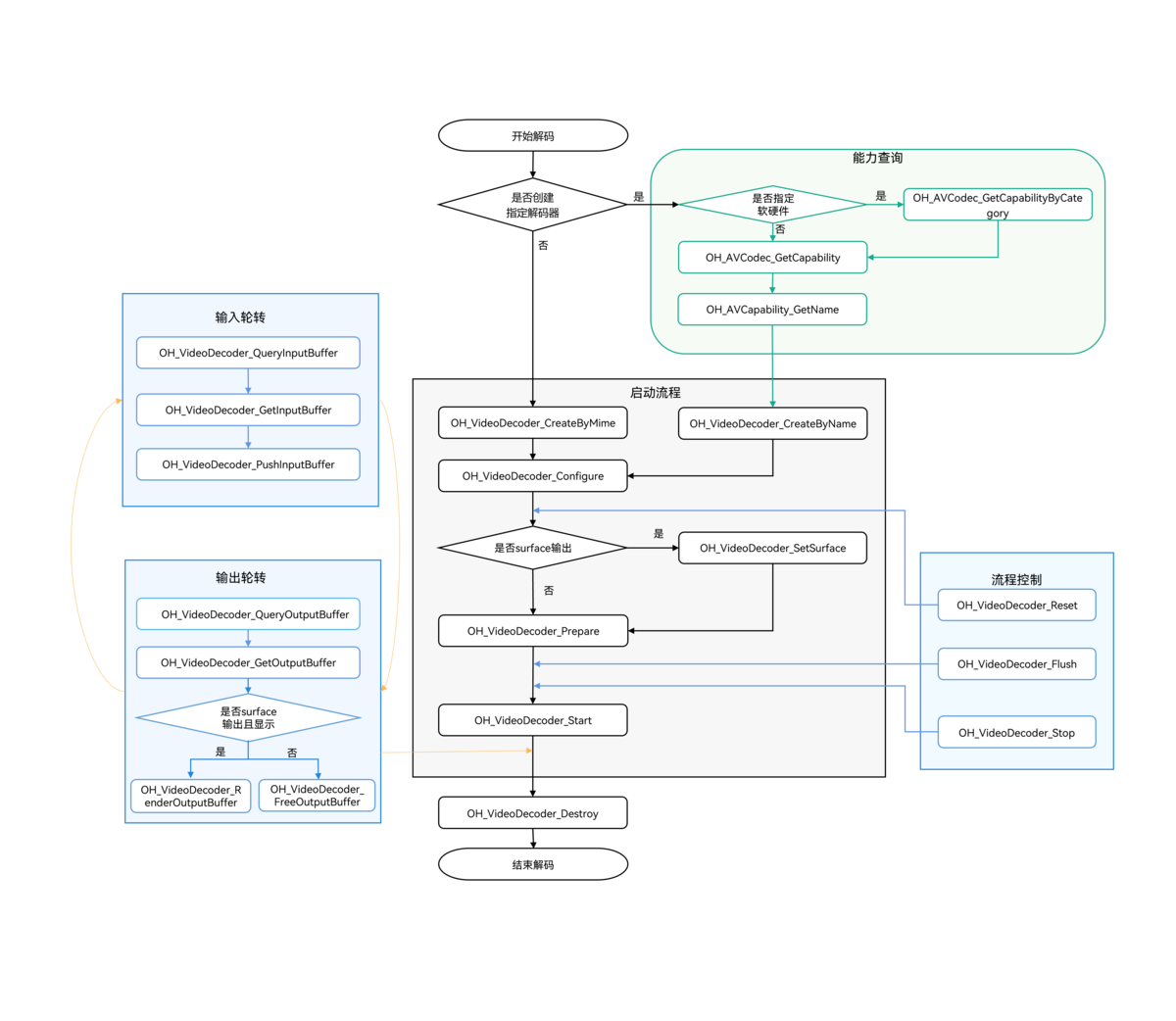
在CMake脚本中链接动态库
target_link_libraries(sample PUBLIC libnative_media_codecbase.so)
target_link_libraries(sample PUBLIC libnative_media_core.so)
target_link_libraries(sample PUBLIC libnative_media_vdec.so)

上述'sample'字样仅为示例,此处由开发者根据实际工程目录自定义。
定义基础结构
本部分示例代码按照C++17标准编写,仅作参考。
-
添加头文件。
#include <multimedia/player_framework/native_avcodec_videodecoder.h>#include <multimedia/player_framework/native_avcapability.h>#include <multimedia/player_framework/native_avcodec_base.h>#include <multimedia/player_framework/native_avformat.h>#include <multimedia/player_framework/native_avbuffer.h>#include <multimedia/player_framework/native_averrors.h>#include <native_buffer/native_buffer.h>#include <memory>#include <fstream>#include <mutex>#include <shared_mutex>#include <string.h> -
全局变量(仅作参考,可以根据实际情况将其封装到对象中)。
// 视频帧宽度。int32_t width = 320;// 视频帧高度。int32_t height = 240;// 视频像素格式。OH_AVPixelFormat pixelFormat = AV_PIXEL_FORMAT_NV12;// 解码器同步锁。std::shared_mutex codecMutex;// 解码器实例指针。OH_AVCodec *videoDec = nullptr;// 解码输出。bool outputDone = false;// 解码输入。bool inputDone = false;std::unique_ptr<std::ifstream> inFile_;
Surface模式
参考以下示例代码,可以完成Surface模式下视频解码的全流程,实现同步模式的数据轮转。此处以输入H.264码流文件,解码送显输出为例。
-
创建解码器实例。
通过名称创建解码器。示例中的变量说明如下:
- videoDec:视频解码器实例的指针。
- capability:解码器能力查询实例的指针。
- OH_AVCODEC_MIMETYPE_VIDEO_AVC:AVC格式视频编解码器。
// 创建硬件解码器实例。OH_AVCapability *capability= OH_AVCodec_GetCapabilityByCategory(OH_AVCODEC_MIMETYPE_VIDEO_AVC, false, HARDWARE);const char *name = OH_AVCapability_GetName(capability);OH_AVCodec *videoDec = OH_VideoDecoder_CreateByName(name);if (videoDec == nullptr) {printf("create videoDec failed");return;} -
调用OH_VideoDecoder_Configure()配置解码器。
- 详细可配置选项的说明请参考媒体数据键值对。
- 参数校验规则请参考OH_VideoDecoder_Configure()。
- 参数取值范围可以通过能力查询接口获取,具体示例请参考获取支持的编解码能力。
目前支持的所有格式都必须配置以下选项:视频帧宽度、视频帧高度。
auto format = std::shared_ptr<OH_AVFormat>(OH_AVFormat_Create(), OH_AVFormat_Destroy);if (format == nullptr) {// 异常处理。}// 写入format。OH_AVFormat_SetIntValue(format.get(), OH_MD_KEY_WIDTH, width); // 必须配置。OH_AVFormat_SetIntValue(format.get(), OH_MD_KEY_HEIGHT, height); // 必须配置。OH_AVFormat_SetIntValue(format.get(), OH_MD_KEY_PIXEL_FORMAT, pixelFormat);OH_AVFormat_SetIntValue(format.get(), OH_MD_KEY_ENABLE_SYNC_MODE, 1); // 同步模式配置。// 配置解码器。OH_AVErrCode ret = OH_VideoDecoder_Configure(videoDec, format.get());if (ret != AV_ERR_OK) {// 异常处理。}
- 要使能视频解码同步模式,必须将OH_MD_KEY_ENABLE_SYNC_MODE配置为1。
- 同步模式在调用OH_VideoDecoder_Configure接口前不能调用OH_VideoDecoder_RegisterCallback接口,否则为异步模式。
-
设置surface。
示例中的变量说明如下:
nativeWindow:获取方式请参考视频解码Surface模式的“步骤-6:设置surface”。
// 设置surface。// 配置送显窗口参数。OH_AVErrCode ret = OH_VideoDecoder_SetSurface(videoDec, nativeWindow);if (ret != AV_ERR_OK) {// 异常处理。} -
调用OH_VideoDecoder_Prepare()解码器就绪。
该接口将在解码器运行前进行一些数据的准备工作。
OH_AVErrCode ret = OH_VideoDecoder_Prepare(videoDec);if (ret != AV_ERR_OK) {// 异常处理。} -
调用OH_VideoDecoder_Start()启动解码器。
// 启动解码器,开始解码。OH_AVErrCode ret = OH_VideoDecoder_Start(videoDec);if (ret != AV_ERR_OK) {// 异常处理。} -
获取可用buffer并写入码流至解码器。
- 调用OH_VideoDecoder_QueryInputBuffer接口获取下一个可用的输入缓冲区(buffer)的索引(index)。
- 根据获取的索引(index),调用OH_VideoDecoder_GetInputBuffer接口获取对应的缓冲区(buffer)实例。
- 将待解码数据写入该缓冲区(buffer)后,调用OH_VideoDecoder_PushInputBuffer接口提交至解码器进行解码。当所有待处理数据全部传递给解码器后,需要将flag标识成AVCODEC_BUFFER_FLAGS_EOS,通知解码器输入结束。
送入输入队列进行解码,示例中的变量说明如下:
- size、offset、pts、frameData:输入尺寸、偏移量、时间戳、帧数据等字段信息,获取方式可以参考媒体数据解析“步骤-9:开始解封装,循环获取sample”。
- flags:缓冲区标记的类别,请参考OH_AVCodecBufferFlags。
bool DecoderInput(OH_AVCodec *videoDec, int64_t timeoutUs){uint32_t index;std::shared_lock<std::shared_mutex> lock(codecMutex);OH_AVErrCode ret = OH_VideoDecoder_QueryInputBuffer(videoDec, &index, timeoutUs);switch (ret) {case AV_ERR_OK: {OH_AVBuffer *buffer = OH_VideoDecoder_GetInputBuffer(videoDec, index);if (buffer == nullptr) {// 异常处理。return false;}// 写入码流数据。uint8_t *addr = OH_AVBuffer_GetAddr(buffer);if (addr == nullptr) {// 异常处理。return false;}// buffer数据填充。int32_t capacity = OH_AVBuffer_GetCapacity(buffer);if (size > capacity) {// 异常处理。}memcpy(addr, frameData, size);OH_AVCodecBufferAttr info;// buffer属性配置。// 配置帧数据的输入尺寸、偏移量、时间戳等字段信息。info.size = size;info.offset = offset;info.pts = pts;if (inFile_->eof()) {info.flags = AVCODEC_BUFFER_FLAGS_EOS;} else {info.flags = flags;}OH_AVErrCode setBufferRet = OH_AVBuffer_SetBufferAttr(buffer, &info);if (setBufferRet != AV_ERR_OK) {// 异常处理。return false;}OH_AVErrCode pushInputRet = OH_VideoDecoder_PushInputBuffer(videoDec, index);if (pushInputRet != AV_ERR_OK) {// 异常处理。return false;}if (inFile_->eof()) {inputDone = 1;}break;}case AV_ERR_TRY_AGAIN_LATER: {break;}default: {// 异常处理。return false;}}return true;} -
获取可用buffer显示并释放解码帧。
- 调用OH_VideoDecoder_QueryOutputBuffer接口获取下一个可用的输出缓冲区(buffer)的索引(index)。
- 根据获取的索引(index),调用OH_VideoDecoder_GetOutputBuffer接口获取对应的缓冲区(buffer)实例。
- 根据开发者设置的isRender标志决定后续操作:若无需送显,则调用OH_VideoDecoder_FreeOutputBuffer接口释放解码帧。若需送显,则可调用OH_VideoDecoder_RenderOutputBuffer接口显示并自动释放解码帧,或调用OH_VideoDecoder_RenderOutputBufferAtTime接口在指定时间点显示并释放解码帧。
bool DecoderOutput(OH_AVCodec *videoDec, int64_t timeoutUs){uint32_t index;std::shared_lock<std::shared_mutex> lock(codecMutex);OH_AVErrCode ret = OH_VideoDecoder_QueryOutputBuffer(videoDec, &index, timeoutUs);switch (ret) {case AV_ERR_OK: {OH_AVBuffer *buffer = OH_VideoDecoder_GetOutputBuffer(videoDec, index);if (buffer == nullptr) {// 异常处理。return false;}// 获取解码后信息。OH_AVCodecBufferAttr info;OH_AVErrCode getBufferRet = OH_AVBuffer_GetBufferAttr(buffer, &info);if (getBufferRet != AV_ERR_OK) {// 异常处理。return false;}if (info.flags & AVCODEC_BUFFER_FLAGS_EOS) {outputDone = 1;}// 解码输出数据处理。// 值由开发者决定。bool isRender;bool isNeedRenderAtTime;OH_AVErrCode result = AV_ERR_OK;if (isRender) {// 显示并释放已完成处理的信息,index为对应buffer队列的下标。if (isNeedRenderAtTime){// 获取系统绝对时间,renderTimestamp由开发者结合业务指定显示时间。int64_t renderTimestamp =std::chrono::duration_cast<std::chrono::nanoseconds>(std::chrono::high_resolution_clock::now().time_since_epoch()).count();result = OH_VideoDecoder_RenderOutputBufferAtTime(videoDec, index, renderTimestamp);} else {result = OH_VideoDecoder_RenderOutputBuffer(videoDec, index);}} else {// 释放已完成处理的信息。result = OH_VideoDecoder_FreeOutputBuffer(videoDec, index);}if (result != AV_ERR_OK) {// 异常处理。return false;}break;}case AV_ERR_TRY_AGAIN_LATER: {break;}case AV_ERR_STREAM_CHANGED: {auto format = std::shared_ptr<OH_AVFormat>(OH_VideoDecoder_GetOutputDescription(videoDec), OH_AVFormat_Destroy);if (format == nullptr) {// 异常处理。}// 获取新宽高。bool getIntRet = OH_AVFormat_GetIntValue(format.get(), OH_MD_KEY_VIDEO_PIC_WIDTH, &width) &&OH_AVFormat_GetIntValue(format.get(), OH_MD_KEY_VIDEO_PIC_HEIGHT, &height);if (!getIntRet) {// 异常处理。}break;}default: {// 异常处理。return false;}}return true;} -
解码器送帧/出帧处理循环。
bool result = true;int64_t timeoutUs = 0; // 单位:微秒(us),负值:无限等待;0:立即退出;正值:指定时间后结束后退出。while (!outputDone && result) {if (!inputDone) {result = DecoderInput(videoDec, timeoutUs);}if (!outputDone) {result = DecoderOutput(videoDec, timeoutUs);}} -
(可选)调用OH_VideoDecoder_Flush()刷新解码器。
调用OH_VideoDecoder_Flush接口后,解码器仍处于运行态,但会清除解码器中缓存的输入和输出数据及参数集(如H.264格式的PPS/SPS)。此时需要调用OH_VideoDecoder_Start接口重新开始解码。
// 通过codecMutex来避免调用Flush接口,状态切换后,解码线程还在跑会退出循环的问题。std::unique_lock<std::shared_mutex> lock(codecMutex);// 刷新解码器videoDec。OH_AVErrCode ret = OH_VideoDecoder_Flush(videoDec);if (ret != AV_ERR_OK) {// 异常处理。}// 重新开始解码。ret = OH_VideoDecoder_Start(videoDec);if (ret != AV_ERR_OK) {// 异常处理。} -
(可选)调用OH_VideoDecoder_Reset()重置解码器。
调用OH_VideoDecoder_Reset接口后,解码器回到初始化的状态,需要调用接口OH_VideoDecoder_Configure、OH_VideoDecoder_SetSurface和OH_VideoDecoder_Prepare重新配置。
// 重置解码器videoDec。std::unique_lock<std::shared_mutex> lock(codecMutex);OH_AVErrCode resetRet = OH_VideoDecoder_Reset(videoDec);if (resetRet != AV_ERR_OK) {// 异常处理。}// 重新配置解码器参数。auto format = std::shared_ptr<OH_AVFormat>(OH_AVFormat_Create(), OH_AVFormat_Destroy);if (format == nullptr) {// 异常处理。}OH_AVErrCode configRet = OH_VideoDecoder_Configure(videoDec, format.get());if (configRet != AV_ERR_OK) {// 异常处理。}// Surface模式需要重新配置surface,而Buffer模式不需要配置surface。OH_AVErrCode setRet = OH_VideoDecoder_SetSurface(videoDec, nativeWindow);if (setRet != AV_ERR_OK) {// 异常处理。}// 解码器重新就绪。OH_AVErrCode prepareRet = OH_VideoDecoder_Prepare(videoDec);if (prepareRet != AV_ERR_OK) {// 异常处理。}解码器回到初始化的状态,调用OH_VideoDecoder_Configure接口重新配置解码器参数时,同步模式需要重新配置OH_MD_KEY_ENABLE_SYNC_MODE为1,否则为异步模式。
-
(可选)调用OH_VideoDecoder_Stop()停止解码器。
调用OH_VideoDecoder_Stop()后,解码器保留解码实例,释放输入输出buffer。
// 终止解码器videoDec。std::unique_lock<std::shared_mutex> lock(codecMutex);OH_AVErrCode ret = OH_VideoDecoder_Stop(videoDec);if (ret != AV_ERR_OK) {// 异常处理。} -
调用OH_VideoDecoder_Destroy()销毁解码器实例,释放资源。
// 调用OH_VideoDecoder_Destroy,注销解码器。std::unique_lock<std::shared_mutex> lock(codecMutex);OH_AVErrCode ret = AV_ERR_OK;if (videoDec != nullptr) {OH_VideoDecoder_Destroy(videoDec);videoDec = nullptr;}执行该步骤之后,需要开发者将videoDec指向nullptr,防止野指针导致程序错误。
Buffer模式
参考以下示例代码,可以完成Buffer模式下视频解码的全流程,实现同步模式的数据轮转。此处以输入H.264码流文件,解码成YUV文件为例。
-
创建解码器实例。
与Surface模式相同,此处不再赘述。
// 通过codecname创建解码器,应用有特殊需求,比如选择支持某种分辨率规格的解码器,可先查询capability,再根据codec name创建解码器。OH_AVCapability *capability = OH_AVCodec_GetCapability(OH_AVCODEC_MIMETYPE_VIDEO_AVC, false);const char *name = OH_AVCapability_GetName(capability);OH_AVCodec *videoDec = OH_VideoDecoder_CreateByName(name);if (videoDec == nullptr) {printf("create videoDec failed");return;} -
调用OH_VideoDecoder_Configure()配置解码器。
与Surface模式相同,此处不再赘述。
auto format = std::shared_ptr<OH_AVFormat>(OH_AVFormat_Create(), OH_AVFormat_Destroy);if (format == nullptr) {// 异常处理。}// 写入format。OH_AVFormat_SetIntValue(format.get(), OH_MD_KEY_WIDTH, width); // 必须配置。OH_AVFormat_SetIntValue(format.get(), OH_MD_KEY_HEIGHT, height); // 必须配置。OH_AVFormat_SetIntValue(format.get(), OH_MD_KEY_PIXEL_FORMAT, pixelFormat);OH_AVFormat_SetIntValue(format.get(), OH_MD_KEY_ENABLE_SYNC_MODE, 1); // 同步模式配置。// 配置解码器。OH_AVErrCode ret = OH_VideoDecoder_Configure(videoDec, format.get());if (ret != AV_ERR_OK) {// 异常处理。}- 要使能视频解码同步模式,必须将OH_MD_KEY_ENABLE_SYNC_MODE配置为1。
- 同步模式在调用OH_VideoDecoder_Configure接口前不能调用OH_VideoDecoder_RegisterCallback接口,否则为异步模式。
-
调用OH_VideoDecoder_Prepare()解码器就绪。
该接口将在解码器运行前进行一些数据的准备工作。
OH_AVErrCode ret = OH_VideoDecoder_Prepare(videoDec);if (ret != AV_ERR_OK) {// 异常处理。} -
调用OH_VideoDecoder_Start()启动解码器。
std::unique_ptr<std::ofstream> outputFile = std::make_unique<std::ofstream>();if (outputFile != nullptr) {outputFile->open("/*yourpath*.yuv", std::ios::out | std::ios::binary | std::ios::ate);}// 启动解码器,开始解码。OH_AVErrCode ret = OH_VideoDecoder_Start(videoDec);if (ret != AV_ERR_OK) {// 异常处理。} -
获取可用buffer并写入码流至解码器。
- 调用OH_VideoDecoder_QueryInputBuffer接口获取下一个可用的输入缓冲区(buffer)的索引(index)。
- 根据获取的索引(index),调用OH_VideoDecoder_GetInputBuffer接口获取对应的缓冲区(buffer)实例。
- 将待解码数据写入该缓冲区(buffer)后,调用OH_VideoDecoder_PushInputBuffer接口提交至解码器进行解码。当所有待处理数据全部传递给解码器后,需要将flag标识成AVCODEC_BUFFER_FLAGS_EOS,通知解码器输入结束。
示例中的变量size、offset、pts、frameData、flags说明与Surface模式相同,此处不再赘述。
bool DecoderInput(OH_AVCodec *videoDec, int64_t timeoutUs){uint32_t index;std::shared_lock<std::shared_mutex> lock(codecMutex);OH_AVErrCode ret = OH_VideoDecoder_QueryInputBuffer(videoDec, &index, timeoutUs);switch (ret) {case AV_ERR_OK: {OH_AVBuffer *buffer = OH_VideoDecoder_GetInputBuffer(videoDec, index);if (buffer == nullptr) {// 异常处理。return false;}// 写入码流数据。uint8_t *addr = OH_AVBuffer_GetAddr(buffer);if (addr == nullptr) {// 异常处理。return false;}// buffer数据填充。int32_t capacity = OH_AVBuffer_GetCapacity(buffer);if (size > capacity) {// 异常处理。}memcpy(addr, frameData, size);OH_AVCodecBufferAttr info;// buffer属性配置。// 配置帧数据的输入尺寸、偏移量、时间戳等字段信息。info.size = size;info.offset = offset;info.pts = pts;if (inFile_->eof()) {info.flags = AVCODEC_BUFFER_FLAGS_EOS;} else {info.flags = flags;}OH_AVErrCode setBufferRet = OH_AVBuffer_SetBufferAttr(buffer, &info);if (setBufferRet != AV_ERR_OK) {// 异常处理。return false;}OH_AVErrCode pushInputRet = OH_VideoDecoder_PushInputBuffer(videoDec, index);if (pushInputRet != AV_ERR_OK) {// 异常处理。return false;}if (inFile_->eof()) {inputDone = 1;}break;}case AV_ERR_TRY_AGAIN_LATER: {break;}default: {// 异常处理。return false;}}return true;} -
获取可用buffer并释放解码帧。
- 调用OH_VideoDecoder_QueryOutputBuffer接口获取下一个可用的输出缓冲区(buffer)的索引(index)。
- 根据获取的索引(index),调用OH_VideoDecoder_GetOutputBuffer接口获取对应的缓冲区(buffer)实例。
- 调用OH_VideoDecoder_FreeOutputBuffer接口释放解码帧。
bool DecoderOutput(OH_AVCodec *videoDec, int64_t timeoutUs){uint32_t index;int32_t cropTop = 0;int32_t cropBottom = 0;int32_t cropLeft = 0;int32_t cropRight = 0;int32_t widthStride = 0;int32_t heightStride = 0;std::shared_lock<std::shared_mutex> lock(codecMutex);OH_AVErrCode ret = OH_VideoDecoder_QueryOutputBuffer(videoDec, &index, timeoutUs);switch (ret) {case AV_ERR_OK: {OH_AVBuffer *buffer = OH_VideoDecoder_GetOutputBuffer(videoDec, index);if (buffer == nullptr) {// 异常处理。return false;}// 获取解码后信息。OH_AVCodecBufferAttr info;OH_AVErrCode getBufferRet = OH_AVBuffer_GetBufferAttr(buffer, &info);if (getBufferRet != AV_ERR_OK) {// 异常处理。return false;}if (info.flags & AVCODEC_BUFFER_FLAGS_EOS) {outputDone = 1;}// 释放已完成处理的信息,index为对应buffer队列的下标。OH_AVErrCode freeOutputRet = OH_VideoDecoder_FreeOutputBuffer(videoDec, index);if (freeOutputRet != AV_ERR_OK) {// 异常处理。return false;}break;}case AV_ERR_TRY_AGAIN_LATER: {break;}case AV_ERR_STREAM_CHANGED: {auto format = std::shared_ptr<OH_AVFormat>(OH_VideoDecoder_GetOutputDescription(videoDec), OH_AVFormat_Destroy);if (format == nullptr) {// 异常处理。}// 获取到变化后的视频宽、高、跨距。bool getIntRet = OH_AVFormat_GetIntValue(format.get(), OH_MD_KEY_VIDEO_PIC_WIDTH, &width) &&OH_AVFormat_GetIntValue(format.get(), OH_MD_KEY_VIDEO_PIC_HEIGHT, &height) &&OH_AVFormat_GetIntValue(format.get(), OH_MD_KEY_VIDEO_STRIDE, &widthStride) &&OH_AVFormat_GetIntValue(format.get(), OH_MD_KEY_VIDEO_SLICE_HEIGHT, &heightStride) &&// 获取裁剪矩形信息可选。OH_AVFormat_GetIntValue(format.get(), OH_MD_KEY_VIDEO_CROP_TOP, &cropTop) &&OH_AVFormat_GetIntValue(format.get(), OH_MD_KEY_VIDEO_CROP_BOTTOM, &cropBottom) &&OH_AVFormat_GetIntValue(format.get(), OH_MD_KEY_VIDEO_CROP_LEFT, &cropLeft) &&OH_AVFormat_GetIntValue(format.get(), OH_MD_KEY_VIDEO_CROP_RIGHT, &cropRight);if (!getIntRet) {// 异常处理。}break;}default: {// 异常处理。return false;}}return true;} -
解码器送帧/出帧处理循环。
bool result = true;int64_t timeoutUs = 0; // 单位:微秒(us),负值:无限等待;0:立即退出;正值:等待指定时长后退出。while (!outputDone && result) {if (!inputDone) {result = DecoderInput(videoDec, timeoutUs);}if (!outputDone) {result = DecoderOutput(videoDec, timeoutUs);}}
后续流程(包括刷新、重置停止和销毁解码器)与Surface模式基本一致,请参考Surface模式的步骤9-12。