使用AudioCapturer开发音频录制功能(ArkTs)
AudioCapturer是音频采集器,用于录制PCM(Pulse Code Modulation)音频数据,适合有音频开发经验的开发者实现更灵活的录制功能。
开发指导
使用AudioCapturer录制音频涉及到AudioCapturer实例的创建、音频采集参数的配置、采集的开始与停止、资源的释放等。本开发指导将以一次录制音频数据的过程为例,向开发者讲解如何使用AudioCapturer进行音频录制,建议搭配AudioCapturer的API说明阅读。
下图展示了AudioCapturer的状态变化,在创建实例后,调用对应的方法可以进入指定的状态实现对应的行为。需要注意的是在确定的状态执行不合适的方法可能导致AudioCapturer发生错误,建议开发者在调用状态转换的方法前进行状态检查,避免程序运行产生预期以外的结果。
图1 AudioCapturer状态变化示意图
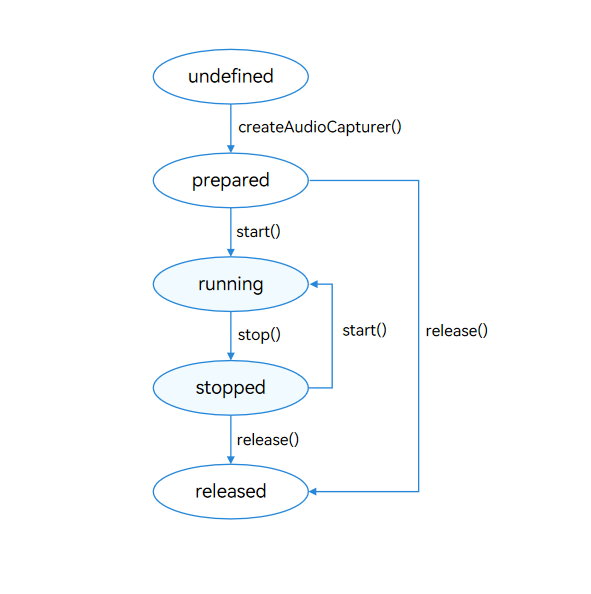
使用on('stateChange')方法可以监听AudioCapturer的状态变化,每个状态对应值与说明见AudioState。
开发步骤及注意事项
以下各步骤示例为片段代码,可通过示例代码右下方链接获取完整示例。
-
配置音频采集参数并创建AudioCapturer实例,音频采集参数的详细信息可以查看AudioCapturerOptions。

当设置Mic音频源(即SourceType为SOURCE_TYPE_MIC、SOURCE_TYPE_VOICE_RECOGNITION、SOURCE_TYPE_VOICE_COMMUNICATION、SOURCE_TYPE_VOICE_MESSAGE、SOURCE_TYPE_LIVE(从API version 20开始支持))时,需要申请麦克风权限ohos.permission.MICROPHONE,申请方式参考:向用户申请授权。
import { audio } from '@kit.AudioKit';// ...let audioStreamInfo: audio.AudioStreamInfo = {samplingRate: audio.AudioSamplingRate.SAMPLE_RATE_48000, // 采样率。channels: audio.AudioChannel.CHANNEL_2, // 通道。sampleFormat: audio.AudioSampleFormat.SAMPLE_FORMAT_S16LE, // 采样格式。encodingType: audio.AudioEncodingType.ENCODING_TYPE_RAW // 编码格式。};let audioCapturerInfo: audio.AudioCapturerInfo = {source: audio.SourceType.SOURCE_TYPE_MIC, // 音源类型:Mic音频源。根据业务场景配置,参考SourceType。capturerFlags: 0 // 音频采集器标志。};let audioCapturerOptions: audio.AudioCapturerOptions = {streamInfo: audioStreamInfo,capturerInfo: audioCapturerInfo};// ...audio.createAudioCapturer(audioCapturerOptions, (err, capturer) => { // 创建AudioCapturer实例。if (err) {console.error(`Invoke createAudioCapturer failed, code is ${err.code}, message is ${err.message}`);// ...return;}console.info(`${TAG}: create AudioCapturer success`);// ...audioCapturer = capturer;if (audioCapturer !== undefined) {audioCapturer.on('readData', readDataCallback);// ...}}); -
调用on('readData')方法,订阅监听音频数据读入回调。

- 线程管理:不建议使用多线程来处理数据读取。若需使用多线程读取数据,需要做好线程管理。
- 线程耗时:readData 方法所在的线程中,不建议执行耗时任务。否则可能会导致数据处理线程响应回调延迟,进而引发录音数据缺失、卡顿、杂音等音频效果问题。
- 注册回调:开发者应避免在主线程中注册回调,以免被其他业务阻塞导致响应回调不及时造成卡顿。建议使用独立的异步线程池处理回调。
import { BusinessError } from '@kit.BasicServicesKit';import { fileIo as fs } from '@kit.CoreFileKit';import { common, abilityAccessCtrl, PermissionRequestResult } from '@kit.AbilityKit';// ...class Options {public offset?: number;public length?: number;}// ...let bufferSize: number = 0;let path = context.cacheDir;let filePath = path + '/StarWars10s-2C-48000-4SW.pcm';file = fs.openSync(filePath, fs.OpenMode.READ_WRITE | fs.OpenMode.CREATE);readDataCallback = (buffer: ArrayBuffer) => {let options: Options = {offset: bufferSize,length: buffer.byteLength}fs.writeSync(file.fd, buffer, options);bufferSize += buffer.byteLength;};// ...audioCapturer.on('readData', readDataCallback); -
调用start方法进入running状态,开始录制音频。
import { BusinessError } from '@kit.BasicServicesKit';// ...audioCapturer.start((err: BusinessError) => {if (err) {// ...console.error('Capturer start failed.');} else {// ...console.info('Capturer start success.');}}); -
调用stop方法停止录制。
import { BusinessError } from '@kit.BasicServicesKit';// ...audioCapturer.stop((err: BusinessError) => {if (err) {// ...console.error('Capturer stop failed.');} else {// ...console.info('Capturer stop success.');}}); -
调用release方法销毁实例,释放资源。
import { BusinessError } from '@kit.BasicServicesKit';// ...audioCapturer.release((err: BusinessError) => {if (err) {// ...console.error('Capturer release failed.');} else {fs.closeSync(file);console.info('Capturer release success.');// ...}});
完整示例
下面展示了使用AudioCapturer录制音频的完整示例代码。
import { audio } from '@kit.AudioKit';
import { BusinessError } from '@kit.BasicServicesKit';
import { fileIo as fs } from '@kit.CoreFileKit';
import { common, abilityAccessCtrl, PermissionRequestResult } from '@kit.AbilityKit';
const TAG = 'AudioCapturerDemo';
class Options {
  public offset?: number;
  public length?: number;
}

let audioCapturer: audio.AudioCapturer | undefined = undefined;
let audioStreamInfo: audio.AudioStreamInfo = {
  samplingRate: audio.AudioSamplingRate.SAMPLE_RATE_48000, // 采样率。
  channels: audio.AudioChannel.CHANNEL_2, // 通道。
  sampleFormat: audio.AudioSampleFormat.SAMPLE_FORMAT_S16LE, // 采样格式。
  encodingType: audio.AudioEncodingType.ENCODING_TYPE_RAW // 编码格式。
};
let audioCapturerInfo: audio.AudioCapturerInfo = {
  source: audio.SourceType.SOURCE_TYPE_MIC, // 音源类型:Mic音频源。根据业务场景配置,参考SourceType。
  capturerFlags: 0 // 音频采集器标志。
};
let audioCapturerOptions: audio.AudioCapturerOptions = {
  streamInfo: audioStreamInfo,
  capturerInfo: audioCapturerInfo
};
let file: fs.File;
let readDataCallback: Callback<ArrayBuffer>;

// ...

async function initArguments(context: common.UIAbilityContext): Promise<void> {
  let bufferSize: number = 0;
  let path = context.cacheDir;
  let filePath = path + '/StarWars10s-2C-48000-4SW.pcm';
  file = fs.openSync(filePath, fs.OpenMode.READ_WRITE | fs.OpenMode.CREATE);
  readDataCallback = (buffer: ArrayBuffer) => {
    let options: Options = {
      offset: bufferSize,
      length: buffer.byteLength
    }
    fs.writeSync(file.fd, buffer, options);
    bufferSize += buffer.byteLength;
  };
}

// 初始化,创建实例,设置监听事件。
async function init(updateCallback?: (msg: string, isError: boolean) => void, stateCallback?:
  (msg: string) => void): Promise<void> {
  audio.createAudioCapturer(audioCapturerOptions, (err, capturer) => { // 创建AudioCapturer实例。
    if (err) {
      console.error(`Invoke createAudioCapturer failed, code is ${err.code}, message is ${err.message}`);
      // ...
      return;
    }
    console.info(`${TAG}: create AudioCapturer success`);
    // ...
    audioCapturer = capturer;
    if (audioCapturer !== undefined) {
      audioCapturer.on('readData', readDataCallback);
      // ...
    }
  });
}

// 开始一次音频采集。
async function start(updateCallback?: (msg: string, isError: boolean) => void): Promise<void> {
  if (audioCapturer !== undefined) {
    let stateGroup = [audio.AudioState.STATE_PREPARED,
      audio.AudioState.STATE_PAUSED, audio.AudioState.STATE_STOPPED];
    // 当且仅当状态为STATE_PREPARED、STATE_PAUSED和STATE_STOPPED之一时才能启动采集。
    if (stateGroup.indexOf(audioCapturer.state.valueOf()) === -1) {
      console.error(`${TAG}: start failed`);
      // ...
      return;
    }

    // 启动采集。
    audioCapturer.start((err: BusinessError) => {
      if (err) {
        // ...
        console.error('Capturer start failed.');
      } else {
        // ...
        console.info('Capturer start success.');
      }
    });
  }
}

// 停止采集。
async function stop(updateCallback?: (msg: string, isError: boolean) => void): Promise<void> {
  if (audioCapturer !== undefined) {
    // 只有采集器状态为STATE_RUNNING或STATE_PAUSED的时候才可以停止。
    if (audioCapturer.state.valueOf() !== audio.AudioState.STATE_RUNNING &&
      audioCapturer.state.valueOf() !== audio.AudioState.STATE_PAUSED) {
      console.info('Capturer is not running or paused');
      // ...
      return;
    }

    // 停止采集。
    audioCapturer.stop((err: BusinessError) => {
      if (err) {
        // ...
        console.error('Capturer stop failed.');
      } else {
        // ...
        console.info('Capturer stop success.');
      }
    });
  }
}

// 销毁实例,释放资源。
async function release(updateCallback?: (msg: string, isError: boolean) => void): Promise<void> {
  if (audioCapturer !== undefined) {
    // 采集器状态不是STATE_RELEASED或STATE_NEW状态,才能release。
    if (audioCapturer.state.valueOf() === audio.AudioState.STATE_RELEASED ||
      audioCapturer.state.valueOf() === audio.AudioState.STATE_NEW) {
      console.info('Capturer already released');
      // ...
      return;
    }

    // 释放资源。
    audioCapturer.release((err: BusinessError) => {
      if (err) {
        // ...
        console.error('Capturer release failed.');
      } else {
        fs.closeSync(file);
        console.info('Capturer release success.');
        // ...
      }
    });
  }
}

// ...

// ...
设置静音打断模式
如果需要实现录音全程不被系统基于焦点并发规则打断的效果,提供将打断策略从停止录音切换为静音录制的功能,录音过程中也不影响其他应用启动录音。开发者在创建AudioCapturer实例时,调用setWillMuteWhenInterrupted接口设置是否开启静音打断模式。默认不开启,此时由音频焦点策略管理并发音频流的执行顺序。开启后,被其他应用打断导致停止或暂停录制时会进入静音录制状态,在此状态下录制的音频没有声音。
回声消除功能
回声消除功能可在支持的设备上有效消除录音过程中的回声干扰,提升音频采集质量。开发者可通过指定特定的Mic音频源SourceType(SOURCE_TYPE_VOICE_COMMUNICATION、SOURCE_TYPE_LIVE)来启用该功能,系统将会自动对采集的音频信号进行回声消除处理。
在启用前,建议先调用isAcousticEchoCancelerSupported接口(从API version 20开始支持)查询当前设备对音频输入源类型SourceType是否支持回声消除功能,以确保功能的可用性。若支持,则可在创建音频录制构造器时设置相应的Mic音频源,从而激活回声消除处理流程。