前端页面调用应用侧函数
开发者使用Web组件将应用侧代码注册到前端页面中,注册完成之后,前端页面中使用注册的对象名称就可以调用应用侧的方法。
如何建立应用侧与H5侧的交互通道
注册应用侧代码有两种方式,一种在Web组件初始化调用,使用javaScriptProxy()接口。另外一种在Web组件初始化完成后调用,使用registerJavaScriptProxy()接口。两种方式都需要和deleteJavaScriptRegister接口配合使用,防止内存泄漏。
在下面的示例中,将test()方法注册在前端页面中, 该函数可以在前端页面触发运行。
应用侧使用javaScriptProxy()接口注册示例:
import { webview } from '@kit.ArkWeb';
import { BusinessError } from '@kit.BasicServicesKit';

class TestClass {
  constructor() {
  }

  test(): string {
    return 'ArkTS Hello World!';
  }
}

@Entry
@Component
struct WebComponent {
  webviewController: webview.WebviewController = new webview.WebviewController();
  // 声明需要注册的对象
  @State testObj: TestClass = new TestClass();

  build() {
    Column() {
      Button('deleteJavaScriptRegister')
        .onClick(() => {
          try {
            this.webviewController.deleteJavaScriptRegister('testObjName');
            this.webviewController.refresh();
          } catch (error) {
            console.error(
              `ErrorCode: ${(error as BusinessError).code},  Message: ${(error as BusinessError).message}`);
          }
        })
      // Web组件加载本地index.html页面
      Web({ src: $rawfile('index1.html'), controller: this.webviewController})
        // 将对象注入到web端
        .javaScriptProxy({
          object: this.testObj,
          name: 'testObjName',
          methodList: ['test'],
          controller: this.webviewController,
          // 可选参数
          asyncMethodList: [],
          permission: '{"javascriptProxyPermission":{"urlPermissionList":' +
            '[{"scheme":"resource","host":"rawfile","port":"","path":""},' +
            '{"scheme":"e","host":"f","port":"g","path":"h"}],"methodList":' +
            '[{"methodName":"test","urlPermissionList":' +
            '[{"scheme":"https","host":"xxx.com","port":"","path":""},' +
            '{"scheme":"resource","host":"rawfile","port":"","path":""}]},' +
            '{"methodName":"test11","urlPermissionList":' +
            '[{"scheme":"q","host":"r","port":"","path":"t"},' +
            '{"scheme":"u","host":"v","port":"","path":""}]}]}}'
        })
    }
  }
}
应用侧使用registerJavaScriptProxy()接口注册。

-
使用registerJavaScriptProxy()方法注册后,在下次加载或者重新加载后生效。
-
示例1:
import { webview } from '@kit.ArkWeb';import { BusinessError } from '@kit.BasicServicesKit';class TestClass {constructor() {}test(): string {return 'ArkUI Web Component';}toString(): void {console.info('Web Component toString');}}@Entry@Componentstruct Index {webviewController: webview.WebviewController = new webview.WebviewController();@State testObj: TestClass = new TestClass();build() {Column() {// jsb对象不再使用后,需解除注册,防止内存泄漏Button('deleteJavaScriptRegister').onClick(() => {try {this.webviewController.deleteJavaScriptRegister('testObjName');this.webviewController.refresh();} catch (error) {console.error(`ErrorCode: ${(error as BusinessError).code}, Message: ${(error as BusinessError).message}`);}})Web({ src: $rawfile('index1.html'), controller: this.webviewController }).onControllerAttached(()=>{try {this.webviewController.registerJavaScriptProxy(this.testObj, 'testObjName', ['test', 'toString'],// 可选参数, asyncMethodList[],// 可选参数, permission'{"javascriptProxyPermission":{"urlPermissionList":[{"scheme":"resource","host":"rawfile","port":"","path":""},' +'{"scheme":"e","host":"f","port":"g","path":"h"}],"methodList":[{"methodName":"test","urlPermissionList":' +'[{"scheme":"https","host":"xxx.com","port":"","path":""},{"scheme":"resource","host":"rawfile","port":"","path":""}]},' +'{"methodName":"test11","urlPermissionList":[{"scheme":"q","host":"r","port":"","path":"t"},' +'{"scheme":"u","host":"v","port":"","path":""}]}]}}');} catch (error) {console.error(`ErrorCode: ${(error as BusinessError).code}, Message: ${(error as BusinessError).message}`);}})}}} -
示例2:
// xxx.ets// xxx.etsimport { webview } from '@kit.ArkWeb';import { BusinessError } from '@kit.BasicServicesKit';class TestClass {constructor() {}test(): string {return 'ArkUI Web Component';}toString(): void {console.info('Web Component toString');}}@Entry@Componentstruct Index {webviewController: webview.WebviewController = new webview.WebviewController();@State testObj: TestClass = new TestClass();@State isRegistered: boolean = false;build() {Column() {// jsb对象不再使用后,需解除注册,防止内存泄漏Button('deleteJavaScriptRegister').onClick(() => {try {this.webviewController.deleteJavaScriptRegister('testObjName');this.webviewController.refresh();} catch (error) {console.error(`ErrorCode: ${(error as BusinessError).code}, Message: ${(error as BusinessError).message}`);}})Web({ src: $rawfile('index1.html'), controller: this.webviewController }).onPageEnd(()=>{try {if(!this.isRegistered){this.webviewController.registerJavaScriptProxy(this.testObj, 'testObjName', ['test', 'toString'],// 可选参数, asyncMethodList[],// 可选参数, permission'{"javascriptProxyPermission":{"urlPermissionList":[{"scheme":"resource","host":"rawfile","port":"","path":""},' +'{"scheme":"e","host":"f","port":"g","path":"h"}],"methodList":[{"methodName":"test","urlPermissionList":' +'[{"scheme":"https","host":"xxx.com","port":"","path":""},{"scheme":"resource","host":"rawfile","port":"","path":""}]},' +'{"methodName":"test11","urlPermissionList":[{"scheme":"q","host":"r","port":"","path":"t"},' +'{"scheme":"u","host":"v","port":"","path":""}]}]}}');this.isRegistered = true;// onPageEnd中注册方法后,需重新加载后生效this.webviewController.refresh();}} catch (error) {console.error(`ErrorCode: ${(error as BusinessError).code}, Message: ${(error as BusinessError).message}`);}})}}} -
可选参数permission是一个JSON字符串,示例如下:
{"javascriptProxyPermission": {"urlPermissionList": [ // Object级权限,如果匹配,所有Method都授权{"scheme": "resource", // 精确匹配,不能为空,必填"host": "rawfile", // 精确匹配,不能为空,必填"port": "", // 精确匹配,为空不检查,必填"path": "" // 前缀匹配,为空不检查,必填},{"scheme": "https", // 精确匹配,不能为空,必填"host": "xxx.com", // 精确匹配,不能为空,必填"port": "8080", // 精确匹配,为空不检查,必填"path": "a/b/c" // 前缀匹配,为空不检查,必填}],"methodList": [{"methodName": "test","urlPermissionList": [ // Method级权限{"scheme": "https", // 精确匹配,不能为空,必填"host": "xxx.com", // 精确匹配,不能为空,必填"port": "", // 精确匹配,为空不检查,必填"path": "" // 前缀匹配,为空不检查,必填},{"scheme": "resource",// 精确匹配,不能为空,必填"host": "rawfile", // 精确匹配,不能为空,必填"port": "", // 精确匹配,为空不检查,必填"path": "" // 前缀匹配,为空不检查,必填}]},{"methodName": "test11","urlPermissionList": [ // Method级权限{"scheme": "q", // 精确匹配,不能为空,必填"host": "r", // 精确匹配,不能为空,必填"port": "", // 精确匹配,为空不检查,必填"path": "t" // 前缀匹配,为空不检查,必填},{"scheme": "u", // 精确匹配,不能为空,必填"host": "v", // 精确匹配,不能为空,必填"port": "", // 精确匹配,为空不检查,必填"path": "" // 前缀匹配,为空不检查,必填}]}]}} -
index1.html前端页面触发应用侧代码。
<!-- index1.html --><!DOCTYPE html><html><body><button type="button" onclick="callArkTS()">Click Me!</button><p id="demo"></p><script>function callArkTS() {let str = testObjName.test();document.getElementById("demo").innerHTML = str;console.info('ArkTS Hello World! :' + str);}</script></body></html>
复杂类型使用方法
应用侧和前端页面之间传递Array
Array可以作为注册对象方法的参数或返回值,在应用侧和前端页面之间传递。
// xxx.ets
import { webview } from '@kit.ArkWeb';
import { BusinessError } from '@kit.BasicServicesKit';

class TestClass {
  constructor() {
  }

  test(): Array<number> {
    return [1, 2, 3, 4]
  }

  toString(param: string): void {
    console.info('Web Component toString' + param);
  }
}

@Entry
@Component
struct Index {
  webviewController: webview.WebviewController = new webview.WebviewController();
  @State testObj: TestClass = new TestClass();

  build() {
    Column() {
      Button('refresh')
        .onClick(() => {
          try {
            this.webviewController.refresh();
          } catch (error) {
            console.error(`ErrorCode: ${(error as BusinessError).code},  Message: ${(error as BusinessError).message}`);
          }
        })
      Button('Register JavaScript To Window')
        .onClick(() => {
          try {
            this.webviewController.registerJavaScriptProxy(this.testObj, "testObjName", ["test", "toString"]);
          } catch (error) {
            console.error(`ErrorCode: ${(error as BusinessError).code},  Message: ${(error as BusinessError).message}`);
          }
        })
      Button('deleteJavaScriptRegister')
        .onClick(() => {
          try {
            this.webviewController.deleteJavaScriptRegister("testObjName");
          } catch (error) {
            console.error(`ErrorCode: ${(error as BusinessError).code},  Message: ${(error as BusinessError).message}`);
          }
        })
      Web({ src: $rawfile('index.html'), controller: this.webviewController })
    }
  }
}
<!-- index.html -->
<!DOCTYPE html>
<html>
<body>
<button type="button" onclick="callArkTS()">Click Me!</button>
<p id="demo"></p>
<script>
    function callArkTS() {
        testObjName.toString(testObjName.test());
    }
</script>
</body>
</html>
非Function等复杂类型使用
非Function等复杂类型作为注册对象方法的参数或返回值,在应用侧和前端页面之间传递。
// xxx.ets
import { webview } from '@kit.ArkWeb';
import { BusinessError } from '@kit.BasicServicesKit';

class Student {
  name: string = '';
  age: string = '';
}

class TestClass {
  constructor() {
  }

  // 传递的基础类型name:"jeck", age:"12"。
  test(): Student {
    let st: Student = { name: "jeck", age: "12" };
    return st;
  }

  toString(param: ESObject): void {
    console.info('Web Component toString' + param["name"]);
  }
}

@Entry
@Component
struct Index {
  webviewController: webview.WebviewController = new webview.WebviewController();
  @State testObj: TestClass = new TestClass();

  build() {
    Column() {
      Button('refresh')
        .onClick(() => {
          try {
            this.webviewController.refresh();
          } catch (error) {
            console.error(`ErrorCode: ${(error as BusinessError).code},  Message: ${(error as BusinessError).message}`);
          }
        })
      Button('Register JavaScript To Window')
        .onClick(() => {
          try {
            this.webviewController.registerJavaScriptProxy(this.testObj, "testObjName", ["test", "toString"]);
          } catch (error) {
            console.error(`ErrorCode: ${(error as BusinessError).code},  Message: ${(error as BusinessError).message}`);
          }
        })
      Button('deleteJavaScriptRegister')
        .onClick(() => {
          try {
            this.webviewController.deleteJavaScriptRegister("testObjName");
          } catch (error) {
            console.error(`ErrorCode: ${(error as BusinessError).code},  Message: ${(error as BusinessError).message}`);
          }
        })
      Web({ src: $rawfile('index.html'), controller: this.webviewController })
    }
  }
}
<!-- index.html -->
<!DOCTYPE html>
<html>
<body>
<button type="button" onclick="callArkTS()">Click Me!</button>
<p id="demo"></p>
<script>
    function callArkTS() {
        testObjName.toString(testObjName.test());
    }
</script>
</body>
</html>
应用侧调用前端页面的Callback
Callback可以作为注册对象方法的参数或返回值,在应用侧和前端页面之间传递。
// xxx.ets
import { webview } from '@kit.ArkWeb';
import { BusinessError } from '@kit.BasicServicesKit';

class TestClass {
  constructor() {
  }

  test(param: Function): void {
    param("call callback");
  }

  toString(param: String): void {
    console.info('Web Component toString' + param);
  }
}

@Entry
@Component
struct Index {
  webviewController: webview.WebviewController = new webview.WebviewController();
  @State testObj: TestClass = new TestClass();

  build() {
    Column() {
      Button('refresh')
        .onClick(() => {
          try {
            this.webviewController.refresh();
          } catch (error) {
            console.error(`ErrorCode: ${(error as BusinessError).code},  Message: ${(error as BusinessError).message}`);
          }
        })
      Button('Register JavaScript To Window')
        .onClick(() => {
          try {
            this.webviewController.registerJavaScriptProxy(this.testObj, "testObjName", ["test", "toString"]);
          } catch (error) {
            console.error(`ErrorCode: ${(error as BusinessError).code},  Message: ${(error as BusinessError).message}`);
          }
        })
      Button('deleteJavaScriptRegister')
        .onClick(() => {
          try {
            this.webviewController.deleteJavaScriptRegister("testObjName");
          } catch (error) {
            console.error(`ErrorCode: ${(error as BusinessError).code},  Message: ${(error as BusinessError).message}`);
          }
        })
      Web({ src: $rawfile('index.html'), controller: this.webviewController })
    }
  }
}
<!-- index.html -->
<!DOCTYPE html>
<html>
<body>
<button type="button" onclick="callArkTS()">Click Me!</button>
<p id="demo"></p>
<script>
    function callArkTS() {
        testObjName.test(function(param){testObjName.toString(param)});
    }
</script>
</body>
</html>
应用侧调用前端页面Object里的Function
前端页面Object里的Function可以作为注册对象方法的参数或返回值,在应用侧和前端页面之间传递。
// xxx.ets
import { webview } from '@kit.ArkWeb';
import { BusinessError } from '@kit.BasicServicesKit';

class TestClass {
  constructor() {
  }

  test(param: ESObject): void {
    param.hello("call obj func");
  }

  toString(param: string): void {
    console.info('Web Component toString' + param);
  }
}

@Entry
@Component
struct Index {
  webviewController: webview.WebviewController = new webview.WebviewController();
  @State testObj: TestClass = new TestClass();

  build() {
    Column() {
      Button('refresh')
        .onClick(() => {
          try {
            this.webviewController.refresh();
          } catch (error) {
            console.error(`ErrorCode: ${(error as BusinessError).code},  Message: ${(error as BusinessError).message}`);
          }
        })
      Button('Register JavaScript To Window')
        .onClick(() => {
          try {
            this.webviewController.registerJavaScriptProxy(this.testObj, "testObjName", ["test", "toString"]);
          } catch (error) {
            console.error(`ErrorCode: ${(error as BusinessError).code},  Message: ${(error as BusinessError).message}`);
          }
        })
      Button('deleteJavaScriptRegister')
        .onClick(() => {
          try {
            this.webviewController.deleteJavaScriptRegister("testObjName");
          } catch (error) {
            console.error(`ErrorCode: ${(error as BusinessError).code},  Message: ${(error as BusinessError).message}`);
          }
        })
      Web({ src: $rawfile('index.html'), controller: this.webviewController })
    }
  }
}
<!-- index.html -->
<!DOCTYPE html>
<html>
<body>
<button type="button" onclick="callArkTS()">Click Me!</button>
<p id="demo"></p>
<script>
    // 写法1
    class Student {
        constructor(nameList) {
            this.methodNameListForJsProxy = nameList;
        }

        hello(param) {
            testObjName.toString(param)
        }
    }
    var st = new Student(["hello"])

    // 写法2
    //创建一个构造器,构造函数首字母大写
    function Obj1(){
        this.methodNameListForJsProxy=["hello"];
        this.hello=function(param){
            testObjName.toString(param)
        };
    }
    //利用构造器,通过new关键字生成对象
    var st1 = new Obj1();

    function callArkTS() {
        testObjName.test(st);
        testObjName.test(st1);
    }
</script>
</body>
</html>
前端页面调用应用侧Object里的Function
应用侧Object里的Function可以作为注册对象方法的参数或返回值,在应用侧和前端页面之间传递。
// xxx.ets
import { webview } from '@kit.ArkWeb';
import { BusinessError } from '@kit.BasicServicesKit';

class ObjOther {
  methodNameListForJsProxy: string[]

  constructor(list: string[]) {
    this.methodNameListForJsProxy = list
  }

  testOther(json: string): void {
    console.info(json)
  }
}

class TestClass {
  ObjReturn: ObjOther

  constructor() {
    this.ObjReturn = new ObjOther(["testOther"]);
  }

  test(): ESObject {
    return this.ObjReturn
  }

  toString(param: string): void {
    console.info('Web Component toString' + param);
  }
}

@Entry
@Component
struct Index {
  webviewController: webview.WebviewController = new webview.WebviewController();
  @State testObj: TestClass = new TestClass();

  build() {
    Column() {
      Button('refresh')
        .onClick(() => {
          try {
            this.webviewController.refresh();
          } catch (error) {
            console.error(`ErrorCode: ${(error as BusinessError).code},  Message: ${(error as BusinessError).message}`);
          }
        })
      Button('Register JavaScript To Window')
        .onClick(() => {
          try {
            this.webviewController.registerJavaScriptProxy(this.testObj, "testObjName", ["test", "toString"]);
          } catch (error) {
            console.error(`ErrorCode: ${(error as BusinessError).code},  Message: ${(error as BusinessError).message}`);
          }
        })
      Button('deleteJavaScriptRegister')
        .onClick(() => {
          try {
            this.webviewController.deleteJavaScriptRegister("testObjName");
          } catch (error) {
            console.error(`ErrorCode: ${(error as BusinessError).code},  Message: ${(error as BusinessError).message}`);
          }
        })
      Web({ src: $rawfile('index.html'), controller: this.webviewController })
    }
  }
}
<!-- index.html -->
<!DOCTYPE html>
<html>
<body>
<button type="button" onclick="callArkTS()">Click Me!</button>
<p id="demo"></p>
<script>
    function callArkTS() {
      testObjName.test().testOther("call other object func");
    }
</script>
</body>
</html>
Promise场景
第一种使用方法,在应用侧new Promise,将Promise作为对象方法的参数或返回值,向前端页面传递。
// xxx.ets
import { webview } from '@kit.ArkWeb';
import { BusinessError } from '@kit.BasicServicesKit';

class TestClass {
  constructor() {
  }

  test(): Promise<string> {
    let p: Promise<string> = new Promise((resolve, reject) => {
      setTimeout(() => {
        console.info('执行完成');
        reject('fail');
      }, 10000);
    });
    return p;
  }

  toString(param: string): void {
    console.info(" " + param);
  }
}

@Entry
@Component
struct Index {
  webviewController: webview.WebviewController = new webview.WebviewController();
  @State testObj: TestClass = new TestClass();

  build() {
    Column() {
      Button('refresh')
        .onClick(() => {
          try {
            this.webviewController.refresh();
          } catch (error) {
            console.error(`ErrorCode: ${(error as BusinessError).code},  Message: ${(error as BusinessError).message}`);
          }
        })
      Button('Register JavaScript To Window')
        .onClick(() => {
          try {
            this.webviewController.registerJavaScriptProxy(this.testObj, "testObjName", ["test", "toString"]);
          } catch (error) {
            console.error(`ErrorCode: ${(error as BusinessError).code},  Message: ${(error as BusinessError).message}`);
          }
        })
      Button('deleteJavaScriptRegister')
        .onClick(() => {
          try {
            this.webviewController.deleteJavaScriptRegister("testObjName");
          } catch (error) {
            console.error(`ErrorCode: ${(error as BusinessError).code},  Message: ${(error as BusinessError).message}`);
          }
        })
      Web({ src: $rawfile('index.html'), controller: this.webviewController })
    }
  }
}
<!-- index.html -->
<!DOCTYPE html>
<html>
<body>
<button type="button" onclick="callArkTS()">Click Me!</button>
<p id="demo"></p>
<script>
    function callArkTS() {
      testObjName.test().then((param)=>{testObjName.toString(param)}).catch((param)=>{testObjName.toString(param)})
    }
</script>
</body>
</html>
第二种使用方法,在前端页面new Promise,将Promise作为对象方法的参数或返回值,向应用侧传递。
// xxx.ets
import { webview } from '@kit.ArkWeb';
import { BusinessError } from '@kit.BasicServicesKit';

class TestClass {
  constructor() {
  }

  test(param:Function): void {
    setTimeout( () => { param("suc") }, 10000)
  }

  toString(param:string): void {
    console.info(" " + param);
  }
}

@Entry
@Component
struct Index {
  webviewController: webview.WebviewController = new webview.WebviewController();
  @State testObj: TestClass = new TestClass();

  build() {
    Column() {
      Button('refresh')
        .onClick(() => {
          try {
            this.webviewController.refresh();
          } catch (error) {
            console.error(`ErrorCode: ${(error as BusinessError).code},  Message: ${(error as BusinessError).message}`);
          }
        })
      Button('Register JavaScript To Window')
        .onClick(() => {
          try {
            this.webviewController.registerJavaScriptProxy(this.testObj, "testObjName", ["test", "toString"]);
          } catch (error) {
            console.error(`ErrorCode: ${(error as BusinessError).code},  Message: ${(error as BusinessError).message}`);
          }
        })
      Button('deleteJavaScriptRegister')
        .onClick(() => {
          try {
            this.webviewController.deleteJavaScriptRegister("testObjName");
          } catch (error) {
            console.error(`ErrorCode: ${(error as BusinessError).code},  Message: ${(error as BusinessError).message}`);
          }
        })
      Web({ src: $rawfile('index.html'), controller: this.webviewController })
    }
  }
}
<!-- index.html -->
<!DOCTYPE html>
<html>
<body>
<button type="button" onclick="callArkTS()">Click Me!</button>
<p id="demo"></p>
<script>
    function callArkTS() {
      let funpromise
      var p = new Promise(function(resolve, reject){funpromise=(param)=>{resolve(param)}})
      testObjName.test(funpromise)
      p.then((param)=>{testObjName.toString(param)})
    }
</script>
</body>
</html>
验证通道是否建立成功
-
打开web调试。
开启web调试请参考使用DevTools工具调试前端页面。
-
举例说明通道是否建立成功。
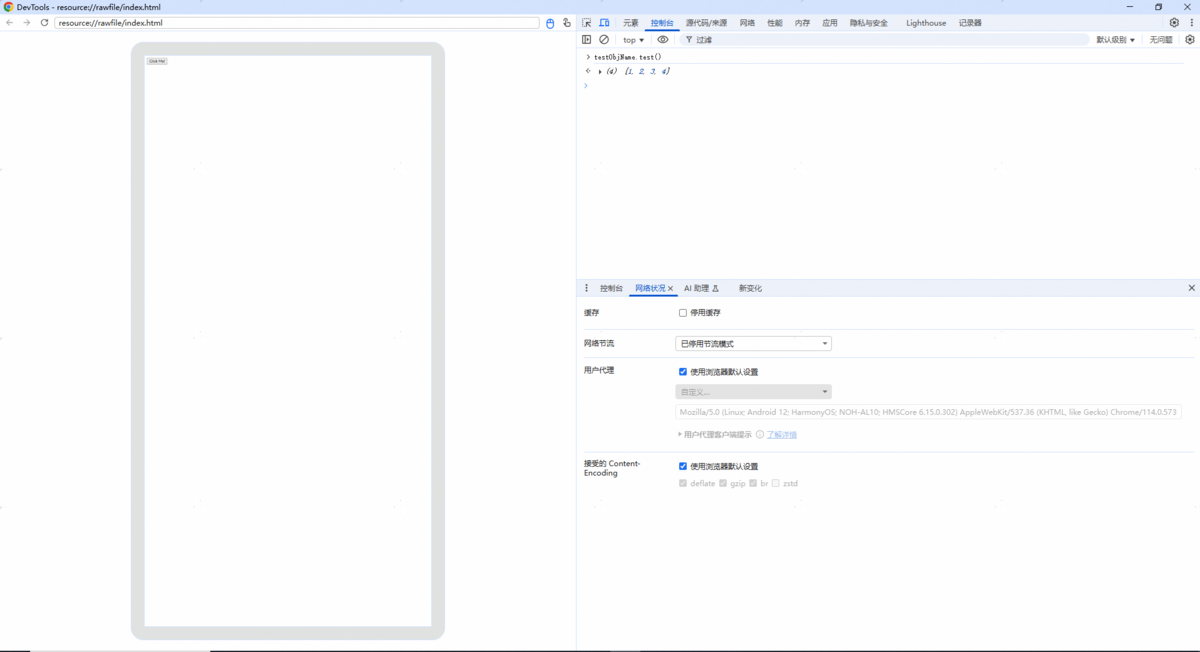
使用复杂类型使用方法中应用侧和前端页面之间传递Array作为示例,调试结果如下图所示: